What Is a Graphics Processing Unit? GPU Explained Simply
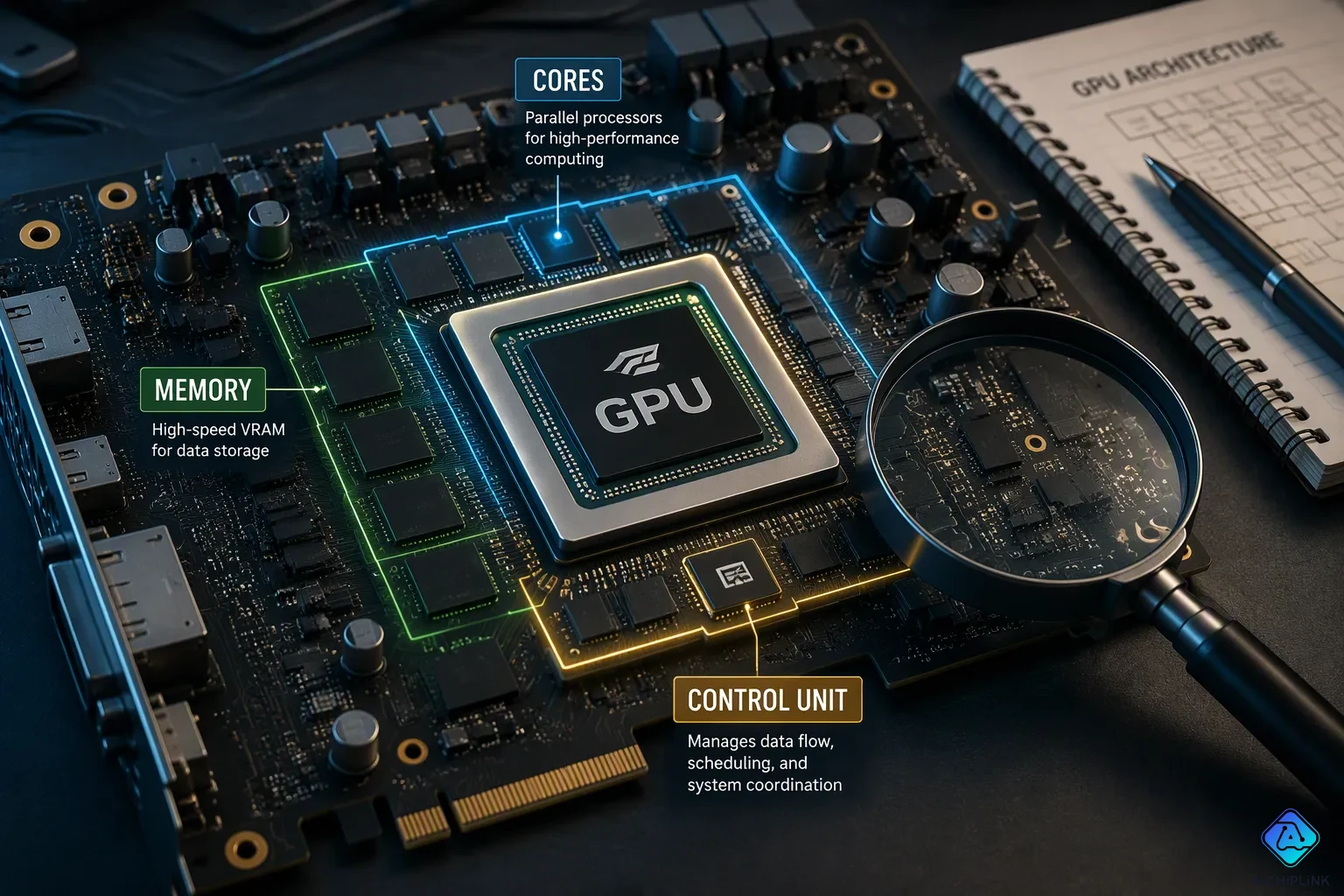
A graphics processing unit is a special processor made to handle many calculations at once, first for creating images on your screen. You use it every day for smooth gaming visuals, fast AI tools, and quick video editing exports.
Think of a GPU like a thousand calculators working together. A CPU is one very smart calculator that handles tasks one at a time.
According to industry tracking, about 76.6 million total PC-GPU units shipped in a recent quarter, with about 12 million discrete add-in-board units shipped.
This article explains what a GPU does, how it is different from a CPU, the two main types, and whether you need one.
Key Takeaways
-
A GPU is a special chip that does many calculations at once, making games and AI run fast.
-
A GPU works with a CPU: the CPU handles general tasks, and the GPU handles parallel jobs like graphics.
-
Integrated GPUs share memory and are good for everyday tasks like browsing and office work.
-
Discrete GPUs have their own memory and are best for gaming, AI, and video editing.
-
A GPU is the chip, while a graphics card is the full board that holds the GPU and its memory.
What Is A Graphics Processing Unit
A graphics processing unit is a specialized electronic circuit. Engineers first designed it to accelerate computer graphics and digital image processing. You can think of it as a chip built for one big job: doing many small math problems at the same time.
A Specialized Circuit For Parallel Work
A GPU holds hundreds or thousands of smaller cores. Each core handles a tiny piece of a larger problem. This design supports parallel processing, which means many calculations run side by side instead of one after another. A CPU works differently. It has only a few cores, and those cores are optimized for sequential tasks. That setup works well for general-purpose work, where each step depends on the last one.
The numbers show the gap clearly. Look at peak single-precision floating-point performance, measured in TFLOPS:
| Processor | Type | Peak FP32 (TFLOPS) |
|---|---|---|
| NVIDIA GeForce RTX 4090 | GPU | 82.58 |
| Intel Core i7 | CPU | 1–3 |
That table explains why so many people ask how do GPUs work so fast. The answer comes down to core count and clock speed together:
The RTX 4090 has 16,384 CUDA cores and a boost clock of up to 2.52 GHz. The formula for FP32 FLOPS is: FLOPS = CUDA cores × 2 × boost clock.
A thousand calculators working together beat one very smart calculator on a huge pile of simple sums. That is the core idea behind the parallel processing offered by GPUs. One smart calculator still wins when the math needs deep, step-by-step reasoning.
How It Teams Up With The CPU
A GPU does not replace a CPU. The two chips split the work. Your CPU runs the operating system, manages files, and handles general-purpose tasks. The GPU takes on parallel-intensive workloads, such as parallel tasks like rendering a 3D scene or training a neural network.
This teamwork shapes the features of GPU design. A graphics processor spends its transistors on many simple cores, not on complex control logic. The CPU sends instructions and data to the GPU. The GPU crunches the numbers and sends results back. Neither chip could do the other's job well.
You can see this split in everyday use. When you open a game, the CPU loads the level and tracks game logic. The GPU draws every frame. When you export a video, the CPU manages the file, and the GPU speeds up the encoding. Graphics processors and CPUs form a partnership, not a competition.
That partnership also explains the name. A graphics processing unit started as a tool for graphics processing, and it still excels there. Today the same parallel design powers AI, science, and more.
What Does A Graphics Processing Unit Do
You count on a graphics processing unit for one main job: speeding up how images, videos, and animations are drawn. Every frame you see in a game, every smooth scroll through a video timeline, and every animated transition on your screen goes through the GPU. This chip turns raw data into pixels at amazing speed.
Rendering Images, Video, And Animation
The main function of a GPU is graphics rendering. When you play a game, the GPU builds each frame from nothing. It figures out lighting, shadows, textures, and shapes for every object on screen. This happens many times per second. A fast GPU can render graphics in real time at high frame rates, which makes motion look smooth and responsive.
Video editing and 3D modeling also need this power. When you export a video, the GPU does the heavy math behind encoding. When you rotate a 3D model, the GPU redraws the scene right away. The parallel processing design of a GPU makes all of this work. Instead of drawing one pixel at a time, it draws thousands at once.
Three-dimensional graphics push this hardware the hardest. A 3D scene has depth, perspective, and complex lighting. The GPU must track every vertex and every texture across the whole frame. This work would be too much for a CPU alone.
Beyond Graphics: AI And Simulations
Modern uses of GPU technology go way past images. Machine learning & AI models train on GPUs because these chips crunch huge datasets in parallel. Research shows the speed advantage clearly:
-
A GPU (Titan X) achieved 3× and 6× speedup over a 4-core i7 CPU for the XGBoost algorithm.
-
A fully connected neural network on GPU achieved 3× speedup compared to a 3 GHz P4 CPU.
-
A GPU-based K-Nearest Neighbor implementation reached 30× speedup over a conventional CPU.
-
The NVIDIA T4 GPU (70 W) delivered a 50× speedup in training compared to an Intel Xeon CPU (150 W) while consuming half the power.
According to a blog on CPU vs. GPU for machine learning, training deep neural networks on a GPU can be over 10 times faster than on an equally priced CPU. That gap explains why so many researchers ask how do GPUs work so well for AI.
Scientific simulations also gain from this. Weather modeling, drug discovery, and physics research all use GPU computing to run complex calculations. Cryptocurrency mining was another early non-graphics use. These tasks share one trait: they need many simple calculations done at once.
You will find graphics processing units in desktops, laptops, gaming consoles, and workstations. Each device uses the GPU differently, but the basic strength stays the same. Whether you edit photos, train an AI model, or play a game, the GPU handles the parallel work that makes it all run smoothly.
Integrated Vs. Discrete GPU
In modern computers, you will find two main kinds of graphics processing unit. Each kind is made for a different type of user. Knowing the difference can help you choose the right computer for what you need.
Integrated GPUs: Built In And Budget Friendly
An integrated graphics processing unit shares memory with the CPU. It sits on the same chip as the processor. This design costs less and saves room inside laptops and small desktops. You can browse the web, write documents, and watch light video playback without any problems. The integrated GPU handles these everyday tasks just fine.
The shared memory design has some tradeoffs. Your system RAM is used by both the CPU and the integrated GPU. Heavy graphics rendering can slow down other programs. These chips also make less heat and use less power, which helps battery life. For students and office workers, an integrated GPU gives you solid value.
Discrete GPUs: Dedicated Power For Demanding Tasks
A discrete graphics processing unit is a separate chip with its own dedicated memory. This memory is called VRAM, and it does not compete with your system RAM. Gamers, AI researchers, and content creators depend on this design. A discrete GPU renders complex 3D scenes, trains machine learning models, and exports video files much faster.
You often find a discrete GPU on a graphics card. That card holds the chip, its memory, and a cooling system. The card plugs into a slot on your motherboard. This setup costs more and uses more power. It also takes up physical space inside the case. Here is a simple comparison:
| Feature | Integrated GPU | Discrete GPU |
|---|---|---|
| Memory | Shares system RAM | Has its own VRAM |
| Power use | Low | High |
| Cost | Lower | Higher |
| Best for | Browsing, office work | Gaming, AI, creation |
Both types handle graphics processing, but they are made for different users. Your budget and the work you do decide which one makes sense.
Graphics Processing Units In Everyday Use
Gaming, AI, And Content Creation
Gaming shows the power of a GPU most clearly. A strong graphics card draws each frame quickly. You see smooth motion with high frame rates. Objects cast accurate shadows. Textures look sharp and detailed. Without a good GPU, graphics rendering suffers. You get low frame rates and blurry images. The game feels slow and unresponsive. Modern games demand even more from the chip. High resolutions like 4K push the hardware harder. Each new generation of games pushes the chip further. You need a capable graphics card for the latest titles.
AI tools also depend on GPUs for speed. Training a machine learning model needs millions of calculations. A CPU can do this work, but it takes much longer. GPUs handle these workloads in parallel. A job that takes days on a CPU finishes in hours on GPUs. Popular AI applications use thousands of GPUs working together. This speed makes modern AI possible. Researchers can test new ideas quickly. Without GPUs, many breakthroughs would take much longer to achieve.
Content creation relies on graphics processing too. Video editing software uses the same parallel design to speed up exports. You render a 4K video in minutes instead of hours. 3D modeling programs redraw scenes instantly. Each rotation and texture change recalculates through these efficient cores. These tasks demand a discrete GPU. Photo editing also benefits from the extra power. Filters and effects apply without lag.
Everyday Tasks And Office Work
Basic office work runs fine on integrated graphics. You browse the web, write documents, and send emails without any trouble. Videos play smoothly. Images load quickly. The integrated GPU handles these jobs without needing extra hardware. You do not notice the graphics processing happening behind the scenes. Email clients and word processors do not strain the chip at all.
Many users already benefit from a GPU every day. Every screen you connect relies on graphics hardware for display. Your operating system draws the desktop using the same technology. Windows, icons, and animations all need rendering power to show pixels. This chip does this work efficiently. Multiple monitors require more from the hardware. An integrated GPU can support two or three screens at once.
It saves power and keeps the system quiet. Most users find it meets all their daily needs. You do not need a dedicated chip for everyday computing tasks. The choice depends on your specific needs. Gaming and content creation demand dedicated hardware. Office work and browsing do not require that level of power. Casual users get great value from an integrated solution.
GPUs Vs. CPUs And Graphics Cards
GPUs Vs. CPUs: Different Tools, Different Jobs
You can spot the difference between gpu and cpu designs at a glance. A CPU has a few powerful cores built for sequential work. A GPU packs thousands of smaller cores built for parallel work. Here is how they compare:
| Feature | CPU | GPU |
|---|---|---|
| Example core count | 6 Zen 4 cores (AMD Ryzen 5 7600) | 16,384 CUDA cores (NVIDIA RTX 4090) |
| Memory bandwidth | ~50 GB/s | Up to 7.8 TB/s |
| Best at | Step-by-step logic | Many tasks at once |
Central processing units handle tasks one after another. They run your operating system and manage files. GPUs batch thousands of operations across many data points at once. This massive parallelism, plus much higher memory bandwidth, makes gpus critical for AI and machine learning.
GPUs Vs. Graphics Cards: What Is The Difference
A GPU is the chip itself. It sits on a circuit board and does the math. A graphics card is the full add-in board. That board holds the GPU, its dedicated memory, and a cooling system. You plug the card into a slot on your motherboard.
People often use "GPU" and "graphics card" interchangeably in casual speech. That habit is fine for everyday talk. Just remember the chip and the board are not the same thing. When you shop, you buy a graphics card. The GPU inside it does the real work. This distinction matters when you compare specs or plan an upgrade.
A graphics processing unit is a chip built for parallel work. It handles thousands of small calculations at once, which makes games, AI tools, and video edits run fast.
You have two main choices. Integrated GPUs share memory and suit browsing, office work, and light video. Discrete GPUs carry their own memory and fit gaming, content creation, and AI training.
Casual users can stay with integrated graphics. Gamers, creators, and AI fans should consider a discrete GPU instead.
Check your current setup before you buy. Ask questions, compare specs, and pick the GPU that matches your needs.

Written by Jack Elliott from AIChipLink.
AIChipLink, one of the fastest-growing global independent electronic components distributors in the world, offers millions of products from thousands of manufacturers, and many of our in-stock parts is available to ship same day.
We mainly source and distribute integrated circuit (IC) products of brands such as Broadcom, Microchip, Texas Instruments, Infineon, NXP, Analog Devices, Qualcomm, Intel, etc., which are widely used in communication & network, telecom, industrial control, new energy and automotive electronics.
Empowered by AI, Linked to the Future. Get started on AIChipLink and submit your RFQ online today!
Frequently Asked Questions
Do you need a GPU for basic computer use?
No. An integrated GPU handles browsing, email, documents, and video playback without trouble. You already use one every time your screen draws a desktop. Casual users get everything they need from that built-in chip.
Can a GPU work without a CPU?
No. The CPU runs your operating system and sends instructions to the GPU. The GPU crunches parallel math and returns results. Each chip depends on the other, so they always work as a team.
Why do GPUs help AI so much?
AI models need millions of small calculations. A GPU runs thousands of those at once through parallel cores. A CPU handles them one step at a time, which takes far longer. That speed gap makes modern AI practical.
Is a graphics card the same thing as a GPU?
Not exactly. The GPU is the chip that does the math. The graphics card is the full board holding that chip, its memory, and cooling. People mix up the terms in casual talk, but the chip and the board differ.
How do you know if you need a discrete GPU?
Check your workload. Gaming, video editing, 3D modeling, and AI training need dedicated power and memory. Office work and web browsing do not. Match the hardware to the tasks you actually run.