Xilinx vs Intel vs Lattice FPGA Comparison for 2026
You need to match FPGA features to your project goals. Check performance, power, cost, and toolchain support. Xilinx FPGAs have strong features for hard tasks. Developers need good toolchain support and trusted interface performance. Joining a design ecosystem helps you save time. When picking an FPGA, think about qualification support and ways to check reliability.
| Selection Criteria | Description |
|---|---|
| Toolchain Support | Developers need tools as much as the silicon itself. |
| Design Ecosystem Participation | Helps cut down integration time and gives local engineering help. |
| Verification Methodologies | Needed to make sure things work well, especially in strict fields. |
| Qualification Support | Needed to meet rules for cars and planes. |
| Proven Interface Performance | Needed for telecom and data centers before designs get approved. |
Key Takeaways
-
Pick Xilinx FPGAs for fast jobs. They work well in data centers and AI. They have special features and quick speed.
-
Use Intel FPGAs for network and telecom work. They are fast and save power. They are good for 5G networks.
-
Go with Lattice FPGAs for low power and low cost. They fit IoT and small devices. They work well and do not use much energy.
-
Always choose your FPGA based on your project needs. Think about speed, power use, and money to get the best one.
-
Use help from the vendor and toolchain resources. Good support and a clear plan can help your project last and do well.
Quick Verdict: Best FPGA for 2026
Picking the right fpga depends on what you want to do. You should check how fast it works, how much power it uses, and how much it costs. Think about what kind of project you want to build. This guide will help you choose the best fpga vendor for your needs.
High-Performance Xilinx FPGAs
Xilinx fpgas are great if you need high speed. They work well for big computing jobs and data centers. The Versal ACAPs series is the top choice for tough tasks. These devices have advanced features and strong solutions for jobs that need quick answers and lots of data.
| FPGA Series | Description |
|---|---|
| Versal ACAPs | High-end family of xilinx fpgas suitable for high-performance applications. |
Xilinx fpgas respond faster than other brands. They miss fewer deadlines and handle more data at once. Your solutions will run quickly and reliably. Here is how xilinx fpgas compare to others in important areas:
| Metric | Xilinx FPGA Performance | Competitor Performance |
|---|---|---|
| Average Response Time | Up to 5.7x lower | Higher response times |
| Deadline Violations | Up to 49% fewer | More frequent violations |
| Tail Response Times | Up to 2.6x lower | Higher tail response times |
| Median Response Time | Up to 9x lower | Higher median response times |
| Throughput | Higher than CPU/GPU frameworks | Lower than xilinx fpgas |
Pick xilinx fpgas if you need fast computing, real-time data, or advanced ai. They give you the features and speed for hard jobs.
Intel FPGAs for Communications
Intel fpgas are good for networking and telecom. The Stratix 10 TX is made for telecom gear and supports new 5G networks. You can also use Agilex, Arria, Cyclone, or MAX families. These fpgas help you build fast and reliable communication systems.
-
Intel Stratix FPGA Series
-
Intel Agilex
-
Arria
-
Cyclone
-
MAX
Choose intel fpgas if you want to make networking or telecom solutions. They offer the right mix of speed and features for these jobs.
Lattice for Low Power and Cost
Lattice fpga is best if you want low power and low cost. Lattice fpgas use very little energy, with standby current as low as 10µA. They are perfect for IoT, portable electronics, and battery-powered devices. Lattice keeps prices low, which is good if you have a small budget.
-
Lattice fpga is ideal for energy-sensitive applications such as IoT and portable electronics.
-
The technology lowers power, cost, and size, which matters for satellites and cars.
-
Lattice focuses on low-power and budget-friendly jobs, making it popular in many industries.
You can pick the Nexus platform if you need scalable solutions. The Avant series is good for mid-range jobs with low power and small size. The iCE40 series works well for ai and sensor processing in small devices.
-
Nexus platform for scalable solutions
-
Avant series for mid-range fpgas with low power and small size
-
iCE40 series for ai and sensor processing
Lattice fpgas are best if you want to save power and money. They work well in edge jobs, IoT, cars, and satellites. You get good performance and low cost, which is hard to find in other high-speed fpgas.
Tip: Match your project needs to each vendor’s strengths. Xilinx fpgas are best for high-speed jobs. Intel fpgas are great for communications. Lattice fpga gives you the best value for low power and cost.
Vendor Overview: Xilinx, Intel, Lattice
Xilinx FPGAs: Strengths and Focus
Xilinx is a leader for high-performance fpga jobs. Xilinx fpgas have advanced features for data centers, telecom, and cars. These fpgas are fast and use little power. Xilinx makes solutions for AI, digital twins, and real-time analytics. You can use these fpgas when you need strong and flexible features. Xilinx also builds strong supply chains and local factories. This helps you get the right fpga for your area.
| Company | Targeted Market Segments |
|---|---|
| Xilinx | Data center acceleration, telecommunications, automotive, aerospace |
Intel FPGAs: Strengths and Focus
Intel fpgas are good for communications and working with processors. You can use Intel fpgas in data centers and 5G networks. Intel makes fpgas that work well with their CPUs. This gives you better speed and low power use. Intel fpgas help you make flexible solutions for many jobs. Intel also focuses on saving money and working with processor platforms.
| Company | Targeted Market Segments |
|---|---|
| Intel | Integration of FPGA technology with processor platforms, data centers |
-
Xilinx and Intel are top choices for high-speed and data center fpgas.
-
Lattice is best for low-power and low-cost fpga jobs.
-
Pick your fpga based on if you need speed, low power, or low cost.
Lattice: Low Power and Edge
Lattice is known for low-power fpgas and edge jobs. You can use lattice fpgas in electronics, edge computing, and IoT. These fpgas use little power, are small, and save money. Lattice makes fpgas for battery-powered and portable devices. You will see lattice fpgas where low power and good speed are important. Lattice helps you build edge solutions that are reliable and low cost.
| Company | Targeted Market Segments |
|---|---|
| Lattice | Low-power applications in consumer electronics, industrial edge computing |
The fpga market will keep growing until 2026. You will see more AI, digital twins, and local factories. These trends help you pick the right fpga for your needs, whether you want high speed or low power.
FPGA Architecture and Technology
Xilinx FPGAs Architecture
Xilinx fpga devices give you very good speed. Xilinx makes these fpgas with smart design and fast processing parts. These features help you finish hard jobs quickly. Xilinx also uses low voltage and smart tools to save power. You can pick from many IP cores in their library. This means you do not have to build everything yourself. The design ecosystem helps you use new technology faster. This saves you time and lets your project grow. Xilinx keeps the same device design, so you can use your IP on different products. The table below shows how these features make things faster:
| Architectural Feature | Contribution to Performance |
|---|---|
| High performance | Advanced design and dedicated processing slices deliver fast results. |
| Power optimization | Low supply voltage and tools cut power use. |
| Comprehensive IP library | Many IP cores reduce development time and let you focus on special features. |
| Design ecosystem | Easy migration to new technologies improves scalability and shortens development cycles. |
| Common device architecture | IP portability saves time and money when adapting designs. |
Intel FPGA Innovations
Intel brings new ideas to fpga technology. You can see this in the Agilex 3 and Agilex 5 FPGA series. Agilex 3 has lots of I/O and uses less power than older Intel fpgas. Agilex 5 E-Series uses Hyperflex and Intel 7 process technology. This helps you get better speed for AI and data jobs. Intel also made the Open FPGA Stack with open-source tools. This makes it easier for you to program and use. Here is a quick look at what Intel has done lately:
| Innovation | Description |
|---|---|
| Agilex 3 FPGA | High I/O density with low power use. |
| Agilex 5 FPGA E-Series | Hyperflex architecture and Intel 7 process for strong AI performance. |
| Open FPGA Stack (OFS) | Open-source tools improve programmability and access. |
Lattice FPGA Design
Lattice cares about low power and small size. You can use Lattice fpga devices for edge and IoT jobs where saving energy is important. The iCE40 family uses very little power when not working. This is good for battery-powered devices. Lattice fpgas can use as little as 10µA in standby mode. This makes them great for jobs like portable electronics. The small size and smart processing help batteries last longer and keep things cool. You get good performance without wasting energy.
-
Lattice fpga design saves power for edge and IoT.
-
iCE40 family uses very little power for battery devices.
-
Small size and smart processing help batteries last longer.
-
Great for energy-saving jobs like IoT and portable electronics.
Note: You should pick the right fpga for your job. Xilinx gives you high speed and advanced features. Intel brings new ideas for AI and communications. Lattice gives you the best power savings for edge and IoT.
Performance and Power Efficiency
Benchmarking FPGA Performance
It is important to know how well an fpga works before you buy it. Performance is needed for fast data jobs and real-time work. You should check how quickly the fpga moves data and finishes tasks. Xilinx fpgas are often the best for fast jobs. They work well for real-time data and big projects. Intel fpgas also do well, especially for fast data in communications. Lattice fpgas use less power and are small, but they still work well for edge jobs.
You can look at these things to check performance:
-
Data throughput (how much data moves each second)
-
Latency (how fast the fpga responds)
-
Task completion time (how quickly jobs finish)
Tip: Make sure the fpga’s speed matches your project. Fast processing helps with AI, networking, and real-time systems.
Power Consumption: Xilinx, Intel, Lattice
You should think about power when picking an fpga. Xilinx fpgas use smart ways to save power but still work fast. Intel fpgas give a good mix of power and speed for big jobs. Lattice fpgas use very little power, which is good for battery and edge jobs.
Here is a table to help you compare power use:
| Vendor | Power Use | Best For |
|---|---|---|
| Xilinx | Medium to high | High-speed data processing |
| Intel | Medium | Communications, high-volume |
| Lattice | Very low | IoT, portable, edge devices |
Pick Xilinx if you need fast jobs and can use more power. Intel is good if you want both speed and not too much power. Lattice is best if you want to save power and still get good work from small devices.
Note: Always check each fpga’s power features. This helps your system last longer and work better.
Cost and Value
Pricing Trends for FPGAs
The price of an fpga changes based on what it can do. Bigger and faster fpgas usually cost more money. Prices have changed as new technology comes out. High-end fpgas cost more when they first come out. If you buy lots of fpgas, each one costs less. You can save money by picking the right fpga for your job. Lattice makes fpgas that are good for low-power jobs and cost less. Xilinx and Intel make fast fpgas that cost more but give you more features.
| Vendor | Typical Price Range | Best Use Case | Cost-Effective Solutions? |
|---|---|---|---|
| Xilinx | High | Data centers, AI, HPC | Sometimes |
| Intel | Medium to High | Communications, networking | Yes |
| Lattice | Low to Medium | IoT, edge, portable devices | Yes |
You should check what features you need and compare prices. This helps you find the best fpga for your project.
Total Cost of Ownership
When you buy an fpga, you pay for more than just the device. You also pay for making, setting up, software, fixing, and power use. Sometimes, you pay more at first but save money later. Here are the main things that add to the total cost:
-
Making and setting up fpgas can cost a lot.
-
Software fees are part of the total cost.
-
Fixing and keeping fpgas working costs money.
-
Power use changes how much you spend over time.
Fpgas with more features cost more at first but can save money if you use many. Lattice fpgas use less power, so you spend less on energy. Xilinx and Intel give you more features, but you should check if you need them. Always look at everything to find the best fpga for your job.
Tip: Pick an fpga that fits your project’s power and feature needs. This helps you get the best value for your money.
Design Tools and Ecosystem
Xilinx Vivado and Vitis
You can use Xilinx Vivado and Vitis to make and test fpga projects. Vivado has a simulator that checks your design before you build it. You get tools like ILA, VIO, and JTAG to AXI IP for debugging. These tools let you see your fpga working as it runs. Vitis gives you two ways to develop: one for software and one for adding features. You can bring Vivado designs into Vitis to help with building software. PetaLinux lets you set up Linux on your fpga. Vitis AI helps you use machine learning, so you can make smart apps.
-
Vivado lets you check your fpga design with a simulator.
-
Vitis helps you make software and add new features.
-
Debugging tools show you how your fpga is working.
-
PetaLinux makes it simple to use Linux in your project.
-
Vitis AI lets you add machine learning to your fpga.
Tip: Use Vivado and Vitis if you want advanced features and strong support for AI and embedded systems.
Intel Quartus Prime
Intel Quartus Prime is an easy way to make fpga designs. The tools are simple and help you work faster. Quartus Prime has better instructions, so you can find answers quickly. You can finish your fpga project faster with these tools. The table below shows how Quartus Prime and Vivado compare:
| Feature/Aspect | Intel Quartus Prime | Xilinx Vivado |
|---|---|---|
| Usability | Easy to use and helps you work faster | Many features but sometimes has bugs |
| Documentation | Much better now, just like Xilinx | Lots of info but can be messy |
| Productivity Increase | About 30-35% faster on projects | N/A |
You can count on Quartus Prime for clear steps and good help. You get more done and the instructions are easy to follow.
Lattice Radiant and Diamond
Lattice Radiant and Diamond tools help you make fpga designs that use little power. You get a full set of tools that guide you step by step. The simple GUI makes designing easy. You can use the built-in tools to debug and move around your project. The power calculator tells you how much power your fpga will use. The table below shows the main features:
| Feature | Description |
|---|---|
| Full Featured, Easy to Use Tool Suite | Has top tools for making fpga projects easily. |
| Predictable Design Convergence | Uses one database for better results and checks. |
| Unparalleled Ease of Use | Simple GUI helps you through each step. |
| Integrated Design Environment | Makes it easy to move and debug your project. |
| Power Calculator | Shows power use based on real chip data. |
-
You can use editors to set timing and design rules.
-
Cross probing and on-chip debugging let you check your fpga as it works.
Note: Lattice tools make low-power fpga design simple and dependable. You can finish your project fast and know how much power you will use.
Industry Applications for FPGAs
Data Centers and HPC
You can use an fpga to make data centers faster. These devices help move lots of data quickly. Xilinx fpgas are very good for this job. They have special features for AI and analytics. You will see them in servers that do many things at once. Intel fpgas also help a lot. They work well with CPUs and manage network traffic. These solutions give fast data movement and real-time answers. The right fpga gives you strong performance and flexibility for hard jobs.
Edge AI and IoT with Lattice
Lattice fpga devices are great for edge AI and IoT. You can use a lattice fpga when you need low power and small size. These devices fit well where you cannot use much energy. Lattice fpgas bring smart features to many fields. Here are some top uses:
-
Automotive: Real-time image processing helps find objects and recognize gestures.
-
Industrial: You can use AI models for monitoring and automation.
-
Consumer: Lattice fpga solutions make audio and visual features better in smart devices.
You get reliable performance and long battery life. Lattice fpga technology lets you add AI to small products. These jobs benefit from low power and flexible features from lattice.
Communications and Automotive
Fpgas are important in communications and automotive jobs. Intel and Xilinx fpgas help move data fast in telecom networks. You can use these devices to build 5G systems and network switches. Lattice fpga devices also help in car electronics. They support safety features and real-time data processing. You will find fpgas in driver-assistance systems and in-vehicle networks. These jobs need quick response and strong reliability. The right fpga gives you tools to meet strict industry needs.
Tip: Match fpga features to your job. This helps you get the best results in data centers, edge AI, IoT, communications, and automotive projects.
Choosing the Right FPGA
Matching Features to Needs
You need to match the right fpga to your project. Start by thinking about what you want your fpga to do. Make a list of the main features your project needs. Do not pick the largest fpga just because it looks powerful. This can waste power, add cost, and make your design harder. Many people make this mistake and end up with unused resources.
Here is a simple checklist to help you choose:
-
Define your fpga’s main job. Write down what you want it to do.
-
Draw a plan for your design. Show how you will connect pins and input/output ports.
-
Decide how many layers your board needs. Most designs use 4 to 6 layers for clear signals and good power.
-
Place your components close together. Shorter wires help your fpga work better.
-
Check your signals and power. Use the right capacitors near power pins to keep your fpga stable.
Tip: Focus on the features that matter most for your application. This helps you avoid extra costs and keeps your design simple.
Support and Roadmaps
When you pick an fpga, you should look at more than just the chip. Good support and a strong roadmap help your project last longer. You want a vendor that fits your application and offers tools your team can use. Check if the vendor keeps fpgas in stock and supports them for many years.
Here are some things to look for:
-
Application fit: Make sure the fpga matches your project’s needs.
-
Toolchain and support: Choose vendors with easy-to-use tools and helpful support.
-
Availability and lifecycle: Pick vendors with a good supply and long product life.
-
Technology roadmap: Look for vendors who keep improving their fpgas and features.
-
Reliability: Select vendors known for safety and following rules.
-
Purchase programs: Ask about discounts or deals to help your budget.
Note: A vendor with a clear roadmap and strong support helps you avoid problems in the future. This makes your fpga project more reliable and easier to manage.
You can find the main differences in the table below. Xilinx gives you fast speed and supports AI. Intel is good for data centers and networks. Lattice helps you use less power and save space. Pick the fpga that fits your project goals.
| Feature | Xilinx | Intel | Lattice |
|---|---|---|---|
| Target Market | High-performance | Networking | IoT, Edge |
| Power | Moderate to high | Moderate | Ultra-low |
| Cost | High | Moderate | Low |
| Strength | Versatility | Integration | Low power |
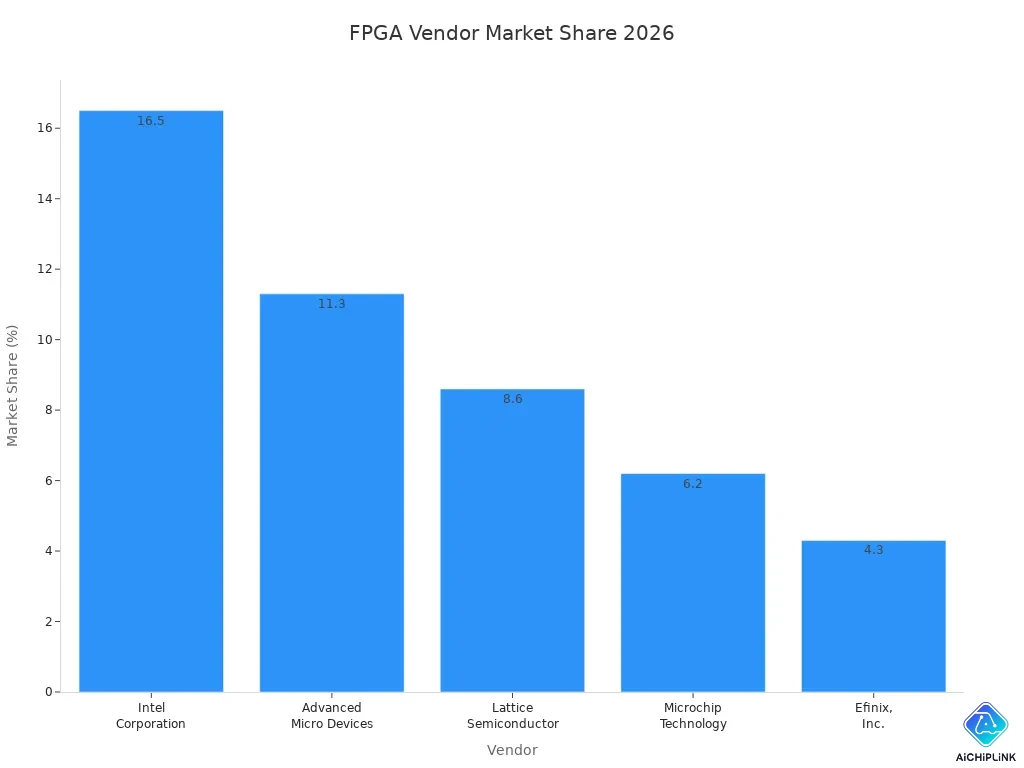
Choose the vendor that meets your technical and business needs. This will help you get the best results.

Written by Jack Elliott from AIChipLink.
AIChipLink, one of the fastest-growing global independent electronic components distributors in the world, offers millions of products from thousands of manufacturers, and many of our in-stock parts is available to ship same day.
We mainly source and distribute integrated circuit (IC) products of brands such as Broadcom, Microchip, Texas Instruments, Infineon, NXP, Analog Devices, Qualcomm, Intel, etc., which are widely used in communication & network, telecom, industrial control, new energy and automotive electronics.
Empowered by AI, Linked to the Future. Get started on AIChipLink and submit your RFQ online today!
Frequently Asked Questions
What makes FPGAs different from other chips?
You can change how FPGAs work after you buy them. These chips are reconfigurable. You can update your design to fit new needs. This gives you more control than fixed chips.
Which FPGA vendor should you choose for your project?
You should look at your project needs. Vendors offer different strengths. Some focus on speed. Others focus on low power. You can match your goals to the right vendor for the best results.
How do FPGAs help in the market for new technology?
You can use FPGAs to test ideas quickly. The market changes fast. FPGAs let you build and change products without waiting for new chips. This helps you stay ahead and try new features.
What are reconfigurable solutions in edge computing?
You can use reconfigurable solutions to change how your device works at the edge. This helps you save power and add new features. You can update your device without changing the hardware.
Can you use FPGAs for both AI and IoT?
Yes, you can use FPGAs for AI and IoT. You can build smart devices that learn and connect. FPGAs work well in many fields. You can make your device fit your needs.