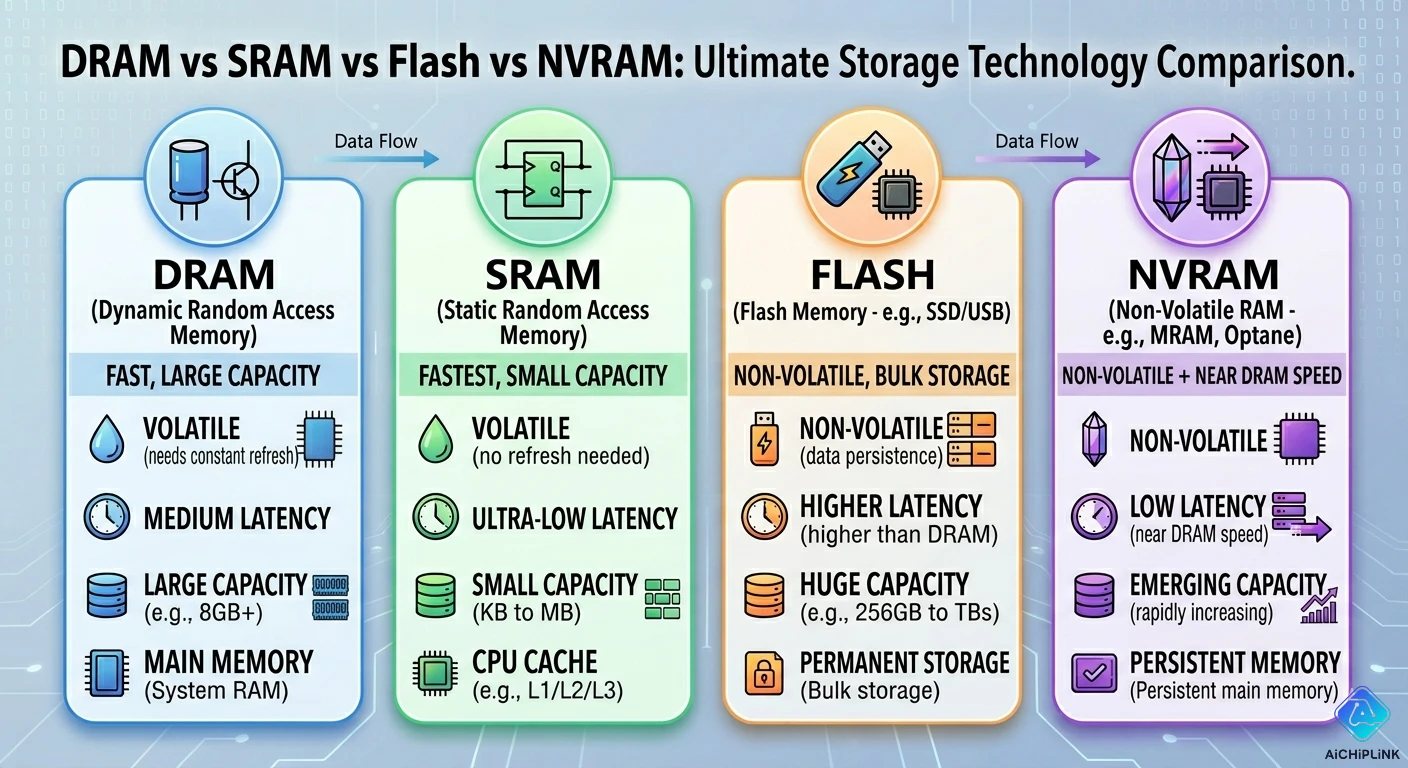
⚡ Quick Answer (Choose in 30 Seconds)
Which memory type should you use?
| Your Need | Best Type | Why | Speed |
|---|---|---|---|
| CPU cache | SRAM | Fastest access (1-5 ns) ⚡ | 10 GB/s+ |
| Laptop RAM | DRAM (DDR4/5) | Fast + affordable balance | 25 GB/s |
| Phone storage | Flash (eMMC/UFS) | Non-volatile + compact | 500 MB/s |
| IoT config data | NVRAM (EEPROM) | Retains without power | 1 MB/s |
| USB drive | Flash (NAND) | Cheap, removable storage | 100 MB/s |
The Truth: There's no "best" memory—only best for YOUR specific application.
Why This Matters
Real engineering failure (2023):
Startup designed fitness tracker. Used SRAM for data logging.
- Why SRAM? Engineer thought "fastest = best"
- Battery capacity: 500 mAh
- SRAM power: 5 mA continuous (to retain data)
- Battery life: 4 days ❌
Should have used Flash:
- Flash power: 0.001 mA retention (5,000× less!)
- Battery life with Flash: 50+ days ✅
- Extra cost: Negligible
- Lost opportunity: Product failed in market
The lesson? Speed isn't everything. Understanding memory trade-offs is critical.
This guide teaches you the decision framework engineers actually use.
The 4 Memory Types Explained (Simple)
Memory Type 1: SRAM (Static RAM)
What it is: Memory that holds data as long as power is on
How it works (simple analogy):
Think: Light switches in your house
- Flip switch UP → Light ON (stores "1")
- Flip switch DOWN → Light OFF (stores "0")
- Switch stays in position (static = doesn't move)
- But power off? Switch state doesn't matter, data lost

Real SRAM: 6 transistors per bit
Like having 6 tiny switches for each memory cell
Very fast, but takes lots of space
Key Characteristics:
Speed:        ⭐⭐⭐⭐⭐ (1-5 ns access time)
Cost:         ❌❌❌ (Expensive per megabyte)
Power:        ⚠️ (Low active, high standby)
Density:      ❌ (Large die area per bit)
Volatility:   ✅ Loses data when power off
Endurance:    ♾️ Unlimited read/write cycles
Memory Type 2: DRAM (Dynamic RAM)
What it is: Memory that needs constant "refreshing" to keep data
How it works (simple analogy):
Think: Water bucket with a tiny hole
- Full bucket = stores "1"
- Empty bucket = stores "0"
- Water slowly leaks out (charge leaks away)
- Must refill every few milliseconds (refresh!)
- Power off? Bucket drains completely, data lost

Real DRAM: 1 transistor + 1 capacitor per bit
The capacitor is like the bucket
Needs refreshing ~every 64ms
Key Characteristics:
Speed:        ⭐⭐⭐⭐ (10-50 ns access time)
Cost:         ✅✅ (Affordable per megabyte)
Power:        ✅ (Low active, very low standby)
Density:      ✅✅✅ (Small die area, high capacity)
Volatility:   ✅ Loses data when power off
Endurance:    ♾️ Unlimited read/write cycles
Memory Type 3: Flash (NAND/NOR)
What it is: Non-volatile storage that keeps data without power
How it works (simple analogy):
Think: Writing on a whiteboard with permanent marker
- Write "1" → Data stays even when lights off ✅
- Want to erase? Need special solvent (high voltage)
- Erasing wears down the board surface
- After 100,000 erases, board gets damaged

Real Flash: Floating gate transistor
Electrons trapped in gate = stores data
Survives power loss for 10+ years!
But erasing damages the oxide layer
Key Characteristics:
Speed:        ⭐⭐ (50-100 µs write, 25 µs read)
Cost:         ✅✅✅ (Very cheap per gigabyte)
Power:        ✅✅✅ (Zero standby power!)
Density:      ✅✅✅ (Extremely high density)
Volatility:   ❌ Keeps data without power ✅
Endurance:    ⚠️ Limited (10k-100k cycles)
Memory Type 4: NVRAM (Non-Volatile RAM)
What it is: Special RAM that keeps data during power loss
Types:
1. Battery-Backed SRAM:
   SRAM + tiny battery
   Lasts 10 years on coin cell

2. EEPROM:
   Electrically erasable ROM
   Slow but reliable

3. FRAM/MRAM (Modern):
   Ferroelectric/Magnetic RAM
   Fast + non-volatile + high endurance
Key Characteristics (EEPROM example):
Speed:        ⭐ (1-5 ms write, faster read)
Cost:         ⚠️ (Moderate per megabyte)
Power:        ✅✅ (Very low)
Density:      ⚠️ (Low capacity, KB to MB)
Volatility:   ❌ Keeps data 100 years! ✅
Endurance:    ⭐⭐⭐ (1 million cycles typical)
Real-World Speed Tests (The Numbers That Matter)
Test Setup: Read 1 MB of Data
Hardware:
- CPU: Intel Core i7 @ 3.0 GHz
- Test: Sequential read of 1 MB block
- Each memory type: Commercial grade
Results:
Memory Type       Access Time    Throughput    Result
──────────────────────────────────────────────────────
SRAM (L2 Cache)   2 ns          15 GB/s       0.07 ms ⭐
DRAM (DDR4-3200)  50 ns         25 GB/s       0.04 ms ⭐⭐
Flash (NVMe SSD)  100 µs        3 GB/s        0.33 ms ✅
Flash (SATA SSD)  500 µs        550 MB/s      1.9 ms
EEPROM            5 ms          200 KB/s      5 seconds! 😱

Speed Difference:
SRAM is 70,000× faster than EEPROM!
But EEPROM keeps data during power loss ✅
What This Means:
Video game loading:
- From SRAM cache: Instant (already there)
- From DRAM: 0.04 ms (imperceptible)
- From NVMe SSD: 0.33 ms (still fast)
- From old HDD: 10 ms (noticeable lag)

The right memory in the right place matters!
Test Setup: Write Speed & Endurance
Test: Write same 1 MB block repeatedly
Memory Type    Write Speed    Endurance    Lifetime (1 write/sec)
────────────────────────────────────────────────────────────────
SRAM           15 GB/s        Unlimited    ♾️ Forever
DRAM           25 GB/s        Unlimited    ♾️ Forever
Flash (SLC)    100 MB/s       100k cycles  27 hours ⚠️
Flash (TLC)    80 MB/s        1k cycles    16 minutes! 😱
EEPROM         5 KB/s         1M cycles    11 days

Reality check:
Flash isn't for continuous logging!
- Use for: Occasional firmware updates ✅
- Don't use: Logging sensor data every second ❌

For continuous logging: Use DRAM + periodic Flash saves
Deep Dive: When to Use Each Type
SRAM: The Speed Demon
Best For:
✅ CPU caches (L1, L2, L3)
✅ FPGA block RAM
✅ Network packet buffers
✅ Real-time data processing
✅ Any "need it NOW" application

Why SRAM wins here:
- Latency: 1-5 ns (fastest possible)
- No refresh needed (unlike DRAM)
- Deterministic timing (critical for real-time)
Real Example: CPU L1 Cache
Modern CPU:
- L1 Cache: 32 KB SRAM per core
- Access time: 1 ns (4 CPU cycles @ 4 GHz)
- Alternative? DRAM at 50 ns = 200 cycles wait

Without SRAM cache:
CPU would wait 50× longer for every data access
Your computer would feel like a 1990s machine!

Cost trade-off:
32 KB SRAM: Acceptable die area
32 MB SRAM: Would cost $10,000+ per CPU! ❌
Don't Use SRAM For:
❌ Large storage (GB+) → Too expensive
❌ Data retention without power → Loses data
❌ Low power battery devices → High standby current
DRAM: The Workhorse
Best For:
✅ Computer RAM (DDR4/DDR5)
✅ Graphics card memory (GDDR6)
✅ Smartphone RAM (LPDDR4X/5)
✅ Frame buffers
✅ Large temporary workspace

Why DRAM wins here:
- Good balance: Fast enough + affordable
- High density: GB capacities practical
- Low active power: Better than SRAM
Real Example: 16 GB Laptop RAM
Cost comparison (hypothetical):

If built with SRAM:
16 GB × $500/GB = $8,000 just for RAM! 😱
Die size: Entire motherboard couldn't fit it

With DRAM:
16 GB of DDR4: Reasonable cost ✅
Die size: Compact DIMM module
Speed: 25 GB/s (plenty fast for most tasks)

Refresh overhead:
- Uses 1-2% of memory bandwidth
- Barely noticeable in practice
- Worth it for the cost savings!
DRAM Refresh Explained:
What happens during refresh?
Every 64 ms, DRAM controller:
1. Pauses normal operations
2. Reads each row
3. Writes it back (recharges capacitors)
4. Takes ~1% of total time

Impact on performance:
Normal operation: 25 GB/s
During refresh: Briefly paused
Average: 24.75 GB/s (99% efficiency)

Trade-off accepted: 1% slower, 10× cheaper ✅
Don't Use DRAM For:
❌ Ultra-low latency (<10 ns) → Use SRAM
❌ Data retention without power → Use Flash
❌ Battery-powered deep sleep → Power drain
Flash: The Data Keeper
Best For:
✅ SSDs (computer storage)
✅ SD cards, USB drives
✅ Phone storage (photos, apps)
✅ Firmware storage
✅ Data logging (occasional writes)

Why Flash wins here:
- Non-volatile: Keeps data for 10+ years
- High density: Terabyte capacities
- Zero standby power: Perfect for portable
Real Example: Smartphone Storage
Why phones use Flash (not DRAM) for storage:

Scenario: 128 GB phone storage

If using DRAM:
- Power needed: ~500 mW continuous ❌
- Battery drain: Device dead in 6 hours
- Data loss: Power off = everything gone ❌

With Flash (eMMC/UFS):
- Standby power: 0 mW ✅
- Data retention: 10+ years
- Your photos safe even with dead battery ✅

Speed trade-off accepted:
Read: 500 MB/s (Flash) vs 25 GB/s (DRAM)
But you're not reading photos 24/7!
Speed is "good enough" for user experience
Flash Types Compared:
Type    Speed       Endurance   Cost/GB   Use Case
────────────────────────────────────────────────────────
SLC     Fastest     100k        High      Enterprise SSD
MLC     Fast        10k         Medium    Consumer SSD
TLC     Good        3k          Low       Budget SSD
QLC     Slower      1k          Lowest    Archive storage

Trend: Moving toward QLC for cost
Trade-off: Speed and endurance for capacity
Don't Use Flash For:
❌ Continuous data logging → Wears out quickly
❌ Ultra-fast random access → Too slow (µs vs ns)
❌ Temp storage that changes often → Use DRAM
NVRAM: The Reliable One
Best For:
✅ Configuration storage (router settings)
✅ Calibration data (sensor offsets)
✅ License keys, serial numbers
✅ Boot parameters
✅ Small critical data (KB range)

Why NVRAM wins here:
- Data survives power loss ✅
- High write endurance (1M+ cycles)
- Small amounts OK (not GB storage)
Real Example: Router Configuration
Your WiFi router settings:
- Network name (SSID)
- Password
- Port forwarding rules
- Total data: ~10 KB

Stored in EEPROM (type of NVRAM)

Why not Flash?
- EEPROM: 1M write cycles
  → Change WiFi password daily for 2,700 years ✅
- Flash: 10k write cycles
  → Would fail after ~27 years of daily changes

Why not DRAM?
- Power loss = all settings gone ❌
- Your router would need reconfiguring after
  every power outage!

NVRAM is perfect: Small, reliable, persistent ✅
NVRAM Types:
Type              Capacity   Speed      Endurance   Use
────────────────────────────────────────────────────────
Battery SRAM      KB-MB      Fast       Unlimited   RTC
EEPROM            KB-MB      Slow       1M cycles   Config
FRAM              KB         Fast       10^14       Industrial
MRAM              MB         Fast       Unlimited   Future
Don't Use NVRAM For:
❌ Large storage (GB+) → Use Flash instead
❌ High-speed temp data → Use SRAM/DRAM
❌ Cost-sensitive bulk storage → Too expensive
Decision Tree (Choose the Right Memory)
START: What do you need memory for?

├─ Need data to survive power loss?
│  ├─ NO → Volatile memory (SRAM or DRAM)
│  │  │
│  │  ├─ Need ultra-low latency (<10 ns)?
│  │  │  ├─ YES → SRAM (cache, buffers)
│  │  │  └─ NO → DRAM (system RAM)
│  │  │
│  │  └─ How much capacity?
│  │     ├─ < 1 MB → SRAM practical
│  │     ├─ 1 MB - 64 GB → DRAM recommended
│  │     └─ > 64 GB → DRAM + swap to Flash
│  │
│  └─ YES → Non-volatile memory (Flash or NVRAM)
│     │
│     ├─ How often do you write?
│     │  ├─ Rarely (< 100/day) → Flash OK
│     │  ├─ Frequently (>1000/day) → NVRAM better
│     │  └─ Continuously → Use DRAM + periodic Flash
│     │
│     └─ How much storage?
│        ├─ < 1 MB → NVRAM (EEPROM)
│        ├─ 1 MB - 1 TB → Flash (SSD, eMMC)
│        └─ > 1 TB → Flash (QLC NAND)
│
└─ Special requirements?
   ├─ Extreme speed (< 1 ns) → SRAM
   ├─ Ultra-low power sleep → Flash or NVRAM
   ├─ Unlimited endurance → SRAM or DRAM
   └─ Automotive (-40 to +125°C) → Industrial grade all types
Hybrid Strategies (Using Multiple Types)
Strategy 1: Memory Hierarchy (How Computers Work)
The Pyramid:
           ┌─────────┐
           │ SRAM    │ ← L1 Cache: 32 KB, 1 ns
           │ (Fast)  │
           ├─────────┤
          ╱│ SRAM    │╲ ← L2 Cache: 256 KB, 5 ns
         ╱ │(Faster) │ ╲
        ╱  ├─────────┤  ╲
       ╱  ╱│ SRAM    │╲  ╲ ← L3 Cache: 8 MB, 10 ns
      ╱  ╱ │ (Fast)  │ ╲  ╲
     ╱  ╱  ├─────────┤  ╲  ╲
    ╱  ╱  ╱│ DRAM    │╲  ╲  ╲ ← System RAM: 16 GB, 50 ns
   ╱  ╱  ╱ │ (Big)   │ ╲  ╲  ╲
  ╱  ╱  ╱  ├─────────┤  ╲  ╲  ╲
 ╱  ╱  ╱  ╱│ Flash   │╲  ╲  ╲  ╲ ← SSD: 1 TB, 100 µs
╱__╱__╱__╱_│ (Huge)  │_╲__╲__╲__╲
           └─────────┘

Principle: Keep frequently used data in fast memory
           Move rarely used data to slow (cheap) memory

Result: Speed of SRAM, capacity of Flash, cost acceptable!
Strategy 2: IoT Data Logger (Smart Combination)
Problem: Log sensor data 24/7, battery-powered
Wrong Approach:
Write directly to Flash every second:
- Flash endurance: 10,000 cycles
- Lifespan: 10,000 seconds = 2.8 hours ❌
- Flash fails quickly!
Right Approach (Hybrid):
1. DRAM buffer: Collect data (fast, volatile)
   Size: 1 MB (holds ~10 minutes of data)
   Power: Active mode only

2. Periodic Flash save: Every 10 minutes
   Transfer 1 MB from DRAM → Flash
   Flash writes: 144 per day

3. NVRAM metadata: Current pointer, timestamp
   Size: 1 KB EEPROM
   Survives power loss ✅

Result:
- Flash endurance: 10,000 / 144 = 69 days continuous ✅
- Much better than 2.8 hours!
- Add wear leveling: 2+ years possible
Strategy 3: Embedded System (Arduino-like)
Typical Memory Map:
Arduino Uno:
┌──────────────────┐
│ SRAM: 2 KB       │ ← Variables, stack
│ (Volatile)       │   Lost on reset
├──────────────────┤
│ Flash: 32 KB     │ ← Program code
│ (Non-volatile)   │   Firmware storage
├──────────────────┤
│ EEPROM: 1 KB     │ ← User settings
│ (NVRAM)          │   Survives reboot
└──────────────────┘

Why this combination?
- SRAM: Fast variable access during operation
- Flash: Program never changes (perfect use!)
- EEPROM: WiFi password, calibration (write rarely)

Each memory type doing what it does best! ✅
Cost vs Performance Trade-offs
Cost Per Megabyte (Relative Comparison)
Memory Type    Cost/MB      Speed       When Worth It
────────────────────────────────────────────────────────
SRAM           Very High    Fastest     Small amounts only
DRAM           Low          Fast        GB-scale system RAM
Flash (SLC)    Medium       Moderate    Enterprise storage
Flash (QLC)    Very Low     Slower      Bulk archive
EEPROM         High         Slowest     KB-scale config data

The trend: Paying more per MB for speed
           Paying less per MB for capacity
Real System Example:
Gaming PC (optimized cost/performance):

32 MB SRAM:   CPU caches ← Small, critical
32 GB DRAM:   System RAM ← Large, fast enough
2 TB Flash:   SSD storage ← Huge, persistent

Total cost breakdown (relative):
SRAM: 1% of memory budget, 50% of CPU cost
DRAM: 10% of system cost
Flash: 15% of system cost

Balanced: Right memory in right place ✅
Common Mistakes & Misconceptions
Mistake 1: "More SRAM = Better Performance"
The Misconception:
Beginner: "SRAM is fastest, so my design should
           use SRAM for everything!"

Reality Check:
16 GB of SRAM would cost more than a car! 😱
And wouldn't fit on any reasonable PCB
The Truth:
SRAM is fastest, but:
- Only economical for small amounts (KB-MB)
- Best used for caches and buffers
- DRAM gives 80% of speed at 1% of cost

Use SRAM where speed is critical
Use DRAM for everything else ✅
Mistake 2: "Flash is Perfect for Data Logging"
The Problem:
Engineer: "Flash is non-volatile and cheap,
           perfect for logging sensor data!"

Implements: Write to Flash every second

Result after 3 hours:
Flash endurance: 10,000 cycles
Writes so far: 10,800 (exceeded!)
Flash status: Failing ❌
The Fix:
Buffer in DRAM first:
- Collect 1000 samples in RAM
- Write to Flash once (1 write vs 1000)
- Flash lifespan: 10,000× longer! ✅

Or use FRAM/MRAM:
- Designed for frequent writes
- 10^14 cycle endurance
- Perfect for continuous logging
Mistake 3: "DRAM Doesn't Need Backup"
The Scenario:
Engineer: "DRAM is system RAM, it's always powered"

Power glitch happens (brownout, battery low)
→ DRAM loses all data instantly ❌
→ Unsaved work: Gone
→ System state: Lost
The Solution:
For critical data:
1. Periodic saves to Flash (every 5 min)
2. Battery backup for DRAM (NVRAM style)
3. Use FRAM for truly critical data

Rule: If you can't afford to lose it,
      don't trust volatile memory alone!
Emerging Technologies (The Future)
New Memory Types (2026 and Beyond)
Technology   Status      Speed    Endurance   Promise
──────────────────────────────────────────────────────────
FRAM         Available   Fast     10^14       Replace EEPROM
MRAM         Available   Fast     Unlimited   Replace SRAM+Flash
PCM          Limited     Medium   10^8        High density
ReRAM        Research    Fast     10^12       Universal memory
NRAM         Research    Fast     Unlimited   Carbon nanotube

The goal: Universal memory
          → Fast as SRAM
          → Non-volatile as Flash
          → Unlimited endurance
          → Affordable as DRAM

We're not there yet, but getting closer!
MRAM (Most Promising):
Magnetic RAM:
✅ Fast: 10-20 ns (close to SRAM)
✅ Non-volatile: Keeps data without power
✅ Endurance: Unlimited writes
❌ Cost: Still higher than DRAM
❌ Density: Lower than Flash

Current use: Automotive, industrial
Future: May replace SRAM in some applications
Summary (The Essentials)
Quick Reference Table
Need               Use This    Why
────────────────────────────────────────────────────────
CPU cache          SRAM        Fastest (1-5 ns)
System RAM         DRAM        Best balance
Phone storage      Flash       Non-volatile, high density
Config data        NVRAM       Reliable, persistent
Continuous log     FRAM/MRAM   High endurance

Power off OK?      SRAM/DRAM   NO → Use Flash/NVRAM
                   Flash/NVRAM YES ✅

Speed critical?    SRAM        YES → < 10 ns needed
                   DRAM        MAYBE → < 100 ns OK
                   Flash       NO → µs acceptable

Large capacity?    DRAM        1-64 GB system RAM
                   Flash       64 GB - 10 TB storage
The Decision Framework
Ask yourself:
1. How much data? (KB, MB, GB, TB)
2. How fast access? (ns, µs, ms)
3. Survive power loss? (Yes/No)
4. How often write? (Rarely, Often, Continuous)
5. What's the budget? (Cost-sensitive or performance-critical)

Then match to:
SRAM → Small, fast, volatile, expensive
DRAM → Medium/large, fast, volatile, affordable
Flash → Large, slow, non-volatile, cheap
NVRAM → Small, slow, non-volatile, reliable
The Verdict
There is NO "best" memory type—only the best choice for YOUR application.
SRAM wins when: Speed is everything, size is small (CPU caches)
DRAM wins when: Need GB capacity, can tolerate power loss (system RAM)
Flash wins when: Need non-volatile, high capacity, acceptable latency (storage)
NVRAM wins when: Small critical data, must survive power loss (config)
The secret? Modern systems use ALL FOUR types, each in its ideal role. Understanding the trade-offs lets you design systems that are fast, reliable, and cost-effective.
For detailed memory datasheets, selection guides, and design tools, visit AiChipLink.com.

Written by Jack Elliott from AIChipLink.
AIChipLink, one of the fastest-growing global independent electronic components distributors in the world, offers millions of products from thousands of manufacturers, and many of our in-stock parts is available to ship same day.
We mainly source and distribute integrated circuit (IC) products of brands such as Broadcom, Microchip, Texas Instruments, Infineon, NXP, Analog Devices, Qualcomm, Intel, etc., which are widely used in communication & network, telecom, industrial control, new energy and automotive electronics.
Empowered by AI, Linked to the Future. Get started on AIChipLink and submit your RFQ online today!
Frequently Asked Questions
What is the main difference between DRAM and SRAM?
The biggest difference is speed and structure. SRAM (Static RAM) uses multiple transistors per bit, making it much faster but more expensive and larger in size. DRAM (Dynamic RAM) uses one transistor and one capacitor per bit, making it slower but much cheaper and better for large-capacity system memory like laptop RAM.
Is Flash memory faster than DRAM?
No, Flash memory is much slower than DRAM. DRAM operates in nanoseconds (ns), while Flash usually works in microseconds (µs) or milliseconds (ms). However, Flash is non-volatile, meaning it keeps data after power is removed, while DRAM loses all data when power is off.
Why is SRAM used for CPU cache instead of DRAM?
Because SRAM provides ultra-low latency, usually around 1–5 ns, which is critical for CPU performance. DRAM is slower and requires refresh cycles, creating delays. CPU cache needs the fastest possible access, so SRAM is the best choice despite its higher cost.
What type of memory is best for IoT configuration storage?
For storing Wi-Fi passwords, calibration values, and device settings, NVRAM such as EEPROM or FRAM is usually the best choice. It keeps data without power, supports reliable long-term storage, and works well for small amounts of critical data.
Can Flash memory replace DRAM completely?
No, Flash cannot fully replace DRAM in most systems. Flash is excellent for storage but too slow for real-time processing and frequent read/write operations. Most computers and embedded systems use DRAM for active working memory and Flash for permanent storage, combining both for the best performance.