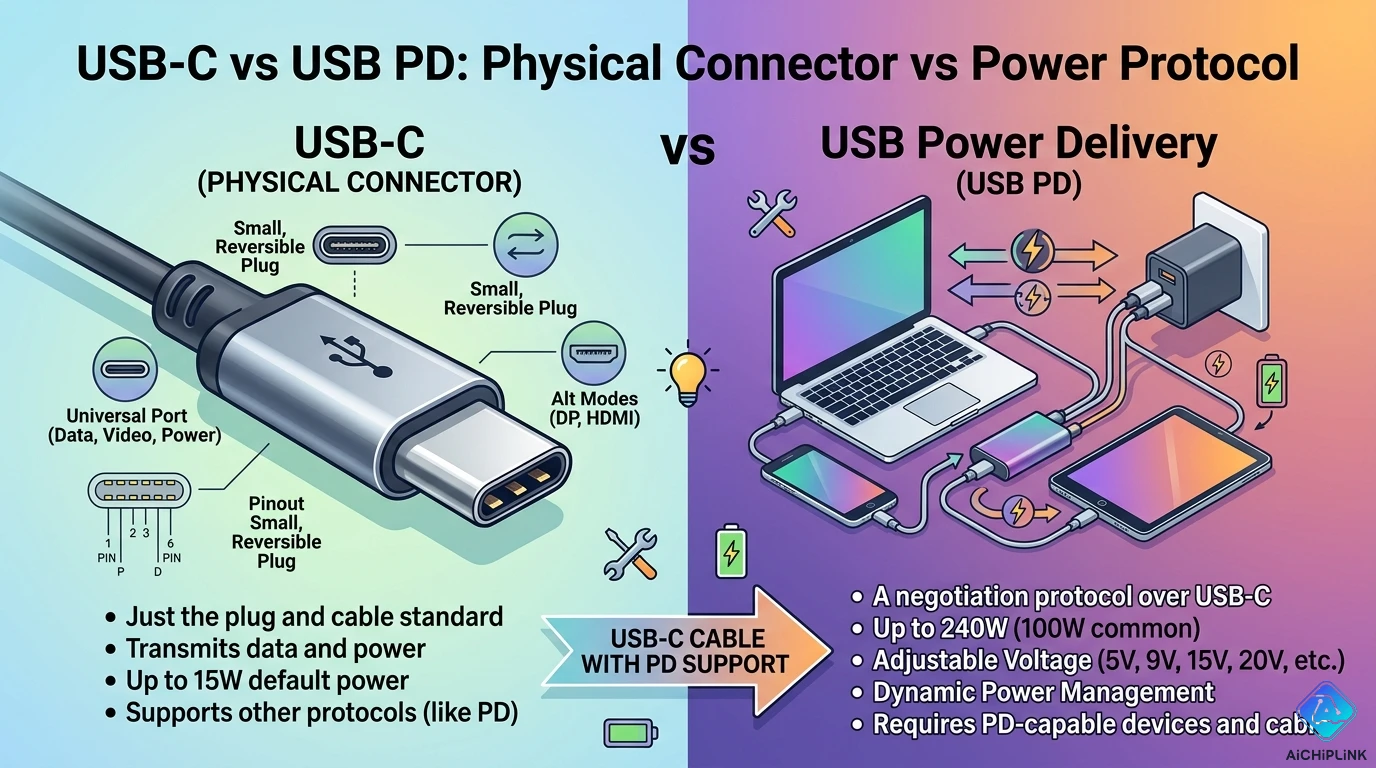
Quick Comparison Matrix
| Feature | USB-C | USB PD |
|---|---|---|
| What It Is | Physical connector type | Power delivery protocol |
| Category | Hardware (plug shape) | Software (charging standard) |
| Function | Connects devices | Delivers high power (up to 240W) |
| Requires | USB-C port | USB-C port + PD chip |
| Reversible | Yes (plug orientation) | N/A (not physical) |
| Can Exist Without Other | Yes (USB-C without PD) | No (PD requires USB-C) |
| Common Confusion | "USB-C = fast charging" ❌ | "PD = connector type" ❌ |
Bottom Line:
- USB-C = The oval-shaped plug (like HDMI vs VGA)
- USB PD = The smart charging technology (like Fast Charge vs Regular Charge)
- They Work Together: USB-C port + USB PD protocol = Fast, intelligent charging
Core Concept: USB-C is Hardware, USB PD is Software
Understanding USB-C (Physical Connector)
What USB-C Actually Is:
USB-C = Connector Shape + Pin Layout

Physical Characteristics:
┌─────────────────┐
│ ╔═════════════╗ │ ← Oval shape, symmetrical
│ ║24 pins      ║ │ ← 12 on top, 12 on bottom
│ ╚═════════════╝ │ ← Reversible (no "up" side)
└─────────────────┘

Size: 8.4mm × 2.6mm
Pins: 24 pins total
Orientation: Reversible (works both ways)
USB-C Capabilities (With Compatible Cable):
✅ Reversible plug (no wrong way)
✅ Data transfer (USB 2.0 to USB4)
✅ Video output (DisplayPort, HDMI)
✅ Audio output
✅ Power delivery (up to 240W with PD)
✅ Single connector for everything

BUT: Not all USB-C ports are equal!
USB-C Does NOT Guarantee:
❌ Fast charging (depends on port specs)
❌ High-speed data (could be USB 2.0)
❌ Video output capability
❌ Any specific power level

USB-C only defines the connector shape!
Understanding USB PD (Power Delivery Protocol)
What USB PD Actually Is:
USB PD = Communication Protocol for Smart Charging

NOT a physical connector!
It's a "language" devices speak to negotiate power.

Think of it as:
USB-C = Phone jack (hardware)
USB PD = The conversation happening (software)
How USB PD Works:
Step 1: Device Plugged In
Charger: "Hello, I can provide 5V, 9V, 12V, 15V, or 20V"
Device: "I need 9V at 3A (27W) to fast charge"

Step 2: Negotiation
Charger: "Confirmed, switching to 9V 3A"
Device: "Charging at 27W" ✅

Step 3: Dynamic Adjustment
Battery 80%: "Reduce to 9V 2A (18W)"
Charger: "Confirmed, reducing power"

All this happens in milliseconds!
USB PD Power Profiles:
Profile 1:  5V @ 3A   = 15W
Profile 2:  9V @ 3A   = 27W
Profile 3: 15V @ 3A   = 45W
Profile 4: 20V @ 3A   = 60W
Profile 5: 20V @ 5A   = 100W
EPR (2021): 28V/36V/48V = up to 240W

Device requests what it needs
Charger provides if capable
Dimension 1: Physical vs Logical
Physical Layer Analysis (USB-C)
USB-C Connector Variants:
| Type | Description | Usage |
|---|---|---|
| USB-C Receptacle | Port on device | Phones, laptops, chargers |
| USB-C Plug | End of cable | Connects to receptacle |
| USB-C to USB-A | Hybrid cable | Legacy compatibility |
| USB-C to Lightning | Apple hybrid | iPhone fast charging |
Pin Configuration:
USB-C has 24 pins:

Power Pins:
- VBUS (4 pins): Power delivery
- GND (4 pins): Ground

Data Pins:
- TX/RX (4 pairs): USB 3.x data
- D+/D- (2 pins): USB 2.0 data

Special Pins:
- CC1/CC2 (2 pins): Configuration Channel
  ↑ These enable USB PD communication!
- SBU1/SBU2 (2 pins): Sideband use (alt modes)
The CC Pins Enable USB PD:
CC (Configuration Channel) pins:
1. Detect cable orientation
2. Negotiate USB PD power levels
3. Enable alternate modes (video, audio)

Without CC pins = No USB PD!
This is why cheap cables often don't work.
Protocol Layer Analysis (USB PD)
USB PD Versions:
| Version | Year | Max Power | Key Feature |
|---|---|---|---|
| USB PD 1.0 | 2012 | 100W | Initial spec |
| USB PD 2.0 | 2014 | 100W | Improved profiles |
| USB PD 3.0 | 2017 | 100W | PPS (variable voltage) |
| USB PD 3.1 | 2021 | 240W | EPR (extended power) |
PD 3.0 PPS (Programmable Power Supply):
Standard PD: Fixed voltages (5V, 9V, 12V, 15V, 20V)
PPS: Variable voltage in 20mV steps

Example:
Device can request: 8.7V, 11.2V, 14.8V, etc.
Benefit: Optimal charging efficiency
Use: Samsung Super Fast Charging, OPPO SuperVOOC
USB PD Communication:
Uses BMC (Biphase Mark Code) on CC pins
Speed: 300 kbaud
Messages:
- Source Capabilities (charger advertises)
- Request (device asks for power)
- Accept/Reject (charger responds)
- PS_RDY (power supply ready)

Happens before charging starts!
Dimension 2: Functionality Comparison
What USB-C Provides (Physical Functions)
1. Reversible Connection
Traditional USB-A:
  ┌────┐
  │    │ ← Only fits one way
  └────┘
  50% chance of wrong orientation!

USB-C:
  ╔════╗
  ║    ║ ← Symmetrical, works both ways
  ╚════╝
  100% success rate
2. Higher Current Capability
USB-A (old):   Max 5V @ 0.9A = 4.5W
USB-C (basic): Up to 5V @ 3A = 15W
USB-C (PD):    Up to 48V @ 5A = 240W

Thicker power pins enable higher current
3. Alternate Modes
USB-C can carry non-USB signals:

DisplayPort:  Up to 8K video
HDMI:         Up to 4K60 video
Thunderbolt:  40 Gbps data + video + power
Audio:        Headphone adapters

All through same connector!
What USB PD Provides (Protocol Functions)
1. Intelligent Power Negotiation
Traditional USB (dumb charging):
Charger: Always outputs 5V
Device: Takes what it gets
Result: Slow charging

USB PD (smart charging):
Charger: Offers multiple voltages
Device: Requests optimal voltage
Result: Fast, efficient charging
2. Bidirectional Power
Laptop can:
- Charge phone (laptop = source)
- Be charged by power bank (laptop = sink)
- Both simultaneously!

Example: Laptop charges from wall + charges phone
Wall → Laptop (60W in) → Phone (15W out)
Net: Laptop gets 45W
3. Dynamic Power Management
USB PD can adjust in real-time:

Scenario: Laptop + Phone both plugged into hub
Total Available: 100W

Initial:
- Laptop: 65W (working hard)
- Phone: 35W (fast charging)

Later (Laptop idle):
- Laptop: 30W (light use)
- Phone: 70W (maximum charging)

PD reallocates power as needed!
Dimension 3: Speed & Performance
Charging Speed Matrix
| Configuration | Power Output | Phone Charge Time (0-50%) | Laptop Charge Time (0-80%) |
|---|---|---|---|
| USB-A (5W) | 5V @ 1A = 5W | 2 hours | Not supported |
| USB-C (15W) | 5V @ 3A = 15W | 45 min | Not supported |
| USB-C + PD (27W) | 9V @ 3A = 27W | 25 min | 3 hours |
| USB-C + PD (45W) | 15V @ 3A = 45W | 20 min | 1.5 hours |
| USB-C + PD (65W) | 20V @ 3.25A = 65W | 18 min | 1 hour |
| USB-C + PD (100W) | 20V @ 5A = 100W | 15 min | 45 min |
Real-World Examples:
iPhone 15 Pro:
- USB-A 5W charger: 0-50% in 90 minutes
- USB-C 20W PD: 0-50% in 25 minutes
Difference: 3.6× faster

MacBook Pro 16":
- 67W USB-C PD: 0-50% in 30 minutes
- 140W USB-C PD: 0-50% in 20 minutes
Difference: 1.5× faster
Data Transfer Speed Matrix
| USB Standard | Max Speed | Via USB-C? | Common Use |
|---|---|---|---|
| USB 2.0 | 480 Mbps | Yes | Cheap cables, charging |
| USB 3.2 Gen 1 | 5 Gbps | Yes | External drives |
| USB 3.2 Gen 2 | 10 Gbps | Yes | Fast SSDs |
| USB 3.2 Gen 2×2 | 20 Gbps | Yes | High-end drives |
| USB4 | 40 Gbps | Yes | Thunderbolt compatible |
| USB4 v2 | 80 Gbps | Yes | Future (2024+) |
Important: USB-C connector ≠ Fast data!
Many USB-C cables are USB 2.0 only (480 Mbps)
Check cable specs!

Visual Identification:
USB 2.0: Thin cable, cheap
USB 3.x: Thicker cable, "SS" marking
USB4: Thickest, "40" or Thunderbolt symbol
Dimension 4: Compatibility & Requirements
USB-C Compatibility Matrix
What Works with USB-C Port:
| Scenario | Works? | Notes |
|---|---|---|
| USB-C to USB-C | ✅ Always | Best compatibility |
| USB-C to USB-A | ✅ Yes | Via adapter/cable |
| USB-A to USB-C | ✅ Yes | Common for charging |
| USB-C to Lightning | ✅ Yes | iPhone fast charge |
| USB-C to HDMI | ⚠️ Maybe | Requires Alt Mode support |
| USB-C to DisplayPort | ⚠️ Maybe | Requires Alt Mode support |
| USB-C headphones | ⚠️ Maybe | Requires Audio Adapter Mode |
Compatibility Issues:
Problem: Not all USB-C ports are equal

Example: Budget phone USB-C port
✅ Charges at 15W
✅ USB 2.0 data (480 Mbps)
❌ No video output
❌ No USB PD negotiation
❌ No Thunderbolt

It's USB-C shaped, but limited functionality!
USB PD Compatibility Matrix
USB PD Requirements:
| Component | Requirement | Without It |
|---|---|---|
| Port | USB-C with PD chip | Only 5V charging |
| Cable | USB-C with E-marker chip | Limited to 60W max |
| Charger | PD-capable power supply | Fixed voltage only |
| Device | PD negotiation support | Basic 5V charging only |
Cable Requirements by Power:
Up to 60W (20V @ 3A):
→ Standard USB-C cable OK
→ No special chip needed

61W - 100W (20V @ 5A):
→ E-marker cable REQUIRED
→ Cable communicates its rating
→ Thicker wires for higher current

101W - 240W (28-48V @ 5A):
→ EPR cable REQUIRED
→ USB PD 3.1 support
→ Special high-voltage rating
Dimension 5: Device Support & Ecosystem
USB-C Device Categories
1. Smartphones (2026 Status):
iPhone:
- iPhone 15/16: USB-C (finally!)
- Supports: USB PD up to 27W
- Data: USB 2.0 (base) or USB 3.2 (Pro)

Android Flagships:
- Samsung S24: USB-C, PD 3.0 PPS, 45W
- Google Pixel 9: USB-C, PD 3.0, 30W
- OnePlus 12: USB-C, PD + VOOC, 100W

Budget Android:
- Often USB-C but limited PD (15-18W)
2. Laptops:
MacBook:
- All models: USB-C/Thunderbolt
- Power: 30W (Air) to 140W (Pro 16")
- Supports: USB PD, Thunderbolt 4

Windows Laptops:
- High-end: USB4/Thunderbolt + PD (65-100W)
- Mid-range: USB-C + PD (45-65W)
- Budget: USB-C charging, maybe PD

Chromebooks:
- Most: USB-C + PD (30-45W)
3. Tablets:
iPad Pro/Air:
- USB-C, Thunderbolt (Pro only)
- PD up to 30W
- Can charge accessories

Android Tablets:
- Varies widely
- Samsung Tab: USB-C + PD 45W
- Budget: USB-C, basic charging
USB PD Charger Categories
1. Phone Chargers (20-45W):
Apple 20W USB-C PD:
- Output: 5V/3A, 9V/2.22A
- Max: 20W
- Use: iPhone, AirPods, Watch

Anker 45W GaN:
- Output: 5V/3A, 9V/3A, 15V/3A, 20V/2.25A
- Max: 45W
- Use: Phones, tablets, small laptops
2. Laptop Chargers (65-100W):
Dell 65W USB-C PD:
- Output: Multiple voltages up to 20V/3.25A
- Max: 65W
- Use: Ultrabooks, 13-14" laptops

Apple 96W USB-C PD:
- Output: Up to 20.3V/4.7A
- Max: 96W
- Use: MacBook Pro 16"
3. Multi-Port Chargers:
Anker 747 (150W):
- 2× USB-C PD (100W + 50W)
- 2× USB-A (12W each)
- Total: 150W shared
- Use: Charge laptop + phone + tablet simultaneously
Use Case Scenario Matrix
Scenario 1: Fast Phone Charging
Requirements Analysis:
Goal: Charge phone 0-50% in 20-30 minutes

What You Need:
✅ Phone with USB-C port + PD support
✅ USB-C PD charger (20W+ for phones)
✅ USB-C to USB-C cable (USB 2.0 OK for charging)

What Happens:
1. Plug in → PD negotiation (milliseconds)
2. Phone requests 9V @ 2A = 18W
3. Charger supplies 18W
4. Battery charges rapidly until 80%
5. Slows down for battery health

Result: 0-50% in 25 minutes ✅
Common Mistakes:
❌ Mistake 1: USB-C charger without PD
→ Only charges at 5V = slow

❌ Mistake 2: PD charger but USB-A cable with adapter
→ Limited to 5V, no PD negotiation

❌ Mistake 3: Cheap cable without proper wiring
→ Can't carry full current, charging slow

✅ Solution: Proper USB-C PD charger + quality USB-C cable
Scenario 2: Laptop Charging & Docking
Requirements Analysis:
Goal: Single cable for power + display + accessories

What You Need:
✅ Laptop with USB-C + PD + DisplayPort Alt Mode
✅ USB-C dock/hub with PD pass-through
✅ USB-C PD charger (65W+ for laptops)

What Happens:
Single USB-C cable delivers:
- 65W power to laptop (via PD)
- 4K video to monitor (via DisplayPort Alt Mode)
- USB ports for keyboard, mouse
- Ethernet connection

Result: One cable does everything! ✅
Dock Configuration:
Wall Outlet → 100W PD Charger → USB-C Dock
                                    ↓
              Laptop ← 65W PD ← USB-C Cable
              Monitor ← DisplayPort
              Keyboard/Mouse ← USB-A ports
              Ethernet ← RJ45 port

Dock uses 35W (100W - 65W) for peripherals
Scenario 3: Power Bank for Travel
Requirements Analysis:
Goal: Charge laptop + phone + tablet on the go

What You Need:
✅ High-capacity power bank (20,000+ mAh)
✅ USB-C PD input & output
✅ Multiple ports (2-3 USB-C + USB-A)

Example: Anker 737 (24,000 mAh, 140W)
Ports:
- USB-C 1: 140W PD (input/output)
- USB-C 2: 100W PD (output)
- USB-A: 18W (output)

Usage:
Laptop (65W) + Phone (20W) + Tablet (18W) = 103W
Power bank can handle all simultaneously ✅
Scenario 4: Video Output (USB-C Alt Mode)
Requirements Analysis:
Goal: Connect laptop to 4K monitor via USB-C

What You Need:
✅ Laptop USB-C with DisplayPort Alt Mode
✅ Monitor with USB-C input
✅ USB-C cable with Alt Mode support

What Happens:
USB-C carries:
- DisplayPort video signal (up to 8K)
- USB PD power (can charge laptop FROM monitor)
- USB data (monitor acts as USB hub)

Result: One cable = video + power + data ✅
Check Compatibility:
Not all USB-C ports support video!

Check laptop specs for:
- "DisplayPort Alt Mode"
- "Thunderbolt 3/4"
- "USB-C with DP"

Check cable for:
- "Alt Mode" or "Video" support
- USB-C Full Featured cable
- Thunderbolt cable (always supports Alt Mode)
Decision Matrix: What Do You Need?
For Consumers (Buying Devices)
Phone Purchase:
Must-Have:
☑ USB-C port (physical connector)
☑ USB PD support (at least 18W+)

Nice-to-Have:
☐ PPS (Programmable Power Supply)
☐ USB 3.x data speeds
☐ Video output capability

Budget phones: USB-C yes, PD limited (15W)
Flagships: USB-C + full PD (27-45W)
Laptop Purchase:
Must-Have:
☑ USB-C charging port
☑ USB PD support (65W+ for productivity)
☑ At least 2 USB-C ports

Nice-to-Have:
☐ Thunderbolt 4
☐ USB4 support
☐ DisplayPort Alt Mode on all ports
☐ 100W PD for future-proofing

Ultrabooks: 2-4 USB-C ports, 45-65W PD
Workstations: 3-4 Thunderbolt, 100W+ PD
For Buyers (Purchasing Accessories)
Charger Selection:
For Phones:
→ 20-30W USB-C PD charger
→ Single port OK
→ Budget: $15-25

For Laptops:
→ Match or exceed laptop's requirement
→ MacBook Pro 16": 96W minimum
→ Dell XPS 13: 65W minimum
→ Budget: $30-60

For Everything:
→ Multi-port GaN charger (100W+)
→ 2× USB-C PD + 1-2× USB-A
→ Budget: $50-80
Cable Selection:
For Charging Only:
→ Any USB-C to USB-C cable
→ USB 2.0 is fine (cheaper)
→ Budget: $5-10

For Charging + Data:
→ USB 3.x cable (check speed rating)
→ Look for "SS" or "10Gbps" marking
→ Budget: $10-20

For 100W+ Power:
→ E-marked cable (required!)
→ Look for "5A" or "100W" rating
→ Budget: $15-30

For Video:
→ USB-C Full Featured cable
→ Or Thunderbolt cable
→ Budget: $20-40
Common Misconceptions Debunked
Myth 1: "USB-C = Fast Charging" ❌
Reality:
USB-C is just the connector shape.
Fast charging requires USB PD protocol.

Examples:
- USB-C port with 5V only = 15W max (not fast)
- USB-C port with PD = 20-240W (fast)

The connector doesn't determine speed!
Myth 2: "All USB-C Cables Are the Same" ❌
Reality:
USB-C cables vary wildly:

Budget cable ($5):
- USB 2.0 data only (480 Mbps)
- 60W power max
- No video support

Premium cable ($30):
- USB 3.2/4 (10-40 Gbps)
- 100W+ power
- Full video support
- E-marker chip

Price reflects capabilities!
Myth 3: "USB PD Only Works with USB-C" ✅ TRUE
Reality:
USB PD requires:
- USB-C physical connector
- CC (Configuration Channel) pins
- PD negotiation chips

Older USB-A cannot support USB PD
The pins don't exist!

USB-A is limited to:
- Basic 5V charging
- Proprietary fast charging (Qualcomm QC, etc.)
Myth 4: "Higher Wattage Chargers Damage Devices" ❌
Reality:
USB PD is negotiated - device requests what it needs.

Example:
100W charger + 18W phone:
1. Charger advertises: "I can do 5V, 9V, 12V, 15V, 20V"
2. Phone requests: "Give me 9V @ 2A = 18W"
3. Charger provides exactly 18W

The charger doesn't "force" power.
Safe to use high-wattage chargers! ✅
Summary & Recommendations
Key Takeaways:
✅ USB-C vs USB PD:
- USB-C = Physical connector (hardware)
- USB PD = Power protocol (software)
- Both work together for fast charging
✅ Not All USB-C is Equal:
- USB-C port might not support PD
- USB-C cable might not handle high power
- Always check specifications!
✅ USB PD Benefits:
- Intelligent power negotiation
- Up to 240W delivery
- Bidirectional power flow
- Single cable for power + data + video
✅ Buying Advice:
- Phones: USB-C + PD 18W minimum
- Laptops: USB-C + PD 65W minimum
- Chargers: Match or exceed device requirement
- Cables: Check power/data ratings
Conclusion
Understanding the difference between USB-C and USB PD is crucial in 2026's charging landscape. USB-C defines the physical connector - the oval-shaped, reversible plug that has become the universal standard. USB PD, on the other hand, is the intelligent communication protocol that enables fast, flexible power delivery up to 240W.
The confusion arises because they often work together - most modern USB-C devices support USB PD for fast charging. However, USB-C without PD is just a connector capable of basic 5V charging, while USB PD without USB-C cannot exist at all, as it requires the specific CC pins found only in USB-C connectors.
When shopping for devices, chargers, or cables, remember this simple rule: USB-C gets you the connector, USB PD gets you the speed. For optimal performance, ensure all components (device, charger, cable) support USB PD at the wattage you need.
For more USB technology guides, charging tutorials, and compatibility information, visit AiChipLink.com.

Written by Jack Elliott from AIChipLink.
AIChipLink, one of the fastest-growing global independent electronic components distributors in the world, offers millions of products from thousands of manufacturers, and many of our in-stock parts is available to ship same day.
We mainly source and distribute integrated circuit (IC) products of brands such as Broadcom, Microchip, Texas Instruments, Infineon, NXP, Analog Devices, Qualcomm, Intel, etc., which are widely used in communication & network, telecom, industrial control, new energy and automotive electronics.
Empowered by AI, Linked to the Future. Get started on AIChipLink and submit your RFQ online today!
Frequently Asked Questions
What is the difference between USB-C and USB PD?
USB-C is a physical connector, while USB PD (Power Delivery) is a charging protocol. USB-C defines the shape and pin layout of the port, whereas USB PD controls how power is negotiated and delivered between devices for fast charging.
Does every USB-C port support USB Power Delivery?
No, not all USB-C ports support USB PD. Some USB-C ports only provide basic 5V charging without fast charging capability. USB PD requires both hardware support and compatible firmware in the device and charger.
Can USB Power Delivery work without USB-C?
No, USB PD requires a USB-C connection. USB PD depends on the Configuration Channel (CC) pins that exist only in USB-C connectors, so it cannot function over older USB-A ports.
Why is my USB-C device charging slowly?
Slow charging usually means USB PD is not active. All components (device, cable, charger) must support USB PD for fast charging.
Is it safe to use a higher wattage USB-C PD charger?
Yes, it is completely safe. USB PD uses intelligent negotiation, so the device only draws the power it needs. For example, a 100W charger can safely charge a phone that only requires 18W.