MSP430 vs ARM Cortex: which microcontroller is right for your project?
You face a tough choice when starting a new build. Which microcontroller should you pick? The answer depends on what your project really needs. The MSP430 from Texas Instruments excels at tasks that use very little power. It handles simple, repeated jobs with very low energy. The ARM Cortex, however, gives better performance for complex, heavy processing work. It also offers better value for money for demanding projects. You must think about power use, cost, speed, chip size, and development help. Each factor matters for your particular project. Think about what your project needs as you read this comparison. Your choice between these two platforms will affect how well your project works. Think carefully about your priorities before you decide.
Key Takeaways
-
MSP430 uses very little power and wakes up quickly, so it's great for battery-powered sensor projects.
-
ARM Cortex gives you more power for every dollar, so it handles harder jobs and small budgets well.
-
MSP430 comes in tiny packages for small devices with little space, while ARM Cortex offers many package sizes to fit different needs.
-
Pick MSP430 for easy, repeating tasks that stay asleep most of the time; pick ARM Cortex for tough apps with strong tools and a helpful community.
MSP430 vs ARM Cortex: A Direct Comparison
When you compare the 16-bit MSP430 with the 32-bit ARM Cortex, you get a clear picture of their strengths. The Texas Instruments MSP430 excels in ultra-low-power sensor node projects. The ARM Cortex offers a better balance for larger calculations and complex tasks. This section provides a direct comparison of these two microcontroller families. Your choice depends on the specific needs of your application.
MSP430 for Ultra-Low-Power Tasks
The MSP430 family uses a 16-bit architecture. This design consumes very little energy. You can run the MSP430 at 1 MHz using only 300 µA of current. At 8 MHz, it draws just 2 mA. These figures show why the MSP430 works well for battery-powered devices.
| Clock Frequency | Active Mode Current |
|---|---|
| 1 MHz | 300 µA |
| 8 MHz | 2 mA |
The MSP430 family serves many applications. Wireless communication modules like BLE and Zigbee rely on the Texas Instruments MSP430 for extended battery life. Medical devices such as wearable health monitors use it for continuous patient monitoring without frequent charging. Industrial automation systems benefit from its low power consumption combined with high reliability. Smart home devices for lighting, temperature, and security control integrate sensors and actuators efficiently. Portable devices like smartwatches, calculators, and fitness trackers ensure long-term device usage on limited power.
The ULPBench score provides a standard measure of energy efficiency. The MSP430FR5969 achieves a score of 121. The older MSP430FG4618 scores 31.74. These numbers show the range of efficiency within the MSP430 family. For your projects that need simple, repeated tasks with minimal power draw, the MSP430 family is the right choice.
ARM Cortex for High-Performance Tasks
The ARM Cortex-M series delivers higher performance for complex applications. The MSP432P401R uses an ARM Cortex-M4F core. It achieves a ULPBench score of 167.4. This score outperforms all other Cortex-M3 and Cortex-M4F microcontrollers on the market.
The new MSP432 MCUs deliver a best-in-class ULPBench™ score of 167.4 – outperforming all other Cortex-M3 and -M4F MCUs on the market.
The ARM platform offers a better price-to-performance ratio for tasks requiring larger calculations. The ARM Cortex-M series includes many options with different memory sizes, clock speeds, and peripheral sets. This flexibility lets you choose the right microcontroller for your project's specific needs. For complex projects that demand more processing power, the ARM Cortex provides the performance you need.
Here is a direct comparison of ULPBench scores:
| MCU (Core) | ULPBench Score |
|---|---|
| MSP430FR5969 (MSP430) | 121 |
| MSP430FG4618 (MSP430) | 31.74 |
| MSP432P401R (ARM Cortex-M4F) | 167.4 |
These scores confirm that the ARM Cortex-M4F offers superior efficiency for applications that need higher performance. Your choice between these two platforms depends on your project's primary requirements. The ARM Cortex-M4F core provides a significant boost in both speed and energy management for demanding tasks. The Cortex architecture handles complex calculations with ease. The ARM ecosystem supports a wide range of development tools and libraries. This makes the ARM Cortex-M series a strong option for projects that require both power and flexibility. The ARM Cortex-M series includes processors from many manufacturers. Each offers different trade-offs between cost, power, and speed. You can find the exact ARM Cortex variant that matches your application's needs. The ARM platform continues to grow with new features and capabilities. This ensures that your projects remain scalable and future-ready.
Power Consumption and Battery Life
Battery life often decides which microcontroller you choose. Your sensor node might run for years on a coin cell. Or your device might need frequent recharging. The difference comes down to sleep current and wake-up speed. These factors matter more than raw processing speed for many projects.
MSP430's Low Sleep Current and Fast Wake-Up
The Texas Instruments MSP430 family shines in standby operation. In LPM3 mode, the auxiliary clock runs directly from a 32 kHz watch crystal. The MSP430 draws approximately 1 microampere (µA) of quiescent current in this state. That tiny draw lets a small battery power your device for years.
| Microcontroller | Architecture | Active Current | Sleep/Standby Current |
|---|---|---|---|
| MSP430 (FRAM) | 16-bit | 126 µA/MHz | Not specified |
| Renesas RA4L1 | ARM Cortex-M33 | 168 µA/MHz | 1.65 µA (standby, SRAM retained) |
| NXP MCX L | ARM Cortex-M33 | 24 µA/MHz | 1.9 µA (low-power sense domain) |
| Silicon Labs xG27 | ARM Cortex-M33 | Not specified | 0.9 µA (deep sleep, 16KB RAM retained) |
| STM32U3 | ARM Cortex-M33 | 10 µA/MHz | 1.6 µA (stop mode) |
| Nordic nRF54L | ARM Cortex-M33 | 2.6 mA (at 128 MHz) | 0.8 µA (System-OFF mode) |
The MSP430 also wakes quickly from standby. Your sensor reads a temperature, transmits the data, then returns to sleep. This cycle consumes minimal energy. The MSP430 family includes high-precision ADCs. Accurate sensor readings matter for battery-powered applications. You get reliable data without wasting power on repeated measurements. This low power consumption makes the MSP430 ideal for remote environmental monitors and wearable health trackers.
ARM Cortex's Power Management Features
ARM Cortex-M processors offer flexible low-power modes at the processor level. You control these modes through the SLEEPDEEP bit in the System Control Block register. The WFI (Wait-For-Interrupt) and WFE (Wait-For-Event) instructions trigger entry into these states.
ARM Cortex-M processors support two low-power modes at the processor level: SLEEP mode and DEEPSLEEP mode. In SLEEP mode, the clock is gated at the processor level, but the system clock remains active. In DEEPSLEEP mode, the system clock, PLL, and flash memory are also switched off. Wake-up from SLEEP mode is via any interrupt or event, while wake-up from DEEPSLEEP mode requires specific wake-up pins or RTC events, depending on the system-on-chip implementation.
Different ARM implementations show varying efficiency. The STM32F072xB datasheet lists current values at 3.3V VDD:
| Low-Power Mode | Typical Current Consumption |
|---|---|
| SLEEP | 3.4 mA |
| STOP (main regulator) | 17.3 µA |
| STOP (low power regulator) | 5.1 µA |
| STANDBY | 2.3 µA |
These numbers show a 1000x reduction from SLEEP to STANDBY. Your application can choose the right low-power mode based on wake-up speed needs. The ARM Cortex-M33 cores in modern low-power microprocessors achieve standby currents below 2 µA. This efficiency makes ARM competitive for battery-powered projects. However, you must configure the clock tree and peripherals carefully. The ARM platform rewards developers who study the reference manual. Your projects gain flexibility with multiple sleep states. Your projects also benefit from the wide ARM ecosystem. The choice between these platforms depends on your specific application. Consider your wake-up frequency and active duty cycle. These factors determine real-world battery life more than datasheet numbers alone.
Cost and Performance Analysis
Your budget plays a big part in choosing a microcontroller. The price gap between entry-level MSP430 and ARM Cortex chips might shock you. You need to think about what you get for your money.
Microcontroller Price Comparison
Entry-level MSP430 chips cost more than basic ARM Cortex chips. One MSP430 model, the MSP430G2955IRHA40R, costs about $5.00 per unit when bought in bulk. ARM Cortex microcontrollers from the 32-bit MCU family range from $0.10 to $1.25 per unit in bulk. Some ARM Cortex models cost between $1.00 and $3.00. This gives ARM-based solutions a clear price edge. The ARM Cortex platform gives you more processing power for each dollar you spend. This makes it a great pick for cost-sensitive projects that need higher performance.
The price gap matters for your projects. If you need a chip for simple tasks, the MSP430 makes sense even with its higher unit cost. The total system cost can be lower because you need fewer external parts. The built-in peripherals and low-power design cut your bill of materials. For projects that need more processing power, ARM Cortex offers a better speed-to-cost ratio. You get higher performance for a lower price per unit. Your projects benefit from this balance when you need complex calculations.
Processing Power and Memory Considerations
The ARM Cortex-M series delivers superior processing power for complex tasks. These 32-bit cores handle larger calculations with ease. The MSP430 uses a 16-bit architecture. This design limits its ability to process complex algorithms quickly. The ARM Cortex-M series also offers more memory options. You can choose from devices with larger flash and RAM capacities. This flexibility supports more demanding applications. You can run complex algorithms without worrying about memory limits. This matters for projects that process large datasets or handle multiple tasks.
The MSP430 excels in efficiency for simple, repeated tasks. Its low power use matters more than raw speed for many battery-powered devices. The ARM Cortex-M series provides the performance you need for tasks like digital signal processing or real-time control. Your choice depends on your application's processing needs. Simple sensor reading and data logging fit the MSP430 well. Complex calculations, graphical interfaces, or communication protocols benefit from ARM Cortex-M series performance. The MSP430 trades raw speed for energy savings. This trade-off works well for devices that spend most of their time sleeping.
Package Size and Physical Constraints
The size of your chip shapes your whole PCB design. A smaller chip lets you build compact products. A larger chip makes soldering and prototyping easier. Your choice between these two families affects your board layout, manufacturing process, and final product size.
Small Form Factor Options for MSP430
The MSP430 family offers some of the smallest packages in the embedded world. Texas Instruments provides several wafer-level chip-scale packages that measure just a few millimeters across. These options suit wearable devices, medical implants, and other space-limited designs.
| TI Package Code | Leads | Pitch | Body Dimensions | Height |
|---|---|---|---|---|
| YDC | 4 | 0.5mm | 1.1x1.1mm | 0.4mm |
| YEA | 5 | 0.5mm | 0.9x1.4mm | 0.5mm |
| YEB | 4 | 0.5mm | 1.3x1.3mm | 0.625mm |
| YEC | 6 | 0.5mm | 1.8x1.3mm | 0.625mm |
| YZP | 8 | 0.5mm | 1.9x0.9mm | 0.5mm |
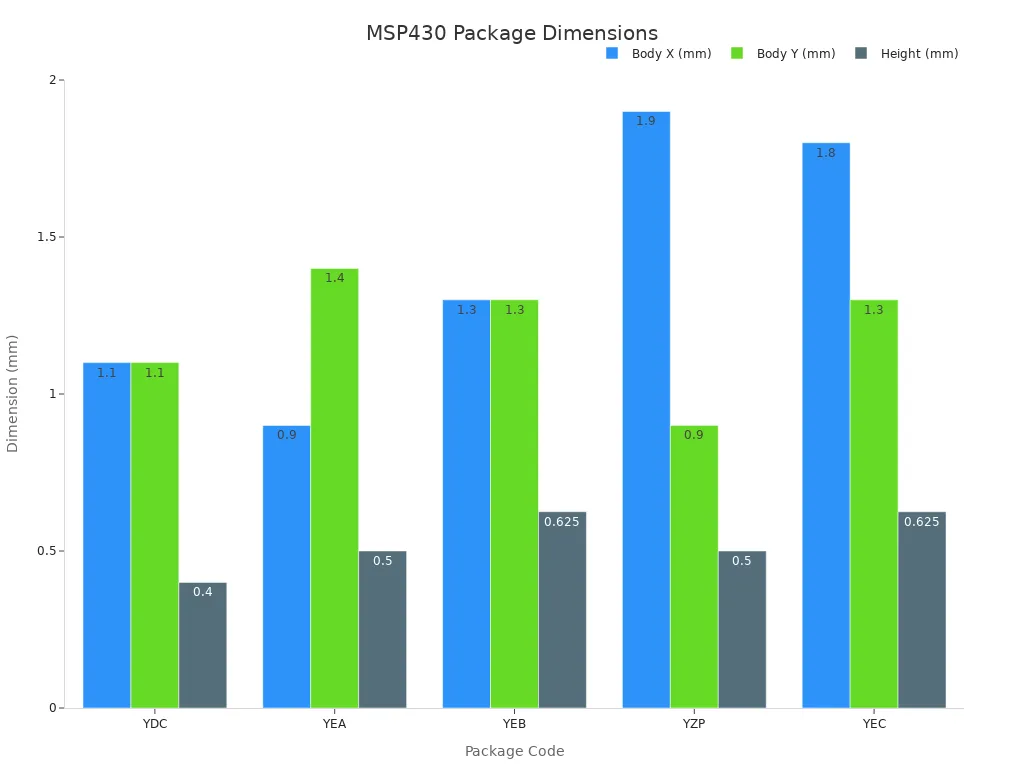
These packages measure less than 2mm in any direction. The YZP package, for example, fits eight leads into a footprint smaller than a grain of rice. This size advantage lets you shrink your product a lot. You can place the MSP430 directly on a flexible substrate or a compact sensor module. The low height also supports slim device profiles. Your PCB design becomes simpler because you save valuable board space for other parts.
ARM Cortex's Versatility in Packaging
ARM Cortex microcontrollers offer a wider range of package choices. You can pick from QFP, QFN, and BGA options based on your manufacturing skills and design needs. This flexibility supports both hobbyist prototyping and high-volume production.
BGA packages are no longer exclusive to large chips; today even simple microcontrollers are available with those little solder balls. However, many hobbyists prefer QFP and QFN packages because they are easier to solder, though BGA offers significant space savings and is sometimes the only choice due to chip shortages.
The SAM3 series from Atmel shows this variety clearly. Different models within the same family come in packages ranging from 48-pin QFP to 144-pin BGA.
| MCU Series | Package Options |
|---|---|
| SAM3N (SAM3N00, SAM3N0) | 48-pin QFP, 64-pin QFP, 48-pin QFN, 64-pin QFN |
| SAM3S (SAM3S8, SAM3SD8) | 64-pin QFP, 64-pin QFN, 100-pin QFP, 100-pin BGA |
| SAM3X (SAM3X4, SAM3X8) | 100-pin QFP, 144-pin QFP, 100-pin BGA, 144-pin BGA |
| SAM3A (SAM3A4, SAM3A8) | 100-pin QFP, 100-pin BGA |
| SAM3U (SAM3U1) | 100-pin QFP, 144-pin QFP, 100-pin BGA, 144-pin BGA |
This range lets you match your package to your production process. QFP packages work well with standard reflow soldering. BGA packages save space but need special inspection tools. For your projects, think about your assembly skills before picking a package. The ARM Cortex platform gives you the freedom to scale from simple boards to complex multi-layer designs. Your application decides the right balance between size and manufacturability. Both families handle different physical limits well.
Development Tools and Ecosystem
Your development environment shapes your entire workflow. The tools you choose affect how quickly you prototype, debug, and deploy your projects. Both platforms offer solid options, but they differ in maturity and approach.
IDEs, Compilers, and Debugging Tools
Texas Instruments provides Code Composer Studio (CCS) as the main IDE for the MSP430. This professional tool supports every MSP430 device. You get debugging, profiling, and RTOS debugging in one package. CCS is free to download and use.
The MSP430 ecosystem also includes several other tools:
-
Energia: An Arduino-like framework based on Wiring. It suits beginners and intro courses that want simplicity.
-
MSP430Ware: A full SDK with driver libraries and peripheral examples. You can copy working code straight into your projects.
-
MSP Academy: Guided learning paths with ready-made lessons. These walk you through common tasks step by step.
For debugging, TI's Launchpad boards include an on-board debugger. These boards cost a little less than $11. The debugger talks to most MSP430 chips through a two-wire link. You also have the open-source MSP430-GCC toolchain. You can install it through package managers like Ubuntu with a simple command. The toolchain includes linker scripts and vector tables for every MSP430 chip.
The ARM Cortex platform uses STM32CubeIDE as its main environment. This free professional IDE includes STM32CubeMX pin setup. You can assign pins, set clocks, and generate startup code visually. The IDE then compiles and debugs your app in one place.
Keil MDK serves as another full environment for the ARM Cortex-M series. It includes the µVision IDE, a debugger, and the Arm C/C++ compiler. MDK supports more than 10,000 devices from all silicon vendors. Free editions support Cortex-M0 and M0+ devices from specific vendors.
Community Support and Documentation
The ARM ecosystem offers a huge community. You find countless forums, tutorials, and third-party libraries online. This support speeds up your learning. When you hit a problem, someone has likely solved it before. The ARM Cortex-M series benefits from years of community work across many manufacturers.
Texas Instruments provides strong documentation for the Texas Instruments MSP430. The datasheets and user guides are thorough and well-organized. You can find application notes for nearly every use case. However, the community outside TI's official channels is smaller. You may wait longer for answers on community forums.
Your choice depends on your comfort with self-directed learning. The ARM platform offers abundant peer support. The MSP430 offers authoritative documentation from one vendor. Both paths lead to successful projects. Your application and personal preference determine the best fit.
Choosing the Right Microcontroller for Your Project
You now understand the main differences between these two platforms. This section helps you pick the best microcontroller by looking at the factors that matter most, starting with your project needs.
Key Factors to Consider
Every project has its own priorities. Check each factor against what your project needs. The table below compares the MSP430 F2617 and the STM32F103 as examples of each family.
| Decision Criterion | MSP430 (e.g., F2617) | ARM-based (e.g., STM32F103) |
|---|---|---|
| Power consumption (average current) | Lower in active and sleep modes; best in LPM3; keeps RAM in sleep | Higher total average current; lowest mode turns off chip and loses RAM; 32-bit RTC allows longer sleep periods |
| Processing speed | 16-bit, 16 MHz; slower computation time | 32-bit, up to 72 MHz; ~8x faster, shorter active processing time |
| Cost (100-piece qty) | $12.63 | $6.37 (about half to a third cheaper) |
| Package size | 10x10 mm (LQFP) | 7x7 mm (smaller) |
| Compiler/firmware support | IAR license ~$2,500; free TI sample code; good phone support | IAR license ~$5,000 (twice); ST phone support via Arizona field office; comparable support quality |
| Best-fit scenario | Frequent small periodic calculations (e.g., every ms/s) or signal processing (FIR filtering) | Less frequent larger calculations (e.g., every 5 minutes) where faster speed compensates for higher power |
Beyond these specs, think about your peripheral needs. Match your required interfaces with what each device offers. Check for mature toolchains and libraries before you commit. Engineers often make avoidable mistakes when they choose. Watch out for these common pitfalls:
-
Mismatching power requirements: Picking a high-power MCU for a battery device. Focus on energy use based on your needs.
-
Underestimating peripheral needs: Choosing an MCU without enough I/O or communication interfaces. Map required peripherals against MCU features before you decide.
-
Neglecting toolchain compatibility: Selecting an MCU without adequate development tools. Verify that mature toolchains exist for the platform.
-
Overpaying for a high-end MCU: Using a powerful chip when a simpler device would work. Match performance and price with your actual product complexity.
You also need to look at the development ecosystem. Knowing an architecture well cuts your learning time. Check environmental conditions like temperature range and humidity. Ensure stable supply for your product's life. Match memory size and type to your needs.
The old ultra-low-power edge of the MSP430 has shrunk with modern low-power families. Unless your project truly needs the MSP430's FRAM feature — unlimited write endurance and low write power for energy-harvesting or constant data-logging products — the ecosystem offers better tooling, scalability, and long-term support. Also, avoid picking a high-end MCU like the STM32H7 for products that need displays, networking, or complex user interfaces. A microprocessor running Linux would be cheaper and more capable. For hard real-time tasks like microsecond-level motor control, a high-end MCU remains the right choice.
A Decision Guide for Your Application
Now you can make a clear choice. For battery-powered projects with simple, repeated tasks, choose the Texas Instruments MSP430. This device works best when your system sleeps most of the time and wakes briefly to read a sensor. The low-power mode capabilities and fast wake-up make it ideal for such scenarios. FRAM memory provides unlimited write endurance and low write power for constant data logging.
For complex projects that demand higher performance, choose the ARM Cortex-M series. For cost-sensitive projects, the platform offers better value. The ecosystem supports your growth with extensive resources and third-party libraries. The ecosystem includes many real-time operating systems and community forums that speed up your development. Select this core when you need faster processing, more memory, or a richer peripheral set.
Your needs should guide every decision. Evaluate your power budget, processing needs, development experience, and system cost. Consider total system cost, including external components, PCB layers, and power management, not just the chip cost. Your application will determine the right balance between power, cost, and performance. The right choice depends on your specific needs. The MSP430 excels in energy efficiency for simple workloads. The ARM Cortex-M series delivers more power per dollar for demanding tasks. Each platform has its place in the embedded world.
Your choice between these two platforms comes down to your project's core needs. The MSP430 excels in battery-powered designs with simple, repeated tasks. Its ultra-low power consumption and fast wake-up make it perfect for sensor nodes. The ARM Cortex delivers superior performance for complex calculations and cost-sensitive projects. You must evaluate your power budget, processing requirements, and development experience before deciding.
Every microcontroller serves a distinct purpose. The MSP430 shines in energy efficiency for simple workloads. The ARM Cortex offers more power per dollar for demanding applications. Both platforms have their place in the embedded world. Select the right tool for your specific application, and your projects will succeed.

Written by Jack Elliott from AIChipLink.
AIChipLink, one of the fastest-growing global independent electronic components distributors in the world, offers millions of products from thousands of manufacturers, and many of our in-stock parts is available to ship same day.
We mainly source and distribute integrated circuit (IC) products of brands such as Broadcom, Microchip, Texas Instruments, Infineon, NXP, Analog Devices, Qualcomm, Intel, etc., which are widely used in communication & network, telecom, industrial control, new energy and automotive electronics.
Empowered by AI, Linked to the Future. Get started on AIChipLink and submit your RFQ online today!
Frequently Asked Questions
Which microcontroller works best for battery-powered sensor projects?
Pick the MSP430 for sensor nodes that stay asleep most of the time. Its standby current uses about 1 µA. The fast wake-up time lets you read a sensor, send data, and go back to sleep quickly. This design helps batteries last for years.
Can the ARM Cortex match the MSP430's low power consumption?
New ARM Cortex-M33 chips can reach standby currents below 2 µA. The STM32U3 series uses only 1.6 µA in stop mode. But the MSP430 still wins in active-mode efficiency at lower clock speeds. Your choice depends on how often you wake up and how long you stay active.
What development tools should you use for each platform?
Texas Instruments gives you Code Composer Studio for the MSP430. This free IDE includes debugging and profiling tools. For the ARM Cortex, STM32CubeIDE offers visual pin setup and code generation. Both platforms also support open-source tools like GCC for flexible development options.
How do you decide between these two for your application?
Match the platform to your project's main needs. The MSP430 fits simple, repeated tasks with very low power use. The ARM Cortex handles complex calculations and gives better cost efficiency. Think about your processing needs, power budget, and total system cost before you make your final choice.