What Sets PCIe Gen6 Apart from Gen5 in 2026
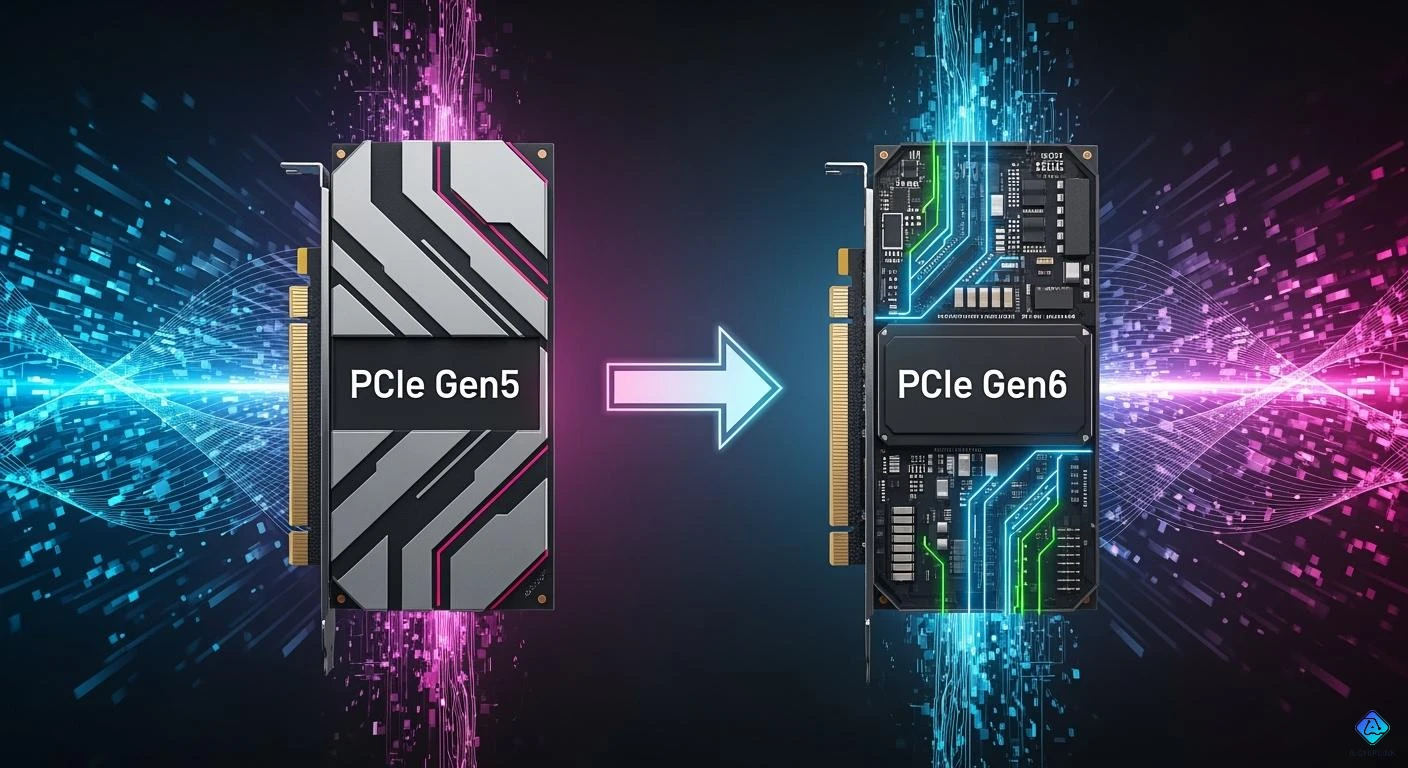
You can see a big jump when you look at PCIe Gen5 and gen6. The table below shows the main things that are different:
| Feature | PCIe Gen5 | gen6 |
|---|---|---|
| Maximum Bandwidth | 32 GT/s per lane | 64 GT/s per lane |
| Theoretical Bandwidth | 4 GB/s per lane | 8 GB/s per lane |
| Total Bandwidth (x16) | 64 GB/s | 128 GB/s |
| Signaling Technology | NRZ (2 voltage levels) | PAM4 (4 voltage levels) |
| Error Correction | None | Forward Error Correction |
| Power Efficiency | Standard | New power-saving states |
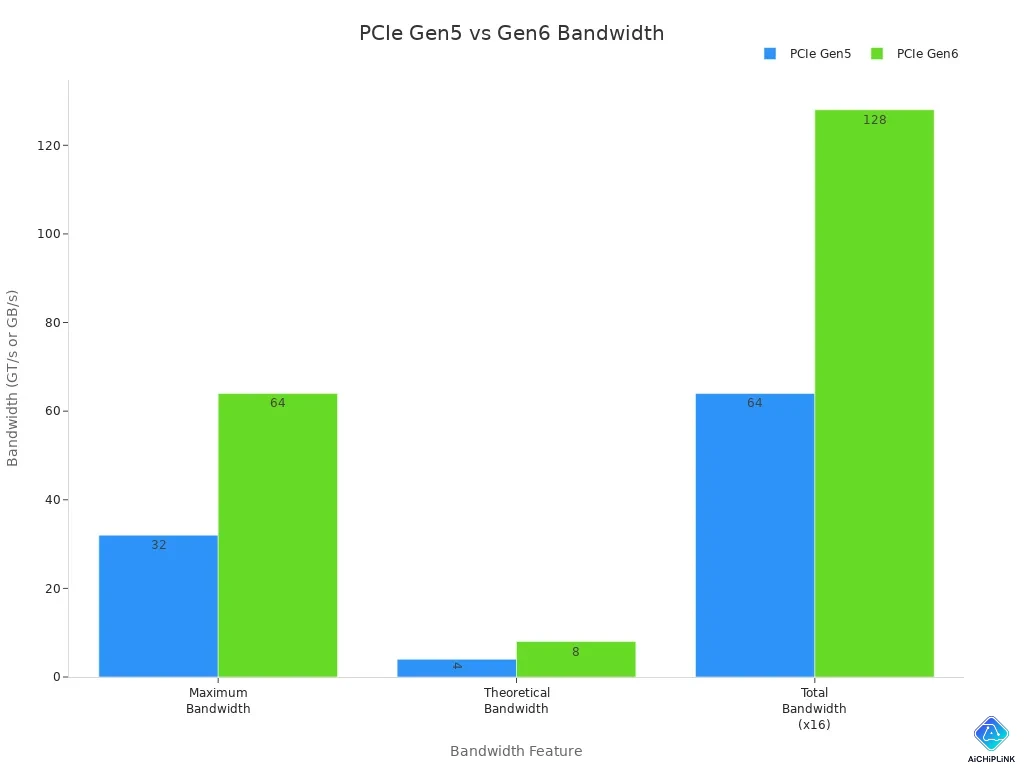
gen6 gives you twice as much bandwidth. It uses new PAM4 signaling to move data faster. It also has better ways to save power. These changes are important for you. They help move data faster, fix errors better, and use less energy in 2026.
Key Takeaways
-
PCIe Gen6 has twice the bandwidth of Gen5. It gives 64 GT/s per lane, while Gen5 gives 32 GT/s. This lets data move faster. It helps apps that need a lot of speed work better.
-
Gen6 uses PAM4 signaling. This lets it send more data at one time. It makes throughput better. But engineers must work hard to keep the signal clear.
-
Forward Error Correction (FEC) is in Gen6. It fixes errors as they happen. This means less data needs to be sent again. It helps things run smoother.
-
Gen6 has better power management. Devices can save energy by changing power states. This helps laptops last longer. It also lowers energy bills for data centers.
-
Gen6 works with Gen5 hardware. This means you can upgrade to Gen6. You will not lose any features or speed.
PCIe Gen5 vs Gen6: Speed
Data Rate Increase
You can see a clear difference when you compare the data rate of PCIe Gen5 and gen6. The table below shows how much each generation can move per second:
| PCIe Generation | Data Rate (GT/s) | Bandwidth per Lane (GB/s) |
|---|---|---|
| PCIe Gen5 | 32 | 4 |
| PCIe Gen6 | 64 | 8 |
Gen6 doubles the data rate compared to Gen5. You get 64 GT/s with gen6, while Gen5 gives you 32 GT/s. This means you can move twice as much data in the same amount of time. If you use a device with 16 lanes, gen6 can reach up to 128 GB/s. Gen5 can only reach 64 GB/s. You will notice this jump in speed when you transfer large files or run apps that need a lot of data.
Real-World Bandwidth Gains
You will feel the benefits of gen6 in your daily tasks. The higher data rate does not just look good on paper. It makes a real difference when you use your computer for things like gaming, video editing, or working with big data. Gen6 lets you load games faster and move videos without waiting. You can also run more apps at the same time without slowdowns.
Tip: If you use AI tools or work in a data center, gen6 helps you process more information at once. This means you get results faster and can handle bigger projects.
The jump from Gen5 to gen6 in data rate means you get double the bandwidth. This boost lets your system send and receive more data at once. You will see smoother performance and less waiting, especially when you use high-speed storage or connect many devices. The gen5 vs gen6 pcie upgrade gives you a clear edge in speed and efficiency.
Signaling and Encoding Changes
PAM4 Signaling
Gen6 changes how it sends data. It switches from NRZ to PAM4 signaling. NRZ uses two voltage levels. PAM4 uses four voltage levels. This lets gen6 send more data at the same speed. You get more throughput without needing faster clocks.
Here is a table that shows the main differences:
| Feature | PCIe Gen5 (NRZ) | PCIe Gen6 (PAM4) |
|---|---|---|
| Voltage Levels | 2 | 4 |
| Noise Immunity | Higher | One-third of Gen5 |
| Complexity | Simpler | More complex |
| Data Rate | 32 GT/s | 64 GT/s |
| Fundamental Frequency | 16 GHz | 16 GHz |
PAM4 signaling lets gen6 double the data rate. You get 64 GT/s, so your devices move more data. PAM4 uses four voltage levels. This means you can send two bits per cycle. Gen6 reaches higher speeds because of this change.
Note: PAM4 signaling is harder to use than NRZ. You need better designs and tighter controls to keep the signal clean.
PAM4 gives you more throughput. But it also brings more noise and interference. Gen6 needs advanced error correction and careful engineering to make PAM4 work well.
Signal Integrity
PAM4 makes gen6 faster. But it also makes the signal weaker. Gen6 has less noise immunity. The signal can get mixed up or lose strength as it travels. Gen6 has only one-third the noise immunity of Gen5. You must use high-quality materials and precise designs.
Here are some ways gen6 keeps the signal strong:
-
Gen6 uses advanced equalization techniques like decision feedback equalization and continuous time linear equalization.
-
Engineers design PCBs with controlled impedance and proper termination to stop signal loss.
-
Gen6 uses high-quality clocking and low-jitter oscillators to keep timing accurate.
-
Advanced connectors reduce lane interference and help maintain throughput.
-
Power management and decoupling capacitors help reduce noise and power spikes.
-
Packaging techniques like micro bumping and Chip-on-Wafer-on-Substrate improve signal integrity.
PAM4 needs more care than NRZ. Gen6 systems use strict insertion loss budgets. They also use better isolation between signal traces. You get faster speeds, but you must pay attention to signal quality.
Tip: If you want to use gen6 for high-speed storage or AI, make sure your system can handle PAM4. Good signal integrity means you get reliable throughput and fewer errors.
PAM4 signaling lets gen6 reach new speeds. You get more data moving at once. But you must use advanced engineering to keep the signal clean. Gen6 gives you tools to handle these challenges. You can enjoy faster and more reliable connections.
Reliability and Error Correction
Forward Error Correction (FEC)
You want your data to move fast and stay safe. gen6 brings a new tool called Forward Error Correction, or FEC. This tool helps fix mistakes in your data as it travels. When you use gen6, you get a lightweight FEC that works with very little delay—less than 2 nanoseconds. This means you do not have to wait long for your data to be checked and fixed.
FEC works together with a strong Cyclic Redundancy Check, or CRC. The CRC looks for any errors that FEC might miss. With both FEC and CRC, gen6 keeps your data safe, even when you use high speeds. You do not need to resend data as often because FEC can fix many errors right away. This is important because gen6 uses PAM4 signaling, which can cause more errors than older methods.
Here are some ways FEC helps you:
-
FEC finds and fixes errors in real time.
-
You see fewer slowdowns because you do not need to resend data.
-
gen6 keeps your data safe, even with more noise from faster speeds.
Tip: If you use gen6 for gaming, AI, or big data, FEC helps you get smooth and reliable performance.
Data Integrity Improvements
You want your data to stay correct from start to finish. gen6 gives you better tools for this job. It uses new data structures called FLITs, which help move data faster and more safely. You also get better error checks and on-the-fly corrections.
Here is a table that shows how gen6 improves data integrity compared to Gen5:
| Feature | PCIe Gen5 | PCIe Gen6 |
|---|---|---|
| Forward Error Correction (FEC) | Not available | Introduced for error correction |
| Flow Control Unit (FLIT) | Standard data transmission | New structures for faster transmission |
You get more than just speed with gen6. You get fewer errors and less data loss. gen6 uses enhanced CRC and FEC together. This means you do not have to worry about losing important files or having your work interrupted.
| Feature | PCIe Gen5 | PCIe Gen6 |
|---|---|---|
| Error Detection Mechanism | Cyclic Redundancy Check (CRC) | Enhanced CRC + Forward Error Correction (FEC) |
| Error Correction Capability | None (retransmissions required) | On-the-fly correction with FEC |
With gen6, you can trust your data to arrive safely and quickly, even when you push your system to the limit.
Power and Thermal Management
Power Efficiency
You want your devices to be fast and not waste energy. gen6 adds new ways to save power and still work well. With gen6, you can control how much power your system uses. This means your computer works hard when needed and saves energy when it can rest.
Here is a quick look at how gen6 makes power use better than Gen5:
| Feature | PCIe Gen5 | gen6 |
|---|---|---|
| Power States | Standard | More advanced options |
| Dynamic Power Control | Basic | Smarter adjustments |
| Idle Power Consumption | Higher | Lower |
gen6 has smarter power management. Your system can turn off parts of the connection when not needed. This helps laptops last longer and saves money in data centers. You get good speed without wasting energy.
Note: gen6 also lets your device switch power states faster. Your device wakes up quickly when you need it.
Thermal Throttling Advances
If your system gets too hot, it slows down to stay safe. gen6 brings new ways to keep your devices cool and working well. You get better sensors and smarter controls that watch the heat all the time.
With gen6, your system reacts faster to heat. It can slow down some lanes or move work to cooler parts. This means you do not get sudden slowdowns and your speed stays steady.
-
gen6 uses advanced thermal sensors to check heat in real time.
-
Your device can spread heat across different lanes.
-
You get fewer slowdowns when you use your device a lot.
If you use gen6 in a gaming PC or server, you will see less overheating. Your hardware stays safe and your speed is more reliable.
Tip: Make sure your system has gen6 thermal features for the best results when you do hard tasks.
PCIe Gen5 Compatibility and Interoperability
Backward Compatibility
You may wonder if your new PCIe Gen6 device will work with your older Gen5 hardware. The good news is that PCIe Gen6 keeps backward compatibility. This means you can plug a Gen6 card into a Gen5 slot, or use a Gen5 card in a Gen6 slot. Your system will adjust the speed to match the slowest part. You do not need to worry about breaking your computer or losing data.
Here is a quick table to show how devices work together:
| Device Type | Slot Type | Will It Work? | Speed Used |
|---|---|---|---|
| Gen6 Card | Gen5 Slot | Yes | Gen5 Speed |
| Gen5 Card | Gen6 Slot | Yes | Gen5 Speed |
| Gen6 Card | Gen6 Slot | Yes | Gen6 Speed |
Note: You get the best performance when both the card and slot use Gen6. If you mix generations, your speed will match the older part.
Mixed-Generation Challenges
You may face some challenges when you mix Gen5 and Gen6 devices. The system will always use the slower speed. Some advanced features in Gen6, like PAM4 signaling or new error correction, may not work with Gen5 devices. You may not see all the benefits of Gen6 if you use older parts.
Here are some things to watch for:
-
Some Gen6 features may not turn on with Gen5 devices.
-
You may need to update your motherboard firmware for best results.
-
Signal quality can drop if you use old cables or connectors.
You should check your system for full support before upgrading. Good pcie connectivity depends on using quality parts and the right settings. If you want the fastest speed and best features, use Gen6 cards with Gen6 slots.
Tip: Always read your device manual before mixing generations. This helps you avoid problems and get the best performance.
Device Impact and Applications
Storage and SSDs
PCIe Gen6 changes how storage works. New SSDs move data twice as fast as before. You get better speed and less waiting. Gen6 uses special signaling and error correction. This keeps your files safe and makes transfers smooth. Here are some ways Gen6 helps SSDs:
-
Data moves twice as fast as Gen5.
-
PAM4 signaling makes things work better.
-
Error correction helps keep data safe.
-
Gen6 is great for fast and efficient storage.
You can stream huge datasets and run fast data systems. Gen6 SSDs let you load files quickly and keep working without delays.
| Feature | PCIe 5.0 | PCIe 6.0 |
|---|---|---|
| Max Speed | ~14GB/s | ~28GB/s |
| Target | High-end consumer | Enterprise/AI |
| Real-World Difference | Small change for gaming and daily use | Big change for AI work |
AI and Data Centers
AI and data centers need fast connections. PCIe Gen6 gives a big boost. You can train large models and run analytics quickly. Gen6 lowers waiting time and increases speed. This helps you use your computers better.
| Metric | PCIe Gen6 | PCIe Gen5 |
|---|---|---|
| Sustained Read Throughput | 14.7 GB/s | N/A |
| IOPS | 2.5M+ | N/A |
| NAND Layer Count | 232-layer | N/A |
| Speed Improvement | 30% faster | N/A |
| Queueing Latency | Lower | N/A |
| Throughput per Watt | Higher | N/A |
| Flexibility for Designs | EDSFF tomorrow | N/A |
You can train AI faster and handle more data. Gen6 lets you store more and copy data quickly. Small improvements save money in big data centers.
Tip: If you use AI or run a data center, Gen6 helps you get better performance.
Gaming and Consumer Devices
You want games to load fast and apps to run well. PCIe Gen6 gives you an advantage. You wait less and play games more smoothly. Gen6 supports fast storage and graphics cards. You can multitask and stream without lag.
-
Games load faster.
-
Video editing and streaming are smooth.
-
Gen6 works well with powerful devices.
Gen6 makes your daily tasks better. You get a good experience whether you play games, edit videos, or use tough apps.
Note: Upgrading to Gen6 helps your device stay ready for new technology.
You see big changes with PCIe Gen6.
-
PAM4 signaling doubles your data speed.
-
Forward Error Correction keeps your data safe.
-
New power states help your devices use less energy.
-
Security features protect your information.
In 2026, you will notice faster apps and smoother gaming. Data centers and AI systems will grow with Gen6. Many companies will choose Gen6 for better speed and efficiency. If you plan to upgrade, think about your needs. Gen4 or Gen5 may still work well for you now.

Written by Jack Elliott from AIChipLink.
AIChipLink, one of the fastest-growing global independent electronic components distributors in the world, offers millions of products from thousands of manufacturers, and many of our in-stock parts is available to ship same day.
We mainly source and distribute integrated circuit (IC) products of brands such as Broadcom, Microchip, Texas Instruments, Infineon, NXP, Analog Devices, Qualcomm, Intel, etc., which are widely used in communication & network, telecom, industrial control, new energy and automotive electronics.
Empowered by AI, Linked to the Future. Get started on AIChipLink and submit your RFQ online today!
Frequently Asked Questions
What makes PCIe Gen6 faster than gen5?
You get double the speed with Gen6. The new specification uses PAM4 signaling. Gen5 uses NRZ signaling. Gen6 moves more data per second. This helps you run apps and games faster than the gen5 standard.
Can I use my gen5 devices with a Gen6 motherboard?
Yes, you can. The PCIe specification supports backward compatibility. You can plug a gen5 device into a Gen6 slot. The system will use the gen5 standard speed. You do not need to change your device.
Does Gen6 use more power than gen5?
No, Gen6 uses power more efficiently. The new standard adds better power states. You get lower idle power use. Gen6 can save energy compared to the gen5 standard. This helps your device stay cool and last longer.
Will my games run better with Gen6 compared to gen5?
Yes, you will see faster load times. Gen6 doubles the bandwidth of the gen5 standard. You get smoother gameplay and less waiting. The new specification helps your games and apps run at their best.
What is the main difference between the gen5 standard and Gen6?
You see a big jump in speed. Gen6 uses PAM4 signaling. Gen5 uses NRZ. Gen6 adds forward error correction. The new standard improves data safety. The specification also brings better power management.