What Components Are Inside an AI Server?
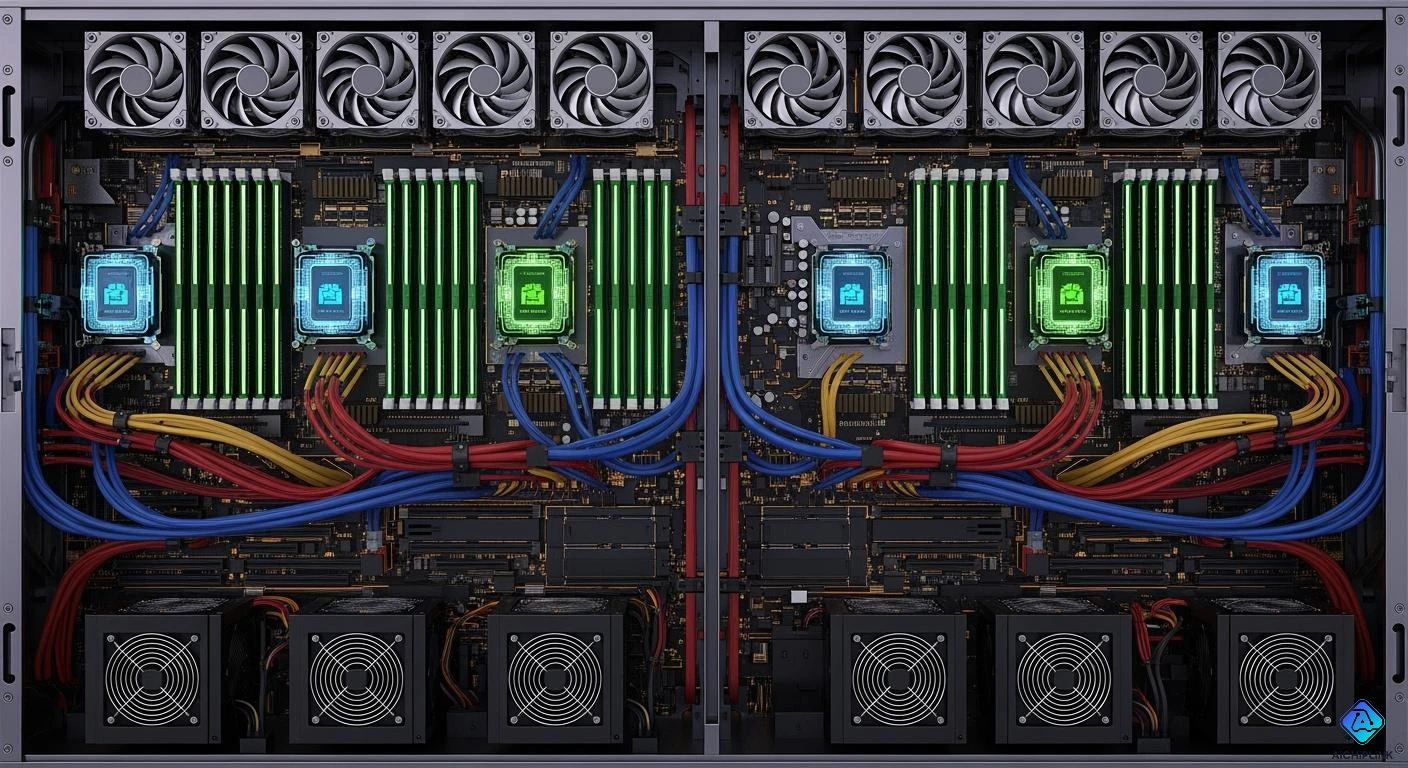
When you open an ai server, you see powerful GPUs or TPUs. There is a strong CPU. The server has lots of memory. It also has fast storage. Advanced networking parts are inside too. These parts make the server different from normal computers. They can handle huge amounts of data. They train complex ai models. You need high-performance chips to process the data. Scalable storage helps store the data that ai workloads need. Many enterprise systems use custom Trainium chips. These systems have hardware made for fast and efficient ai development.
Key Takeaways
- AI servers have strong GPUs, fast memory, and good cooling. These help them do hard AI jobs. CPUs get data ready and control resources. GPUs do quick math for training and inference. High-bandwidth memory and NVMe SSDs give fast data access. This helps AI models train smoothly. AI servers need strong power and good cooling. This is because they use a lot of energy and make a lot of heat. Special networking like NVLink and Infiniband helps GPUs and servers talk fast. This is important for big AI jobs.
Core AI Server Components
CPU and Motherboard
Every ai server has a cpu and motherboard in the middle. The cpu gets data ready and helps with feature engineering. It also controls the ai pipeline. The cpu makes sure resources are used well for ai jobs. The motherboard links all the parts together. It helps data move smoothly. You need a strong cpu so data does not get stuck before reaching the gpu. The motherboard in an ai server is made with special materials. It has more layers than a normal server. This helps it work faster and handle more work.
The cpu and motherboard in ai servers are not like regular servers. Ai servers use special materials and tricky designs. They can use more power and move more memory at once. A dgx a100 motherboard can have up to 32 layers. Normal servers only have about 12 layers.
| Role of CPU in AI Workloads | Impact on AI Workload Performance |
|---|---|
| Data Preprocessing and Feature Engineering | CPUs are good at hard data jobs. These jobs help get data ready for ai. |
| Model Training for Smaller Datasets | CPUs can train simple models well. They do not need to send data to the gpu. |
| Inference for Latency-Sensitive Applications | CPUs work fast for real-time jobs. They use special instructions to help. |
| Orchestration and Control | CPUs run the whole ai pipeline. They keep data moving and manage resources. |
| Traditional Machine Learning Algorithms | Old machine learning works best on CPUs. These jobs do not split into many parts. |
| CPU Specifications | You need a strong CPU. This keeps data moving to the GPU without slowing down. |
| Dimension | General-Purpose Server | AI Server |
|---|---|---|
| Primary processor | CPU (multi-core) | GPU / AI Accelerator (thousands of cores) |
| Memory architecture | DDR5 DIMM, ~100–800 GB/s bandwidth | HBM3e on-package, up to 8 TB/s per GPU |
| Internal bandwidth | PCIe Gen4/5 (64–128 GB/s) | NVLink 4.0/5.0 (900–1,800 GB/s) |
| Power per node | 300–600 W | 3,000–10,000+ W |
| Cooling requirement | Air cooling (most configurations) | Air or direct liquid cooling (mandatory for B200) |
| PCB layer count | 8–12 layers (typical server board) | 16–32+ layers (GPU baseboard) |
| PCB material | Standard FR4 | Low-loss laminates (Megtron 6/7, Rogers, Tachyon) |
| Design complexity | Moderate | Extremely high (HDI, controlled impedance, CoWoS integration) |
GPU Accelerators for AI
Most ai jobs need gpu accelerators. The gpu in a dgx a100 has thousands of cores. It can do many math problems at once. This is important for deep learning and big training jobs. Special ai instructions, like tensor cores, make the gpu work up to 20 times faster. High memory bandwidth helps the gpu use big datasets quickly. You use gpu accelerators for both training and inference. They give high speed and low wait times.
| Feature | Description |
|---|---|
| Floating-Point Operations | These are needed for ai. Gpus do billions of these every second. |
| Massive Parallelism | New gpus like NVIDIA’s A100 have thousands of cores. They work at the same time. |
| Specialized AI Instructions | Tensor cores make ai jobs up to 20 times faster. |
| High Memory Bandwidth | Over 1.5 TB/s memory bandwidth means fast data use. |
| Energy Efficiency | Gpus do more work for each watt. This saves money. |
-
Training needs lots of power and memory.
-
Inference needs to be fast and handle lots of jobs.
| Attribute | GPUs | AI Accelerators |
|---|---|---|
| Specialization | Gpus are made for parallel jobs, like video and graphics. | Ai accelerators are made for ai jobs, like neural networks. |
| Efficiency | Gpus use a lot of power. They are not always efficient. | Ai accelerators use less power and are made for ai jobs. |
| Accessibility | Gpus are easy to find and use with tools like CUDA. | Ai accelerators are harder to get but more tools support them now. |
| Use Cases | Gpus are used for games, video, crypto, and some ai. | Ai accelerators are used for vision, language, cars, and more. |
Memory and HBM
Ai jobs need lots of ram and high-bandwidth memory, called hbm. Hbm helps stop memory slowdowns and sends data to the gpu faster. This is very important for training big ai models. The dgx a100 uses hbm3e, which gives up to 8 tb/s for each gpu. With more ram, you can train bigger models and use bigger batches. Hbm stacks give high speed and work well. Regular servers use ddr memory, but ai servers need hbm for speed and size.
Hbm is the fastest, but it costs more and uses more power. There are other memory choices too.
Chip designers make ai servers with more memory to help ai accelerators and new gpus. For example, eight hbm4e stacks at 16 gb/s can reach 32.768 tb/s. This is needed for huge ai models and fast jobs.
-
Hbm helps train hard ai models.
-
It lets you get data faster, so training is quicker.
-
More ram means you can train bigger models and use bigger batches.
-
Graphics memory is needed for ai jobs that need fast data.
-
Stacked memory is growing because it gives more speed for ai.
-
Ddr memory is for regular servers, but not for ai servers.
Storage (NVMe, SSD)
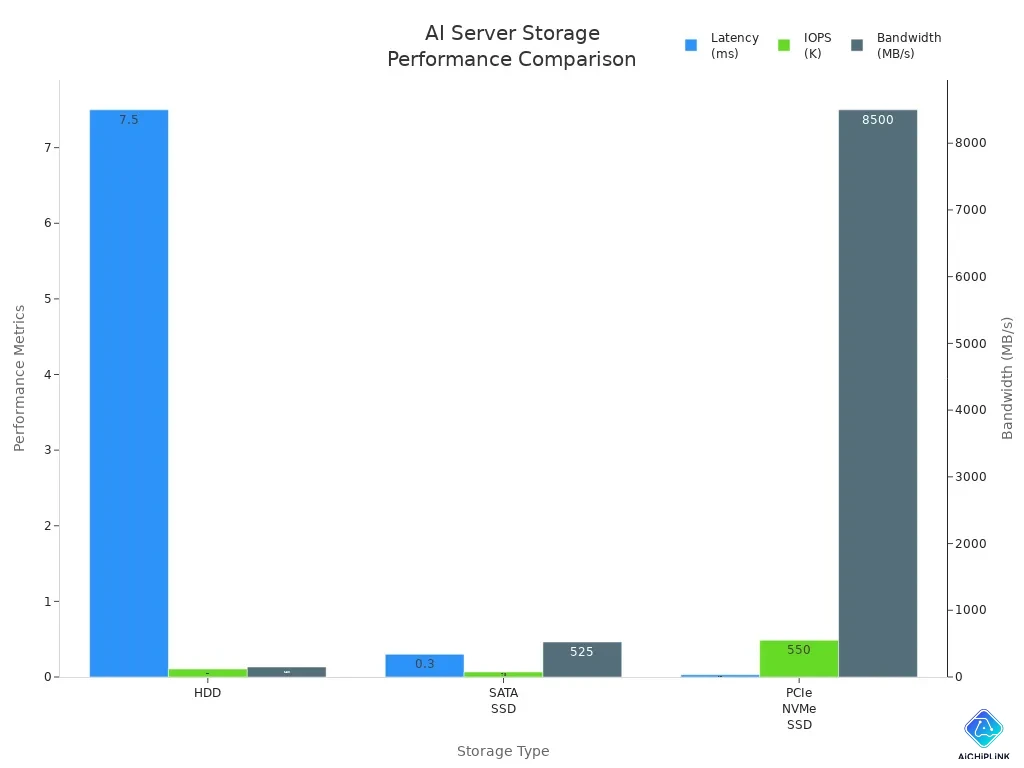
Ai jobs need fast storage. Ai servers use nvme and ssd drives to keep big datasets and ai models. Nvme connects right to the cpu using pcie lanes. This stops slowdowns and gives high speed and low wait times. You can load data fast for training and inference. The dgx a100 uses nvme storage for speed and trust.
| Storage Type | Latency | IOPS (Approx.) | Bandwidth (Approx.) |
|---|---|---|---|
| HDD | ~5-10ms | ~80-160 IOPS | ~100-200 MB/s |
| SATA SSD | ~0.1-0.5ms | ~50K-100K IOPS | ~500-550 MB/s |
| PCIe NVMe SSD | ~0.01-0.05ms | ~100K-1000K IOPS | ~3000-14000 MB/s |
-
High bandwidth makes loading big datasets and models faster.
-
High iops means you can read and write many files at once.
-
Low latency means the server answers fast for real-time jobs.
-
Nvme storage connects right to the cpu, so there are no slowdowns.
-
Software storage lets you change things to make it faster and lower wait times.
-
Optical storage uses light to move data, making it faster for big ai jobs.
Networking and Interconnects
Ai jobs need fast networking and interconnects. Ai servers use things like infiniband and nvlink for quick talks between gpus and servers. These give high speed and low wait times. The dgx a100 uses nvlink to link gpus. This is faster than pcie. You can keep model states the same across thousands of gpus in ai data centers.
-
Infiniband lets servers talk fast with hardware help.
-
Nvlink gives fast links between gpus.
-
Scale-up networks join many accelerators in one rack.
-
Back-end networks link xpUs in different racks for big jobs.
-
Front-end networks connect the cluster to users and data.
-
Slow networks can make processing units wait and waste time.
-
Slow talks between nodes can take up 30-50% of training time.
-
Just 100 microseconds more wait can make training 15% slower.
-
Spectrum-XGS ethernet gives up to 1.9 times more speed than normal ethernet.
-
Smart algorithms cut down wait times for ai jobs in data centers.
-
Better speed means jobs finish faster for big ai jobs.
Mellanox makes special networking for ai training, like infiniband with sharp and rdma for direct gpu talks. These make wait times shorter and training faster.
-
Ai servers need super fast links to move lots of data with little wait.
-
Ai data centers treat servers as one big team, not single machines.
-
Keeping model states the same on thousands of gpus needs special networking.
-
Ai cloud data centers can have hundreds of thousands or millions of links.
-
These links move data at about 100 billion bits per second.
-
The setup lets data move fast, which is needed for ai jobs.
Cost and Specialized Design
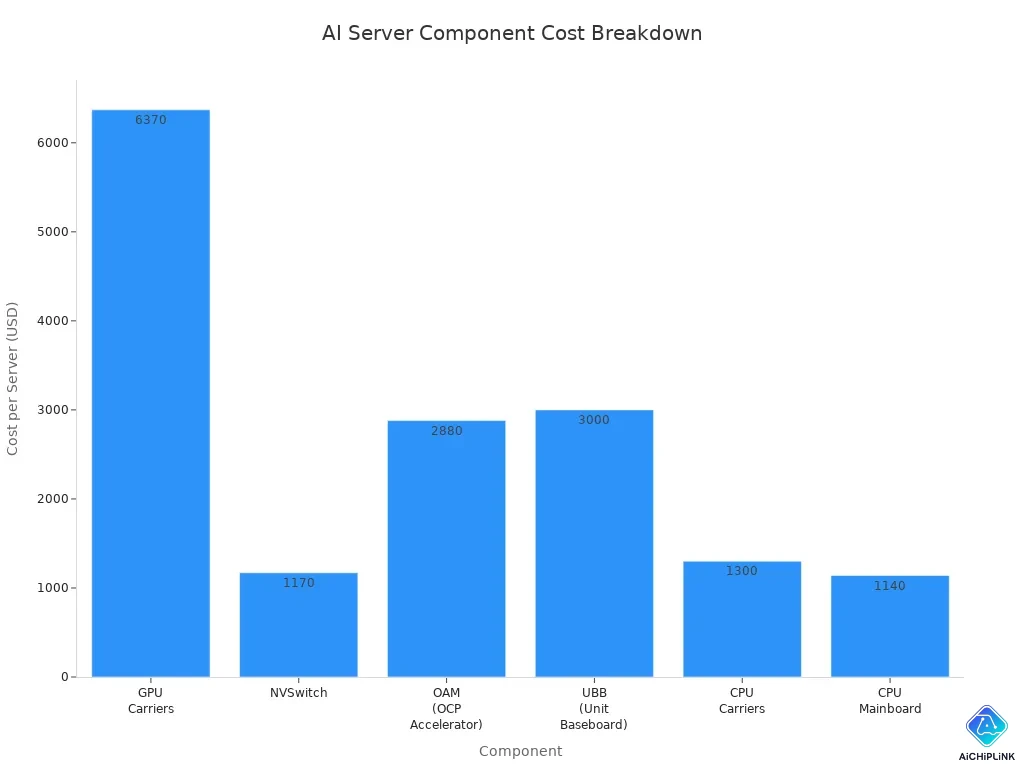
Ai server parts cost a lot and are made in special ways. The gpu board in a dgx a100 can cost over $12,000. The cpu mainboard and other parts add more cost. Ai servers use special materials and hard designs to handle big jobs and fast links.
| Component | Cost per Server | Contribution to Total Cost |
|---|---|---|
| GPU Carriers | $6,370 | 52% |
| NVSwitch | $1,170 | N/A |
| OAM (OCP Accelerator) | $2,880 | N/A |
| UBB (Unit Baseboard) | $3,000 | N/A |
| Total (GPU Board) | $12,250 | 100% |
| CPU Carriers | $1,300 | N/A |
| CPU Mainboard | $1,140 | N/A |
| Functional Accessory Boards | N/A | N/A |
| Dimension | General-Purpose Server | AI Server |
|---|---|---|
| Primary Processor | CPU (multi-core) | GPU / AI Accelerator |
| Memory Architecture | DDR5 DIMM (~100–800 GB/s) | HBM3e (~8 TB/s per GPU) |
| Internal Bandwidth | PCIe Gen4/5 (64–128 GB/s) | NVLink 4.0/5.0 (900–1,800 GB/s) |
| Power per Node | 300–600 W | 3,000–10,000+ W |
| Cooling Requirement | Air cooling | Air or direct liquid cooling |
| PCB Layer Count | 8–12 layers | 16–32+ layers |
| PCB Material | Standard FR4 | Low-loss laminates |
| Design Complexity | Moderate | Extremely high |
You pay more for ai server parts because they give the speed ai jobs need. The special design helps move data fast, train hard, and work well.
Power and Cooling in AI Servers
Power Delivery Systems
AI servers need strong power systems to work well. They use much more power than normal computers. One rack can use up to 80 kW. Some racks even use over 100 kW. This happens because training with gpus needs a lot of energy. Backup power systems help if the main power goes out. UPS units with lithium-ion batteries charge fast and hold lots of power. Generators give extra backup and are set up with extra safety. This keeps things running during long power cuts. Dynamic load systems change power use as needed. This keeps the server steady when ai jobs change quickly.
AI jobs can make power use go up and down fast. Power systems must handle these changes. This stops stress on parts and keeps the server safe.
| AI Rack Type | Power Demand Range | Average Power Demand |
|---|---|---|
| AI-Capable Racks | 30 kW to over 100 kW | More than 60 kW |
| Server Type | Power Consumption Comparison |
|---|---|
| AI Servers | 3 to 10 times more power per rack |
| AI Servers | 300% to 666% more power |
Advanced Cooling Solutions
AI servers get very hot because they work hard. You need special cooling to keep them safe. Coolant Distribution Units use pumps and heat exchangers for liquid cooling. Direct-to-chip cooling puts cold plates on the gpu die. This cools better than air. Rear door heat exchangers go on racks to help control heat. Scalable cooling modules are good for small data centers. They can cool up to 1.6MW. Free cooling uses outside air or water to save energy. Heat recovery systems take extra heat and use it again. This helps save energy.
| Cooling Solution Type | Description |
|---|---|
| Coolant Distribution Units (CDUs) | Pumps and heat exchangers for liquid cooling at rack base. |
| Direct-to-Chip Cooling | Cold plates touch gpu die, outperforming air cooling by 82%. |
| Rear Door Heat Exchangers | Liquid-cooled units on racks to manage heat. |
| Scalable Cooling Modules | Compact solutions for smaller centers, up to 1.6MW cooling. |
| Free Cooling | Uses outside air or water for efficiency. |
| Heat Recovery Systems | Captures and repurposes excess heat. |
AI servers need more energy for cooling. As power use goes up, cooling can use a big part of the total power. New cooling ways work better than old air cooling.
You face problems like higher voltages and steady power use. Circuit size matters too. AI chips use 700W to 1200W each. This is much more than regular CPUs. Cooling must remove heat from GPUs, CPUs, and memory when they work hard. Strong builds and special airflow keep servers safe in crowded racks.
AI Data Center Design Considerations
Scalability for AI Workloads
When you make an ai data center, you have to think about the future. You need to be ready to add more servers and handle bigger ai jobs later. Many centers use modular hardware and software-defined networks. This makes it easy to add more compute and storage without changing everything. Hyperscale systems use special hardware and can change resources quickly. These things help you work with more data and bigger models as you grow.
Here is a table that lists important things for scaling ai data centers:
| Feature | Description |
|---|---|
| Power and cooling infrastructure | High power delivery and special cooling for GPU clusters. |
| Storage challenges | Fast storage for large datasets and many read requests. |
| Networking architecture | High-bandwidth networks to reduce delays in distributed training. |
| Object storage | Scalable and cost-effective storage for big data. |
| Scalable architecture | Easy to add more compute and storage as the center grows. |
You also need to think about space, power, and cooling. Good planning helps you set up immersion tanks and cooling fluid paths. Safety clearances and easy access to power keep the center safe and working well.
Intelligent Architecture
An ai data center needs a smart design to work well. You want fast connections and smooth running. Centers use high-capacity, lossless networks with non-blocking Clos fabrics. These networks let any server talk to another server fast. High-performance switches and routers connect all the parts.
Automation is very important in new centers. Automated tools control the network, watch resources, and change settings right away. This keeps the center working well, even when ai jobs change. Sensors and monitors check temperatures and how things are running. These tools help you find problems early and keep the center reliable.
Tip: Using automated scaling and good monitoring helps you stop outages and keep your ai data center working well.
Here is a table with key things to think about when designing ai data centers:
| Design Consideration | Description |
|---|---|
| Dimensional Considerations | Plan hardware size and quantity for immersion tanks. |
| Tank Placement | Choose spots with enough space and easy maintenance access. |
| Cooling Fluid Circulation Paths | Optimize for even cooling across all components. |
| Safety Clearances | Meet rules for emergency access and safety. |
| Electricity Infrastructure | Place power sources safely and within reach. |
| Sensors and Monitoring Systems | Use continuous monitoring for best performance. |
| Expansion and Scalability | Design for future growth and more ai workloads. |
You can see that every part of the ai data center works together. This helps you train models faster and keep the center running its best.
You can see that ai servers use special hard drives and pcie links. They have advanced designs made for ai jobs. Dedicated ai servers help with big ai training and fast inference. They also handle complex ai tasks. These servers use more power than regular servers. The table below shows the difference:
| Server Type | Average Power Consumption | Percentage Comparison |
|---|---|---|
| AI Server | ~2 kW | 300% to 666% more |
| Normal Server | 300-500 W | Baseline |
If you know how ai servers are set up, you can pick the best system for ai jobs. You can make ai training better and speed up inference. This knowledge helps you manage pcie, hard drives, and ai models for any job. You fix problems in ai server design. You support ai tasks and keep your models and inference jobs working well.
-
You make smarter choices for ai servers and infrastructure.
-
You make sure your ai jobs and applications run fast.
-
You manage data, pcie, and hard drives for every model and system.

Written by Jack Elliott from AIChipLink.
AIChipLink, one of the fastest-growing global independent electronic components distributors in the world, offers millions of products from thousands of manufacturers, and many of our in-stock parts is available to ship same day.
We mainly source and distribute integrated circuit (IC) products of brands such as Broadcom, Microchip, Texas Instruments, Infineon, NXP, Analog Devices, Qualcomm, Intel, etc., which are widely used in communication & network, telecom, industrial control, new energy and automotive electronics.
Empowered by AI, Linked to the Future. Get started on AIChipLink and submit your RFQ online today!
Frequently Asked Questions
What makes an AI server different from a regular server?
You find AI servers with powerful GPUs, high-bandwidth memory, and advanced cooling. These parts help you train and run AI models faster than regular servers.
How much power does an AI server use?
You see AI servers use much more power than normal computers. One rack can need up to 100 kW. You must plan for strong power systems.
Why do AI servers need special cooling?
AI servers get very hot when they work hard. You use liquid cooling or advanced airflow to keep them safe and running well.
Can you upgrade an AI server easily?
You can upgrade some parts, like memory or storage. Upgrading GPUs or cooling systems is harder. You need to check the server design first.
What storage types work best for AI workloads?
You use NVMe SSDs for fast data access. These drives help you load big datasets quickly. Slow storage can make your AI jobs take longer.