Micron vs Samsung Memory Comparison
If you want good memory for daily use, Samsung often provides strong speed, new tech, and fair prices. In the comparison of Micron vs Samsung, it's clear that both brands offer dependable memory, but changes in the industry make choosing between Micron and Samsung increasingly important. Micron is now focusing more on business and AI markets, which may lead to higher prices or fewer choices for regular memory. This makes selecting the right brand, whether it's Micron or Samsung, crucial for steady use and lasting value.
Key Takeaways
-
Samsung memory is a good pick for most people because it is fast, comes in many types, and does not cost too much.
-
Micron makes memory for businesses and AI. It uses less energy and works well for servers and special jobs.
-
Both brands work well, but Samsung usually costs less and gives more choices for regular buyers.
-
Think about what you need before you buy memory: Samsung is great for games and normal use, but Micron saves power and lasts longer for work.
-
Both Micron and Samsung memory can be trusted. They have good warranties, so they are safe to use in many devices.
Micron vs Samsung: Quick Verdict
Which Is Better for Most Users?
When you compare Micron and Samsung, you want to pick what fits you. Most people will find Samsung is the better pick. Samsung gives you fast memory and works with many devices. The price and features are balanced well. Samsung sells more memory, so you see it in lots of gadgets. This means you get more choices and better help if you need it.
Micron is different. They focus on business and AI. If you want memory that saves power and lasts long, Micron is good. Their memory uses less energy and can last longer. But you might not find as many choices for normal use. For most people who want speed and value, Samsung is the top pick.
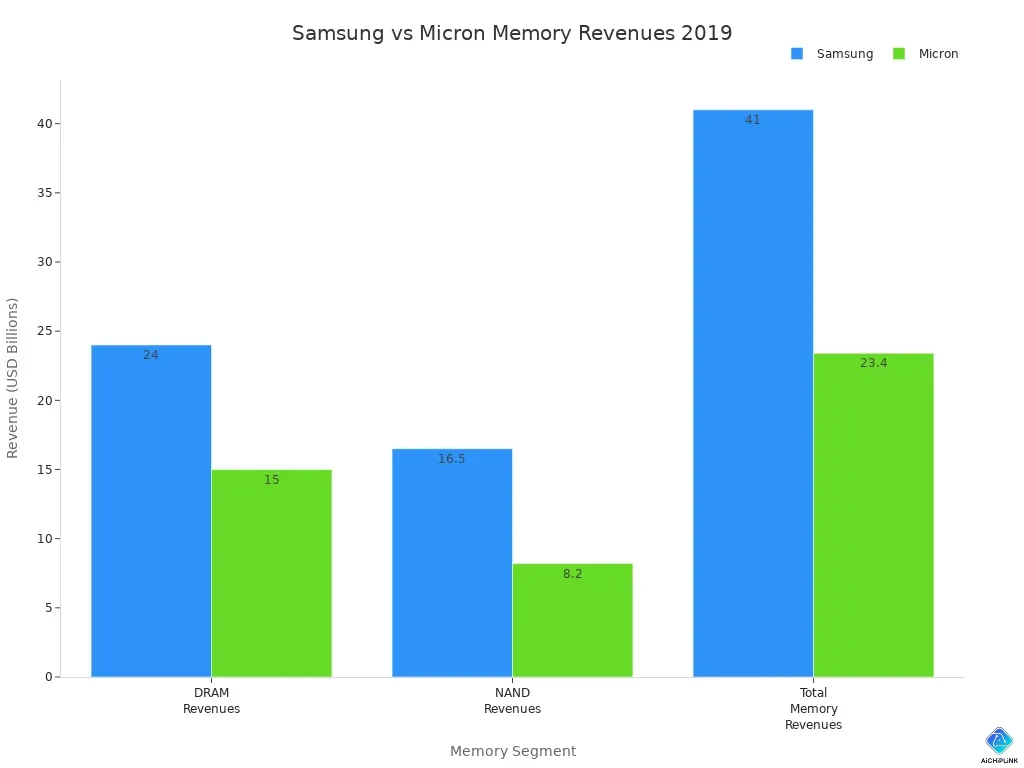
You can see how Samsung is ahead in market share in the chart below:
Key Differences
It helps to know the main ways these brands are not the same. Here is a table to show some key things to compare:
| Feature | Micron | Samsung |
|---|---|---|
| DDR5 Die Size | 66.26 mm² | 73.58 mm² |
| DRAM Cell Size | Same as DDR4 | Decreased by 8.7% |
| DR | Same as DDR4 | Decreased by 5% |
-
Micron keeps the cell size the same as DDR4, but Samsung makes it smaller by 8.7%.
-
Samsung also lowers DR by 5%, which helps with speed and saving energy.
-
Micron uses the 1Z process early, so their memory uses less power and costs less.
-
Samsung is slower with new tech, but they still have many products for everyone.
Note: Micron works on saving power and controlling energy. Samsung gives you more options and better prices for most people.
When you look at Micron and Samsung, Samsung has more products and sells more. Micron is best for saving energy and being reliable, mostly for business and AI. If you want good value and easy upgrades, Samsung is a safe choice. If you need the best reliability or work in special jobs, Micron could be better. The best brand for you depends on what you care about most.
Micron and Samsung Overview
Micron Company Profile
Micron is a leader in memory technology. The company started in Boise, Idaho in 1978. Micron grew fast and became public in the 1980s. In the 1990s and 2000s, Micron made more DRAM and flash memory. They became a top U.S. chip maker. In 2010, Micron bought Numonyx to get better at flash memory. In 2013, Micron bought Elpida Memory to make more DRAM. In 2016, Micron got Inotera Memories in Taiwan to help with DRAM. In 2019, Micron took full control of IM Flash Technologies from Intel. In 2021, Micron sold the Lehi fab to Texas Instruments and stopped making 3D XPoint. By 2023 and 2024, Micron started to grow again because of AI. They also shared plans to expand.
Micron is one of the top three memory makers in the world. Their data center business grew three times bigger in fiscal Q2 2025. Over half of Micron’s money in fiscal Q1 2025 came from data centers. Micron wants to get 20-25% of the High Bandwidth Memory market by the end of 2025. Micron focuses on business and AI, so their products fit those needs. You can find Micron memory in servers, AI systems, and business solutions. Micron’s story shows steady growth and new ideas.
Samsung Company Profile
Samsung is a big name in memory technology. They have reached many important goals. The table below shows some of Samsung’s big achievements:
| Year | Milestone |
|---|---|
| 2002 | Became #1 in NAND flash memory and #2 in semiconductors worldwide |
| 2003 | Became #1 globally in flash memory |
| 2005 | Developed world's first 50 nanometers 16Gb NAND flash memory |
| 2015 | Began mass production of the industry’s first 256Gb V-NAND flash memory |
| 2016 | Started industry’s first mass production of system-on-chip with 10-nanometer FinFET technology |
| 2021 | Began mass production of the most advanced 14nm EUV DDR5 DRAM |
| 2022 | Developed industry’s first 12nm-class DDR5 DRAM |
| 2023 | Began mass production of industry’s most advanced 12nm-class DRAM |
| 2024 | Announced industry’s first 24GB GDDR7 DRAM for next-generation AI computing |
Samsung sells memory for phones, laptops, servers, and AI devices. They lead in new ideas and set standards for others. Samsung gives you lots of choices and good quality. Their history shows they always try to make memory better. You can trust Samsung for fast and reliable memory.
Memory Lineup Comparison
DRAM and DDR5 Memory
You see many types of memory in the market. Micron and Samsung both make dram for computers, servers, and gaming devices. Micron uses the M-D1z process for DDR5 memory. Samsung uses the D1y process. The die size for Micron DDR5 is 66.26 mm². Samsung DDR5 has a die size of 73.58 mm². You can find Micron memory in products like TeamGroup ELITE DDR5. Samsung memory appears in G.SKILL Trident Z5. The table below shows some main features:
| Feature | Micron DDR5 | Samsung DDR5 |
|---|---|---|
| Process Technology | M-D1z | D1y |
| Die Size (mm²) | 66.26 | 73.58 |
| Example Product | TeamGroup ELITE DDR5 | G.SKILL Trident Z5 |
Micron and Samsung both offer dram with high speed and low power use. You get fast memory for gaming and work. Samsung leads in HBM4 memory. Nvidia uses Samsung HBM4 for AI chips. Micron also competes in HBM memory for business and AI. You can trust both brands for reliable dram.
NAND and SSDs
You need storage for your files and apps. Micron and Samsung both make nand and SSDs. Samsung is famous for its 980 PRO SSD and 990 PRO SSD. Micron offers Crucial P5 Plus SSD and Micron 7450 SSD. You get fast read and write speeds with these memory products. Samsung gives you more choices for consumer and enterprise memory. Micron focuses on business and AI storage. Both brands use advanced nand technology for better performance.
Tip: If you want memory for gaming or daily use, Samsung gives you more options. If you need memory for servers or AI, Micron is a strong choice.
You can find memory from both brands in laptops, desktops, and data centers. You get reliable dram and nand for every need.
DDR5 Technology
Cell Size and Innovations
There are big changes in ddr5 when you look at Micron and Samsung. Micron uses a smaller cell size for ddr5 memory. Samsung’s cell size is bigger. This makes ddr5 memory work differently in your devices. Micron uses a special process called M–D1z. This gives higher bit density and better power savings. Samsung uses the D1y process, which is not as new. With Micron’s ddr5, more data fits in the same space. This means you get better performance. Samsung’s ddr5 has normal efficiency and bigger active pitches.
Here is a table to show the differences:
| Feature | Micron | Samsung |
|---|---|---|
| DDR5 Die Size | Smaller | Larger |
| Bit Density | Higher due to advanced tech | Lower |
| Process Technology | M–D1z (more advanced) | D1y (less advanced) |
| Active/WL/BL Pitches | Smaller | Larger |
| Power Efficiency Potential | Improved | Standard |
Micron’s ddr5 uses smaller pitches and new technology. You get better power savings and more data in less space. Samsung’s ddr5 is made for being reliable and working with many devices. Both brands help ddr5 memory get better with new ideas.
Proprietary Features
Micron and Samsung both have special features in their ddr5 memory. Micron’s ddr5 gives you over twice the bandwidth. It has on-die ECC that lowers errors by up to 28%. Micron also has its own thermal management solutions. Decision Feedback Equalization and better refresh schemes keep Micron’s ddr5 stable and fast.
Samsung’s ddr5 has longer burst lengths of 16. This makes getting data faster. On-die ECC lowers errors by up to 20%. Samsung’s ddr5 focuses on burst length and working with many devices.
Here is a table with some features:
| Feature | Micron DDR5 | Samsung DDR5 |
|---|---|---|
| Effective Bandwidth | More than 2X the effective bandwidth | Improved burst lengths of 16 (BL16) |
| On-die ECC | Reduces system-level errors by up to 28% | Reduces system-level errors by up to 20% |
| Thermal Management Solutions | Proprietary solutions for higher sustained performance | N/A |
| Decision Feedback Equalization | Yes | N/A |
| Improved Refresh Schemes | Yes | N/A |
You see new things in ddr5 memory. Micron’s LPDDR5X saves over 10% more power. Universal Flash Storage 4.0 helps with advanced AI. Samsung’s G9 NAND makes mobile storage better. Micron’s AI storage is used in the Samsung Galaxy S25 series. You can find ddr5 memory for gaming, AI, and more.
Tip: If you want ddr5 with high bandwidth and power savings, Micron is a strong pick. If you need ddr5 with fast burst lengths and lots of compatibility, Samsung is a good choice.
Performance
Speed and Latency
You want memory that works fast and does not lag. Both Micron and Samsung DDR5 can reach speeds of 4.8 GB/s. Newer models may go up to 8.4 GB/s. This means you get good speed for games, work, or watching videos. Micron keeps the cell size from DDR4. Samsung makes its cell size smaller by 8.7%. Micron uses better cell density, which helps with speed and saving power. Samsung matches Micron in top speed, so both brands work about the same for most things.
Here is a table that shows the main features for your analysis:
| Feature | Micron DDR5 | Samsung DDR5 |
|---|---|---|
| Die Size | 66.26 mm² | 73.58 mm² |
| Cell Size | Retained from DDR4 | Decreased by 8.7% |
| DRAM Cell Density | More advanced | Less advanced |
| Maximum Speed | Up to 4.8 GB/s | Up to 4.8 GB/s |
| Future Bandwidth | Up to 8.4 GB/s | Up to 8.4 GB/s |
Both brands give you strong performance. Sometimes, Micron has lower CAS latency. This can make your computer answer faster. Samsung gives you good speed for less money, so you do not pay too much.
Overclocking and Stability
You might want to make your memory even faster. Most people find that Micron and Samsung are not great for overclocking. Here are some points for your analysis:
-
Samsung RAM is not made for gaming. It does not have XMP profiles or heat spreaders.
-
Micron memory is good for simple desktops or servers. It is not made for gamers who want top speed.
-
Both brands are not the best for overclocking. They do not have enough cooling.
You get steady and safe performance for daily use. If you want to overclock, you should look at other brands with special gaming features. Micron and Samsung focus on being reliable and working well for a long time. You can trust their memory, but do not expect high overclocking.
Tip: Pick Micron or Samsung if you want memory that is stable and dependable. If you want to build a gaming computer or need more speed, choose memory with better cooling and overclocking support.
Reliability
Error Rates and Durability
You want memory that works well every day. Micron and Samsung make memory that lasts a long time. You can trust both brands to keep your data safe. Micron uses on-die ECC in DDR5 memory. This helps fix small mistakes before they get worse. Samsung also uses on-die ECC. This lowers the chance of losing your data. You will have fewer crashes and less risk of broken files.
Micron memory is used in servers and business computers. These need to be very tough. Samsung memory is found in laptops, desktops, and phones. You see Samsung chips in many devices because they pass hard tests. Both brands test their memory for thousands of hours. They check how it works in heat, cold, and heavy use. You can expect Micron and Samsung memory to last for years.
Here is a quick look at how both brands handle errors and durability:
| Feature | Micron | Samsung |
|---|---|---|
| On-die ECC | Yes | Yes |
| Target Devices | Servers, AI, Business | Laptops, Phones, PCs |
| Durability Testing | Extensive | Extensive |
| Average Lifespan | 5+ years | 5+ years |
Tip: If you need memory for important work or long use, both Micron and Samsung are very reliable.
Quality Control
You might wonder how these companies keep their memory so good. Micron and Samsung use advanced factories with strict rules. They check every step when making memory. High Bandwidth Memory is harder to make than normal memory. Sometimes, there are problems in the chip layers. This means not all chips turn out perfect.
Micron gets fewer good chips, so their prices are higher. Samsung sometimes gets even fewer good chips. This means there are not as many chips to sell. It can make memory cost more for everyone. Both companies try to make their factories better and fix problems. They use special machines to find tiny mistakes early. This helps you get memory that passes tough tests.
Note: New memory types are harder to make, but Micron and Samsung spend money on better tools and testing. This helps you get memory that works well and lasts longer.
Value
Price Comparison
You want to know which brand gives you more for your money. Samsung and Micron both sell memory at different prices. Samsung usually has lower prices for memory. You see Samsung memory in lots of devices. This helps Samsung keep costs low. Micron sells more to business and AI users. This can make Micron cost more for regular people.
Here is a table to help you compare prices:
| Brand | Typical Price (Consumer DDR5) | Typical Price (Enterprise SSD) |
|---|---|---|
| Samsung | $60-$120 | $200-$400 |
| Micron | $70-$140 | $220-$450 |
You can see Samsung is cheaper for most people. Micron sometimes costs more, but it saves more power. Samsung makes more money because they sell more memory at lower prices. Micron makes good money from selling to business and AI.
Tip: If you want cheap memory for your laptop or desktop, Samsung is a good pick. If you need memory for servers or AI, Micron has strong choices.
Long-Term Value
You should think about how memory works over time. Samsung memory works well and is easy to upgrade. You find Samsung memory in many devices, so you get good help. Micron memory lasts longer in hard places. You see Micron memory in servers and data centers.
Both brands test their memory to make sure it lasts. Most products work for at least five years. Samsung sells a lot, so you get more updates and support. Micron sells more to business and AI, so they grow in those areas.
-
Samsung gives you value with low prices and works with many devices.
-
Micron gives you value with strong power savings and reliability.
Note: Pick Samsung for daily use and upgrades. Choose Micron if you need memory for business or AI.
Usage & Compatibility
Device Compatibility
You want memory that works in your device with no trouble. Samsung memory fits in many laptops, desktops, phones, and tablets. You can find Samsung chips in brands like Dell, HP, Lenovo, and Apple. Micron memory also works in lots of computers and servers. You see Micron in business laptops, gaming PCs, and big servers.
Here is a table to show where each brand works best:
| Device Type | Samsung Memory | Micron Memory |
|---|---|---|
| Laptops | ✅ | ✅ |
| Desktops | ✅ | ✅ |
| Smartphones | ✅ | ❌ |
| Servers | ✅ | ✅ |
| Gaming Consoles | ✅ | ✅ |
| AI Systems | ✅ | ✅ |
Tip: If you use a phone or tablet, Samsung is a better pick. If you build a server or workstation, Micron is very reliable.
User Experiences
You may want to know what people think about Micron and Samsung memory. Many users say Samsung memory is fast and does not crash much. It is easy to upgrade and works well for games and daily use. Micron memory gets good reviews for lasting a long time in hard jobs. People trust Micron in servers and business computers.
Here are some things users often say:
-
Samsung memory is quick and simple to put in.
-
Micron memory keeps working even with heavy use.
-
Samsung has more support and updates.
-
Micron is great for business and AI.
Note: Both brands work well. Samsung fits more devices and is easy to upgrade. Micron is best for business and AI.
You can pick Samsung for daily use and lots of device choices. You can choose Micron for tough jobs and memory that lasts. 😊
Which to Choose?
Best for Performance
If you want fast memory for games or work, Samsung is a great choice. Samsung memory works in many laptops, desktops, and phones. It gives you DDR5 and HBM4 memory with high speed and big capacity. You can pick from many Samsung options and upgrade easily. Micron also has strong memory, mostly for business and AI. You see Micron in servers and work computers where speed is important. Most people will get better performance from Samsung.
Tip: Pick Samsung for fast memory in games or daily use. Choose Micron if you need speed for business or AI.
Best for Reliability
You need memory that works well every day. Both Micron and Samsung are known for being reliable, but they have different strengths.
-
Micron makes DRAM for businesses with good error correction. You find Micron in data centers and other important places.
-
Samsung gives long-term deals and keeps making DRAM better. Samsung memory is used in servers and big computer systems.
-
Micron sells DDR5, HBM3E, and GDDR6 memory for steady supply and strong reliability.
-
Samsung leads with 14nm DRAM and special server memory.
If you run a business or keep important data, Micron is a top pick for reliability. Samsung also gives you memory you can trust for servers and big systems.
Best for Value
You want good memory that does not cost too much. Samsung sells memory at lower prices for most people. You see Samsung in many devices, so upgrading is easy and cheap. Micron used to sell cheaper memory with its Crucial brand. Now, Micron is focusing on business and not selling as much to regular buyers. This means Micron is not the best for saving money. Samsung is still the best pick if you want affordable RAM or SSDs.
Note: Pick Samsung for low prices and easy upgrades. Choose Micron if you need memory for business or high-end computers.
You have many choices when picking memory. Samsung stands out for most users. Here are some key points:
-
Samsung's memory sales reached about $41 billion in 2019, almost double Micron's $23 billion.
-
Both brands earn most of their money from DRAM, but Samsung keeps higher profits.
-
Samsung offers more products and better support.
Micron now focuses on AI and business memory. You may find fewer Micron options for gaming or home use. Think about your needs before you choose. Share your thoughts or questions below! 😊

Written by Jack Elliott from AIChipLink.
AIChipLink, one of the fastest-growing global independent electronic components distributors in the world, offers millions of products from thousands of manufacturers, and many of our in-stock parts is available to ship same day.
We mainly source and distribute integrated circuit (IC) products of brands such as Broadcom, Microchip, Texas Instruments, Infineon, NXP, Analog Devices, Qualcomm, Intel, etc., which are widely used in communication & network, telecom, industrial control, new energy and automotive electronics.
Empowered by AI, Linked to the Future. Get started on AIChipLink and submit your RFQ online today!
Frequently Asked Questions
What is the main difference between Micron and Samsung memory?
You will see that Samsung offers more choices for everyday devices. Micron focuses on business and AI. Samsung memory often costs less. Micron memory saves more power and works well in servers.
Can you use Micron and Samsung RAM together?
You can use both brands together if they match in type, speed, and voltage. Always check your motherboard’s manual. Mixing brands may lower performance, but most systems work fine.
Which brand is better for gaming?
Samsung memory works well for gaming. You get good speed and easy upgrades. Micron memory is reliable but focuses more on business and AI. For most gamers, Samsung is the better pick.
Do both brands offer good warranties?
Yes, you get strong warranties from both Micron and Samsung. Most products come with at least a three-year warranty. Always check the details before you buy.
How do you know if your device uses Micron or Samsung memory?
You can check your device’s specs online or use free software like CPU-Z. Look for the memory manufacturer in the details. Many laptops and desktops list the brand in their system info.