What is RAID (Redundant Array of Independent Disks)?
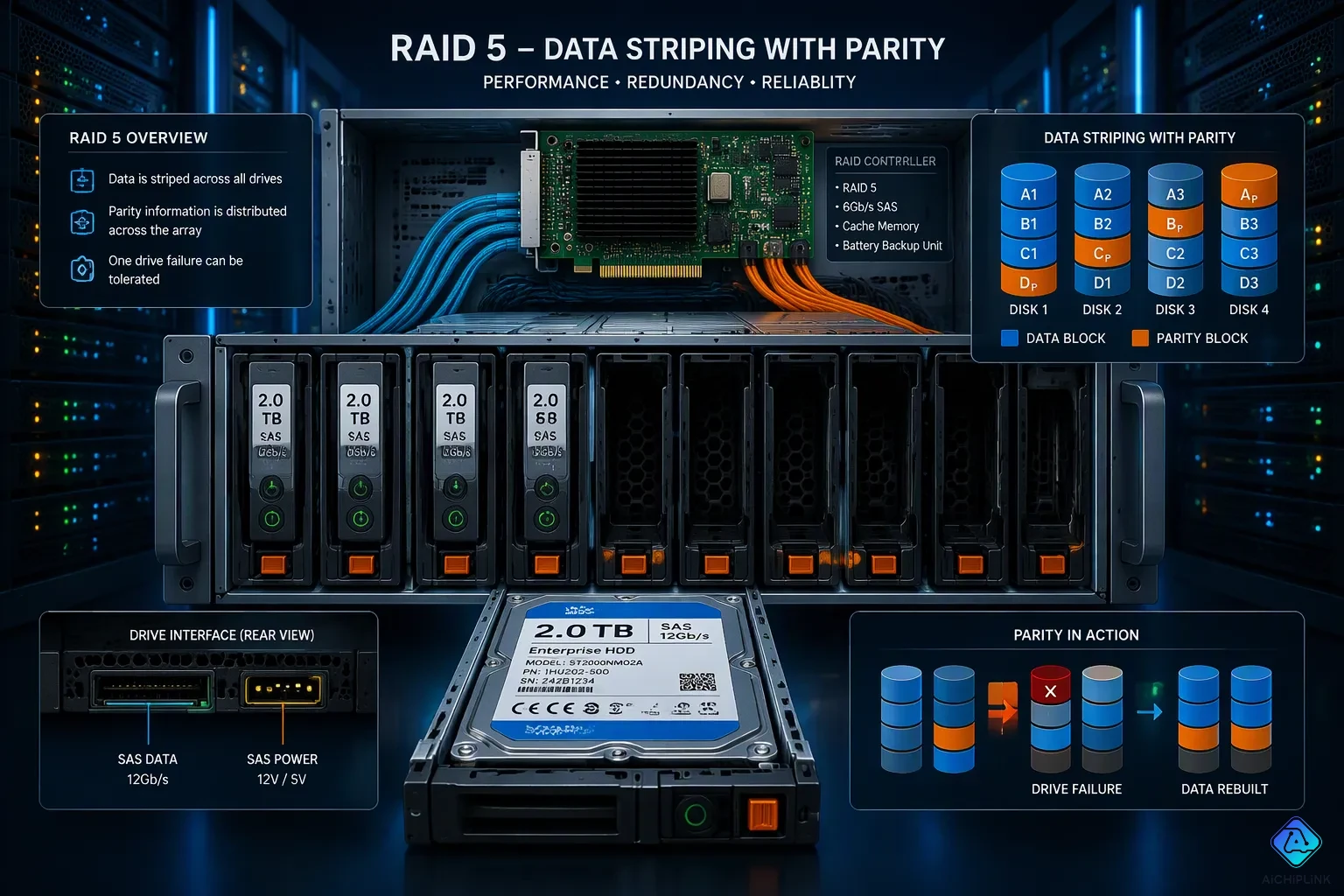
What is RAID? RAID is a data storage technology that joins multiple physical disk drives into one logical unit. What does RAID stand for? RAID stands for Redundant Array of Independent Disks. This technology also goes by Redundant Array of Inexpensive Disks. RAID storage handles two main goals: improving performance and providing redundancy (fault tolerance). Understanding RAID means learning about different redundant arrays of independent disks levels, such as RAID 0, RAID 1, and RAID 5. Each level uses methods like striping, mirroring, or parity. You can set up RAID through hardware or software controllers. The trade-offs between speed, cost, and data protection guide which RAID configuration you choose.
Key Takeaways
-
RAID groups several hard drives together to make them work faster and keep your data safe.
-
Different RAID levels give you different trade-offs: RAID 0 is fast but risky, RAID 1 copies your data, RAID 5 balances speed and safety, RAID 6 survives two drive failures, and RAID 10 gives top performance with redundancy.
-
RAID protects against drive failure, but it does not protect against data loss from deletion, malware, or disasters. Always keep a separate backup.
-
Pick a RAID level that fits what you need: speed, cost, or protection from disk failure. For example, RAID 5 works well for file servers, while RAID 10 is great for important applications.
-
RAID also works with SSDs, but parity writes can make an SSD wear out faster. Software controllers that support TRIM help keep the speed up.
What Is RAID and How Does It Work?
RAID is a data storage technology that combines multiple physical drives into one logical unit. The operating system sees this unit as a single disk. Data is distributed across the drives rather than stored on a single drive. This distribution is the foundation of how does RAID work. The primary goals are data redundancy, fault tolerance, and performance. A RAID array can use hard disk drives or solid-state drives.
Striping, Mirroring, and Parity
Striping, mirroring, and parity are the core mechanisms behind RAID. Block-level striping splits data into blocks and writes them across multiple hard drives. Block-level striping improves speed because several drives read and write at the same time. Block-level striping alone offers no protection against disk failure. Block-level striping appears in RAID 0. Block-level striping spreads the workload evenly. Block-level striping can boost throughput on large files. Block-level striping does not copy data. Block-level striping is the simplest method. Block-level striping pairs well with other techniques. Block-level striping forms the base of many RAID levels.
Disk mirroring writes the same data to two or more drives. If one drive fails, the other drive holds a complete copy. Mirroring plus striping combines both methods for speed and safety. Parity stores calculated values that can rebuild lost data. A RAID system uses parity to recover from a single drive failure. RAID 5 is designed to withstand the failure of just one drive at a time.
-
If two or more drives fail simultaneously, the entire RAID 5 array becomes inaccessible and data loss occurs.
-
RAID 5 cannot survive multiple disk failures; RAID 6 is required to tolerate two simultaneous disk failures.
-
Recovery of a RAID 5 array with two failed drives is generally unfeasible unless the data from the failed drives can be retrieved.
Parity carries a cost. RAID 5 suffers a 75% degradation of overall write performance because it takes four operations per write. Worst-case write IOPs are 375, which is 25% of pure drive performance. This confirms the 75% penalty.
Hardware vs. Software RAID Controllers
A RAID array needs a controller to manage the drives. Hardware controllers are dedicated cards with their own processor and memory. They handle parity calculations without burdening the main processor. Software controllers run as part of the operating system. They cost less but consume system resources. Both types work with HDDs and SSDs. The choice affects speed, cost, and complexity. A RAID storage setup with a hardware controller often delivers better performance under heavy loads. A software RAID system suits budget builds and home users. The controller choice shapes the overall experience.
Common RAID Levels in Redundant Arrays of Independent Disks
RAID 0, RAID 1, and RAID 5
RAID 0 uses block-level striping across multiple drives. It breaks data into blocks and writes them to several hard drives at once. This method gives high read and write speeds. But RAID 0 offers no data redundancy. If one drive fails, users lose all their data. RAID 0 works well for temporary files or non-critical applications. The lack of fault tolerance makes it a risky choice for important data.
RAID 1 depends on disk mirroring. It writes the same data to two or more drives at the same time. If one drive fails, the other drive keeps a complete copy. This setup gives excellent data redundancy. Read performance gets better because the system can read from either drive. Write speed matches a single drive. The cost doubles for a given storage capacity. Mirroring + striping combines both methods for better performance in other RAID levels. For a single drive, the failure metric is simply MTBF. For a RAID 1 array, the MTTDL (Mean Time To Data Loss) is given by (MTBF ^ #Disks) when replacement time is ignored. This shows the RAID 1 array achieves much higher reliability. The redundant array of independent disks configuration offers much better protection against disk failure. What is raid without understanding the value of mirroring? RAID 1 remains a top choice for simple, reliable data protection.
RAID 5 uses block-level striping with distributed parity. It writes data and parity across all drives. This setup lets the array survive a single disk failure. RAID 5 needs at least three drives. Parity information helps rebuild lost data. Write performance takes a 75% penalty due to parity calculations. Read performance stays excellent. RAID 5 offers a good balance between storage efficiency and protection. This raid level works well for applications that need both speed and safety. Different raid levels serve different needs, and RAID 5 sits in the middle.
RAID 6 and RAID 10
RAID 6 is like RAID 5 but adds extra protection. It uses double distributed parity. The minimum requirement is four drives. RAID 6 can handle two drive failures at the same time. This makes it attractive when space and cost matter and surviving multiple drive failures is required. RAID 6 uses parity overhead equal to the capacity of two disks. For a six-drive array with 4TB drives, the raw capacity equals 24TB. The usable capacity equals 16TB after subtracting two drives worth of parity. This yields a storage efficiency of 66.67%. Write performance is lower than RAID 5 because of extra parity calculations. Read performance stays good. RAID 6 becomes a strong choice for large arrays where a second failure could happen during rebuild.
RAID 10 combines mirroring with striping. It mirrors pairs of drives first, then stripes across those pairs. This provides both speed and redundancy. RAID 10 needs at least four drives. It can survive multiple failures if they occur in different mirrored pairs. Write performance is good because each write goes to the mirrored pair. Read performance is excellent. The cost is high because only half the raw capacity is usable. RAID 10 offers the best balance of performance and protection for critical applications.
Understanding how does raid work guides users in choosing the right raid level. Raid levels explained simply: RAID 0 for speed, RAID 1 for redundancy, RAID 5 for balance, RAID 6 for extra protection, and RAID 10 for best performance with redundancy. Raid storage decisions depend on speed, cost, and fault tolerance needs. Multiple physical drives combine into one array. Multiple drives offer different configurations. This raid level choice impacts both performance and safety. A raid system should match workload requirements. A raid array provides specific benefits based on the chosen level. Raid levels like these give users flexibility to match storage needs precisely.
Benefits and Drawbacks of RAID
Performance and Redundancy Gains
A RAID array gives you faster read and write speeds than a single drive. Block-level striping spreads data across several drives. This lets multiple drives work at the same time. The result is higher throughput for big files and demanding applications. Disk mirroring adds another layer of speed. A RAID system can read from either drive in a mirrored pair. This makes read performance even better.
Data redundancy is the other major gain. A RAID level with parity or mirroring can survive a disk failure. If one drive stops working, the array keeps running. The system rebuilds lost data from parity or a mirror copy. This protects against single disk failures. For businesses, this uptime matters. A RAID storage setup keeps critical services online during a drive replacement.
Cost, Complexity, and Failure Risks
The downsides start with cost. A RAID array needs more physical drives than a single-disk setup. Mirroring cuts usable capacity in half. Parity-based RAID levels lose one or more drives worth of space. Hardware controllers add another expense. They cost more than software options.
Complexity also rises. Users must configure the array, choose a RAID level, and manage rebuilds. A failed rebuild can leave data exposed. Some RAID levels offer no redundancy at all. RAID 0 stripes data for speed but provides zero protection. One disk failure destroys the entire array.
RAID does not guard against every threat. A controller failure can take down the whole array. User error, malware, or a natural disaster can destroy data on all drives at once. Multiple disk failures can overwhelm parity-based levels. RAID 5 handles only one disk failure at a time. RAID 6 tolerates two simultaneous disk failures. Neither survives a fire or flood. These limits show why data protection and fault tolerance require more than RAID alone.
Practical Considerations for Using RAID
Using redundant arrays of independent disks in real life means matching the raid array to the job it must do. Knowing what a raid storage setup can protect against stops you from making risky guesses.
Choosing the Right RAID Level
Picking the right raid level begins with speed, cost, and fault tolerance. A video editing workstation needs high read and write speeds. Striping gives the fastest performance but has no redundancy. One disk failure wipes out the whole array. Industry analysis suggests RAID 5 or RAID 6 for video editing setups. These different raid levels mix striping with parity for speed and protection. A 4K block size with a 1024KB stripe size works well for video workloads.
A small office file server that puts data safety first gains from RAID 5. This level makes the most of storage capacity while guarding against one drive failure. Multiple drives join together to build the raid system.
Common setup mistakes ruin good choices. Administrators pick mismatched drives with different model revisions or capacities. Wrong controller settings make arrays unstable. Poor raid level selection is one of the most common errors. Rebuild failures happen from incompatible replacement disks or power loss during reconstruction. Physical connection problems like loose cables also cause trouble.
RAID Is Not a Backup
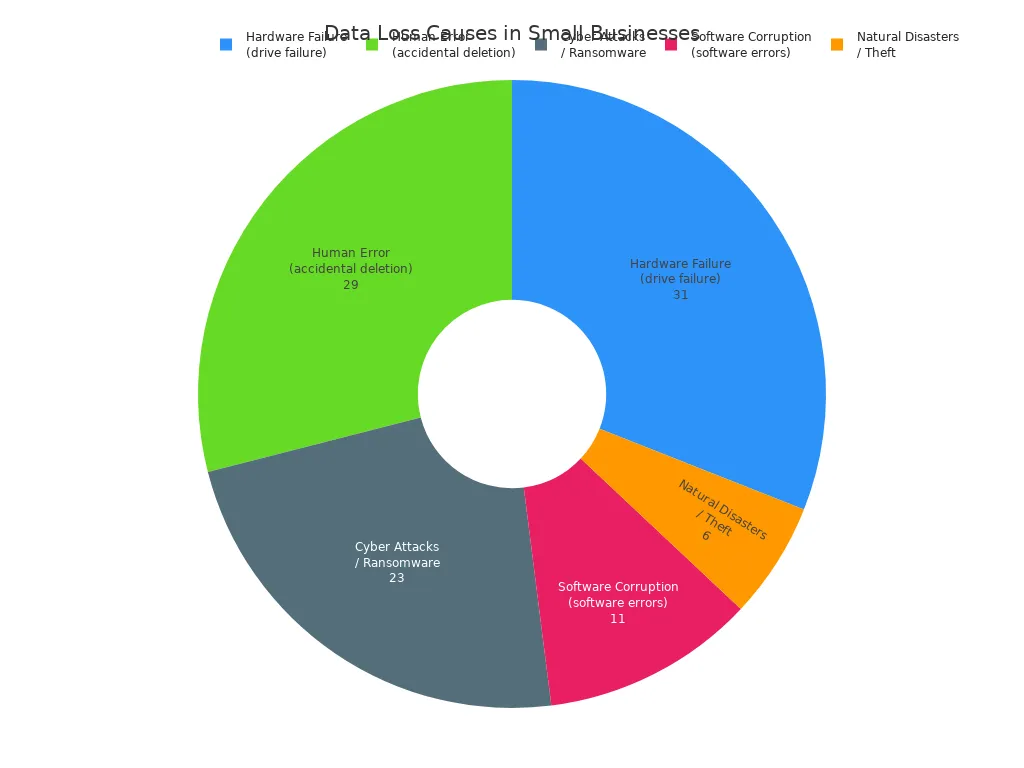
The technology protects only against drive failure. It does not guard against accidental deletion, software corruption, or ransomware. Data loss statistics show the limitation. Hardware failure causes 31% of data loss in small businesses. Human error accounts for 29%. Cyber attacks cause 23%. Software corruption causes 11%. Natural disasters cause 6%. Over two-thirds of data loss comes from causes beyond raid's protection.
Accidental deletion, overwriting important files, misconfigured systems, and improper handling of data account for an estimated 29% of all data loss incidents. Software corruption accounts for approximately 11 per cent of data loss incidents but is frequently underestimated as a risk. Ransomware encrypts your data and demands payment for the decryption key.
The array keeps running during a disk failure. It does not stop ransomware. It does not survive a fire. Every configuration needs a separate backup strategy. A 3-2-1 backup rule works well. Keep three copies on two media types with one offsite. This approach covers deletion, corruption, ransomware, and disasters.
RAID in the Modern Era
RAID with SSDs
RAID works with SSDs too, but it behaves differently than with hard drives. SSDs have no moving parts, so they don't need to seek. Striping and mirroring work the same way. TRIM commands help SSDs stay fast over time. In a RAID 0 array with four NVMe SSDs, TRIM speed changes with stripe block size. The table shows this.
| Stripe Block Size | TRIM (BIO_DELETE) Throughput | Scaling Factor vs. 16 KiB |
|---|---|---|
| 16 KiB | ≈350 MiB/s | 1× |
| 256 KiB | ≈5.5 GiB/s | ≈16× |
| 1 MiB | ≈12.5–15 GiB/s | ≈36.6×–43.9× |
A single SSD gives about 2.5 to 2.6 GiB/s for unbuffered 1 MiB reads. A four-disk NVMe array with 16 KiB stripe under GEOM software reaches about 4 GiB/s. The gain over one disk is 30 to 40 percent. TRIM support matters for speed. At the same 16 KiB stripe size, GEOM software performs 30 to 40 percent faster than a setup without TRIM.
Parity-based RAID 5 uses block-level striping with distributed parity. For any random write smaller than the stripe size, RAID 5 writes to two SSDs per logical write. This doubles the effective write burden and reduces SSD lifespan.
This 'failure probability acceleration phenomenon' ... highlights the inadequacy of balancing P/E cycles alone. The reliability gap between two highly worn disks can be far greater than their P/E count difference suggests. ... Therefore, a more advanced wear-leveling scheme is needed—one that not only balances the I/O load but also proactively manages the reliability risk of the entire array.
Users must think about these effects when building a raid array with SSDs. Extra writes from parity calculations shorten SSD life. Software controllers that support TRIM help keep speed up. Hardware controllers often lack TRIM support. Choosing the right raid storage setting matters for SSD longevity. A proper raid system handles SSDs differently from HDDs.
Erasure Coding and Beyond
Erasure coding is a modern option instead of regular raid levels. Large storage systems like Ceph and MinIO prefer erasure coding for fault tolerance. Erasure coding splits data into pieces and stores parity pieces across many drives. This method gives better storage efficiency than mirroring. Unlike RAID 6, which uses double parity across all drives, erasure coding allows flexible redundancy. For example, a system can store multiple data and parity pieces across drives, offering higher storage efficiency than mirroring.
Block-level striping appears in raid arrays but not in erasure coding. Rebuilding data needs more computation. Network overhead grows. For big systems, these costs are okay. The technology keeps changing along with new storage hardware.
A RAID setup joins several physical drives to boost speed and protect data. People asking what is raid learn how it balances speed, cost, and fault tolerance. Different raid levels fit different jobs. The right raid storage pick depends on what the application needs. A raid array guards against disk failure but not against deletion or corruption. Users must pair their RAID setup with a separate backup plan. Modern options like erasure coding give flexible redundancy for large RAID systems. The global RAID controller market continues to expand as storage demands grow. RAID is still a useful choice. Storage technology keeps changing, but RAID stays important.

Written by Jack Elliott from AIChipLink.
AIChipLink, one of the fastest-growing global independent electronic components distributors in the world, offers millions of products from thousands of manufacturers, and many of our in-stock parts is available to ship same day.
We mainly source and distribute integrated circuit (IC) products of brands such as Broadcom, Microchip, Texas Instruments, Infineon, NXP, Analog Devices, Qualcomm, Intel, etc., which are widely used in communication & network, telecom, industrial control, new energy and automotive electronics.
Empowered by AI, Linked to the Future. Get started on AIChipLink and submit your RFQ online today!
Frequently Asked Questions
What does RAID stand for?
RAID stands for Redundant Array of Independent Disks. The term also means Redundant Array of Inexpensive Disks. This technology joins multiple physical drives into one logical unit. A raid setup improves speed and protects data through redundancy.
Does RAID replace a backup?
No. A raid array guards against disk failure only. Hardware failure causes 31% of data loss in small businesses. Human error causes 29%. Cyber attacks cause 23%. Users need a separate backup plan for deletion, corruption, and disasters.
Which RAID level should a user pick?
The choice depends on speed, cost, and fault tolerance. RAID 0 gives speed with no protection. RAID 1 offers simple mirroring. RAID 5 balances both. RAID 6 survives two failures. RAID 10 delivers top performance with redundancy. Different raid levels fit different jobs.
Can RAID work with SSDs?
Yes. Raid storage supports solid-state drives. Striping and mirroring work the same way. TRIM commands keep SSDs fast. Parity writes shorten SSD life. Hardware controllers often lack TRIM support. Software controllers handle SSDs better in many cases.