What Is HBM Memory and How Does It Work
You use HBM memory to make your computer or device faster and better. This memory stacks chips on top of each other. It connects them with lots of tiny wires. These wires help data move fast through a wide bus. HBM memory is placed close to processors. This means you get faster access and less waiting than with regular DRAM. Today, HBM helps with things like AI and data analysis. The worldwide market may be worth over $7 billion in 2024.
Key Takeaways
- HBM memory puts chips on top of each other. This helps devices work faster and better. The wide bus design in HBM moves data very quickly. This is good for things like AI and games. HBM uses less power than older memory types. This helps devices stay cool and use less energy. HBM memory is small, so it fits in tiny devices. This makes devices lighter and easier to make. Each new HBM memory version gets faster and holds more. It also uses less power. This helps with hard jobs that need a lot of speed.
What Is High Bandwidth Memory
HBM Memory Basics
High bandwidth memory is used in devices that need to handle lots of data fast. It has a special design. Chips are stacked to make a tower. These stacks are inside the GPU package. Older memory types spread chips out on the circuit board. This new setup puts memory closer to the processor. Data travels a shorter distance.
Here are some important features of hbm memory:
-
High memory bandwidth lets you move lots of data at once.
-
Lower power use keeps your device cool and saves energy.
-
Big memory capacity means you can store more information.
-
Fast transfer rates help your computer work quicker.
HBM gets these benefits by stacking DRAM chips and connecting them with tiny wires called through-silicon vias (TSVs). This design makes data paths shorter. It boosts speed and makes memory more efficient.
High bandwidth memory is different from other types like GDDR. HBM uses a stacked design. GDDR memory sits flat around the GPU. HBM gives you a wider bus and higher bandwidth. It is great for high-performance computing and data-heavy jobs. You also get better energy efficiency. This matters for mobile devices and powerful computers.
How High Bandwidth Memory Works
You use high-bandwidth memory when you need fast and reliable performance. The secret is its wide interface. HBM memory uses a bus that can be 1024-bit or even 2048-bit wide. This wide bus lets you access many pieces of data at the same time. You do not need to run the memory at super high speeds. Instead, you get high throughput by moving lots of data in parallel.
Here is a simple table showing how HBM compares to other memory types:
| Memory Type | Bus Width | Bandwidth | Power Efficiency | Application |
|---|---|---|---|---|
| HBM | 1024-2048 | Hundreds of GB/s to TB/s | High | AI, HPC, Data Centers |
| GDDR | 32-384 | Tens of GB/s | Moderate | Gaming, Mainstream GPUs |
HBM3 can transfer data at 6.4 Gb/s per pin. This adds up to 819 GB/s per stack. HBM3E goes even higher. It reaches 9.8 Gb/s and almost 1 TB/s per stack. These numbers show why high bandwidth memory is so important for data-heavy jobs.
HBM uses both 2.5D and 3D architectures. In 3D, chips stack vertically and connect through TSVs. In 2.5D, chips sit side-by-side on a silicon base called an interposer. Both designs bring components closer together. This improves performance and power efficiency.
You benefit from HBM's "wide, slow, and stacked" method. Instead of pushing narrow buses to extreme speeds, HBM uses wide interfaces at moderate frequencies. This method delivers hundreds of GB/s with less power per bit. You also get simpler wiring and less interference. This makes your device more reliable.
HBM Memory Architecture
3D Stacking and 2.5D Packaging
Imagine building a tower with memory chips. Instead of laying chips flat, you stack them up. This lets you fit more memory in less space. You get higher density and faster data movement. Here is how it works:
-
Makers build thin memory dies.
-
They stack these dies on top of each other.
-
Each layer connects with tiny wires going up and down.
This stacked design gives you more memory without making devices bigger. Data moves quickly because it does not travel far. You see faster speeds and better energy use.
When you stack memory dies, each layer becomes a unit cell. Adding more layers increases capacity and speed.
2.5D packaging helps too. It uses a thin base called an interposer. The interposer links the memory stack to the processor. You get high data rates, sometimes up to 2 terabits per second. This setup works well for AI chips and other fast processors. You use less power and get more bandwidth for each watt.
-
2.5D packaging connects different chips on the same base.
-
It combines fast memory with strong processors.
-
You get better performance, especially for big data jobs.
Through-Silicon Vias (TSVs)
You need a way to connect all the layers in your memory stack. Through-silicon vias, or TSVs, make this happen. These are tiny holes filled with metal. They go through each memory die and link the layers. TSVs let signals move up and down fast.
-
TSVs work like elevators for data, carrying signals through layers.
-
They cut down the distance data must travel, so speeds go up.
-
You also get better bandwidth because signals do not get lost.
One HBM stack can have 1,200 to 1,800 TSVs per layer. Some stacks use even more for better signal quality. Lots of connections help you move lots of data at once. You get fast data transfer and a small design.
When you use hbm memory, you get both stacked chips and TSVs. These features work together to give you fast, efficient, and strong memory for tough jobs.
High-Bandwidth Memory Features
Wide Bus and Bandwidth
High bandwidth memory is very fast because it uses a wide bus. The bus is like a big road with many lanes. This lets lots of data move at the same time. HBM3 has a much wider bus than GDDR6. For example, GDDR6 has a 384-bit bus. HBM3 in NVIDIA H100 has a 5120-bit bus. AMD Instinct MI300X has an even bigger 8192-bit bus.
| Memory Type | Bus Width |
|---|---|
| GDDR6/GDDR6X | 384 bits |
| HBM3 (NVIDIA H100) | 5120 bits |
| HBM3 (AMD Instinct MI300X) | 8192 bits |

A wider bus lets you move more data at once. This makes memory bandwidth higher. Your device can do big jobs like AI and gaming better. You will see faster loading and smoother play.
High-bandwidth memory puts memory close to the processor. This lowers waiting time and makes your computer work better.
| Aspect | Description |
|---|---|
| Transfer Rates | HBM has a wide bus, so it moves data faster than other memory. |
| Performance Benefits | Faster loading and smooth data help your computer do hard jobs. |
| Latency | HBM puts memory near the GPU, so things run quicker. |
Power Efficiency
High bandwidth memory uses less power. HBM needs less energy for each bit of data. This keeps your device cool and saves electricity.
| Memory Type | Power Efficiency | Operating Voltage | Data Transfer Efficiency |
|---|---|---|---|
| HBM | More efficient | Lower | Higher due to wider bus |
| GDDR | Less efficient | Higher | Lower due to narrower bus |
HBM’s smart design helps control heat in strong computers. You see special cooling like vapor chambers and liquid cooling. Computers also check their temperature to stay safe.
HBM’s power savings mean you need less cooling. Your device can keep working fast without getting too hot.
Compact Size
High bandwidth memory does not take up much space. HBM stacks chips on top of each other. Each chip is very thin, only 30–50 micrometers thick. New HBM can stack up to 16 chips. The whole stack is less than 775 micrometers tall.
-
HBM fits more memory in a small spot.
-
You get more memory in each rack, so you save money.
-
Small size makes building computers easier and lighter.
You find these good things in handheld games, edge AI, and mobile devices. HBM gives you more room on chips and boards. Your device can be smaller and lighter.
Small memory lets you make strong devices that are not heavy or big.
HBM Memory Generations
HBM vs HBM2 vs HBM2E vs HBM3
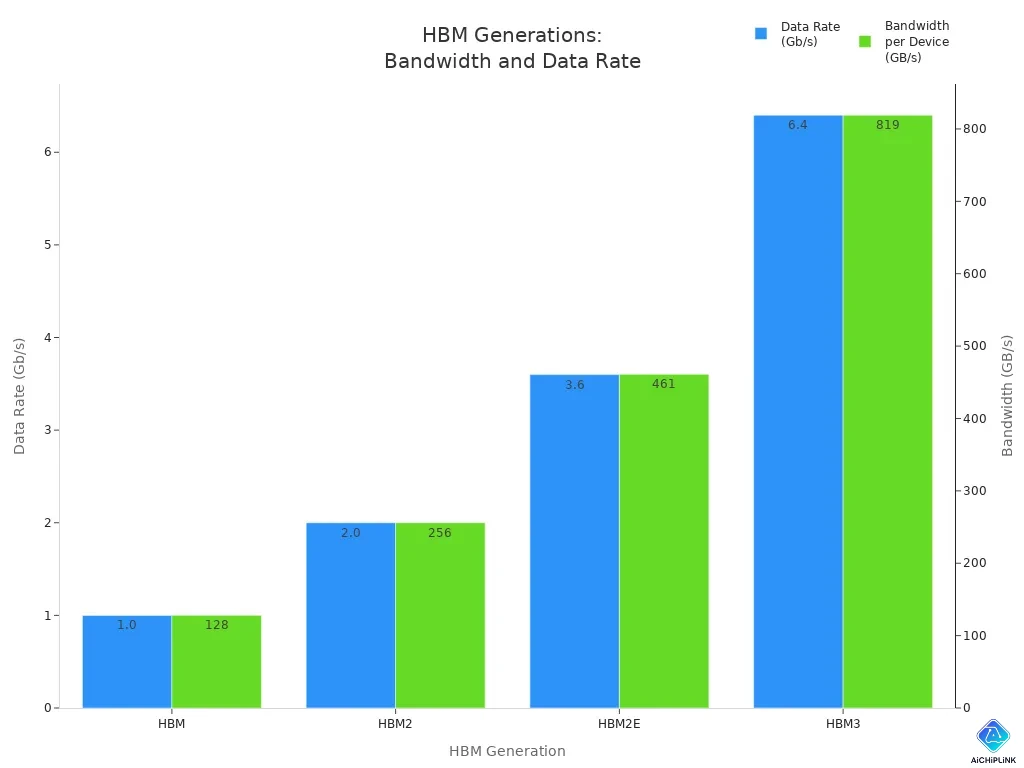
You can see how high-bandwidth memory has changed over time. Each new generation brings faster speeds, bigger capacity, and better power use. The table below shows how the main features have improved:
| Generation | Data Rate (Gb/s) | Bandwidth per Device (GB/s) |
|---|---|---|
| HBM | 1.0 | 128 |
| HBM2 | 2.0 | 256 |
| HBM2E | 3.6 | 461 |
| HBM3 | 6.4 | 819 |
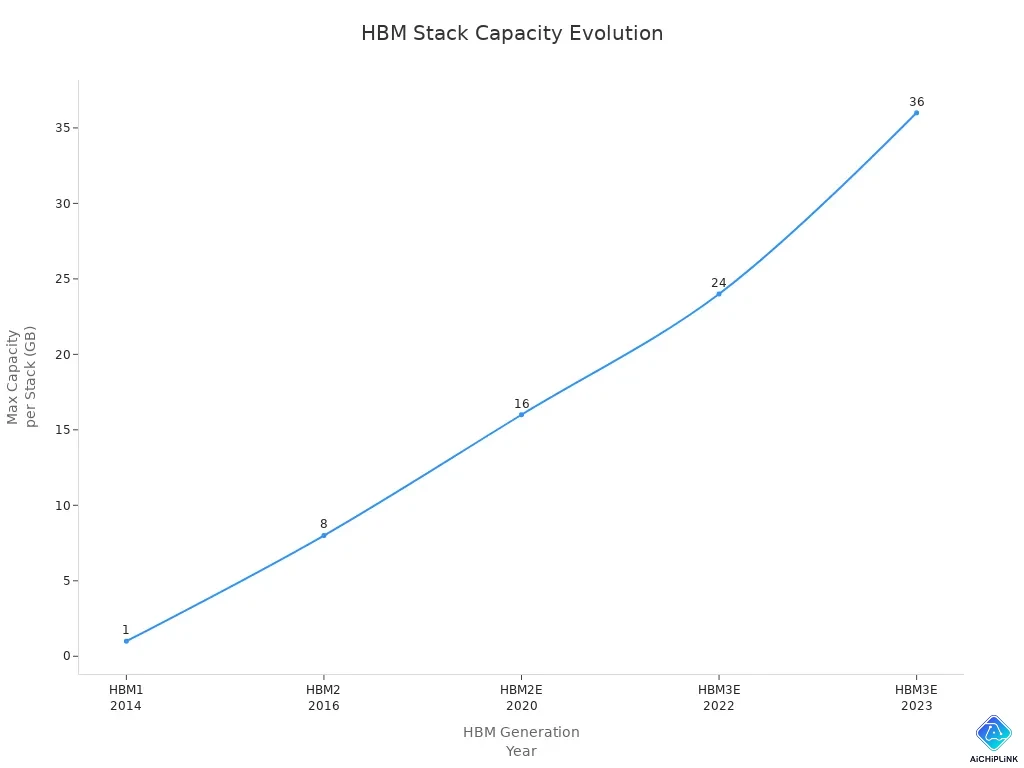
You get more memory in each stack as well. The latest HBM3E can hold up to 36 GB per stack and reach 1 TB/sec bandwidth. This is a huge jump from the first HBM, which had only 1 GB per stack and 128 GB/sec bandwidth.
| HBM Generation | Year Introduced | Max Capacity per Stack | Bandwidth per Stack |
|---|---|---|---|
| HBM1 | 2014 | 1 GB | 128 GB/sec |
| HBM2 | 2016 | 8 GB (8-high) | 307 GB/sec |
| HBM2E | 2020 | 16 GB (8-high) | 460 GB/sec |
| HBM3E (latest) | 2023 | 36 GB (12-high) | 1 TB/sec |
Performance Improvements
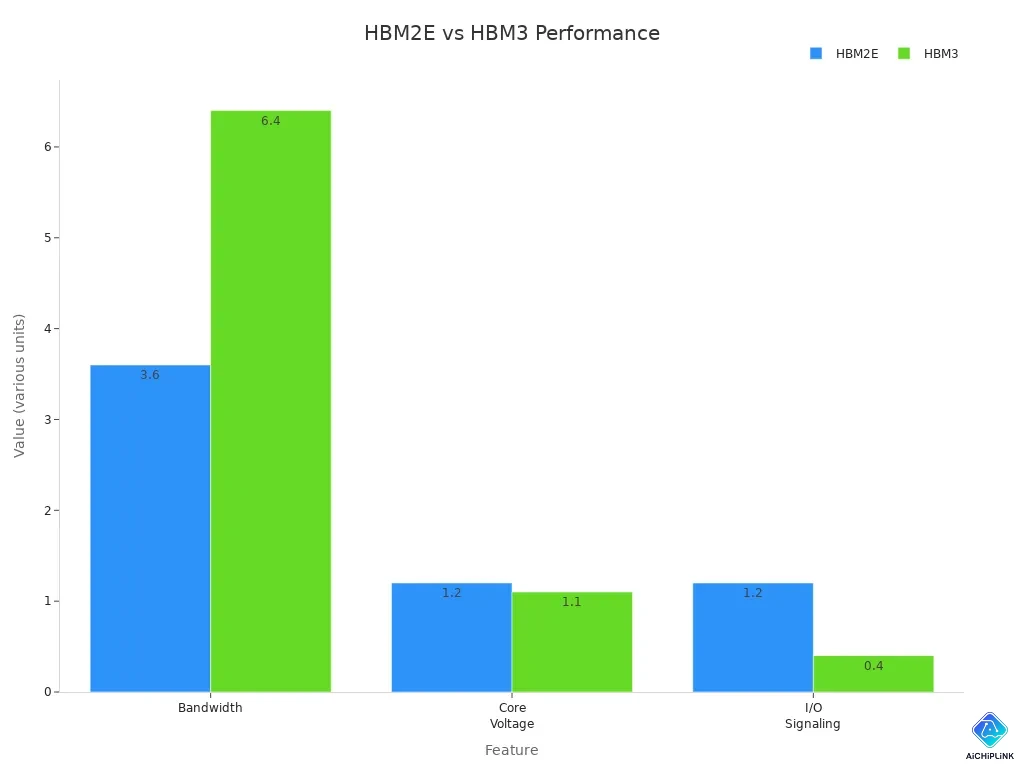
You notice big performance gains with each new HBM generation. HBM3 gives you much higher memory bandwidth and lower power use than HBM2E. The table below shows some key differences:
| Feature | HBM2E | HBM3 |
|---|---|---|
| Bandwidth per stack | 460 GB/s | 819 GB/s |
| Memory Capacity per stack | 8 GB | 24 GB |
| Core Voltage | 1.2V | 1.1V |
| I/O Signaling | 1.2V | 400mV |
| Power Efficiency | - | More efficient |
You benefit from these improvements in many ways:
-
AI workloads run faster, so you get results sooner.
-
Games look smoother and load quicker.
-
Data centers process more information with less energy.
-
VR and AR devices show better graphics with less lag.
-
Scientists can finish complex simulations in less time.
Each new HBM generation helps you handle bigger jobs, save power, and enjoy better performance. High-bandwidth memory keeps pushing the limits for AI, gaming, and data science.
HBM in AI and Computing
Role in AI Workloads
You use hbm memory when training big AI models. High bandwidth memory gives you more speed for tough jobs. It helps with tasks like gradient updates and optimizer state management. More bandwidth lets you use bigger batches during training. This makes your GPU work harder and improves your models.
-
HBM memory lets you run bigger batches, so training finishes faster.
-
You get better GPU use, which means less wasted time and more results.
-
Memory bandwidth affects how long training takes for large models.
NVIDIA's DGX SuperPOD systems use HBM3. They support batch sizes two to three times bigger than before. This makes models learn faster and helps you reach your goals sooner.
You see a big change in how fast you finish. If you train a model for three months on HBM2E, you might finish in six to eight weeks on HBM3E. This speed boost lets you try more ideas and stay ahead in AI. HBM memory makes hard jobs easier and more efficient.
Use in GPUs and Data Centers
You find hbm memory in top GPUs and data centers. These systems need fast and reliable memory for big jobs and lots of data. High bandwidth memory helps them handle huge amounts of information quickly.
| GPU Model | Manufacturer | Memory Type | Memory Bandwidth |
|---|---|---|---|
| H100 | NVIDIA | HBM3E | 3.35 TB/s |
| MI200 | AMD | HBM2E | Improved Bandwidth |
-
NVIDIA's Volta architecture used HBM2 in the Tesla V100.
-
AMD's MI200 series brought HBM2E, making memory even better.
You see hbm memory in data centers for AI, machine learning, and visualization. These centers need high bandwidth memory for tough jobs. You get faster processing, smoother work, and more reliable results. HBM memory helps you handle complex tasks and big datasets easily.
You get faster speeds and use less power with HBM memory. It works well because of its 3D stacking and wide bus. These features help you do big AI and science jobs. HBM is used in most new data centers and strong computers. As data keeps growing, HBM will change and improve. Future versions like HBM4 and HBM5 will give even more bandwidth.
-
HBM’s high bandwidth helps you train AI models quickly. You can also run hard simulations in less time.
Experts think HBM sales will go up fast as computers face bigger challenges.

Written by Jack Elliott from AIChipLink.
AIChipLink, one of the fastest-growing global independent electronic components distributors in the world, offers millions of products from thousands of manufacturers, and many of our in-stock parts is available to ship same day.
We mainly source and distribute integrated circuit (IC) products of brands such as Broadcom, Microchip, Texas Instruments, Infineon, NXP, Analog Devices, Qualcomm, Intel, etc., which are widely used in communication & network, telecom, industrial control, new energy and automotive electronics.
Empowered by AI, Linked to the Future. Get started on AIChipLink and submit your RFQ online today!
Frequently Asked Questions
What devices use HBM memory?
You find HBM memory in high-end GPUs, AI accelerators, and data center servers. Some gaming consoles and advanced laptops also use HBM for better speed and power savings.
Is HBM memory better than GDDR memory?
HBM gives you higher bandwidth and uses less power than GDDR. You get faster data movement and cooler devices. GDDR costs less and works well for gaming, but HBM is best for big data jobs.
Can you upgrade HBM memory in your computer?
You cannot upgrade HBM memory yourself. Makers build HBM stacks into the GPU or processor. You need to buy a new device if you want more HBM.
Why does HBM cost more?
HBM costs more because it uses advanced stacking and tiny connections called TSVs. The design is complex. You pay extra for higher speed and better power use.
Does HBM help with gaming?
You see smoother graphics and faster loading in games that use HBM. Most top gaming GPUs use GDDR, but HBM can boost performance in some high-end cards.


