SK hynix vs Samsung Memory: Which is Better?
If you want the best DDR5, you should choose hynix. DDR5 performance from hynix leads the market. Many users see hynix DDR5 products run faster and more stable than samsung DDR5 products. Samsung still shines in other memory types, but hynix DDR5 products set the standard. You get better value and reliability with hynix DDR5 memory. When you compare SK hynix vs Samsung, focus on your needs. For a quick answer, check the comparison table below.
Key Takeaways
-
Pick SK hynix DDR5 memory if you want fast speed and better performance for games and hard work.
-
Choose Samsung GDDR6 memory for graphics cards because it stays cooler and uses less power.
-
Think about what you need: SK hynix is great for speed, but Samsung is good for trust and can handle more tasks at once.
-
Always make sure your motherboard works with the memory before you buy it so it works well.
-
Keep up with market news and price changes because memory prices can go up and down a lot.
SK hynix vs Samsung: Quick Comparison
Key Differences
When you look at sk hynix and samsung, you see they are different in ddr5 and gddr6 memory. People talk about hynix and samsung because of speed, stability, and value. Here are the main things to remember:
-
SK hynix is best for ddr5. hynix ddr5 modules are faster and can be overclocked more. Many people say hynix ddr5 works better for hard jobs.
-
Samsung is great for gddr6. If you want gddr6 memory for graphics cards, samsung keeps things cooler and uses less power.
-
Samsung gddr6 memory stays cooler than hynix. For example, on the RX 9060 XT V3, samsung gddr6 memory is 10°C cooler than hynix gddr6 memory. Samsung gddr6 also needs less fan speed and power.
-
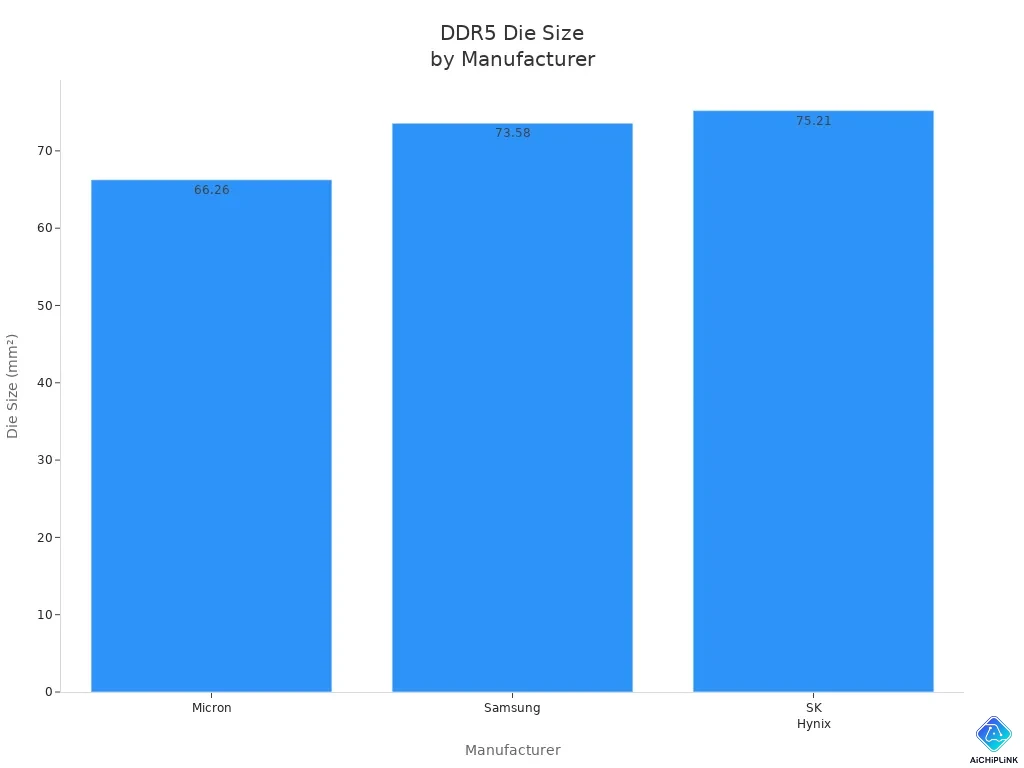
Both brands use new process technology for ddr5. SK hynix ddr5 uses H-D1y, and samsung ddr5 uses S-D1y. The die sizes are close, but hynix ddr5 usually works better.
-
SK hynix and samsung both make strong memory. They have good heat control and voltage regulation. This helps with power and makes memory last longer.
Tip: If you want fast ddr5 for games or work, pick sk hynix. If you need gddr6 for a graphics card, samsung is usually better.
Comparison Table
This table shows how sk hynix and samsung compare in important ways:
| Feature | SK hynix (DDR5/GDDR6) | Samsung (DDR5/GDDR6) |
|---|---|---|
| DDR5 Performance | 🏆 Market leader, fast speeds | Good, but less stable at high speeds |
| GDDR6 Performance | Good, higher temps | 🏆 Lower temps, better efficiency |
| Reliability | Strong, proven quality | Strong, proven quality |
| Thermal Performance | Warmer in GDDR6, good in DDR5 | 🏆 Cooler in GDDR6, efficient |
| Value | Great for DDR5, fair for GDDR6 | Good for GDDR6, fair for DDR5 |
Technical Details
| Memory Type | Manufacturer | Die Size (mm²) | Process Technology |
|---|---|---|---|
| DDR5 | Micron | 66.26 | M-D1z |
| DDR5 | Samsung | 73.58 | S-D1y |
| DDR5 | SK Hynix | 75.21 | H-D1y |
Both sk hynix and samsung use advanced process technology for ddr5. The die sizes are almost the same, but hynix ddr5 is usually faster and more stable.
Thermal and Power Efficiency
| Feature | Description |
|---|---|
| Heat Dissipation | Both brands have better designs for heat control and reliability. |
| Voltage Regulation | On-DIMM VRMs help control voltage and save power. |
| Thermal Management | Sensors and throttling keep memory from getting too hot. |
Real-World Example
-
On the RX 9060 XT V3, samsung gddr6 memory runs at 77°C with a fan speed of 1461 RPM. SK hynix gddr6 memory runs at 87°C with a fan speed of 1814 RPM.
-
Samsung gddr6 memory uses less power (183W) than hynix gddr6 memory (207W) during tough tests.
When you compare sk hynix and samsung, think about what you need. For ddr5, sk hynix gives you the best speed and value. For gddr6, samsung is cooler and more efficient. If you want the best for games, work, or graphics, check which memory type is right for your computer.
DDR5 Memory Performance
Benchmark Results
You want to know how DDR5 memory works in real tests. SK hynix does very well in DDR5 benchmarks. Hynix DDR5 modules reach faster speeds and lower latency. This helps games load quickly and apps respond fast. Samsung DDR5 memory is good at standard JEDEC speeds. When you push DDR5 past its limits, hynix stays strong. Samsung DDR5 modules can have trouble with stability at high speeds. Poor core design in samsung DDR5 makes overclocking harder. Hynix DDR5 memory stays stable even when you use your system a lot.
Here is a simple table comparing DDR5 performance at JEDEC and overclocked speeds:
| DDR5 Memory Brand | JEDEC Speed (MT/s) | Overclocked Speed (MT/s) | Stability at High Speed | Latency (ns) |
|---|---|---|---|---|
| SK hynix | 4800 | 7200+ | 🏆 Stable | 65 |
| Samsung | 4800 | 6000-6400 | Less stable | 70 |
Note: You get the best DDR5 performance from hynix if you want to overclock. Samsung DDR5 memory works well at normal speeds but loses stability when pushed.
Real-World Use Cases
You see the difference between hynix and samsung DDR5 memory in daily tasks. Hynix DDR5 modules give you faster frame times in games. You notice smoother gameplay, especially during busy moments. Samsung DDR5 memory is reliable. You avoid stutters during long gaming sessions. For work, samsung DDR5 memory gives higher capacity. You can use up to 32GB modules, which helps when you run many apps. Hynix DDR5 kits are usually smaller, like 16GBx2. Speed matters for gaming, but capacity and stability matter for work.
-
Hynix DDR5 memory is great for speed and latency. You get quicker frame times in games.
-
Samsung DDR5 memory is reliable. You avoid stutters during long sessions.
-
Samsung DDR5 modules offer higher capacity. You benefit as a content creator or multitasker.
-
Hynix DDR5 kits are smaller. You pick them for pure speed.
-
For workflows with many apps, capacity and stability are important.
Tip: If you play games and want fast DDR5, pick hynix. If you work with big files or run many programs, samsung DDR5 memory gives you more capacity and reliability.
You see that DDR5 performance depends on what you need. Hynix DDR5 memory gives you the best speed and stable overclocking. Samsung DDR5 memory offers reliability and higher capacity. You should choose DDR5 memory based on your main tasks. Gaming is better with hynix DDR5. Productivity and multitasking are better with samsung DDR5 memory.
Reliability and Quality
Build and Longevity
You want your ddr5 memory to work well for a long time. SK hynix and samsung both make strong modules. But their build quality and how long they last are not the same. SK hynix uses MR-MUF technology. This helps ddr5 memory stay cool and keeps it steady. Samsung uses Non-Conductive Film. This does not cool as well as MR-MUF. SK hynix is better at packaging memory. This means you get more reliable ddr5 memory. SK hynix has better yields, so their memory works more often. Samsung has lower yields. You may see less steady performance with samsung.
Here is a table comparing build quality and longevity:
| Feature | SK Hynix | Samsung |
|---|---|---|
| Thermal Performance | Superior due to MR-MUF technology | Lower due to Non-Conductive Film |
| Packaging Productivity | Higher productivity in packaging processes | Lower yields noted |
| Reliability and Lifespan | Potentially higher due to better thermal management | Potentially lower due to lower yields |
SK hynix ddr5 memory gives you better performance and reliability. Good thermal management lowers power use and keeps memory safe. You get longer life and steady performance, even when you use your computer a lot. Samsung ddr5 memory works well. But you may see higher power use and less steady results.
Tip: If you want ddr5 memory that lasts and is strong, SK hynix gives you better specs and performance.
Warranty and Support
You need good support when you buy ddr5 memory. SK hynix gives you a 3-year limited warranty. You must keep the original box for warranty claims. You also need proof you bought it and batch code. This helps you get help if your ddr5 memory has problems. Samsung offers similar warranty terms. But you should check the details for your area.
-
SK hynix needs the original box for warranty.
-
You must show proof you bought it and batch code.
-
SK hynix gives a 3-year limited warranty.
Both brands care about reliability and support. You feel safe when you pick ddr5 memory from SK hynix or samsung. Good warranty and support help protect your money. You also get help if you have power or performance problems.
Note: Always check warranty details before buying ddr5 memory. You want strong support and clear rules.
Compatibility and Availability
System Compatibility
You want your computer to work with new ddr5 and ddr4 modules. SK hynix and Samsung have many choices for desktops and laptops. Most OEM SK hynix ddr5 modules fit brands like Dell and Lenovo. These modules are tested before you buy them, so problems are rare. You pay less, but you might not get a box or full warranty. Third-party modules with SK hynix chips have more features. You can use EXPO or XMP profiles to tune them. These modules work well with AMD Ryzen 7000 systems. They cost more, but you get better heat spreaders and more support.
Samsung ddr5 modules also work in most computers. They run steady at JEDEC speeds. If you upgrade a laptop, you want stable ddr4. Both brands sell big ddr4 modules for multitasking. Unbranded SK hynix kits are cheaper and hold more data. You may not get help or the same quality every time. You should check compatibility when you replace a broken stick in a business laptop. For simple upgrades, you do not need to worry much.
| Module Type | Pros | Cons | Best Use |
|---|---|---|---|
| OEM SK Hynix DDR5 | Pre-validated, cheaper | Limited warranty, no XMP/EXPO | Business laptop replacement |
| Third-Party SK Hynix DDR5 | Full warranty, tuning profiles | Higher price | Gaming PC upgrade |
| Unbranded SK Hynix DDR4 | Low price, high density | No support, inconsistent QC | Budget workstation |
Tip: Always check your motherboard’s QVL list before you buy ddr5 or ddr4 modules.
Market Availability
You see ddr5 and ddr4 modules from SK hynix and Samsung in stores around the world. North America wants a lot of ddr5 memory for fast computers. Europe is growing with new tech and better computers. Asia-Pacific leads with big factories making memory chips. Samsung and SK hynix sell most ddr5 and ddr4 modules in these places.
Supply chain problems make it harder to find memory. High demand from AI makes the market tight. Companies focus on expensive ddr5, so there are fewer regular ddr4 and ddr5 modules. It can take over 32 weeks to make new ddr5 memory. Prices for ddr4 and ddr5 have gone up a lot, sometimes by 700%. You may wait longer for new ddr5 memory. The shortage will likely last until 2027.
-
You can find ddr5 and ddr4 modules from SK hynix and Samsung in most places.
-
High demand and not enough new factories cause shortages.
-
Companies make more high-end ddr5 memory first.
| Region | Key Players | Market Characteristics |
|---|---|---|
| North America | Micron, Samsung, SK Hynix | Fast growth, high demand for ddr5 and ddr4 memory |
| Europe | Samsung, SK Hynix | Tech advancements, rising need for ddr5 and ddr4 |
| Asia-Pacific | Samsung, SK Hynix | Leading investments, strong supply of ddr5 and ddr4 |
Note: If you need ddr5 or ddr4 memory soon, check local stores and be ready for higher prices.
Price and Value
DDR5 Price Comparison
You want to get the best deal when you buy memory for your computer. Over the past year, prices for DDR5 memory have changed a lot. Here is what you need to know:
-
SK hynix's memory chip prices have increased by nearly 700% over the past year.
-
Samsung has raised its memory prices by approximately 30% recently.
These changes make a big difference when you shop for DDR5. You may notice that SK hynix DDR5 costs much more than before. Samsung DDR5 also costs more, but the increase is not as high. If you compare DDR5 to ddr4, you see that ddr4 is still much cheaper. Many people choose ddr4 for budget builds or upgrades. DDR5 gives you better performance, but you pay a premium for it. You should check prices often because they can change quickly.
| Memory Type | SK hynix Price Trend | Samsung Price Trend | Typical Use |
|---|---|---|---|
| DDR5 | ⬆️ +700% | ⬆️ +30% | High-end gaming, productivity |
| ddr4 | Stable, lower cost | Stable, lower cost | Everyday use, budget builds |
Tip: If you want the best performance, DDR5 is the top choice. If you want to save money, ddr4 still offers good value.
Value for Different Users
You should pick memory based on how you use your computer. If you play games or run heavy apps, DDR5 gives you the highest performance. SK hynix DDR5 often leads in speed, but the price is much higher now. Samsung DDR5 is a bit more affordable, but you may not get the same performance at high speeds. For most users, ddr4 is still a smart pick. You get solid performance for daily tasks, and you do not spend as much. If you build a gaming PC, you may want DDR5 for the best frame rates. If you use your PC for school or work, ddr4 gives you enough speed and saves you money.
-
Gamers: Choose DDR5 for top performance, but expect to pay more.
-
Content creators: DDR5 helps with big files, but ddr4 can still handle most jobs.
-
Everyday users: ddr4 offers the best value and enough performance for web, school, and office work.
Note: Always check if your motherboard supports DDR5 or ddr4 before you buy. You want memory that fits your system and your budget.
Which Memory to Choose?
Best for Gaming
You want your games to run fast and smooth. The DDR5 memory you pick can change how your games feel. SK hynix DDR5 is known for being very quick. It has high speeds and tight timings. This helps your games react faster when you play. Samsung DDR5 is good if you play for a long time. It gives steady and reliable performance. You might like Samsung if you care more about stability than speed.
-
SK hynix DDR5 is fast and helps games respond quickly.
-
Samsung DDR5 is steady and works well for long gaming.
-
Pick SK hynix for speed or Samsung for consistency.
Tip: If you play fast games and want quick reactions, SK hynix DDR5 is a great choice. If you play for hours, Samsung DDR5 keeps things stable.
Best for Productivity
You need more memory for big jobs like video editing or 3D work. High-capacity DDR5 helps your computer do these tasks without slowing down. Many people who work with big files use 32GB or 64GB kits. These bigger modules are popular in North America. They are made for hard work and high performance.
-
Get at least 32GB DDR5 for editing videos or 3D projects.
-
Use 64GB DDR5 if you do lots of things at once or work with 4K video.
-
Both SK hynix and Samsung have big memory kits for pros.
Note: More memory means your work goes smoother and you wait less when using tough apps.
Best for Budget
You want good memory but do not want to spend too much. The Crucial 16GB DDR5-4800 module is a smart pick under $200. Micron makes this memory and checks it to make sure it works well. Many people say it is fast and does not have many problems. It has thousands of good reviews, so it is both cheap and trustworthy.
If you look at cheaper SK hynix or Samsung DDR5, you may see some differences. Samsung memory often stays cooler and uses less power than SK hynix. Cooler memory helps your computer stay quiet and stable.
| Brand/Model | Capacity | Typical Price | Key Benefit |
|---|---|---|---|
| Crucial DDR5-4800 | 16GB | $149.99 | Reliable, affordable |
| SK hynix DDR5 | 16GB+ | Higher | Fast speeds |
| Samsung DDR5 | 16GB+ | Higher | Cooler operation |
Tip: For the best deal, choose a trusted module like Crucial DDR5-4800. If you want faster speed or cooler memory, look at SK hynix or Samsung.
You see SK hynix lead in DDR5 memory. Samsung stands out in GDDR6 for graphics. The table below shows how each brand fits different needs:
| Memory Type | Strengths | Best For |
|---|---|---|
| DDR5 | Fast speeds, power efficiency | Gaming, everyday computing |
| GDDR6 | High bandwidth, cool operation | Graphics, demanding workloads |
You should check your main tasks and budget. Prices keep rising because AI and servers need more memory. Smaller buyers may wait longer for new modules. Choose SK hynix for speed or Samsung for cooler graphics. Always match your choice to your system and market trends.

Written by Jack Elliott from AIChipLink.
AIChipLink, one of the fastest-growing global independent electronic components distributors in the world, offers millions of products from thousands of manufacturers, and many of our in-stock parts is available to ship same day.
We mainly source and distribute integrated circuit (IC) products of brands such as Broadcom, Microchip, Texas Instruments, Infineon, NXP, Analog Devices, Qualcomm, Intel, etc., which are widely used in communication & network, telecom, industrial control, new energy and automotive electronics.
Empowered by AI, Linked to the Future. Get started on AIChipLink and submit your RFQ online today!
Frequently Asked Questions
Is SK hynix DDR5 memory compatible with my motherboard?
You need to check your motherboard’s specifications. Most new motherboards support SK hynix DDR5. Look for DDR5 support in your manual or on the manufacturer’s website.
Why does Samsung GDDR6 run cooler than SK hynix?
Samsung uses advanced cooling designs and efficient chips. These features help Samsung GDDR6 memory stay cooler during heavy use. Cooler memory can improve your system’s stability.
Which brand is better for overclocking DDR5?
SK hynix DDR5 usually overclocks higher and stays stable. You get better results if you want to push your memory speeds. Many gamers and PC builders choose SK hynix for this reason.
Can I mix SK hynix and Samsung memory in one system?
You can mix them, but you may see lower performance. Your system will match the slowest module. For best results, use the same brand and model.
How do I know if my memory is SK hynix or Samsung?
Check the label on your memory stick. You can also use software like CPU-Z. Look for the manufacturer’s name or code in the SPD tab.