DDR5 Memory Distributor Comparison
You can see Kingston Technology is the leader in DDR5 memory. They have the biggest share because they sell to many places and have strong partners. DDR5 memory helps run AI, machine learning, and data analytics. It does this by providing faster speed, more bandwidth, and better power use. Samsung, SK Hynix, Micron, Teamgroup, Corsair, and G.SKILL also make good DDR5 memory. Their products are reliable and work very well. When you look at DDR5, check its performance, reliability, capacity, power management, and if it fits your needs. If you want to get Source HBM3E Memory for special uses, knowing these things will help you choose well.
Key Takeaways
-
DDR5 memory is faster and holds more than DDR4. It works well for AI, gaming, and data analytics.
-
When picking DDR5 memory, look at speed, reliability, size, and power use. Make sure it fits what you need.
-
Top brands like Kingston, Micron, and Samsung are leaders. They have new features and are very reliable.
-
For gaming and home, Corsair and G.Skill are good choices. They look cool and work fast.
-
Always make sure your motherboard works with DDR5 memory. This helps you get the best performance.
DDR5 Memory: Key Features
DDR5 vs DDR4
When you look at ddr5 and ddr4, you notice many upgrades. DDR5 memory is faster and can move more data than ddr4. It also holds more memory in each module. You can use ddr5 for things like AI, gaming, and data analytics. These jobs need fast dram to work well. The table below shows the main differences between ddr5 and ddr4:
| Specification | DDR4 | DDR5 |
|---|---|---|
| Bandwidth | Maximum 3200 MT/s | 4800-5600 MT/s |
| Capacity | 32GB per module | Up to 128GB per module |
| IO Voltage | 1.2V | 1.1V |
| Bank groups | 16 banks | 32 banks |
| Burst Length | 8 | 16 |
| Latency | Lower Latency | Higher Latency |
| Power Management | On motherboard | On Module |
| On-die ECC | Not standard | Available in some modules |
DDR5 gives you faster data rates, so your computer can handle more at once. This makes it easier to run big programs and open large files. DDR5 can also hold up to 128GB per module, which is good for heavy tasks. The number of bank groups and burst length are both doubled in ddr5. This helps memory work smoother and increases bandwidth. DDR5 has a little more latency, but most people will still see better performance.
Power Management and Capacity
DDR5 memory changes how power is controlled. Each ddr5 module has its own power management IC. This helps the memory use power better and work more steadily. DDR5 uses 1.1V, which is less than ddr4’s 1.2V. This saves energy, especially in places with lots of memory modules.
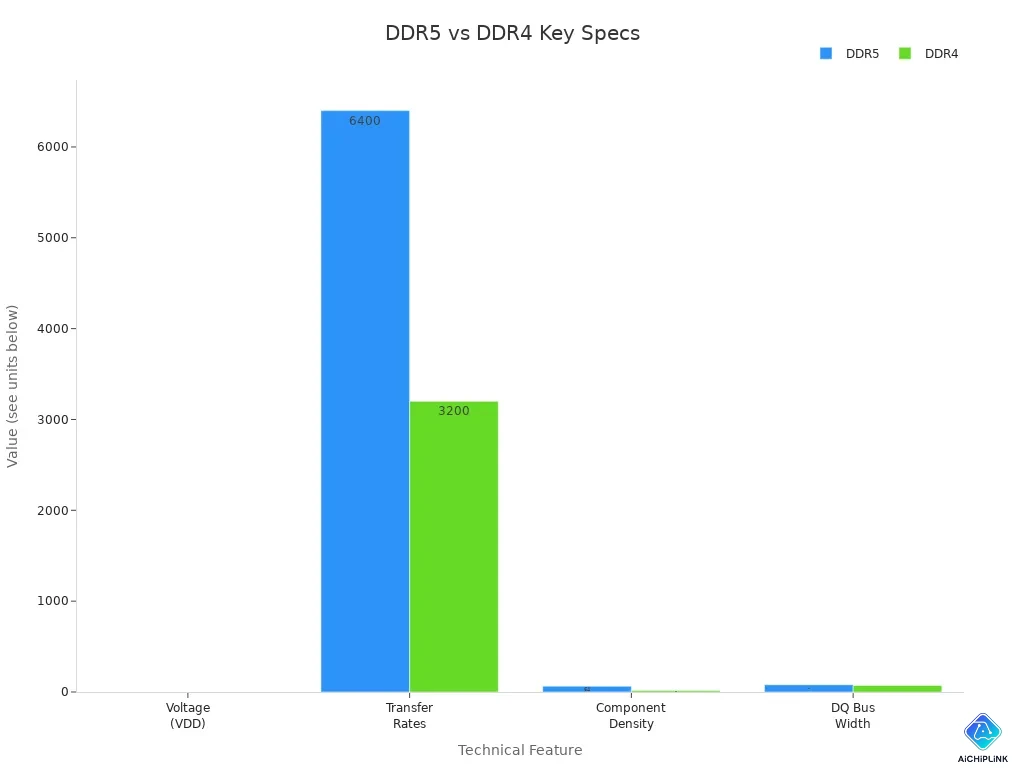
DDR5 also has higher component density. Each dram chip can store more data, so one module can have up to 128GB. This lets you run more virtual machines or bigger databases. DDR5 adds on-die ECC, which helps fix errors inside the chip. This makes your data safer and more reliable.
When you compare ddr5 and ddr4, you see ddr5 is faster, has more bandwidth, and better power control. These things make ddr5 a good pick for people who need strong and steady dram for new computers.
Top DDR5 Memory Distributors
Micron, Samsung, SK Hynix
Micron, Samsung, and SK Hynix are big ddr5 memory suppliers. They use advanced technology and make a lot of memory. Their ddr5 modules can run at 4800 MHz or 5600 MHz. Each company brings new features to ddr5.
-
Micron uses M-D1z process technology. This makes chips smaller and packs in more bits. You get more memory in a tiny space.
-
Samsung uses a high-k metal gate process for ddr5 memory. This helps save power and makes the memory last longer.
-
SK Hynix makes a 24-GB ddr5 chip with D1a nm technology and EUV lithography. This gives you more memory and better speed.
You can see these new ideas in the table below. Each company tries to make heat control, signal quality, and module design better.
| Innovation Type | Description |
|---|---|
| Enhanced Thermal Management | Better heat spreaders, cooling channels, and new thermal materials. |
| Improved Signal Integrity | Uses decision feedback equalization and clock training algorithms. |
| Innovative Memory Module Designs | Smaller layouts and new ways to mount the modules. |
| AMD Implementation | Supports ddr5 speeds up to 5200 MT/s, and plans for higher speeds. |
| Intel Implementation | DDR5 controllers in SoCs for cars, speeds up to 6400 MT/s, and can go up to 8400 MT/s. |
Tip: If you need ddr5 for servers or workstations, look at these companies. Their memory has lots of space and works very well.
Teamgroup, Corsair, G.Skill
Teamgroup, Corsair, and G.Skill are well-known ddr5 brands for regular users. These companies make memory for gamers and people who like to upgrade their computers. G.Skill is known for high-quality memory that works fast and can be customized. You can pick modules with cool designs and RGB lights. Corsair makes top ddr5 memory for gaming. They use special looks and talk to the gaming community. Teamgroup gives you memory that works well for daily tasks.
Corsair and G.Skill cost more because of their special designs and focus on fans. You get memory that looks nice and runs quickly. These brands help you build a computer that matches your style.
If you want ddr5 for gaming or home computers, check out these brands. They have fast memory, good performance, and extra features.
DDR5 DIMMs and Use Cases
RDIMM vs UDIMM
When you pick DDR5 DIMMs, you find two main types. These are RDIMM and UDIMM. It is important to know how each one works. RDIMM means Registered DIMM. UDIMM means Unbuffered DIMM. RDIMM has a chip called RCD. This chip helps control signals. It keeps memory steady when you use lots of modules. UDIMM does not have this chip. People use UDIMM in home computers and gaming systems.
Here is a table that shows how they are different:
| Feature | RDIMM | UDIMM |
|---|---|---|
| Architecture | Contains RCD chip | No RCD chip |
| Compatibility | Not pin-compatible with UDIMM | Compatible with previous DDR generations |
| Use Case | Best for servers and enterprise systems | Suitable for home computers and gaming |
| Performance | Maintains speed under heavy workloads | Focused on speed for gaming applications |
You should pick RDIMM for servers and big workstations. You should pick UDIMM for gaming and home computers. RDIMM keeps memory fast and steady when you do hard jobs. UDIMM gives you speed for games and everyday tasks.
Note: If you build a server, you need RDIMM. If you upgrade your gaming PC, you need UDIMM.
Server vs Client Applications
DDR5 dimms can be used in both servers and client computers. The results you get depend on where you use them. Servers need strong memory for big jobs. Clients, like home computers, need fast memory for games and apps.
Look at this table to see how DDR4 and DDR5 memory compare in servers and client computers:
| Metric | DDR4 Performance | DDR5 Performance |
|---|---|---|
| End-to-End Throughput (FPS) | Lower in memory-bound scenarios | Higher in memory-bound scenarios |
| Latency | Higher variability in latency | More consistent latency |
| Memory Bandwidth Utilization | Near maximum usage for modest workloads | Higher maximum attainable bandwidth |
You can see DDR5 dimms give you more throughput and steady latency. Servers use DDR5 memory to do many things at once. Client computers use DDR5 for smoother games and faster apps. DDR5 dimms help you get the best speed in both cases.
If you want to run AI or big data, you need DDR5 memory in your server. If you want to play games or use creative apps, DDR5 dimms in your PC make everything faster.
DDR5 Memory Comparison Table
Specs and Performance
You want to compare DDR5 memory from different brands. You can look at a table to see specs and performance. This helps you pick the best module for your needs. DDR5 modules give more bandwidth and better speed than older memory. You can find modules with different frequencies, sizes, and power features.
| Distributor/Brand | Frequency (MT/s) | Bandwidth (GB/s) | Capacity (GB per DIMM) | Power Management IC (PMIC) | ECC Support | Overclocking | Warranty Type |
|---|---|---|---|---|---|---|---|
| Micron | 4800, 5600 | Up to 44.8 | Up to 64 | Advanced PMIC | On-die ECC | No | Limited |
| Samsung | 4800, 5600 | Up to 44.8 | Up to 64 | Built-in PMIC | On-die ECC | No | Limited |
| SK Hynix | 4800, 5600 | Up to 44.8 | Up to 64 | Built-in PMIC | On-die ECC | No | Limited |
| TeamGroup | 4800, 5200 | Up to 41.6 | 16-48 | Built-in PMIC | On-die ECC | No | Lifetime |
| Corsair | 4800, 5200, 5600 | Up to 44.8 | Up to 64 | Built-in PMIC | On-die ECC | Yes (XMP 3.0) | Limited |
| G.Skill | 4800, 5200, 5600 | Up to 44.8 | Up to 64 | Built-in PMIC | On-die ECC | Yes (XMP 3.0) | Limited |
| XPG HUNTER | Up to 5200 | N/A | Up to 64 | Built-in PMIC | On-die ECC | Yes (XMP 3.0) | Limited Lifetime |
| ADATA | Up to 4800 | 38.4 | Up to 64 | N/A | N/A | N/A | Limited Lifetime |
Most DDR5 modules run at 4800 to 5600 MT/s. Higher frequency means faster speed and more bandwidth. Most modules have built-in PMIC to help control power. This keeps the memory steady. Many modules have ECC support to fix errors and keep data safe. Some modules, like Corsair and G.Skill, let you overclock with Intel XMP 3.0. This gives you extra performance.
You can pick modules with different sizes. Most DDR5 modules go up to 64 GB per DIMM. TeamGroup has modules from 16 GB to 48 GB. This gives you choices for different jobs. You can use big modules for data or simulation work. Smaller modules are good for gaming or daily tasks.
Tip: For simulation or industrial jobs, Micron and TeamGroup have strong power control and error fixing. For gaming, Corsair, G.Skill, and XPG HUNTER give you overclocking and fast speed.
You can test DDR5 modules with benchmarks like STREAM, SPEC CPU, LMbench, and RAMspeed. These tests check bandwidth, latency, and how memory works. You can use them to compare modules and see which is best.
Unique Features
You want to know what makes DDR5 modules special. Each brand adds its own features to the modules. These features help you get the best speed for your work.
-
Micron modules have good heat control and power management. You get voltage control on the DIMM. This keeps the memory cool and steady when working hard.
-
TeamGroup modules have high capacity and ECC support. You can use these for big jobs and simulations.
-
Corsair and G.Skill modules support Intel XMP 3.0. You can overclock these for gaming and creative work.
-
XPG HUNTER modules give 50% more speed than DDR4-3200. You get built-in PMIC and on-die ECC for safety.
-
ADATA modules give good bandwidth and size for everyday use.
DDR5 modules use dual 32-bit subchannels in each 64-bit module. This gives more bandwidth and better speed. You can use modules with on-die ECC to keep data safe. You can pick modules with different voltage levels. DDR5 uses 1.1 V, which saves energy and keeps memory cool.
You can choose modules by warranty and support. TeamGroup gives a lifetime warranty. XPG gives a limited lifetime warranty. You can get help if your module breaks. You need proof of purchase for warranty claims.
Note: For gaming, pick modules with higher speed. Dual channel 16 GB modules at 6400 MT/s are better for games than dual channel 32 GB modules at the same speed and latency. Most games do not need more than 32 GB of memory.
You can use DDR5 modules for many jobs. Pick high capacity modules for servers and simulations. Pick high speed modules for gaming and creative work. Use modules with strong power control for reliability.
DDR5 modules give you more bandwidth, better power use, and high speed. You can pick modules that fit your needs and get the best results for your work.
Technical Analysis of DDR5 Memory
Manufacturing Strengths
Top DDR5 makers use new technology to make memory better. Micron, Samsung, and other brands have strong factories. These factories help them make DDR5 memory that works well and is easy to find. You can see their strengths in the table below:
| Feature | Micron DDR5 Specifications | Samsung DDR5 Specifications |
|---|---|---|
| Bandwidth | Up to 9200 MT/s (RDIMM), 8800 MT/s (MRDIMM) | Up to 7200 Mbps |
| Capacity | 128GB RDIMMs with 32Gb monolithic die | Industry's largest 1TB DDR5 memory module |
| Energy Efficiency | Up to 22% improved energy efficiency | 20% greater efficiency than DDR4 |
| Reliability | Up to 16% lower latency compared to competitors | ODECC technology for enhanced data reliability |
DDR5 memory gives you more bandwidth and bigger size than older memory. This lets you run more apps and save more files. Makers also work on using less power. This means your computer does not get as hot and uses less energy. In big server rooms, memory can use almost half the power. DDR5 helps lower this, which is good for the planet and saves money.
Note: North America and Asia-Pacific want DDR5 memory that uses less energy. Europe is starting to use it more because of new rules about the environment.
Reliability and Quality
You want DDR5 memory that works well and lasts long. Reliability matters for home and work computers. You can check reliability by looking at error correction, signal quality, and power control. Top brands test their memory to make sure it is safe and steady.
-
Error correction keeps your data safe from mistakes.
-
Signal quality tests make sure data moves without problems.
-
Power control helps memory use energy smartly.
-
Environmental tests check if memory works in different places.
Nanya Technology uses special tests to check signal quality. Huawei uses other tests to check how data moves. These tests help you get DDR5 memory that is strong and high quality.
You can also look at RMA rates to see how often memory breaks. Lower rates mean the memory is more reliable. Here is a chart that shows RMA rates for popular brands:
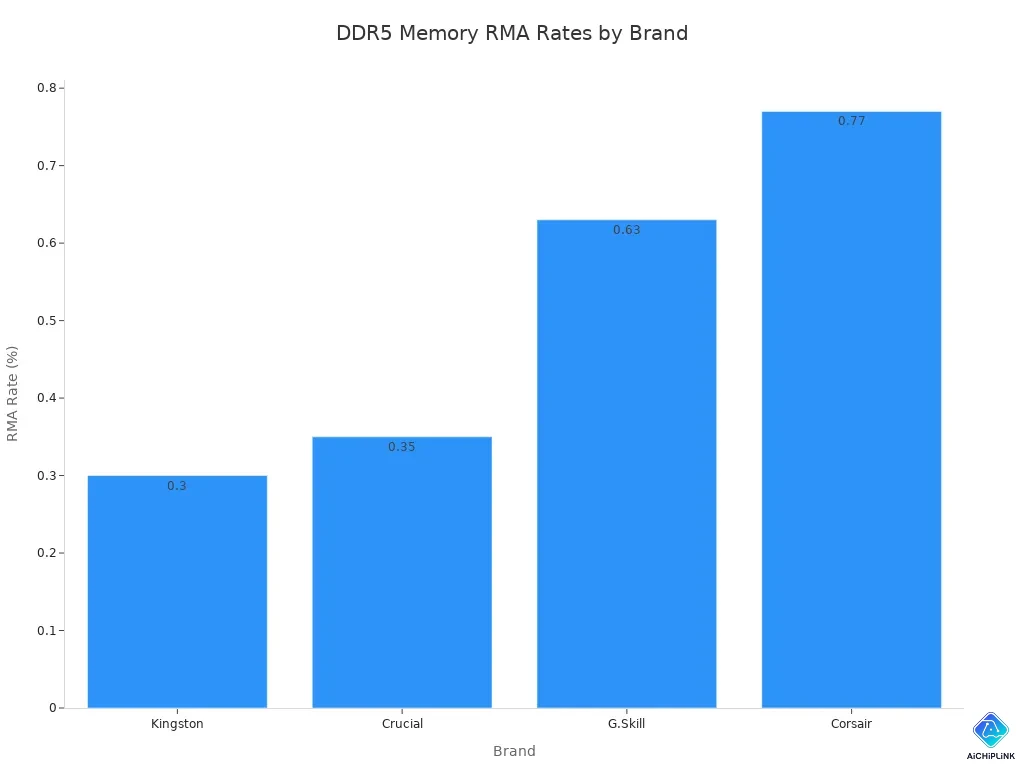
Kingston and Crucial have the lowest RMA rates. This means their DDR5 memory is very reliable. G.Skill and Corsair also make good memory, but their rates are a bit higher. You should pick memory with strong signal quality and low failure rates for the best results.
Tip: Always check for error correction and signal quality when you buy DDR5 memory. These features help you avoid problems and keep your data safe.
Market Position and Sourcing
Pricing and Availability
You might see that ddr5 memory costs more now than before. This is because more companies want ddr5 for AI servers and new tech. Makers are building more high-bandwidth memory, so there is less ddr5 for normal buyers. In some places, prices are not rising as fast, but most areas still have high prices. If you want to buy ddr5 soon, you will pay more than last year. Memory supply is different in each region and with each distributor. Some distributors get new stock faster, but others wait longer. You should check with a few sellers before you buy to find the best price.
The ddr5 market is getting bigger very quickly. Experts think the ddr5 DIMM socket market will be worth 1.6 billion dollars in 2024. It could grow to 3.8 billion dollars by 2030. This means more people and companies will use ddr5 memory in the future.
Source HBM3E Memory and DDR5 Trends
You can see new trends in advanced memory. Many companies want to get hbm3e memory for AI and high-performance computers. HBM3E gives strong bandwidth and steady performance. It is the best choice for making things right now. HBM4 will come later and may change how computers work, but today, hbm3e memory is safer to use.
Here are some tips for getting hbm3e memory and ddr5:
-
Make sure the memory works with your system so you do not have problems.
-
Check if the seller can give you memory for a long time.
-
Pick sellers who help with lifecycle and end-of-life plans.
-
Choose sellers who offer memory from more than one company.
-
Talk to sellers early to lower risks and make sure you get your order.
More people want hbm3e memory and ddr5 because of AI and new data jobs. Prices for advanced memory like DRAM and NAND have gone up by about 30%. Companies are making bigger factories and ordering early to keep up. If you want hbm3e memory, you should act fast and work with sellers you trust.
Tip: Always compare sellers for ddr5 and hbm3e memory. Look for good support, steady supply, and strong performance to get the best deal.
Choosing the Right DDR5 Memory
You can pick from many DDR5 memory options. Kingston FURY Beast is good for gamers and creators. Crucial DDR5 Pro is great for people who need steady memory. Corsair Vengeance is fast and has RGB lights for gaming fans. ADATA XPG Lancer stays cool and works quickly. DDR5 helps you finish video editing or 3D design faster. Big DDR5 modules are best for business users with heavy jobs and virtual machines. Always look at the specs, what you need, and if you can trust the seller before buying. Watch DDR5 news and prices so you can make smart choices.

Written by Jack Elliott from AIChipLink.
AIChipLink, one of the fastest-growing global independent electronic components distributors in the world, offers millions of products from thousands of manufacturers, and many of our in-stock parts is available to ship same day.
We mainly source and distribute integrated circuit (IC) products of brands such as Broadcom, Microchip, Texas Instruments, Infineon, NXP, Analog Devices, Qualcomm, Intel, etc., which are widely used in communication & network, telecom, industrial control, new energy and automotive electronics.
Empowered by AI, Linked to the Future. Get started on AIChipLink and submit your RFQ online today!
Frequently Asked Questions
What makes DDR5 memory better than DDR4?
DDR5 memory gives you faster speeds, higher capacity, and better power use. You can run more programs at once. Your computer stays cooler and uses less energy.
How do you choose the right DDR5 distributor?
You should look for trusted brands with good reviews. Check if they offer strong support and warranties. Compare prices and make sure the distributor has steady stock.
Can you use DDR5 memory in any computer?
No, you need a motherboard that supports DDR5. Always check your computer’s manual or the motherboard’s website before you buy DDR5 memory.
Why do DDR5 prices change so often?
Prices change because of high demand, new technology, and supply limits. When more people want DDR5 for AI or gaming, prices can go up quickly.


