What Is SDRAM and How Does It Work
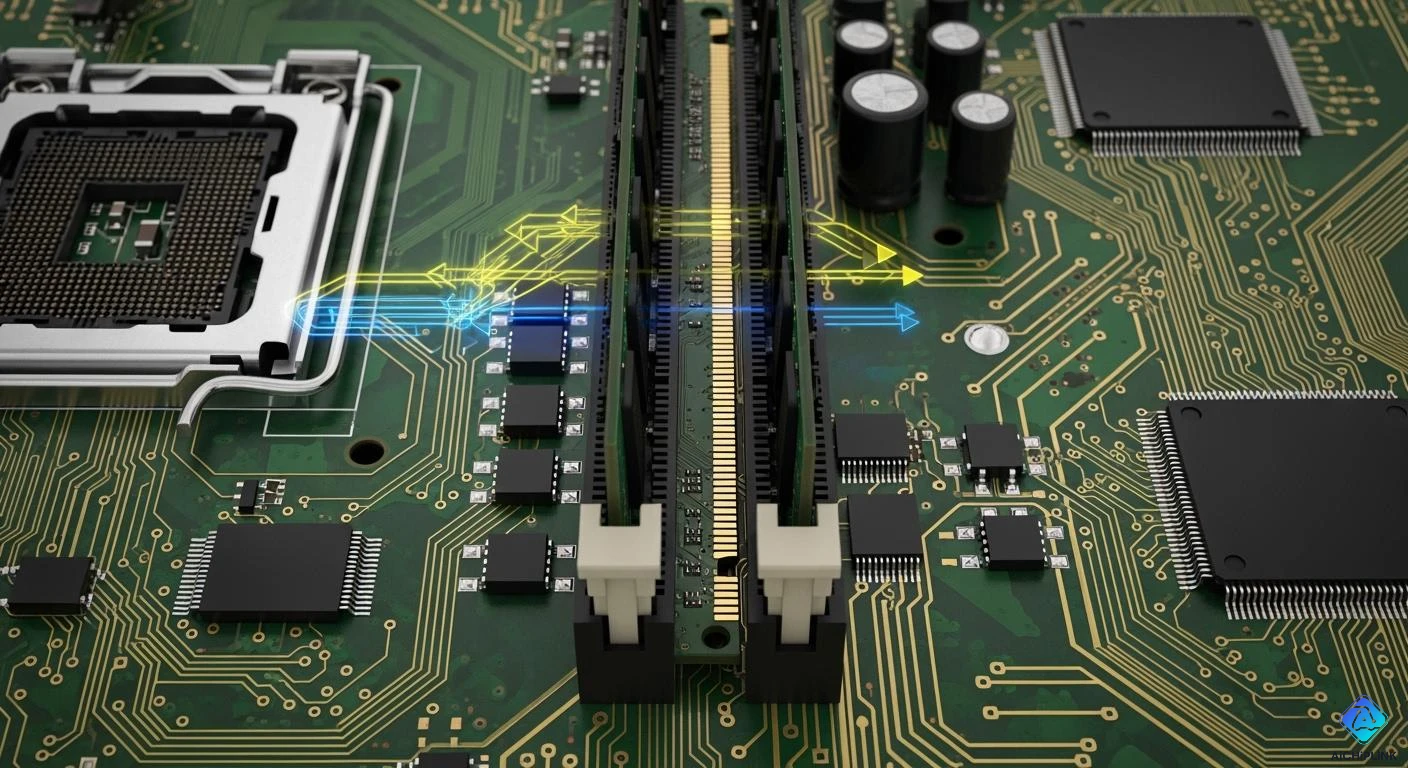
When you ask, what is sdram?, you discover that it stands for Synchronous Dynamic Random Access Memory. SDRAM helps your computer store and quickly access data. It works in step with the system clock. This timing means your processor can handle more instructions at once. As a result, your computer runs faster than if it used older types of memory. Understanding sdram gives you an edge when choosing or upgrading devices.
Key Takeaways
-
SDRAM means Synchronous Dynamic Random Access Memory. It lets computers get data faster by matching the system clock.
-
This memory helps computers work better. It uses burst transfers and pipelining. These features let many tasks happen at once.
-
Knowing about SDRAM helps you pick the right device or upgrade. This makes your computer faster and work better.
-
DDR SDRAM is used more now. But SDRAM is still found in some devices like servers and network tools.
-
Always make sure the memory fits your computer before upgrading. This helps stop problems with how your computer works.
What Is SDRAM?
SDRAM Definition
People often ask, what is sdram? SDRAM means Synchronous Dynamic Random-Access Memory. This memory works with your computer’s clock signal. The timing helps the memory controller and chip work together. It lets your computer send commands and get data quickly. SDRAM has many memory cells. Each cell uses a capacitor and a transistor. The capacitor holds a charge for a ‘1’ and no charge for a ‘0’. You pick data using bank, row, and column addresses. This setup helps your computer find and use data fast.
Synchronous Operation
You might wonder why “synchronous” is important in what is sdram? Synchronous means sdram follows the system clock. This makes sdram different from older memory types. Asynchronous DRAM does not use the clock signal. SDRAM matches its work to the CPU’s speed. This helps data move faster and more efficiently. You get burst transfers and pipelining. These let sdram handle many commands at once. You get more bandwidth and better speed.
Tip: Synchronous operation lets your computer do many things at once, so you wait less for data.
Here’s a simple table that shows how sdram and asynchronous DRAM are different:
| Feature | SDRAM | Asynchronous DRAM |
|---|---|---|
| Operation Timing | Works with the system clock | Does not use the system clock |
| Data Transfer Speed | Faster with burst transfers and pipelining | Slower, does one thing at a time |
| Efficiency | Can do more than one thing at once | Waits for each job to finish |
You can see sdram moves data faster and works better. SDRAM is used in computers and gaming consoles. DDR sdram is even faster and builds on these features.
-
SDRAM works with your CPU’s clock.
-
Burst transfers give you more bandwidth.
-
Pipelining lets sdram use many banks at once.
SDRAM History
You may ask, what is sdram? SDRAM was first used in the late 1990s. Before sdram, computers used asynchronous DRAM. As computers got better, sdram became the main memory type. You could find sdram in desktops, laptops, and servers. DDR sdram came next and was even faster. DDR sdram moves data twice each clock cycle. Now, ddr sdram is in almost every new device. SDRAM changed how computers use data. You get faster speeds, better efficiency, and easier multitasking.
If you want to know what is sdram?, remember it connects old DRAM and new DDR sdram. SDRAM made computers faster and more stable. Some devices still use sdram, but most new computers use ddr sdram for better speed.
How SDRAM Works
SDRAM Data Flow
You might wonder how sdram manages to move data so quickly inside your computer. The secret lies in how it works with the motherboard clock. Sdram lines up its actions with the system clock, which keeps everything running smoothly. This process helps your computer handle more tasks at once and reduces waiting time for data.
Here is how sdram coordinates data flow:
-
Sdram uses a synchronous interface, matching its operations to the motherboard’s clock signal.
-
This timing allows sdram to process data faster than older memory types.
-
Sdram uses pipelining, which means it can start a new memory task before the last one finishes. This keeps data moving and cuts down on delays.
Note: Pipelining lets your computer work on several memory jobs at the same time, making everything feel faster.
SDRAM Performance
Sdram changed the way computers handle speed and efficiency. When you compare sdram to older DRAM, you see a big jump in how fast data moves. Sdram can transfer data at speeds of 66, 100, or even 133 MHz, with data rates between 0.8 and 1.3 GB per second. Ddr, which came after sdram, pushes these numbers even higher.
| Type of RAM | Speed (MHz) | Data Rate (GB/s) |
|---|---|---|
| SDRAM | 66, 100, 133 | 0.8 - 1.3 |
| DDR | 200, 266, 333, 400 | 2.1 - 3.2 |
Sdram stands out because it works in sync with the system clock. This design makes data access much faster than with traditional DRAM. Ddr takes things further by using both edges of the clock cycle, which doubles the amount of data moved in the same amount of time. You get less waiting and more doing.
If you want a computer that feels quick and responsive, sdram plays a big part. Its ability to handle multiple tasks and move data efficiently makes it a key part of modern computing.
SDRAM vs DDR and Other RAM
SDRAM vs DDR
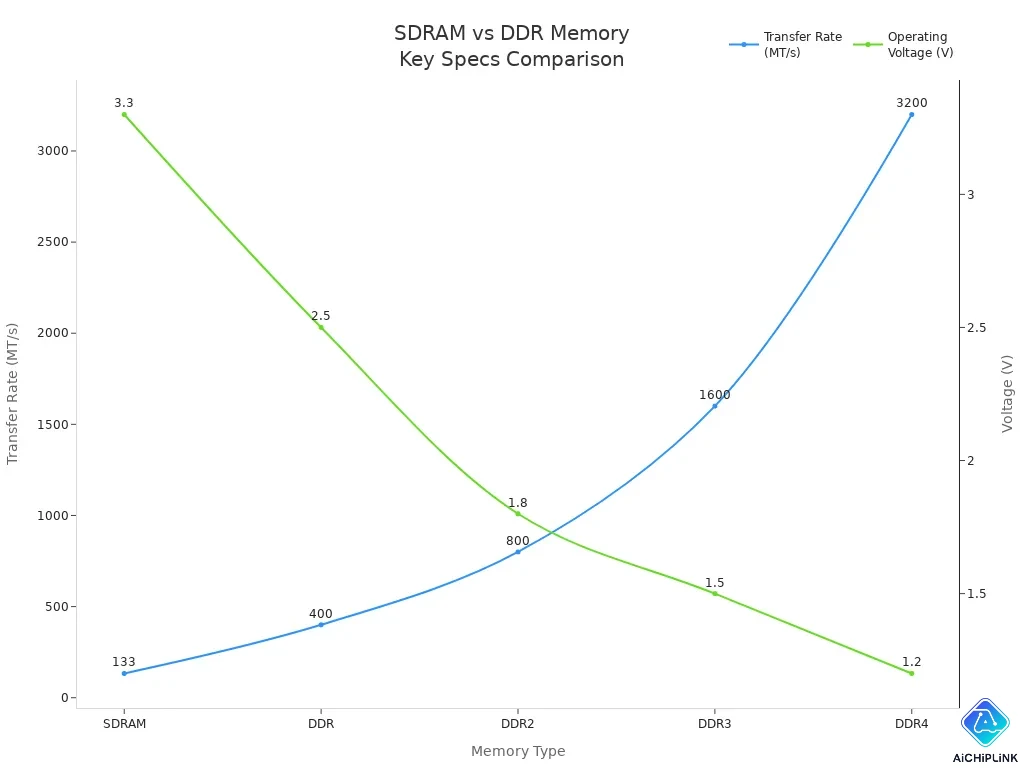
You might wonder how sdram and ddr are different. Both help your computer store and move data. Sdram sends data on one clock edge. Ddr sends data on both edges. This lets ddr move twice as much data at once. So, ddr is faster and works better.
Power use also changes between them. Sdram uses more power because it is older. Ddr uses less power, especially newer versions. This helps your device last longer and keeps it cooler.
Here is a chart that shows how transfer rates and voltage change as memory improves:
SDRAM vs DRAM/SRAM
You may ask how sdram compares to DRAM and SRAM. Sdram is a type of DRAM. It works with the system clock, so it is faster than old DRAM. SRAM is even faster and uses less power. But SRAM costs more money. You find SRAM inside your CPU as cache. Sdram and DRAM are used for main memory. They are cheaper and can hold more data.
Here is a table to show the differences:
| Memory Type | Speed (Access Time) | Efficiency (Power Consumption) | Cost |
|---|---|---|---|
| SRAM | 10 nanoseconds | Lower power consumption | High |
| DRAM | 60 nanoseconds | Higher power consumption | Low |
Tip: Use sdram or ddr for main memory. Use SRAM for cache if you need the fastest speed.
SDRAM vs DDR Table
You can look at sdram and ddr side by side. This table shows the main differences:
| Metric | DDR SDRAM | SDRAM |
|---|---|---|
| Data transfer rate | Sends data on both clock edges, so it moves more data | Sends data on one clock edge, so it moves less data |
| Clock frequency | Uses DDR signaling to double the data rate | Frequency is usually shown in MHz |
| Data prefetch | Can fetch two data units at once for efficiency | Usually fetches one data unit at a time |
| Bandwidth | Has higher bandwidth because it moves more data | Has lower bandwidth |
| Internal architecture | Moves data on both clock edges for higher rates | Moves data on one clock edge |
You can see ddr is faster, uses less power, and has more bandwidth. Sdram is still used in some devices. Most new computers use ddr for better performance.
SDRAM Today
Devices Using SDRAM
You see sdram in many devices today. Even though newer memory types like ddr ram are common, sdram still plays a role in modern technology. You find sdram in network switches and routers. Servers use sdram as primary memory. Embedded systems rely on sdram for stable performance. These devices need reliable memory that handles data quickly.
-
Network switches use sdram for fast data routing.
-
Routers depend on sdram to manage connections.
-
Servers trust sdram for handling large amounts of information.
You also notice sdram in some industrial equipment and older computers. Many laptops and desktops now use ddr ram, but sdram remains important in specialized hardware.
SDRAM Compatibility
When you upgrade memory, you must check compatibility. If you try to replace sdram with ddr ram, you may face problems. Sometimes, your system does not recognize the new memory. Windows may fail to load. BIOS might see the new ram, but you need to adjust memory timing settings. Issues with attributes like tRASmin can cause errors. You must match the memory type to your motherboard.
Here is a table showing common sdram form factors:
| Form Factor | Size | Typical Usage |
|---|---|---|
| DIMM | 133.35 mm (5.25 in) | Personal computers |
| SO-DIMM | 67.6 mm (2.66 in) | Laptops |
You must check the form factor before buying new memory. DIMM fits desktops. SO-DIMM fits laptops.
Is SDRAM Still Relevant?
You may wonder if sdram matters today. Industry experts say ddr5 sdram will grow in the next five years. The shift from ddr ram to ddr5 sdram will change how companies build and use computers. Sectors like AI, machine learning, and 5G need higher data speeds. DDR5 sdram will help these industries process more information. Automotive and industrial fields will also use ddr5 sdram for advanced technology.
Note: DDR5 sdram brings faster speeds and better efficiency. You will see it in new devices and industries.
You see sdram in many places, but ddr ram and ddr5 sdram lead the way in modern computing.
SDRAM Glossary
Synchronous
You see "synchronous" a lot when learning about synchronous dynamic random access memory. This means the memory works together with the system clock. All signals are checked on the up or down part of the clock. With synchronous dynamic random access memory, every action happens at a set time. This helps your computer run well and stops mistakes when moving data.
The clock’s timing helps commands and data move together. This timing is important for speed and for making sure things work right.
DRAM
DRAM stands for Dynamic Random Access Memory. You find DRAM in almost every computer today. It stores data using small capacitors and transistors. Each cell keeps one bit of information. DRAM’s design lets you get to any memory cell fast and in any order. Modern DRAM uses one transistor and one capacitor for each cell. This saves space and power. Synchronous dynamic random access memory is a kind of DRAM that works with the system clock. It uses pipelining to move data across many banks at once. This means faster data flow and less waiting.
-
DRAM uses capacitors to hold bits.
-
The 1T1C design makes DRAM small and saves energy.
-
Synchronous dynamic random access memory works better by matching the CPU clock.
DDR
DDR stands for Double Data Rate. You see this in double data rate synchronous dynamic random access memory. DDR is based on synchronous dynamic random access memory but moves data on both the up and down parts of the clock. This doubles the data rate without making the clock faster. DDR also uses a prefetch system, so it can grab more data with one request. You get much better speed and more bandwidth.
DDR memory helps your computer run faster by moving more data at once.
Latency
Latency is how long it takes for memory to give you data after you ask. In synchronous dynamic random access memory, you often hear about CAS latency. This is the number of clock cycles you wait to get your data. Lower latency means you get your data faster. For example, a CAS latency of 34 means you wait 34 clock cycles. SRAM has much lower latency than SDRAM or DDR, with times of just 1-3 nanoseconds. DDR5 has higher latency than DDR4, but its faster clock speeds help make up for it.
-
SRAM: 1-3 nanoseconds (very fast)
-
SDRAM/DDR: Higher latency, but good for lots of data
Tip: Lower latency means you get your data faster, so your computer feels quicker.
You now know SDRAM changed computers by syncing memory with the CPU clock. This made data move faster and more efficiently. SDRAM’s pipelining lets your computer handle many tasks at once. Here is a quick comparison:
| Feature | SDRAM | DDR |
|---|---|---|
| Data Rate | Single Data Rate | Double Data Rate |
| Transfers per Clock Cycle | 1 transfer | 2 transfers |
| Power Consumption | 3.3V | Lower than SDRAM |
-
SDRAM’s design improved speed and reduced latency.
-
Knowing RAM types helps you pick the right memory for your needs.
If you find a term confusing, check the glossary for a simple explanation.

Written by Jack Elliott from AIChipLink.
AIChipLink, one of the fastest-growing global independent electronic components distributors in the world, offers millions of products from thousands of manufacturers, and many of our in-stock parts is available to ship same day.
We mainly source and distribute integrated circuit (IC) products of brands such as Broadcom, Microchip, Texas Instruments, Infineon, NXP, Analog Devices, Qualcomm, Intel, etc., which are widely used in communication & network, telecom, industrial control, new energy and automotive electronics.
Empowered by AI, Linked to the Future. Get started on AIChipLink and submit your RFQ online today!
Frequently Asked Questions
What does SDRAM stand for?
SDRAM stands for Synchronous Dynamic Random Access Memory. You see this type of memory in many computers and devices. It works with the system clock to move data quickly.
Can you upgrade SDRAM in your computer?
You can upgrade SDRAM if your motherboard supports it. Check your device’s manual for the right type and size. Always match the form factor, like DIMM or SO-DIMM.
Why is SDRAM faster than older DRAM?
SDRAM works in sync with the system clock. This lets your computer send and receive data at set times. You get faster data flow and less waiting.
Is SDRAM still used in new computers?
Most new computers use DDR SDRAM, which is an improved version. You still find SDRAM in some older devices and special equipment.