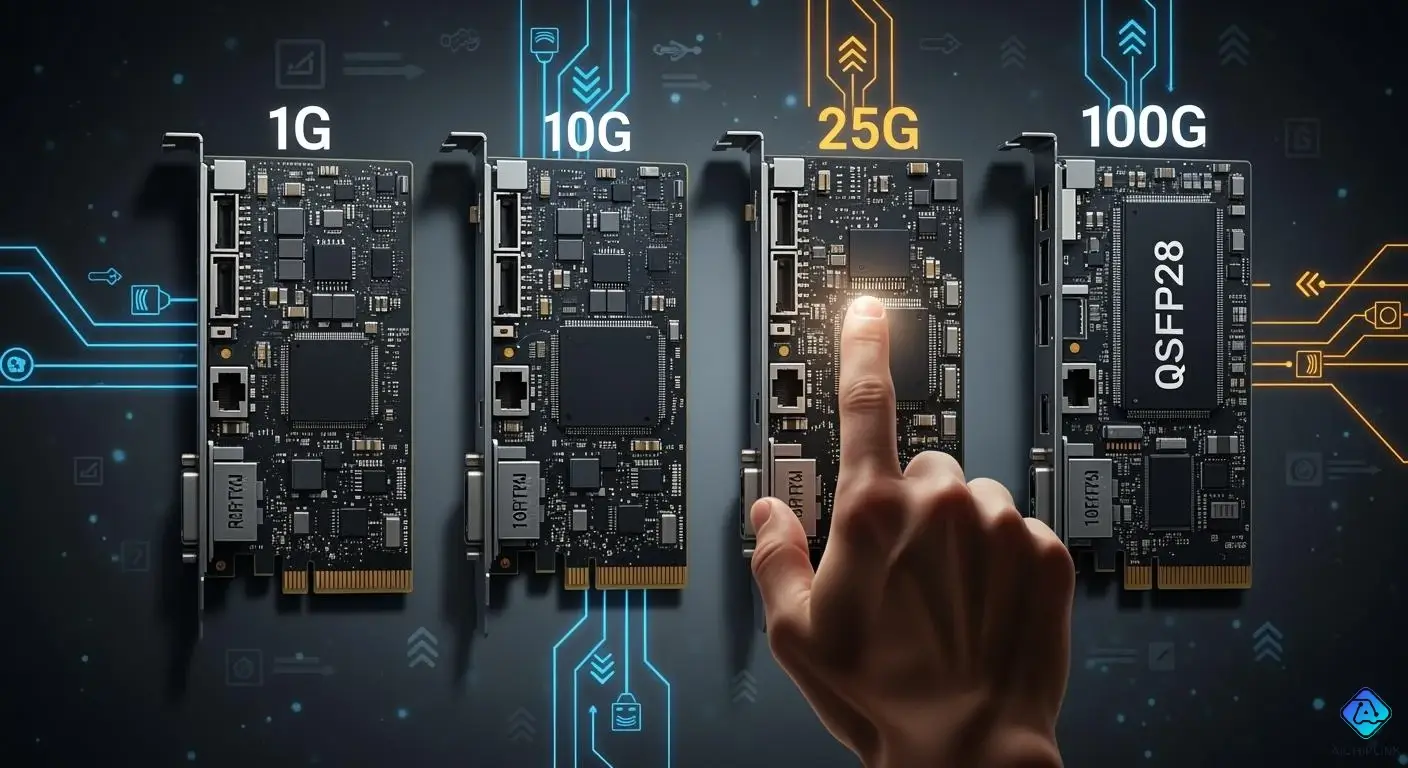
You need a complete guide to pick the best ethernet for your network. First, check how much speed and bandwidth your network needs. Ethernet speed is important if your business requires fast data transfers. Make sure it is compatible with your network hardware and operating systems. This helps you avoid potential issues. Port setup and form factor demonstrate how ethernet fits into your system. Ethernet driver support and power usage also impact network strength. This complete guide assists you in matching network speed, ethernet compatibility, and features with what you truly need.
Key Takeaways
-
Make a list of the apps you use and how much bandwidth they need. This helps you pick the best adapter for your network speed.
-
Pick an ethernet adapter that fits what you need now and later. This stops you from spending more money to upgrade soon.
-
Think about latency and how well the adapter works. Low latency makes things like video calls faster and smoother.
-
Check if the adapter works with your computer and operating system. This helps you avoid problems with connections or slow speeds.
-
See if the adapter has extra features like offloading or virtualization support. These features can make your network work better.
Complete Guide to Network Adapter Selection
Assessing Network Speed Needs
First, you need to know how much speed your network needs. The right ethernet network adapter depends on how many people use it and what they do. Some activities, like video calls or file sharing, use more bandwidth than others. For example, one person on a video call uses about 1 GB every hour. Watching HD movies uses even more data. List all the apps your network uses. Figure out how much bandwidth each app needs. Multiply that by the number of users. Add everything up to find your total bandwidth.
Tip: You can use the table below to quickly guess your bandwidth needs based on how big your group is.
| Organization Size | Bandwidth Requirement (Mbps) |
|---|---|
| Small businesses (1-10) | 25 - 100 |
| Medium-sized businesses (10-50) | 100 - 500 |
| Large enterprises (50+) | 500 - 1000 or higher |
If you have a small business, a 1G ethernet network adapter is usually enough. Medium-sized businesses often need 10G adapters for faster speeds. Large companies or data centers may need 25G or 100G adapters for very fast data and big jobs.
Matching Adapter to Use Case
Pick an ethernet network adapter that fits what you do. If you just check email or browse the web, a 1G adapter is fine. If you share files, do video calls, or use virtualization, you need faster speeds. Big companies using AI or real-time analytics should look at 25G or 100G adapters. These adapters help move data quickly and make the network work better for hard tasks.
Note: Using the wrong adapter speed can cause trouble. If you send data from a fast computer to a slow one, you might lose packets or see slow speeds. For example, sending from a 10G ethernet network adapter to a 1G adapter can drop packets. Buffering helps a little, but you should match adapter speed to your network.
Think about the future too. If your business will grow, pick an ethernet network adapter that can handle faster speeds later. This saves money because you won’t need to upgrade soon.
Evaluating Latency and Performance
Network latency can slow down your apps, but it’s not always the main problem. Sometimes, things like database I/O or storage I/O cause slowdowns. You might see timeouts, slow DNS, or busy databases. Find out where the latency happens to fix the problem. Tools like Wireshark can help you check your network and find issues.
Tip: For the best speed, pick an ethernet network adapter with low latency and high throughput. This matters for things like video calls or online games that need fast responses.
Look at your whole network setup too. A good network has the right ethernet network adapter, good cables, and strong hardware. Always test your network after adding a new adapter to make sure it works well.
How to Choose the Right Adapter
Here are steps to help you pick the best ethernet network adapter:
-
Figure out your network speed needs using the table above.
-
Pick an adapter that fits your use and future plans.
-
Check latency and how your network performs.
-
Make sure it works with your hardware and operating system.
-
Think about extra features like offloading and virtualization support.
Choosing the right ethernet network adapter helps your network run well and lets your business move data quickly.
Network Adapter Speeds and Use Cases
1G NIC: Entry-Level Applications
A 1G NIC is good for simple jobs. It works well in small offices and homes. You can use it for sharing files and browsing the web. It is fast enough for email and light streaming. This adapter does not cost much. You do not need special cables or switches. You can use Cat 5e or Cat 6 ethernet cables. It does not use much power or make much heat. If you want a basic network, a 1G NIC is a good choice. It gives you steady performance without costing a lot.
10G NIC: Enterprise and Data Center
A 10G NIC is for bigger businesses and data centers. It helps with fast file transfers and cloud access. You can use it for virtualization too. Many data centers use 10G NICs for better speed and less delay. You need Cat 6a or fiber cables for full speed. It uses more power and makes more heat than a 1G NIC. You need to plan for cooling and energy use. A 10G NIC costs more, but it gives much better network speed. You can connect servers and storage with 10G NICs for heavy work.
| Network Adapter | Power Consumption | Heat Output |
|---|---|---|
| 10G | Higher | Higher |
| 25G | Lower | Lower |
25G NIC: High-Performance Demands
A 25G NIC is for networks that need high speed. It is used in data centers and wireless backhaul. It also works for enterprise interconnect jobs. You get 2.5 times more bandwidth than a 10G NIC. It uses less power and makes less heat than a 10G NIC. This makes your network work better. You need Cat 8 cables for full 25 Gbps speed up to 30 meters. Cat 6a works for short runs, but Cat 8 is best. You can use 25GBASE-T ports with older 10G and 1G devices. Many data centers now use leaf and spine setups and upgrade to 25G and 100G switches for better speed.
| Application Type | Benefit Description |
|---|---|
| Data Center Top of Rack | Great for places that need lots of bandwidth. |
| Wireless Backhaul | Helps wireless networks move data fast. |
| Enterprise Interconnect Applications | Meets new server needs for high performance. |
| Bandwidth Comparison | Gives 2.5 times more bandwidth than 10G in the same SFP. |
Tip: You can upgrade to 25G NICs and still use old adapters.
100G Ethernet: Advanced Scenarios
You need 100G ethernet for very big networks. This adapter is used in large data centers and by cloud companies. It is also used in IT, telecom, BFSI, healthcare, government, and factories.
| Industry | Description |
|---|---|
| IT & Telecom | Fast networking for moving lots of data. |
| BFSI | Safe and big networks for banks and finance. |
| Healthcare | Moves patient data quickly and safely. |
| Government | Strong networks for public services. |
| Manufacturing | Handles lots of data for making products. |
A 100g ethernet adapter is best for AI, big data, and real-time analytics. You can use OM4 MMF cables and BiDi optical transceivers to save money. Many groups use new 100g ethernet switches that work with old ones. This lets you upgrade slowly. The Hertz Corporation moved from 10G to 100G ethernet. They saved money and made their network greener. You get better power use and can grow your network in the future with 100g ethernet. You can handle huge jobs and support many users with 100 gigabit ethernet. If you want the fastest network, a 100g nic is the best pick.
Network Interface Card Compatibility
PCIe Requirements
Check your PCIe slot before you put in a network interface card. Most ethernet adapters need a PCIe slot on your motherboard. Fast nics, like 10G or 100g ethernet adapters, need PCIe Gen3 x8 or better. Multi-gigabit nics and fiber nics need more bandwidth. Make sure your computer has the right slot. If you use an old PCIe slot, your ethernet nic might be slow. Always match your adapter’s PCIe version to your motherboard for best speed.
Platform and OS Support
Pick a network interface card that works with your operating system. Some adapters for desktops do not work well on servers. You might have driver problems or slow speeds. This can happen with some Intel adapters, like I211, I217-V, I218-V, I219-V, I225-V, and I226-V, especially on Windows Server. You could lose your connection or see slow speeds if you use the wrong adapter.
Common compatibility issues:
Desktop adapters may not work on servers.
Some Intel adapters do not work with Windows Server.
You might lose your connection or have slow speeds.
Cabling: Copper vs. Fiber
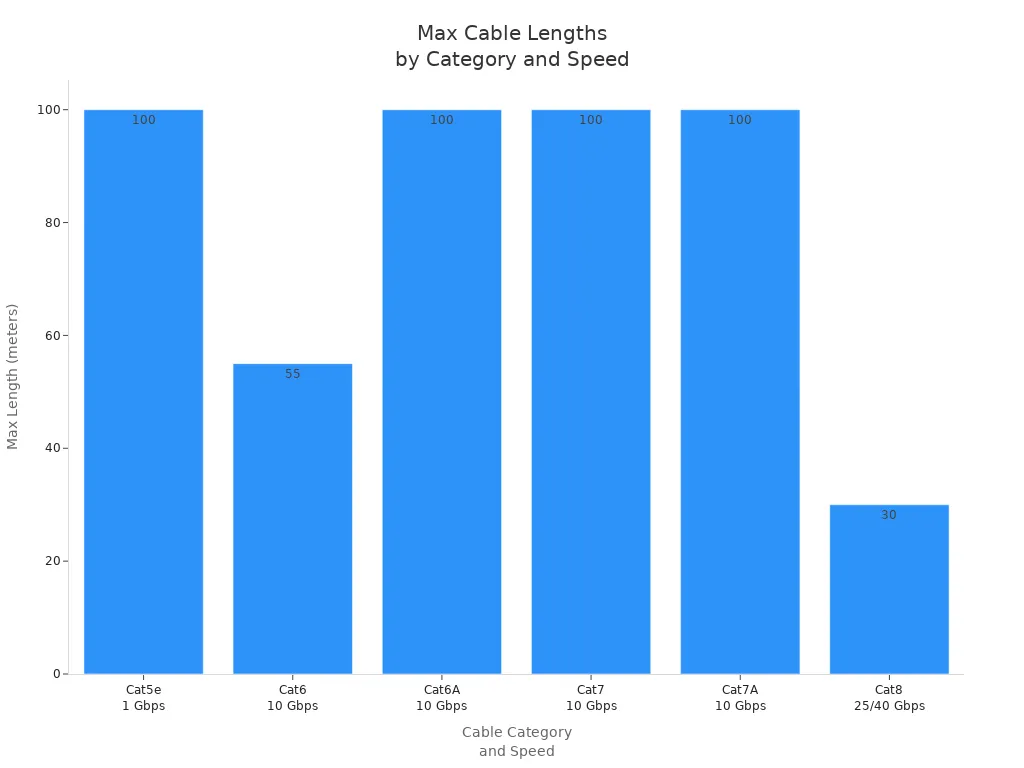
Pick the right cable for your ethernet adapter. Copper ethernet nics use twisted pair cables like Cat5e, Cat6, Cat6A, Cat7, Cat7A, and Cat8. Fiber nics use single-mode or multimode fiber cables. Each cable type has its own limits for distance and speed.
| Cable Category | Maximum Length | Speed Supported |
|---|---|---|
| Cat5e | 100 meters | 1 Gbps |
| Cat6 | 55 meters | 10 Gbps |
| Cat6A | 100 meters | 10 Gbps |
| Cat7 | 100 meters | 10 Gbps |
| Cat7A | 100 meters | 10 Gbps |
| Cat8 | ≤30 meters | 25/40 Gbps |
| Factor | Copper Cabling | Fiber Cabling |
|---|---|---|
| Latency | Higher latency (2-4 microseconds) | Near-zero latency |
| Bandwidth | Supports 10 Gbps up to 100 meters | Higher bandwidth over longer distances |
| Distance | Best up to 30 meters | Can go several kilometers |
| Interference | Can get EMI and RFI | Not affected by EMI and RFI |
If you need to go far or want top speed, pick a fiber network card. Fiber nics, including pcie fiber nics, are good for fast and long-distance ethernet. Copper cables are cheaper and good for short runs. Fiber gives you better speed and less interference.
Integration with Existing Network
You can add new network interface cards without turning off your network. Many systems use rolling deployments. This lets you update some parts while others keep working. Automated device onboarding helps your network find and set up new adapters fast. Security credentials are given with little work. Compliance checks make sure new adapters follow your network rules.
| Strategy | Description |
|---|---|
| Automated Device Onboarding | Makes adding new devices easy and keeps settings the same. |
| Configuration Drift Detection | Watches for changes to keep your network safe and correct. |
| Incident Response Automation | Fixes problems fast and keeps your network running during changes. |
These methods help your ethernet network stay strong and work well. Your network can grow and stay fast as you add new adapters and ethernet nic types.
NIC Features and Form Factors
Offloading and Acceleration
Modern network adapters use offloading and acceleration to make ethernet faster. These features let the adapter do some jobs instead of your CPU. When offloading is used, your CPU can do other things. This makes your network work better, especially when you need to move a lot of data. For example, TCP checksum offloading lets the adapter check for errors. Scatter/gather processing helps the adapter collect data from different memory spots. Segmentation offloading breaks big packets into smaller ones for easier handling.
| Feature | Description |
|---|---|
| TCP Checksum Offloading | Adapter checks data for errors, freeing up CPU resources. |
| Scatter/Gather Processing | Adapter gathers data from multiple locations for efficient transfer. |
| Segmentation Offloading | Adapter splits large packets for smoother network traffic. |
You can find these features in adapters from Mellanox. These adapters support lossless networking, RDMA, and adaptive routing. They help your ethernet network work well for AI and cloud computing.
Offloading helps your CPU and makes networks faster in data centers and cloud setups.
Virtualization Support
If you use virtualization, you need an adapter that supports it. Some adapters have special features for virtual machines. For example, VMXNET 3 gives high performance with multiqueue and IPv6 support. SR-IOV passthrough lets virtual machines talk right to the adapter. This lowers wait time and makes ethernet faster. Other options like E1000E, E1000, and Flexible work with many operating systems. PVRDMA lets virtual machines move data fast using RDMA.
-
VMXNET 3: High performance, multiqueue, IPv6 support.
-
SR-IOV: Direct access for low-latency needs.
-
PVRDMA: Fast data transfer between virtual machines.
Security and Reliability
A good ethernet network needs to be safe and reliable. Modern adapters use security rules to stop people who should not get in. These features keep your data safe and correct. They also help your business follow rules like GDPR and HIPAA. Adapters with endpoint protection can react to threats quickly. Network segmentation and firewalls block bad traffic and protect your network. These steps help your network stay up during attacks and keep your services working.
Security features in your adapter keep your network, data, and business safe.
SFP, SFP+, QSFP, RJ45 Options
You need to pick the right form factor for your ethernet adapter. Each interface works with different speeds and devices.
| Interface | Speed (Gbps) | Compatibility |
|---|---|---|
| SFP | Up to 1 | Works with many cables and devices |
| SFP+ | Up to 10 | Backward compatible with SFP modules |
| QSFP | Up to 40 | Aggregates channels, works with SFP+ and SFP |
| RJ45 | N/A | Used for standard ethernet connections with copper cables |
SFP and SFP+ are used a lot in big networks. QSFP is for higher speeds and more connections. RJ45 is best for simple ethernet networks with copper cables. Pick the adapter that matches your network speed and cables for the best results.
Adapter Comparison Table
When you pick a network adapter, you want to see what makes them different. The table below lets you compare 1G, 10G, 25G, and 100G ethernet adapters. You can use this table to find the ethernet adapter that fits your needs.
| Factor | 1G | 10G | 25G | 100G |
|---|---|---|---|---|
| Cost | Lowest | Reduced | Lower | Lowest |
| Power Consumption | Low | Moderate | Lower | Lowest |
| Port Density | Low | Moderate | Higher | Highest |
| Fiber Utilization | Basic | Moderate | Improved | Best |
| Future Scalability | Limited | Limited | Good | Excellent |
Best-Fit Scenarios
A 1G ethernet adapter is good for small offices or homes. It works for web browsing, email, and sharing small files. If you need more speed, a 10G ethernet adapter is better for medium businesses or teams that are growing. You can use it for fast file sharing, video calls, and using the cloud.
A 25G ethernet adapter is best for networks that need high performance. You will find it in data centers or places with lots of virtualization. It gives you more bandwidth and works more efficiently. If you want the fastest and most flexible network, pick a 100G ethernet adapter. Big companies, cloud providers, and research labs use it for AI, big data, and real-time analytics.
Tip: Always pick an ethernet adapter that fits your network now and in the future. This helps you save money because you won’t need to upgrade soon.
Key Differences Summary
Each ethernet adapter has its own job in your network. The 1G adapter is for basic speed and low cost. The 10G adapter gives you more speed and can handle more users. The 25G adapter is very efficient and uses fiber better. The 100G adapter is the fastest and is best for growth. When you look at these adapters, think about how big your network is, how fast you need it to be, and if you want to grow. The right ethernet adapter will keep your network strong and ready for anything new.
Buying Tips and Troubleshooting
Budget and Warranty
You want to get the best value when you choose an ethernet network adapter. Start by setting a budget. Prices can change a lot based on speed and features. A 1G ethernet adapter costs less than a 100G model. Think about what your network needs now and what it might need later. Sometimes, spending a little more now saves money in the future. Always check the warranty before you buy. A good warranty protects you if something goes wrong. Many brands offer at least a one-year warranty. Some give you three years or more. Longer warranties show that the company trusts its product.
Tip: Save your receipt and warranty card. You may need them if you ask for support.
Installation and Setup
Installing an ethernet network adapter can be easy if you follow the right steps. First, make sure the adapter works with your operating system. Some adapters do not support all systems, which can cause problems. Next, check that your hardware matches the adapter. The slot on your motherboard must fit the adapter. If you use a Storage Area Network, set up the adapter to work with it. Use the correct cables for your ethernet speed. For example, a 10G or 25G adapter may need special fiber or Cat 6a cables. Using the wrong cable can stop your network from working well.
Here are some common setup challenges:
-
Picking an adapter that does not match your operating system.
-
Using an adapter that does not fit your hardware.
-
Not setting up the adapter with your Storage Area Network.
-
Using the wrong cables for your ethernet adapter.
Note: Always read the manual before you start. This helps you avoid mistakes.
Common Issues and Solutions
You may face some problems after installing a new ethernet adapter. Sometimes, the adapter does not show up in your system. Try checking the PCIe slot and making sure the adapter is seated well. If you see slow speeds, check your cables and make sure they support your ethernet speed. Driver problems can also cause trouble. Download the latest drivers from the maker’s website. If your network drops out, look for updates for your operating system. You can also try another PCIe slot if you have one.
| Problem | Solution |
|---|---|
| Adapter not detected | Reseat adapter, check slot compatibility |
| Slow speeds | Use correct cables, update drivers |
| Network drops | Update OS, try a different PCIe slot |
If you follow this buying guide, you can pick the right ethernet adapter and solve most problems quickly. Good planning and careful setup keep your network strong.
You can pick the right ethernet adapter by following some easy steps. Start by checking how fast your network needs to be. Then, choose an ethernet adapter that fits what you want to do. Check if it works well with your computer and other hardware. Look at how fast it is and if there is any delay. Use the table to compare different ethernet adapters and see which one is best for you. Remember, the speed, features, and if it works with your stuff all help your network work better.
If you want to learn more about ethernet adapters, check tech forums or the maker’s website.

Written by Jack Elliott from AIChipLink.
AIChipLink, one of the fastest-growing global independent electronic components distributors in the world, offers millions of products from thousands of manufacturers, and many of our in-stock parts is available to ship same day.
We mainly source and distribute integrated circuit (IC) products of brands such as Broadcom, Microchip, Texas Instruments, Infineon, NXP, Analog Devices, Qualcomm, Intel, etc., which are widely used in communication & network, telecom, industrial control, new energy and automotive electronics.
Empowered by AI, Linked to the Future. Get started on AIChipLink.com and submit your RFQ online today!
Frequently Asked Questions
What is the difference between copper and fiber network adapters?
You use copper adapters for short distances and lower costs. Fiber adapters work best for long distances and higher speeds.
How do I know if my motherboard supports a new network adapter?
You check your motherboard’s PCIe slot type and version. Most modern adapters need PCIe Gen3 x8 or better. Tip: Read your motherboard manual for slot details before buying.
Can I upgrade from 1G to 10G or 25G without changing all my cables?
You may need new cables. Cat6a supports 10G up to 100 meters. Cat8 supports 25G up to 30 meters. · Cat5e: 1G · Cat6a: 10G · Cat8: 25G
Do network adapters work with all operating systems?
You need to check driver support for your operating system. Some adapters work only with Windows or Linux. Note: Always download the latest drivers from the manufacturer’s website.