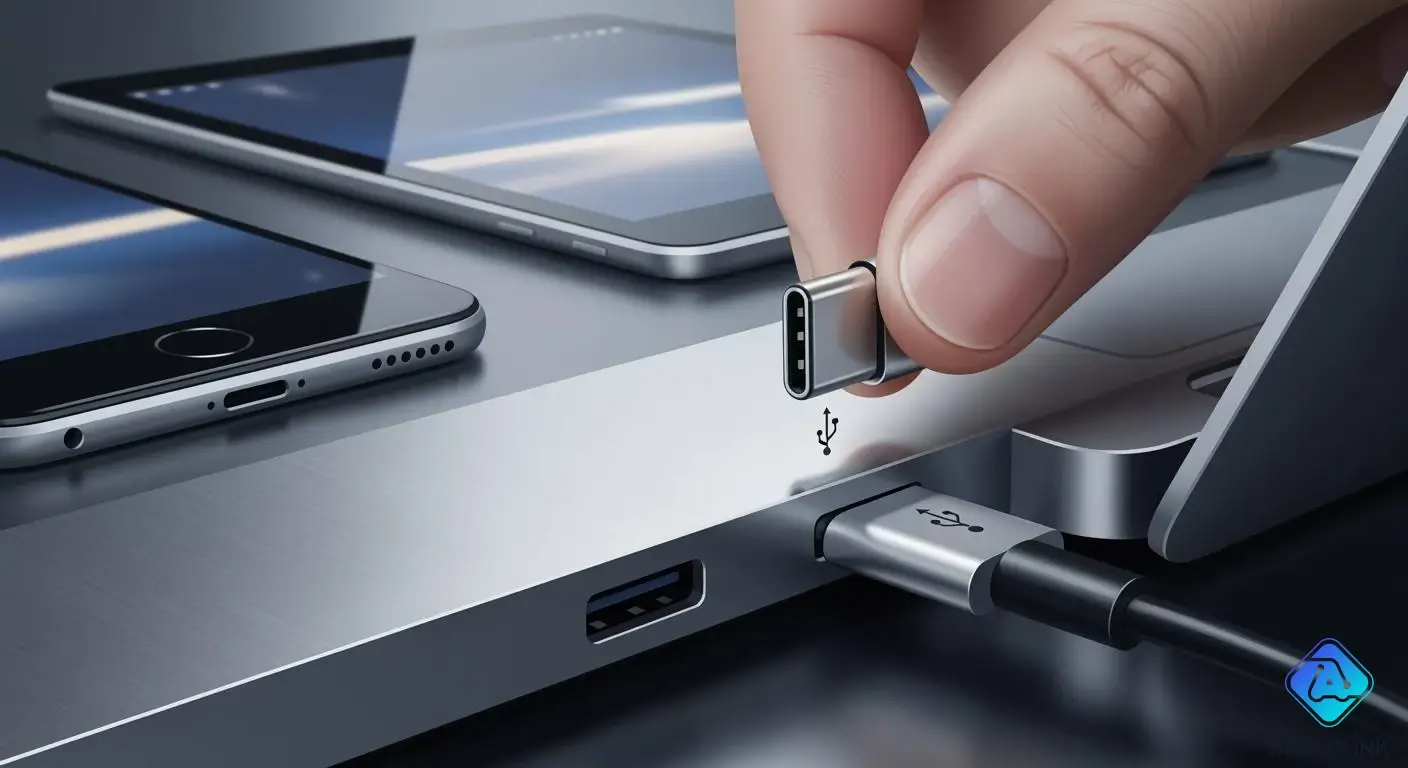
You use the usb type-c connector every day. You might not even notice it. This small connector has 24 pins. You can plug it in either way. This makes it easy to use. The usb type-c is now the standard for many devices. Most new laptops have usb-c ports. Tablets and smartphones also use usb-c ports. You will see usb-c on Apple MacBook Pro. Dell, HP, and Lenovo laptops use it too. Popular phones like Samsung Galaxy S21 have usb-c. Google Pixel 5 and OnePlus 9 Pro use it as well. The type-c connector replaces old usb ports. It gives you a simple way to connect your devices. It is also reliable.
Key Takeaways
- USB Type-C connectors can be plugged in either way. You do not have to worry about which side is up. They are easy to use. They support fast data transfer. This lets you move big files quickly. USB Type-C can give power up to 240W. This helps charge laptops and other devices fast. The small design makes devices thinner and lighter. This makes them easier to carry. It is important to use good USB Type-C cables. This keeps your devices safe and working well. Always check if your cable works with your device before using it.
USB Type-C Connector Features
Reversible and Universal Design
You do not need to worry about which way you plug in usb type c. The 24-pin design lets you connect your phone, laptop, or tablet easily. You will not have to flip the connector again and again. This saves you time and keeps you from getting annoyed.
The usb type-c connector is a universal standard. You can use it with many different devices. It works with smartphones, tablets, laptops, and even monitors. You can use adapters or special cables for older devices. This makes usb-c a good choice for all your tech.
Here is a table that shows what the 24 pins do inside a usb type c:
| Pin Group | Number of Pins | Function / Purpose | Key Details |
|---|---|---|---|
| Power (VBUS & Ground) | 8 | Provide bus power and ground return | Multiple pins for lower resistance and higher current capacity |
| High-Speed Data (TX/RX) | 8 | Support "SuperSpeed" data for USB 3.2 Gen1/Gen2, USB4, and Alternate Modes | Four shielded differential pairs ensure two TX and two RX lines are always accessible |
| USB 2.0 Data (D+/D-) | 4 | Carry legacy USB 2.0 signals (up to 480 Mbps) | One pair on each side effectively creates a single USB 2.0 channel |
| Sideband Use (SBU) | 2 | Used for auxiliary signals in Alternate Modes | Low-frequency pins |
| Configuration Channel (CC) | 2 | Manage cable orientation detection and USB Power Delivery communication | One CC pin becomes VCONN to power active cable electronics |
usb-c works with both new and old usb standards. This means you can use one connector for lots of devices.
Tip: If you have older devices, you can use a usb-c adapter or a regular usb type c cable to connect them.
-
usb type c lets you connect to many devices like smartphones, tablets, and laptops.
-
You can use usb-c instead of other connectors like HDMI and DisplayPort.
-
Some older devices still use usb-a or micro-usb, but usb-c is getting more popular every year.
Compact and Robust Build
usb type c is smaller than older usb connectors. This small size helps you carry lighter and thinner devices. You will see usb-c ports on thin laptops and ultrabooks. Your smartphone can also be slim because of this connector.
Manufacturers use strong materials to make usb type c connectors last longer. The shell is often made of metal or tough plastic. Inside, there are materials like Stanyl, which is very strong and does not wear out fast. The parts that insulate stop electrical problems and help prevent fires.
| Material | Properties |
|---|---|
| Stanyl | High retention force, excellent wear and friction properties, superior mechanical strength. |
| Insulating | Superior resistance to electrical tracking, essential for preventing fire hazards. |
You can trust usb-c to work every day. Many usb type c ports are sealed to keep out water and dust. They can handle shaking and bumps. The design also stops interference from other electronics.
-
The small design lets you use usb-c in more places, like phones and machines.
-
The strong build means your usb-c port will last through many uses.
High Data Transfer and Power Delivery
usb-c gives you much faster data speeds than old usb connectors. The usb 4 standard can go up to 40 Gbps. The newest usb 4 version 2.0 can reach 80 Gbps. This means you can move big files, stream videos, and connect screens with no delay.
-
usb-c supports usb 4, usb 3.2, and usb 2.0, so you can use it for many devices.
-
You get faster data transfer for photos, videos, and backups.
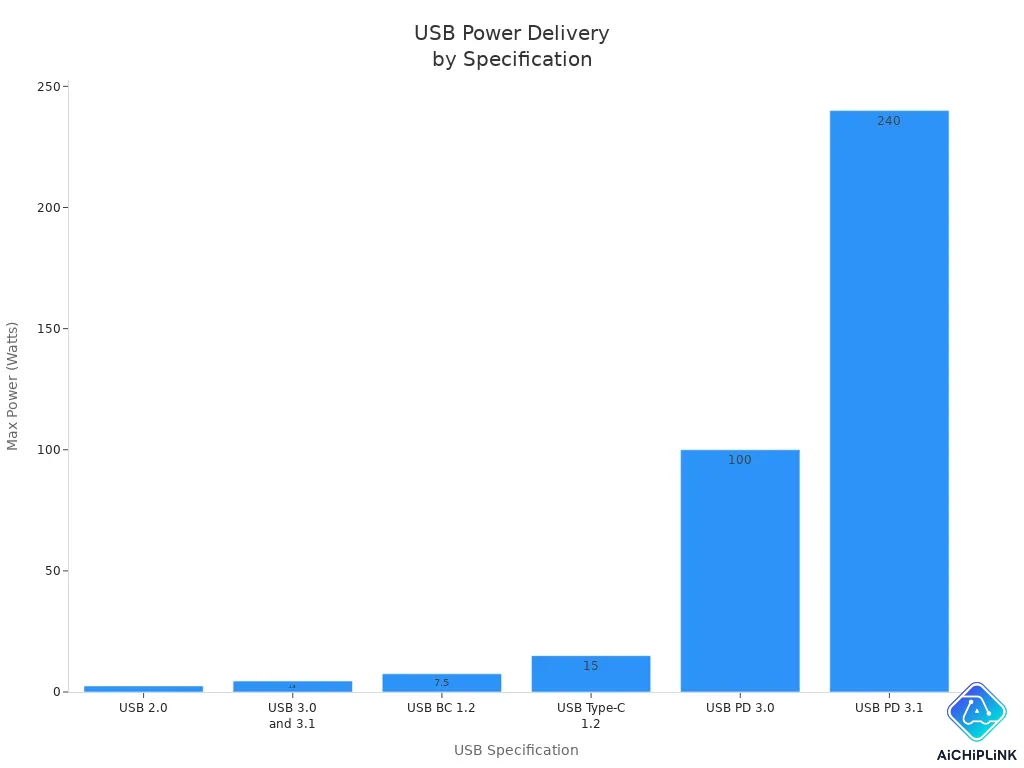
usb type c also lets you charge devices quickly. The power delivery standard helps you charge safely and fast. With usb pd 3.1, you can get up to 240W of power. This is enough to charge laptops, monitors, and even some appliances.
| Specification | Maximum Power | Maximum Voltage | Maximum Current |
|---|---|---|---|
| USB 2.0 | 2.5 W | 5 V | 500 mA |
| USB 3.0 and 3.1 | 4.5 W | 5 V | 900 mA |
| USB BC 1.2 | 7.5 W | 5 V | 1.5 A |
| USB Type-C 1.2 | 15 W | 5 V | 3 A |
| USB PD 3.0 | 100 W | 5/9/15/20 V | 5 A |
| USB PD 3.1 | 240 W | 28/36/48 V | 5 A |
You can use usb-c for fast charging your phone or laptop. The power delivery is safe and works well. Many devices now use usb-c ports for both charging and data.
-
You can use one usb-c cable for charging, data, and video.
-
The usb-c port supports usb 4, so you get the newest features.
-
The power delivery standard lets you charge bigger devices, not just phones.
Note: Always use a good cable to get the best charging and data speeds.
With usb type-c, you get a connector that works for charging, data, and video. You can enjoy fast charging, quick data transfer, and a strong, small connector every day.
How USB Type-C Works
Connection Process
When you connect a device with a usb type c cable, you do not need to check which side is up. The usb-c connector fits either way. You plug it in, and your device starts working right away. The usb-c port uses smart technology to detect what kind of device you have. It checks if you want to charge, transfer files, or send video.
You will notice that usb-c supports many protocols. These include:
-
USB 3.1
-
USB 3.2
-
USB4
-
DisplayPort Alternate Mode
-
Thunderbolt 3
-
USB Power Delivery
You can use usb-c for more than just charging. It works with DisplayPort, HDMI, PCIe, Ethernet, and Thunderbolt. This means you can connect monitors, hard drives, and even network cables with the same usb-c connector.
Tip: If you use a usb type c adapter, you can connect older devices to your new laptop or phone.
Data and Power Transmission
The usb-c connector lets you send data and power at the same time. You can transfer photos, videos, and documents while charging your device. The usb-c port manages this with special chips called E-Marker chips. These chips help your devices talk to each other and switch roles when needed.
You get faster data transfer speeds with usb-c. The port supports usb 3.2 and usb4, so you can move large files quickly. You can also stream high-quality video without lag. The usb-c connector makes sure your devices use the best speed available.
Here is how usb-c handles power and data:
| Feature | What It Does |
|---|---|
| Power Delivery (PD) | Lets devices manage power roles, up to 100W |
| Bidirectional Power | Devices can send or receive power |
| E-Marker Chips | Control power and data management |
With usb-c, you can charge your laptop, phone, or tablet. The power delivery system keeps your devices safe and charges them fast. You do not need separate cables for charging and data. The usb type c connector does it all.
Note: Always use a high-quality usb-c cable for the best charging and data transfer speeds.
You will find usb-c ports on many devices. The usb-c connector gives you a simple way to connect, charge, and transfer data every day.
USB-C vs. Other USB Ports
USB Type-C vs. USB-A and USB-B
You may have seen different usb connectors on your devices. The most common older types are USB-A and USB-B. USB-A looks like a flat rectangle. USB-B is mostly square and often connects to printers or scanners. The new usb type c connector has an oval shape. You can use it on both the host and the device, which makes it more flexible.
Here is a table to help you see the main differences:
| Type | USB Type A | USB Type B | USB Type C |
|---|---|---|---|
| Shape | Rectangular | Mostly square | Oval shaped |
| Connection | Host and connector | Connector | Host and Connector |
| Backward Compatible | No | Yes | Yes |
| Reversible | No | No | Yes |
| Versions | 1.1, 2.0, 3.0, 3.1, 3.2 | 1.1, 2.0, 3.0, 3.1 | 1.1, 2.0, 3.0, 3.1, 3.2, 4.0 |
| Version top speed | Up to 10Gbps | Up to 10Gbps | Up to 80Gbps |
| Common supported Devices | Desktops, laptops, smartphones | Printers, scanners, cameras | All newer devices, including desktops, laptops, smartphones |
You will notice that usb-c stands out because you can plug it in either way. You do not have to worry about the orientation. This makes connecting devices much easier.
Improvements and Distinctions
When you use usb-c, you get many benefits over older usb ports. The compact size lets you use it in slim laptops and phones. You can enjoy faster data transfer speeds. USB-C supports up to 20 Gbps with USB 3.2 and up to 80 Gbps with USB4. Older usb ports only reach up to 5 or 10 Gbps.
You can also charge bigger devices with usb-c. It delivers up to 100 watts of power, while older usb ports only provide up to 12 watts. This means you can charge laptops, tablets, and even some monitors with one cable.
Here is a quick comparison:
| Feature | USB Type-C | Older USB Standards |
|---|---|---|
| Max Data Transfer Speed | Up to 20 Gbps | Up to 5 Gbps |
| Max Power Delivery | Up to 100 watts | Up to 12 watts |
| Suitable for Large Devices | Yes | No |
You will find that usb-c is also more versatile. It can handle charging, data, and video all at once. You do not need separate cables for each task. The reversible design means you never have to flip the connector to find the right side.
-
Reversible design for easy use
-
High-speed data transfer for quick file sharing
-
Power delivery for charging many devices
-
Smaller size for modern, thin devices
-
Bi-directional power and data for more flexibility
Tip: If you want a simple and powerful connection, choose usb-c. You can use one cable for almost everything.
You can see that usb type c brings a big upgrade to your daily tech experience. You get more speed, more power, and more convenience with usb-c.
Benefits and Uses of USB Type-C
Advantages for Users and Manufacturers
You get lots of good things with usb type c. The usb-c connector makes using devices simple and quick. You do not need to worry about plugging it in wrong. The reversible design saves time and keeps your devices safe. You can charge fast and move files quickly every day.
Here is a table that shows the main benefits for you:
| Benefit | Description |
|---|---|
| Reversible Design | You can plug in the cable either way. This makes connecting easy and safe. |
| High-Speed Data Transfer | You move big files fast, with speeds up to 40Gbps. |
| Power Delivery | You charge devices quickly, up to 100 watts, while sending data at the same time. |
| User-Friendly | You do not need to check which way to plug in, so you connect devices with less effort. |
Manufacturers also get benefits from usb-c. Big brands like Apple, Samsung, and Dell use usb-c ports now. They can use one type of connector for many products. This change means fewer usb connectors are needed. It also helps companies design and test new devices more easily. The standard helps companies follow rules, like the EU’s Common Charger Directive, and cuts down on electronic waste.
-
Manufacturers use fewer parts, so costs go down.
-
The standard makes it easier to make new products with usb type c receptacles.
-
Companies can follow global rules and help the environment.
Common Devices and Applications
You see usb-c on many devices today. Most smartphones, tablets, and laptops use usb type c for charging and data. You also find usb-c on monitors, cameras, and even home appliances. The usb type-c connector works for both personal and industrial uses.
USB Type-C lets devices reach higher signal speeds, up to 20 Gbps, and supports power delivery, so devices can ask for up to 100 W, which is important for powering industrial equipment.
Here are some common uses for usb-c:
-
Smartphones and tablets use usb-c for fast charging and moving data.
-
Laptops and ultrabooks use usb-c ports for charging, video, and connecting accessories.
-
Monitors and docking stations use usb-c to send video, audio, and power with one cable.
-
Appliances and industrial machines use usb type c to make connections easier and help with automation.
You can use one usb-c cable for many jobs. The power delivery standard lets you charge bigger devices, not just phones. Usb-c supports usb pd, so you get safe and fast charging. Usb type c also helps cut down on cable mess and keeps your workspace neat.
You will find usb type c receptacles in lots of places. Usb-c makes it easy to connect, charge, and move data with just one cable.
Considerations and Limitations
Compatibility Issues
You may think all usb-c cables work the same. That is not true. Usb-c looks like it fits everywhere, but it does not always work the same way. Some cables only work with older usb standards. You might not get fast charging or quick data speeds. Using the wrong cable can stop your device from working. It could even hurt your device.
-
Picking the right usb-c cable is hard. Devices have different needs.
-
Some usb-c ports only charge. Others send data or video.
-
Many cables do not follow the newest usb-c rules. You might get slow speeds.
If your cable does not work, you may feel upset. Always check what your cable and device can do before using them.
Manufacturers help by making adapters and docks. You can use a usb-c-to-usb-a dongle for old devices. This makes your speed slower. Multiport hubs keep usb-c features. They cost more and are bigger. Some devices, like hard drives, need native usb-c to use all features.
| Strategy Type | Description |
|---|---|
| Adapters | USB-C-to-USB-A/HDMI dongles let you connect old devices but slow down speeds. |
| Docks | Multiport hubs keep usb-c features but add size and cost. |
| Performance Trade-offs | Devices like hard drives may not use usb-c’s best features without full support. |
Cable Quality and Safety
You should care about cable quality when using usb-c. Bad cables can cause big problems. Usb-c has small pins close together. This can make short circuits happen. Some cables miss important parts, like resistors. This can send too much power and break your device. Charging with a bad cable can ruin your device.
-
Cheap cables can get too hot or even catch fire.
-
Loose cables can spark. Sparks are dangerous.
-
Bad chargers can send the wrong voltage. This can break your usb-c port.
Always buy cables that follow safety rules. Good cables meet standards like UL 9990 or UL 444. These rules help keep your devices safe.
| Standard | Description |
|---|---|
| UL 9990 | Safety rules for information and communication cables |
| UL 444 | Safety rules for communication cables |
| UL 758 | Safety rules for appliance wiring material |
| UL 13 | Safety rules for power-limited circuit cables |
Rules say cables must pass crush and bend tests. They must match the right power rating. They must stop electrical problems. Picking a good usb-c cable keeps your devices safe and working well.
You see the usb type-c connector in many places. It helps make things easier for you. You can plug it in both ways. It moves files quickly and charges devices fast. You only need one cable for lots of devices. Here are some main features:
| Feature | Benefit |
|---|---|
| Reversible Design | Simple to plug in |
| High-Speed Data | Fast file transfers |
| Power Delivery | Charges laptops and phones |
| Durability | Works for a long time |
| Audio/Video | Connects to screens and headphones |
You should check if usb-c works with your device. Make sure your cable is good quality before you buy it. Usb-c is becoming the main connector, so you will be ready for new tech.
-
USB-C lets you charge, send data, and connect devices with one cable.
-
Knowing about usb-c helps you pick the best usb devices for you.

Written by Jack Elliott from AIChipLink.
AIChipLink, one of the fastest-growing global independent electronic components distributors in the world, offers millions of products from thousands of manufacturers, and many of our in-stock parts is available to ship same day.
We mainly source and distribute integrated circuit (IC) products of brands such as Broadcom, Microchip, Texas Instruments, Infineon, NXP, Analog Devices, Qualcomm, Intel, etc., which are widely used in communication & network, telecom, industrial control, new energy and automotive electronics.
Empowered by AI, Linked to the Future. Get started on AIChipLink.com and submit your RFQ online today!
Frequently Asked Questions
What makes USB Type-C different from older USB connectors?
You can plug USB Type-C in either way. It works for charging, data, and video. You use one cable for many devices. Older USB connectors only fit one way and often need separate cables for each job.
Can you use a USB Type-C cable with any device?
You can use USB Type-C with many devices, but not all. Some older devices need adapters. Always check your device’s port and cable features before connecting.
Does USB Type-C charge devices faster?
Yes, USB Type-C supports fast charging. Many phones and laptops charge quicker with USB Power Delivery. You need a good cable and charger to get the best speed.
Is USB Type-C safe to use?
USB Type-C is safe if you use quality cables and chargers. Cheap or damaged cables can cause problems. Always buy cables that meet safety standards.