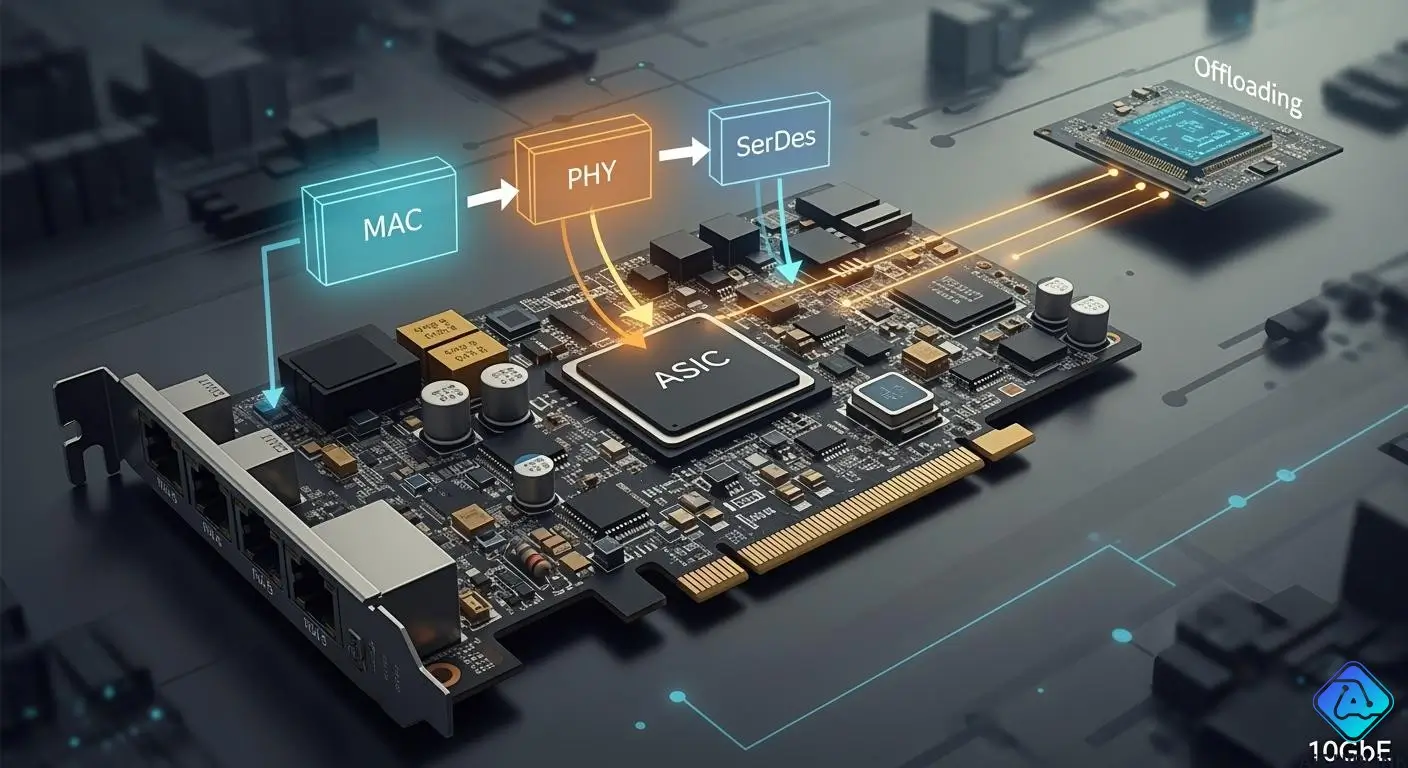
You want to learn how 10gbe nics work in your network. When you send or get data, 10 gigabit ethernet moves it through different parts. The MAC controls frames and links to your computer. The PHY changes signals so 10 gigabit ethernet can go through cables. SerDes helps 10gbe nics by changing data for fast speeds. Offloading lets 10 gigabit ethernet do jobs quickly. If you know how 10gbe nics work, you can make your 10 gigabit ethernet better.
-
MAC, PHY, SerDes, and offloading help 10gbe nics work fast.
-
You will see how each part helps 10 gigabit ethernet work well.
Key Takeaways
-
Learn what MAC, PHY, SerDes, and offloading do in 10GbE NICs. These parts work together to move data quickly and well.
-
Pick a 10GbE card with many queues, low delay, and low power use. This helps your network work better and faster.
-
Use offloading tools like TCP Segmentation Offload (TSO) to help the CPU. This lets your computer do other jobs and keep fast data speeds.
-
Make sure the 10GbE card works with older systems before you upgrade. Most 10GbE cards can work with old tech, so changes go smoothly.
-
Update drivers and firmware often to keep things working well. Updating stops slowdowns and makes your network more reliable.
How 10GbE NICs Work: Data Path Overview
10GbE NIC Architecture
A 10gbe network card acts like a smart bridge. It connects your computer to the network. Inside, different hardware parts work together. They move data very fast. Each part has its own job. Transmit and receive queues move packets in and out. MSI-X interrupts help your computer react fast to network events. Receive Side Scaling (RSS) spreads work across many processor cores. Physical Functions (PFs) and Virtual Functions (VFs) add advanced features. These features include things like virtualization. All these things make 10 gigabit ethernet strong and quick.
Here is a table that shows how hardware parts compare in performance and regular 10gbe cards:
| Component Type | Performance NICs | Commodity NICs |
|---|---|---|
| Transmit/Receive Queues | 1,024 | 128 |
| MSI-X Interrupts | 1,024 | 128 |
| Receive Side Scaling (RSS) | 64 per port | 16 per port |
| Physical Functions (PFs) | 16 | 2 |
| Virtual Functions (VFs) | 240 | 128 |
| Latency (half round trip) | < 4 microseconds | > 8 microseconds |
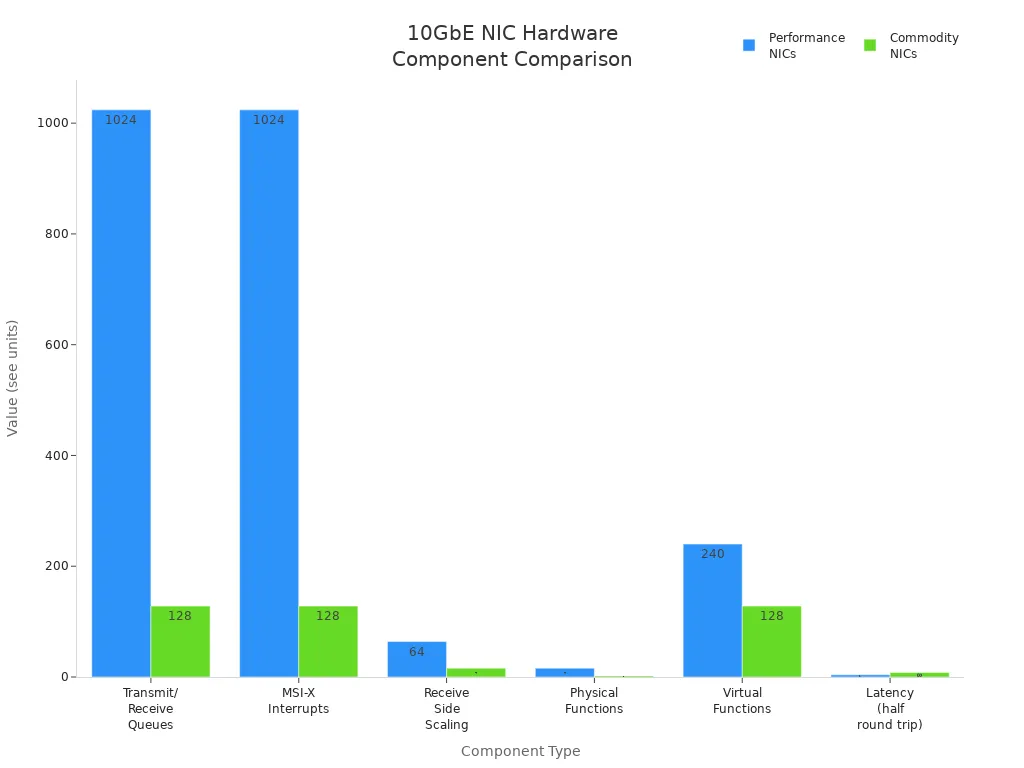
You can see that performance 10gbe cards have more queues and interrupts. They also have more functions. This lets them move more data and react faster. Lower latency means 10 gigabit ethernet gives quick results. This is important for data centers and high-speed computers.
Power use is also important when you pick a 10gbe card. Some cards use more energy than others. Here is a table that shows how much power different 10g cards use:
| NIC Type | Power Consumption (Watts) |
|---|---|
| 10Gbase-T | 12 |
| SFP+ | 4 |
| 10Gbase-T Switches | More than SFP+ and QSFP+ |
You can save energy by picking the right 10g card. SFP+ cards use less power than 10Gbase-T cards.
Step-by-Step Data Flow
You send data from your computer to the network with a 10gbe card. The data follows a clear path:
-
Your computer makes data packets and sends them to the 10gbe card.
-
The card puts packets in transmit queues.
-
The MAC puts packets into frames for 10 gigabit ethernet.
-
The PHY turns digital data into signals for cables.
-
SerDes changes data for fast serial sending.
-
The card sends signals over cables to the network.
-
When data comes in, the card gets signals and does the steps backwards.
-
The PHY turns signals back into digital data.
-
SerDes gets data ready for the MAC.
-
The MAC puts frames together and sends packets to your computer.
With 10 gigabit ethernet, you get full-duplex. This means you can send and get data at the same time. Here are some good things about full-duplex in 10gbe:
-
You can send and get data at once.
-
You do not get network slowdowns.
-
You get faster data speeds and better results.
10gbe cards work with many systems. Sometimes you need to connect new 10g cards to old equipment. Most 10 gigabit ethernet cards work with older tech. This helps you when you upgrade your network. You can keep good speed even with new and old tech together.
10gbe technology keeps getting better. In 2024, 10 gigabit ethernet cards became even faster and more reliable. Network as a Service (NaaS) makes it easier for apps to use the network. New DOCSIS 4.0 tech lets you get speeds over 9 gigabits per second. These changes help your 10g network work better.
Low latency is another big feature of 10gbe cards. You get fast data moves with almost no wait. This is important for data centers and places that need speed. The way 10 gigabit ethernet cards are built helps you avoid slowdowns. This keeps your network working well.
Tip: When you pick a 10gbe card, look for high queue counts, low latency, and low power use. These things help you get the best from your 10 gigabit ethernet network.
Now you know how data moves through a 10gbe card. Each part works together to give you fast, strong, and efficient 10 gigabit ethernet.
MAC and PHY in 10 Gigabit Ethernet
MAC Role in 10GbE NICs
The MAC, or Media Access Control, acts as the traffic manager for your 10g network interface card. You use the MAC to handle Ethernet frames and make sure your data follows the rules set by IEEE 802.3. The MAC connects your computer to the network by using the 10-Gigabit Media Independent Interface, also called XGMII. This connection lets your system send and receive data at 10g speeds.
You can see how the MAC works with other parts of your 10gbe card:
-
The MAC talks to your computer through XGMII.
-
It follows the rules for sending and receiving frames in 10 gigabit ethernet.
-
The MAC links to the PHY using XGMII, so data moves smoothly between digital and physical layers.
-
The MAC uses registers to talk with the PHY and check link status.
-
You can use these registers to set up your 10gbe card or check if your 10g link works.
The MAC makes sure your 10gbe network interface card keeps up with fast data. You get reliable frame delivery and smooth data flow in your 10 gigabit ethernet network.
PHY and Signal Transmission
The PHY, or Physical Layer, changes digital data into signals that travel over cables or fiber. You need the PHY to send your 10g data across different types of media. The PHY takes the digital signals from the MAC and turns them into electrical or optical signals. This step lets your 10gbe network interface card send data over copper cables or fiber optics.
The IEEE sets the rules for how these signals work in 10 gigabit ethernet. The PHY follows these rules to make sure your 10gbe card connects with other devices. The PHY also negotiates link settings with the device on the other end. You can use the PHY’s register interface to set up your 10g link or check its status.
You get support for different 10g standards, like 10GBase-T for copper and SFP+ for fiber. The PHY also helps your 10gbe card handle large frames, called jumbo frames, which use a bigger MTU (Maximum Transmission Unit). This feature lets you move more data in each packet, making your 10 gigabit ethernet network faster and more efficient.
Tip: When you choose a 10gbe network interface card, check if the PHY supports the cable type and MTU size you need. This helps you get the best speed and reliability from your 10g network.
SerDes and Offloading in 10GbE
SerDes in 10G Data Conversion
SerDes helps 10 gigabit ethernet move data very fast. SerDes stands for Serializer/Deserializer. It changes data from your computer into serial streams. This lets your 10gbe card send data quickly. SerDes makes sure data moves fast and does not get stuck. You need SerDes for high-speed ethernet to work well. When you use 10g fiber optic nics, SerDes gives you the speed you want.
10-Gb Ethernet (XAUI) uses four SerDes channels together. These channels give you a total bandwidth of 10g. This setup helps your 10gbe card send and get data without slowing down. SerDes uses different encoding schemes. Here is a table that shows how NRZ and PAM4 encoding work for 10g fiber optic nics:
| Encoding Scheme | Advantages | Disadvantages |
|---|---|---|
| NRZ (PAM2) | Easy to use, handles noise well, uses less power | Symbol rate is same as bit rate, needs more bandwidth for faster speeds, channel loss goes up with frequency |
| PAM4 | Sends twice as much data at same symbol rate, needs less bandwidth | Needs good SNR, can get noise easily, uses more power, hardware is harder to build, has more errors than NRZ |
Tip: If you want your 10gbe card to work best, check the encoding scheme. NRZ works for most 10g fiber optic nics. PAM4 can help you get faster speeds in some cases.
Offloading Features in 10GbE NICs
Offloading helps your 10 gigabit ethernet work faster and better. Offloading means your card does network jobs for your computer. This saves time and lets your computer do other things. Many 10g fiber optic nics use offloading. Here are some common offloading jobs:
-
Receive-Side Scaling (RSS) spreads network work to many CPU cores.
-
TCP Segmentation Offload (TSO) breaks big data into small pieces for faster sending.
-
Other offload features help with checksums and packet filtering.
Offloading makes your ethernet connections work better. Your 10gbe card does hard network jobs, so your CPU works less and data moves faster. You see smoother performance, especially when you use 10g fiber optic nics in busy places.
Note: Offloading features help a lot in 10 gigabit ethernet. You should look for these features when you pick a 10gbe card for your network.
Integration in 10G Fiber Optic Network Card
Packet Journey Example
When you send data with a 10g fiber optic network card, the packet takes a simple path. Your computer makes the data and gives it to the card. The MAC gets the packet and puts it in an Ethernet frame. Then, SerDes turns the frame into a fast serial stream. The PHY changes this stream into light signals for the fiber cable. The 10g fiber optic network card sends the light signal across the network very fast.
When you get data, the steps go backwards. The PHY takes the light signal and turns it into digital data. SerDes changes the serial data into parallel data. The MAC checks the frame and sends the packet to your computer. Offloading features in the 10g fiber optic network card help with jobs like segmentation and checksums. This lets your CPU do other things and keeps data moving fast.
You can use jumbo frames and big MTUs with many 10g fiber optic network cards. This means you send more data in each packet, so you get faster data transfer. But, using jumbo frames depends on your switch, hardware, software, and the transceiver you use. The table below shows what can change jumbo frame support:
| Factor | Description |
|---|---|
| Switch Compatibility | Different switches support jumbo frames in different ways. |
| Hardware and Software Influence | Hardware and software can change how big MTUs work. |
| Transceiver Performance | Some transceivers work better with big frame sizes. |
| Software Version | The software version can change the biggest frame size you can use. |
Tip: Always check your switch and transceiver details before you turn on jumbo frames for your 10g fiber optic network card.
Real-World Compatibility
You want your 10g fiber optic network card to work with lots of systems. Most cards work with popular operating systems and servers. The table below shows some common choices:
| Operating System | Version/Details |
|---|---|
| Windows | 7 (IA32 and X64) |
| Windows Server | 2008 (x64 and IPF) |
| Windows Server | 2008 Core (x64 and IPF) |
| Windows Server | 2008 R2 (x64 and IPF) |
| Windows Server | 2008 R2 Core (x64 and IPF) |
| Linux | SLES 11 SP1 |
| Microsoft Windows Server | 2003 |
| Microsoft | Vista |
| SUSE | SLES 10 or later |
| Microsoft Windows Virtual Server | 2005 |
| Red Hat Enterprise | 4 or later |
| FreeBSD | 5.x or later support |
| VMware | ESX 4.0/4.1, ESXi 5.0 support |
You should also think about real-life things when you use a 10g fiber optic network card in a data center. Fiber optic cards give you faster data speeds and low wait times. They cost more to set up and take care of, but they are good for the future. The table below shows important points:
| Consideration | Description |
|---|---|
| Performance | Fiber optic cards give you faster data speeds, over 10 Gbps, which is good for big data jobs. |
| Cost | You pay more at first and later because cables and transceivers cost more. |
| Latency | Fiber optics have less wait time and are not bothered by electromagnetic noise, so you get steady connections. |
| Scalability | Fiber optics can grow with your needs, so you do not need big upgrades later. |
| Installation & Maintenance | It is harder and costs more to set up and take care of fiber optic systems than Ethernet systems. |
Note: If you want the best from your 10g ethernet, plan for the cost, setup, and future needs. The right 10g fiber optic network card gives you the speed and steady network you want.
You can see how 10gbe and 10g ethernet work together inside your 10g fiber optic network card. If you pick the right card, you get fast data, good compatibility, and a strong network for your network interface cards.
You can see how MAC, PHY, SerDes, and offloading all help your 10g network work better. When you set up your 10g fiber optic network card, you should use certified cables. You also need to keep the rack cool and update your drivers. These things make your network faster. You should not use the wrong MTU settings or set up RAM badly. These mistakes can slow down your network. Updating firmware helps your 10g connection stay strong. If you know about these parts, you can pick better 10g cards and get the best speed.
Troubleshooting steps for 10g network performance:
-
Minimize EMI.
-
Control rack temperature.
-
Set speed/duplex manually.
-
Update NIC drivers and firmware.
-
Shorten cable runs or use fiber.
Common mistakes that reduce 10g network performance:
-
Mismatched MTU settings.
-
Poor RAM configuration.
-
Bad driver implementations.
Tip: Always update firmware and drivers to keep your 10g network performance high.

Written by Jack Elliott from AIChipLink.
AIChipLink, one of the fastest-growing global independent electronic components distributors in the world, offers millions of products from thousands of manufacturers, and many of our in-stock parts is available to ship same day.
We mainly source and distribute integrated circuit (IC) products of brands such as Broadcom, Microchip, Texas Instruments, Infineon, NXP, Analog Devices, Qualcomm, Intel, etc., which are widely used in communication & network, telecom, industrial control, new energy and automotive electronics.
Empowered by AI, Linked to the Future. Get started on AIChipLink.com and submit your RFQ online today!
Frequently Asked Questions
What does the MAC do in a 10GbE NIC?
You use the MAC to manage Ethernet frames. The MAC controls how your data moves between your computer and the network. It follows rules to keep your connection fast and reliable.
How does offloading help my computer?
Offloading lets your NIC handle network tasks. You save CPU power and get faster data speeds. Tip: Offloading features like checksum and segmentation boost your network performance.
Can I use jumbo frames with any 10GbE NIC?
You need to check your switch, NIC, and software. Some devices support jumbo frames, but others do not.
What should I do if my 10GbE network runs slow?
You should update your drivers and firmware. You can check your cables and MTU settings. · Use certified cables · Set speed manually · Control rack temperature