What Are Audio and Video Solutions and What Do They Include?
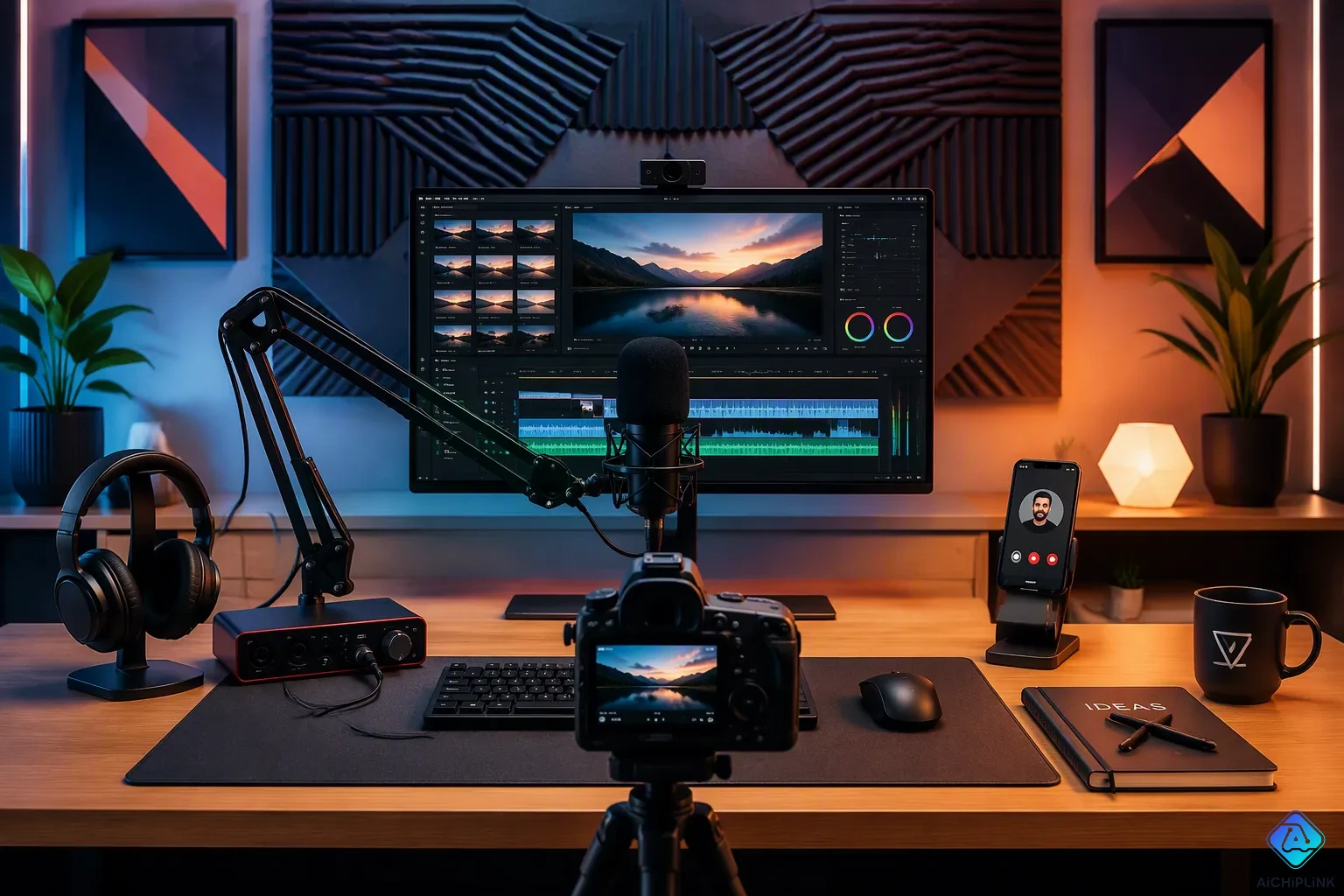
Audio and video solutions are connected systems that mix sound, video, and display tech into one smooth setup. You might call them audiovisual or AV solutions. These systems bring together gear like speakers, microphones, screens, and projectors, plus software for control and networking setup to link everything. The professional AV market for these audio-visual solutions grows steadily with a compound annual growth rate of about 7.2% over recent years. Businesses in many industries use these systems for digital signage in lobbies and hallways. Signage applications create engaging visual displays that inform employees and grab customer attention. Whether you need clear communication in a conference room or lively presentations in a public space, these connected systems help you get your message across well.
Key Takeaways
-
Audio and video solutions bring together sound, video, and control systems in one easy-to-use setup.
-
These systems include microphones, speakers, screens, cameras, and control panels that are easy to manage.
-
Control systems such as Crestron and AMX handle devices automatically, saving time in meetings.
-
Different places like conference rooms, classrooms, and entertainment venues need custom AV solutions.
-
Good planning and help make sure your AV system works well and lasts a long time.
What Audio and Video Solutions Include
Audio and video solutions are combined systems that bring together sound, video, and control technologies into one setup. These systems use hardware, software, and network parts that work together. Knowing the main parts of audio-visual solutions helps you plan a system that fits your space and goals.
Audio Components
Audio components capture, handle, and send sound through your room. Microphones pick up voices from tables, ceilings, or wireless devices. Speakers go on walls or ceilings and spread sound evenly. Amplifiers make signals stronger, mixers balance many inputs, and audio processors improve sound quality. Many new audio systems have noise-canceling tech and automatic gain control. These features keep speech clear in meetings and presentations.
You have to choose between wired and wireless microphones. Wired microphones give steady, clear signals with almost no delay. They cost less and do not need batteries. Wireless microphones let you move freely and have a clean setup with no cables on the floor. They use radio waves and need correct setup to avoid problems. You must manage batteries because a dead battery can ruin an event. Wired microphones are good for studios and buyers on a budget. Wireless ones work best for live shows, big rooms, and outdoor events.
Video Components
Video components handle everything your viewers see. High-quality displays show Full HD and 4K content using HDMI, VGA, or wireless links. Projectors work in big rooms where a fixed screen is not possible. Video conferencing cameras record at least 1080p with wide-angle lenses, autofocus, and pan-tilt-zoom control for large areas. Video walls make smooth big images across many panels. Media players and wireless presentation systems let you switch devices without cables. Products like Barco ClickShare and Crestron AirMedia do this job well.
Display technology keeps getting better. Direct-view LED screens now replace older LCD video walls in offices and stores. They give better brightness, save energy, and have smooth panel design. People want 4K and 8K resolutions more and more. Companies use these screens for impressive presentations and video calls. About half of new setups focus on smart integration with AI and IoT. This allows real-time content control, automation, and analysis. Digital displays and signs also improve from these advances. New digital signs use AI and live data for personal content. Cloud systems let you manage and update them from anywhere.
The quality and reliability of your AV gear depends on picking parts that fit your room size, user needs, and budget. A small meeting room needs different video systems than a big auditorium. Planning each part carefully stops expensive upgrades later.
Control and Connectivity in Audiovisual Systems
Control systems connect your audio and video parts so they work as one smooth unit. Without them, you have to adjust each device on its own. With them, a touch panel or voice command can run everything. These systems are the backbone of modern audio-visual solutions.
Control Systems and Automation
Control platforms from Crestron and AMX act as the smart center of your setup. They link every device into one ecosystem. Here is how they bring different parts together:
| Control System | Integration Approach |
|---|---|
| Crestron | Gives you a flexible platform that brings together all parts of an enterprise AV system for one room or whole buildings. |
| AMX (by Harman) | Offers advanced control solutions for large AV setups with automation you can customize. |
These platforms run your audio systems by changing volume levels and input sources on their own. They manage video systems by handling displays and routing sources. They also work with lighting and shades to set the mood.
The benefits are easy to measure. One-touch-to-join with Microsoft Teams Rooms or Zoom Rooms lets you walk in, tap your scheduled meeting, and the system turns on displays and starts the video call. This feature removes 80% of user frustration. Automated systems save about 6 minutes per meeting. For a company with 4,000 meetings a year, that gives back nearly 400 hours of productive time. Voice-activated control adds convenience. You can give one command to start a "Movie Night" routine that dims lights, closes blinds, and turns on the home theater system.
Networking and Infrastructure
Audio visual equipment needs a strong network to send signals. AV-over-IP technology removes the limits of physical cable runs. You can add new displays or sources without rewiring. Performance includes visually lossless video with almost no latency, which is critical for control rooms and live events. This technology supports digital signage distribution across large campuses.
Two networking standards lead the industry. Dante is a proprietary protocol that routes audio channels across Gigabit Ethernet. It supports up to 512 inputs and outputs. Many large enterprises pick Dante for growing networks. AVB is an open standard that guarantees bandwidth without licensing fees, which is ideal for schools.
| Feature | Dante | AVB |
|---|---|---|
| Licensing Model | Proprietary, per-port fees | Open standard, no licensing |
| Switch Requirements | No certification required | Requires AVB-certified switches |
| Latency Guarantee | ~1 ms at Gigabit | ≤2 ms at 100 Mbps |
For long-distance signal transmission, you have several choices. HDMI-to-SDI conversion extends video over long distances using SDI cable. Optical HDMI cables support runs up to 98.4 feet and cut down interference. SDI fiber multiplexers carry multiple channels over one fiber. Each approach serves different needs for conferencing, digital signage, or entertainment setups.
Types of Audio-Visual Solutions by Setting
Different spaces need different systems. A small huddle room and a concert hall use the same basic parts, but they use them in very different ways. The table below shows how the main sectors break down.
| Sector | AV Solution Categories |
|---|---|
| Corporate | Video conferencing systems; Boardroom and conference room AV; Digital signage; Wireless presentation systems |
| Education | Smartboards and interactive displays; PA systems; Classroom AV integration; Lecture capture systems |
| Entertainment & Hospitality | High-end sound systems; LED displays and projection mapping; Control automation systems; Home theater setups |
Conference Room Audio Video Solutions
Conference room audio video solutions focus on one goal: helping people meet without trouble. A modern video conferencing system must handle video, audio, teamwork, control, platform, management, and growth. Check each area before you buy. Remote view depends on resolution, field of view, framing, tracking, and zoom. Clear speech depends on microphone pickup, speakers, and echo and noise control.
Simple content sharing matters too. Users should share presentations and applications without stopping the meeting. Support both wireless and wired sharing, plus BYOD so guests can use the room's camera, microphone, speakers, and display. Larger rooms benefit from multiple screens. Remote participants and shared content then appear at the same time. A dedicated touch controller, such as the Yealink MTouch Plus for Microsoft Teams Rooms, lets users join, adjust settings, share content, and end calls the same way in every room.
Interactive whiteboards make these spaces stronger. They come in sizes from 55" to 105" with 4K Ultra HD resolution, touch interaction, and content sharing options. Teams can present, brainstorm, and decide together. Users share, edit, and annotate in real time. Digital signage helps workplace communication by showing announcements, safety updates, meeting room schedules, and promotions. Centralized remote management keeps every screen current.
Education, Events, and Entertainment
Educational AV solutions build on the same base. Smart classrooms use interactive flat panels, projectors, and LED displays for courseware. Ceiling speakers, microphones, and amplifiers carry clear sound to in-room and remote students. PTZ cameras, ePTZ cameras, and document cameras record and stream lectures. Wireless presentation lets students mirror laptops, tablets, and mobile devices without cables. AV-over-IP switching manages multiple sources across rooms. A McGraw-Hill Education Digital Trends Survey found that 62% of students say digital learning technology boosts their interest in course material.
Entertainment AV solutions focus on scale and show. Large-scale projection often needs 20,000 lumens or more per projector to cut through stage lighting. Teams blend multiple projectors into one seamless image. They build 3D scans of venues as blueprints for lining up visuals to walls and stage builds. Live streaming now uses 5G and adaptive bitrate streaming for high-resolution, low-buffering video. Interactive projection mapping lets guests trigger visuals by walking through a space.
Corporate AV solutions tie these settings together. Standard setups for small, medium, and large rooms make buying, support, and training easier. Centralized device management offers remote monitoring, updates, and fixing problems. Security features cover login, access control, and admin permissions. A flexible design grows as you add offices or change platforms.
Benefits of Audiovisual Solutions
Clearer Communication and Collaboration
Good audio and video solutions make everyday teamwork easier. A high-performance setup can cut meeting startup delays by as little as five minutes per meeting. That small saving adds up to hours of recovered productive time each week. Over 60% of respondents say the inability to see and engage participants hurts the meeting experience. The right audiovisual tools fix that problem directly.
The chart below shows how employees prefer to collaborate and what blocks them.
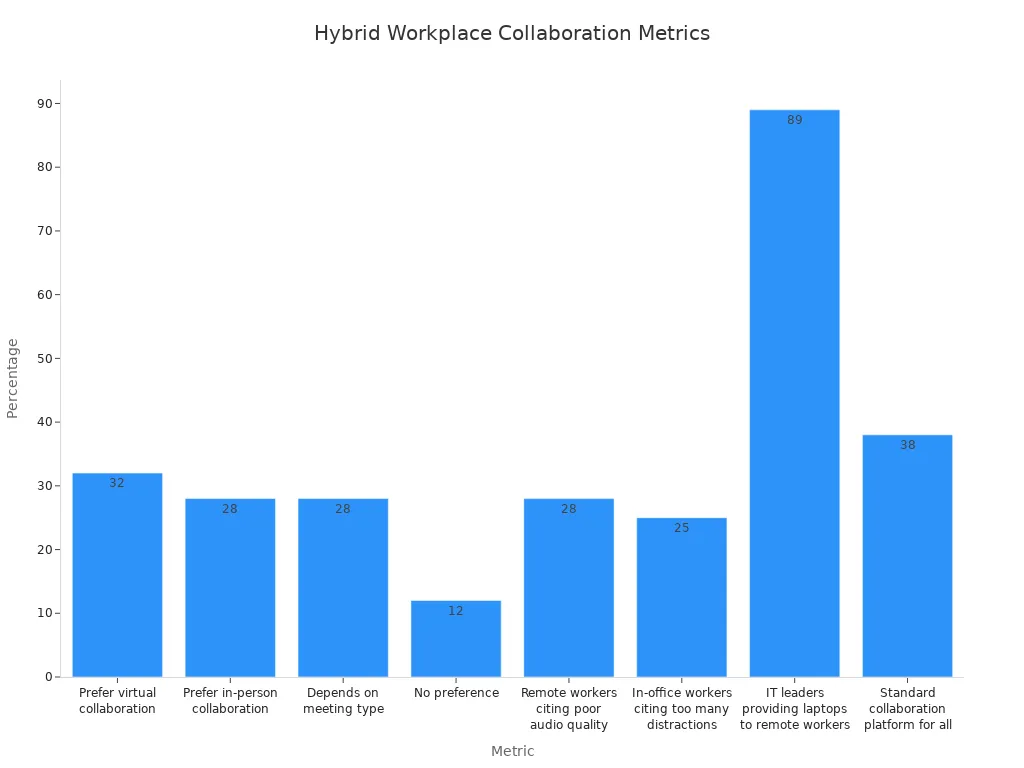
Wide-angle cameras with automatic tracking capture everyone in the room. Beamforming microphones improve audio clarity and reduce background noise. One-touch meeting connections and wireless presentation sharing cut technical setup time. These features deliver enhanced communication across every corporate meetings session. Teams also gain enhanced communication through digital signage that relays company news and promotes well-being initiatives. That signage fosters increased engagement and improves staff retention. Mobile apps let employees join meetings from smartphones or tablets, which drives increased engagement for remote staff. The quality and reliability of your video and audio gear directly shape how well people connect. Every room that adopts these tools sees enhanced communication become the norm.
Security and Peace of Mind
Modern systems protect your conversations and your data. End-to-end encryption secures video conferencing and classified briefings. Network access control uses 802.1x to restrict device access to authorized networks only. Audio transmissions use AES-256 encryption, a standard trusted by financial and government institutions. The Secure Remote Password protocol ensures user passwords never travel over the network in plain text. Data-at-rest encryption protects sensitive information stored on devices. Regular security testing and firmware patches maintain long-term protection. Tamper-proof technology prevents unauthorized access to your AV equipment. Access-controlled systems use multi-layer authentication for restricted environments. SCIF-approved solutions support Sensitive Compartmented Information Facilities. Classified video conferencing platforms handle high-level encryption needs. These safeguards give you the benefits of audio-visual solutions that keep sensitive discussions private and secure.
Choosing the Right Audio and Video Solution
Picking the right system means more than just buying new gear. You have to match the technology to your room, your work, and your money. A step-by-step plan helps you avoid expensive mistakes.
Assessing Needs and Space
The first step is to list your meeting types and how people work. Talk to the people who use the room every day. Ask them what problems they have and how they need to work together. Do you need a small huddle room, a boardroom, or a large meeting space? Then match these needs to room sizes using common categories. Huddle rooms fit up to 5 people. Small rooms hold up to 8. Medium rooms take up to 13. Large rooms fit up to 20.
Next, do a careful check of the room. Measure the size and look at the light levels. Bad light makes video look poor. Set brightness to a low, indirect level. Place lights so they do not reflect off the screen. Use spotlights that point away from screens. Stay away from uncovered windows facing the display because they lower contrast.
Sound conditions matter just as much. Walls should be matte and not shiny. Acoustic treatments help control echoes. Furniture and soft background noise keep the room quiet. These things directly affect what audio and video gear you choose.
Budget, Scalability, and Support
Your budget must cover more than just the cost of hardware. Different parts last different amounts of time. Commercial displays work for 6 to 8 years. Video conferencing bars and cameras need replacement every 4 to 6 years because software changes. Control processors and DSP units run 8 to 10 years. Speakers and amplifiers can last over 10 years. A full room refresh usually happens every 5 to 7 years. Plan your audio and video systems around these replacement times.
Scalability is important. Choose platforms that can grow with your company. Look for systems that let you add rooms or upgrade parts without replacing everything. AV-as-a-Service and leasing give you financial options.
Support is critical. When choosing the right AV equipment, check the integrator carefully. Look for AVIXA CTS certifications as proof they know what they are doing. Ask about their process covering consultation, design, installation, testing, training, and ongoing support. Look at service agreements and warranty terms. Do not just think about price. The right partner makes sure your audiovisual systems work well. Good support also helps you manage digital signage across your company. Well-kept signage keeps your messages fresh and engaging.
Audio and video solutions integrate audio components, video displays, control systems, and networking infrastructure into one unified setup. These systems support corporate meetings, education, events, and entertainment. Your choice depends on your organization's specific needs, room size, and budget. As you plan for 2025 adoption, follow these steps:
-
Evaluate your events and operations to identify benefits from upgraded technologies like wireless systems or XR.
-
Partner with AV professionals who provide skilled technical labor and implementation support.
-
Invest in training your internal teams to manage advanced systems effectively.
-
Stay competitive by attending industry events and monitoring emerging trends.
This careful evaluation helps you select the right audio-visual solutions for effective communication and impactful digital signage.

Written by Jack Elliott from AIChipLink.
AIChipLink, one of the fastest-growing global independent electronic components distributors in the world, offers millions of products from thousands of manufacturers, and many of our in-stock parts is available to ship same day.
We mainly source and distribute integrated circuit (IC) products of brands such as Broadcom, Microchip, Texas Instruments, Infineon, NXP, Analog Devices, Qualcomm, Intel, etc., which are widely used in communication & network, telecom, industrial control, new energy and automotive electronics.
Empowered by AI, Linked to the Future. Get started on AIChipLink and submit your RFQ online today!
Frequently Asked Questions
How do wired and wireless microphones differ for your setup?
Wired microphones give you steady, clear signals with almost no delay and cost less. Wireless microphones let you move around freely and keep cables off the floor. Pick wired ones for studios. Pick wireless ones for live events or big rooms. Both choices affect how clear your audio sounds.
What do control systems do in your AV setup?
Control systems from Crestron and AMX link all your devices into one smart unit. You can run displays, audio, lighting, and shades from a single touch panel. These systems make your audio-visual solutions easy to use.
What is AV-over-IP technology and why does it matter?
AV-over-IP sends video signals over your normal network. You can add displays or sources without running new wires. This technology gets rid of cable distance limits. It works great for big campuses and digital signage.
How long does your AV equipment typically last?
Commercial displays last 6 to 8 years. Video bars need to be replaced every 4 to 6 years. Control processors run 8 to 10 years. Speakers can last more than 10 years. Plan a full room refresh every 5 to 7 years.
What security features protect your AV system?
End-to-end encryption keeps your video calls secure. AES-256 encryption protects your audio transmissions. Network access control limits device access to approved networks only. These safeguards keep your private talks private.