Raspberry Pi vs. Leading Alternatives: Which Single Board Computer Wins in 2026
You want the best single-board computer in 2026. Orange Pi 5 Plus is the top Raspberry Pi alternative. The market for SBCs is bigger now. It reached $4.5 billion in 2026:
| Year | Market Size (USD) |
|---|---|
| 2026 | 4.5 billion |
You should think about what matters most. Performance, price, compatibility, and use case are important. These things help you choose:
| Factor | Description |
|---|---|
| Performance | Needed for AI and robotics. |
| Price | Important for budget-friendly sbcs. |
| Compatibility | Decides what software and hardware you can use. |
| Use Case | Features change for media centers, industrial tasks, or hobby projects. |
If you want raspberry pi alternatives, you must pick the right sbc for your needs. Alternatives work for AI, media, industrial, x86, and hobby projects.
Key Takeaways
-
The Orange Pi 5 Plus is the best other choice to Raspberry Pi in 2026. It works better for AI and video jobs.
-
When picking a single board computer, think about how fast it is. Also look at the price, if it works with your stuff, and what you want to do with it.
-
Raspberry Pi 5 is still a good pick for new users. It is easy to use and has lots of people who can help.
-
You can also look at Radxa Rock 5B+ and NVIDIA Jetson Orin Nano. These are good for harder things like gaming, AI, and robotics.
-
Always pick the board that fits your project best. This helps you get the best results and saves money.
Quick Verdict: Best Single Board Computer 2026
Top Pick: Orange Pi 5 Plus
You want a board that is special in 2026. The Orange Pi 5 Plus gives you great speed for most jobs. It does better with many tasks at once, video work, and AI than other boards. You can check the table to see how it compares:
| Benchmark Category | Orange Pi 5 Plus | Other SBCs (e.g., Raspberry Pi 5) |
|---|---|---|
| Multi-core Workloads | Superior | Inferior |
| Video Encoding | Superior | Inferior |
| AI Applications | Superior | Inferior |
You get fast speeds and smooth use. This board is good for hard projects, watching videos, and machine learning. You can trust it for fun or work. Many people pick it because it works well and supports many things.
Tip: If you need a board for AI or video, Orange Pi 5 Plus is the best pick.
Raspberry Pi 5: Still Relevant?
You might ask if Raspberry Pi 5 is still important. It is still a top choice for learning and easy projects. The board is simple to use and has a big group of users. You can find lots of guides and add-ons. But now, other boards are faster and have more features. For example:
-
ZimaBoard 2 has an N150 processor and two SATA connectors. It is better for network storage.
-
Radxa X4 is better than Raspberry Pi in most ways except saving power. It costs about the same and runs more operating systems with its x86 N100 processor.
You can use Raspberry Pi 5 for easy jobs, but you may want to try other boards for harder projects.
Notable Runners-Up
You have more good choices besides the top pick. These boards have cool features and good points:
-
Radxa Rock 5B+ gives strong speed and many ports.
-
NVIDIA Jetson Orin Nano is great for AI and robots.
-
BeagleBone AI-64 is made for work and real-time jobs.
-
ODROID-H3+ is good for home servers and networks.
-
ZimaBoard 2 and Radxa X4 let advanced users use x86.
You should pick the board that fits your project. Each board is best for different things. You can find one for a media center, AI, or a home server.
Meet the Raspberry Pi Alternatives
Orange Pi 5 Plus Overview
You want a board that gives you speed and flexibility. The orange pi 5 stands out because it uses a powerful Rockchip RK3588S processor. You get up to 32GB of RAM, which helps you run many programs at once. This board supports fast storage and has HDMI 2.1 for clear video. You can use it for AI, media centers, or even as a desktop computer. Many people choose this board when they look for raspberry pi alternatives.
Radxa Rock 5B+ Overview
You see the radxa rock 5b as a strong choice. The radxa rock 5b uses the RK3588 chip, which gives you high performance for games, servers, and AI. You get two HDMI ports, PCIe 3.0, and fast USB. The radxa rock 5b supports up to 16GB of RAM. You can use it for heavy tasks. The radxa rock 5b also works with many operating systems. If you want raspberry pi alternatives with more power, the radxa rock 5b is a smart pick.
NVIDIA Jetson Orin Nano Overview
You need a board for AI and robots. The NVIDIA Jetson Orin Nano gives you a strong GPU and special AI tools. You can use it for smart cameras, robots, or machine learning. This board supports many sensors and has a lot of memory. You get fast results when you work with AI. Many people use this board as one of the top raspberry pi alternatives for smart projects.
BeagleBone AI-64 Overview
You want a board for real-time work. The BeagleBone AI-64 uses a Texas Instruments chip. You get strong AI support and many ports for sensors. This board works well for robots, machines, and learning. You can use it for projects that need quick actions. The BeagleBone AI-64 is a good choice if you want raspberry pi alternatives for industry or education.
ODROID-H3+ Overview
You look for a board that acts like a small PC. The odroid h3+ uses an Intel Jasper Lake chip. You get two RAM slots and support for fast storage. This board works well for home servers, media centers, and network tools. You can run Windows or Linux. Many people pick this board when they want an sbc that feels like a desktop.
Other Notable Alternatives
You have more options. The ESP32 is small and cheap. You can use it for smart home projects. The Arduino Uno Q helps you learn about electronics. The zimaboard 2 and radxa x4 use x86 chips. You can run Windows, Linux, or even use them as firewalls. The zimaboard 2 gives you two SATA ports for storage. The zimaboard 2 is great for home servers. The zimaboard 2 also supports many operating systems. You can use the zimaboard 2 for media, storage, or network jobs. The radxa x4 gives you more power and supports many apps. You can find raspberry pi alternatives for every project.
Raspberry Pi 5 vs. Alternatives: Comparison Table
Specs & Performance
You want to compare raspberry pi 5 with other boards. The Radxa ROCK 5B+ gives you up to 32GB of RAM and a fast RK3588 chip. Orange Pi 5 Ultra offers LPDDR5 memory and Wi-Fi 6E. NVIDIA Jetson Orin Nano Super brings powerful AI with 67 INT8 TOPS. BeagleY-AI supports machine vision and real-time tasks. Raspberry pi 5 uses a Broadcom BCM2712 chip and up to 8GB LPDDR5. You get good performance for learning and basic projects. If you need best mainline kernel support, Radxa ROCK 5B+ stands out. You can run docker on all these boards, but some handle docker better with more RAM and faster chips.
| Board | RAM | CPU/SoC | AI Power | Main Feature |
|---|---|---|---|---|
| Raspberry Pi 5 | 2-8GB | BCM2712 | Basic | Well supported |
| Radxa ROCK 5B+ | Up to 32GB | RK3588 | 6 TOPS NPU | All-round upgrade |
| Orange Pi 5 Ultra | Up to 32GB | RK3588 | 6 TOPS NPU | Media & vision builds |
| NVIDIA Jetson Orin Nano | 8GB | Orin Nano | 67 INT8 TOPS | Robotics & AI |
| BeagleY-AI | 4GB | TI AM67A | DSPs, AI | Embedded vision |
Price & Value
You want the best value for money. Raspberry pi 5 costs less than most alternatives. Orange Pi 5 Plus (16GB) costs $130-$160. Radxa ROCK 5B+ costs $189-$229. NVIDIA Jetson Orin Nano Super costs $249-$299. ZimaBoard 2 costs $159-$229. Libre Computer Le Potato costs $35-$45. You get better performance-per-dollar with Orange Pi 5 Plus. If you need price-to-performance, Orange Pi 5 Plus and Libre Computer Le Potato offer strong choices. You can run docker on all these boards, but higher RAM helps with docker containers.
| Board | Price Range |
|---|---|
| Raspberry Pi 5 | $60-$90 |
| Orange Pi 5 Plus (16GB) | $130-$160 |
| Radxa ROCK 5B+ | $189-$229 |
| NVIDIA Jetson Orin Nano | $249-$299 |
| ZimaBoard 2 | $159-$229 |
| Libre Computer Le Potato | $35-$45 |
Compatibility & OS Support
You need boards that support many operating systems. Raspberry pi 5 supports Linux and Windows. Orange Pi 5 Pro supports Orange Pi OS (Droid), Orange Pi OS (Arch), Ubuntu, Debian, and Android 12. LattePanda 3 Delta supports Windows 10, Ubuntu, and other Linux systems. You get broad support for docker on all these boards. If you want stability, Raspberry pi 5 is well supported by its community. Orange Pi 5 Pro gives you more choices for OS and docker support.
| SBC Model | Operating Systems Supported |
|---|---|
| Raspberry Pi 5 | Linux, Windows |
| Orange Pi 5 Pro | Orange Pi OS, Ubuntu, Debian, Android 12 |
| LattePanda 3 Delta | Windows 10, Ubuntu, Linux |
Unique Features
You want features that make your sbc special. Raspberry pi 5 gives you DSI/CSI connectors, onboard WiFi, and Bluetooth. Le Potato offers low power use and eMMC storage. Radxa ROCK 5B+ gives you dual M.2 slots and Wi-Fi 6. Orange Pi 5 Ultra supports HDMI input and vision builds. NVIDIA Jetson Orin Nano Super brings CUDA and TensorRT for AI. You can run docker on all these boards, but some boards have unique hardware for docker workloads.
Tip: If you need docker for media, AI, or vision, Orange Pi 5 Plus and NVIDIA Jetson Orin Nano Super offer unique features.
Strengths & Weaknesses
Raspberry Pi 5 Pros & Cons
This board has a design that is easy to use. You can set it up quickly. Many people like the guides and accessories.
-
Pros:
-
Integrated design
-
Works offline
-
Modular and flexible
-
-
Cons:
-
Some modules have latency
-
Certain features need online access
-
Orange Pi 5 Plus Pros & Cons
This board has strong hardware and fast connections. The table shows how it compares to Raspberry Pi 5:
| Feature | Orange Pi 5 Plus | Raspberry Pi 5 |
|---|---|---|
| Hardware Capabilities | Great for storage-heavy workloads | Good for most tasks |
| Connectivity | PCIe Gen 3 ×4, dual 2.5G Ethernet | Standard ports |
| Ecosystem Support | Smaller, but growing community | Large, mature community |
| Use Cases | Self-hosting, containers, homelab | Vision tasks, AI kits |
You can use orange pi 5 for big jobs and storage. There are fewer guides, but the community is getting bigger.
Radxa Rock 5B+ Pros & Cons
| Pros | Cons |
|---|---|
| High Performance | Higher Price |
| Expandability | Sometimes Hard to Find |
| Good Build Quality | Steep Learning Curve |
| Open Hardware | Needs Strong Power Supply |
This board gives you silent 4K video and fast boot. You may need to buy a power adapter. You might spend more time setting it up.
NVIDIA Jetson Orin Nano Pros & Cons
This board is fast for AI jobs. It gives you 67 TOPS for AI, which is much more than Raspberry Pi 5.
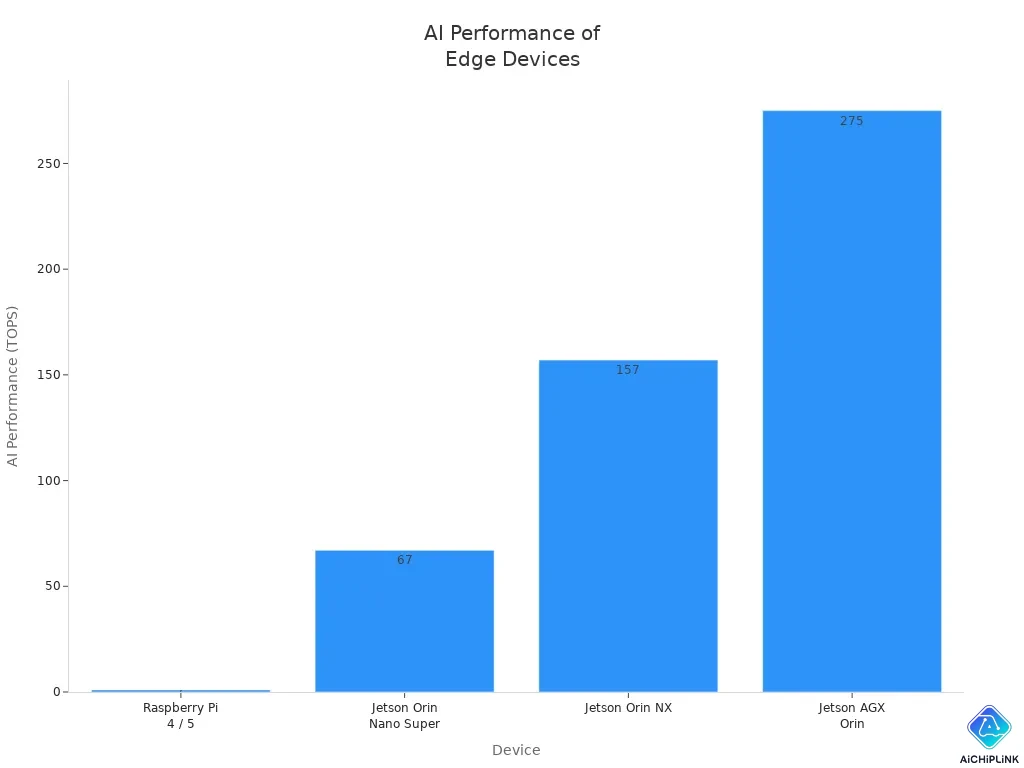
You can use it for robots and smart cameras. You may pay more and need to learn new tools.
BeagleBone AI-64 Pros & Cons
| Advantages | Disadvantages |
|---|---|
| Real-time processing | Complex PRUs |
| Reliable I/O control | Steep learning curve |
| Many GPIO and peripherals | Not easy for beginners |
This board gives you precise timing for machines. It can be hard to use if you are new to sbc boards.
ODROID-H3+ Pros & Cons
This board is small and uses x86. It has two fast network ports. You can add more network cards. The odroid h3+ works well for home servers. There are many guides and BIOS updates.
Other Alternatives Pros & Cons
| SBC Model | Strengths | Weaknesses |
|---|---|---|
| Particle Boron | WiFi, low cost, easy to use | No surface mount |
| BeagleBone Black | Simple setup, low power, many I/O pins | Lacks multimedia features |
| NVIDIA Jetson Nano | AI platform, GPU acceleration | Higher cost, needs better software support |
| Rock Pi 4 | High performance, low power, versatile GPIO | Expensive adapters, image quality issues |
| SeeedStudio NPi i.MX6ULL | HD video support | Some hat compatibility issues |
| SimpleLink Wi-Fi CC3200 | Multiple displays, good for gaming | Display and USB limits |
| ODROID boards | Fast, good heat management | More expensive, smaller community |
You can choose the best board for your project by looking at these strengths and weaknesses.
Best Use Cases for Raspberry Pi 5 and Alternatives
Beginners & Learning
If you are new to tech, start simple. Raspberry Pi 5 and Raspberry Pi Zero 2 W are great for beginners. These boards are easy to set up. You get lots of help from the community. There are many guides online. You can use them for coding and electronics. They are good for basic automation too. Look at the table to compare:
| Single Board Computer | Key Features | Price |
|---|---|---|
| Raspberry Pi 5 | Quad-core, 8GB RAM, dual 4K monitors, USB-C | $60-$70 |
| Raspberry Pi Zero 2 W | Compact, Wi-Fi, Bluetooth, 512MB RAM | $15 |
Tip: Pick Raspberry Pi 5 if you want more power.
Media Centers & Streaming
You can make your board play movies and music. Boards with HDMI and good network work best. Orange Pi 5 Plus and Radxa Rock 5B+ are top choices for media centers. They play 4K video and run apps like Kodi and Plex. The table shows what you need:
| Feature | Description |
|---|---|
| Video and Audio Output | HDMI for HD screens, analog for old TVs |
| Network Connectivity | Ethernet and Wi-Fi for streaming |
| Storage Capacity | SD card or eMMC for media files |
| Software Compatibility | Runs Kodi and other media apps |
If you want a media center, pick a board with HDMI 2.1 and strong network.
AI & Machine Learning
You need a strong board for AI and machine learning. NVIDIA Jetson Orin Nano and ROCK Pi N10 have fast CPUs and GPUs. These boards work well for smart cameras and robots. You can use them for data analysis and advanced projects. They give you quick results.
| SBC Name | CPU Specs | GPU Specs | NPU/ML Accelerator | RAM |
|---|---|---|---|---|
| Jetson Orin Nano | 8-core ARM v8.2 | 512-core Volta GPU | 2x NVDLA Engines | 32GB |
| ROCK Pi N10 | RK3399Pro | Mali T860MP4 | 3.0 TOPS | 4-8GB |
Industrial & Real-Time Applications
You want a board for factories and robots. Kickpi K8 and Kickpi K7 are made for industry. They give you edge AI and dual Ethernet. You get real-time control for smart systems. NVIDIA Jetson Orin Nano is also good for automation and robotics.
-
Kickpi K8: Best for computer vision and edge AI.
-
Kickpi K7: Good for smart home and cars.
-
NVIDIA Jetson Orin Nano: Top for robots and real-time jobs.
Home Servers & Networking
You can build a server for your home or office. ZimaBlade, Odroid H3+, and LattePanda Sigma are strong picks. These boards have fast Ethernet and SATA for storage. They support many operating systems. You can run a media server, NAS, or router.
| Model | Key Features | Use Case |
|---|---|---|
| ZimaBlade | Gigabit Ethernet, SATA, PCIe | NAS, media server |
| Odroid H3+ | Intel CPU, up to 64GB RAM | High-performance server |
| LattePanda Sigma | Quad 4K displays, edge computing | Smart home server |
DIY & Maker Projects
You can use many boards for DIY projects. Raspberry Pi 5, Orange Pi 5 Pro, LattePanda 3 Delta, Nvidia Jetson Nano, Raspberry Pi Zero 2 W, Odroid H3+, Radxa X4, and ZimaBlade are all popular. These boards are cheap and flexible. You can build robots and smart devices. You can make custom media centers too. There are many options to fit your ideas.
Note: Pick a board that matches your project’s needs for power, ports, and community help.
Compatibility & Ecosystem
OS Support & Software
You want your board to use the right software. Raspberry Pi 5 works with Raspberry Pi OS, Ubuntu, and many Linux systems. Orange Pi 5 Plus can run Android, Ubuntu, and Debian. Radxa Rock 5B+ lets you use Linux and Android. NVIDIA Jetson Orin Nano uses JetPack, which is based on Ubuntu, for AI projects. BeagleBone AI-64 runs Debian and other Linux systems. You can find lots of guides to help you install these systems. Most boards let you use Docker for containers. This makes it easy to run apps. You should look at the board’s website for the newest OS images.
Tip: Try out different operating systems to see which one is best for your project.
HATs & Accessories
You can add HATs and accessories to make your board do more things. Raspberry Pi 5 has many HATs for sensors, cameras, and screens. Orange Pi and Radxa boards can use some Raspberry Pi HATs, but not all of them. NVIDIA Jetson Orin Nano uses special add-ons for AI and robots. BeagleBone AI-64 has capes for work in factories. You can find cases, fans, and power supplies for every board. Good accessories can make your project easier. Always check if the HAT or accessory fits your board before you buy it.
| Board | HAT/Accessory Support |
|---|---|
| Raspberry Pi 5 | Largest community of HATs |
| Orange Pi 5 Plus | Some Pi HATs, own add-ons |
| Radxa Rock 5B+ | GPIO, some Pi HATs |
| NVIDIA Jetson Orin | AI modules, cameras |
| BeagleBone AI-64 | Capes for industry |
Community & Documentation
You need help when you build something new. Raspberry Pi has the biggest group of users. You can find answers to almost any question. Orange Pi and Radxa have more people joining their groups now. NVIDIA Jetson Orin Nano has a very active group for AI and robots. BeagleBone users share lots of guides for real-time projects. You can join forums, read wikis, and watch videos. Good guides help you fix problems fast. You should join the group for your board. You will learn faster and get better results. Every sbc works best when you use help from the community.
Note: The community can help you fix problems and share new ideas.
Choosing the Right Board
User Profiles & Decision Checklist
You want to find the best single board computer for you. First, think about how you will use your board. Different people need different things from their boards. Use this checklist to help you pick:
-
Write down what you need your board to do. If you need fast speed or special ports, make a list.
-
Look at all the boards that fit your project. Compare what each board can do.
-
Think about the computer module type. Some boards use ARM, and some use x86. This changes how you run programs and keep your board working.
-
Remember, the price is not the only cost. You also pay for things like cases, power, and fixing problems.
-
Check if the board works well in hot or cold places. This is important if you use it outside or in a factory.
-
Look for ethernet, the size of the case, and how fast the board is. These things matter for home servers, media centers, and work projects.
Here is a table to help you match what you need to the right board:
| User Profile | Key Needs | Recommended Board |
|---|---|---|
| Beginner | Easy setup, guides | Raspberry Pi 5 |
| Media Center Builder | HDMI, fast network | Orange Pi 5 Plus |
| AI Enthusiast | GPU, AI tools | NVIDIA Jetson Orin Nano |
| Industrial User | Real-time, robust ports | BeagleBone AI-64 |
| Home Server Owner | x86, storage, ethernet | ODROID-H3+ |
| Maker/DIY | Flexible, GPIO, community | Radxa Rock 5B+ |
Tip: Always think about what your project needs before you pick a board. The right board will work well and save you money later.
Use this checklist to help you choose the best board. Every project is not the same. Pick a board that fits your goals and where you will use it.
You have many choices for your next sbc. Orange pi 5 stands out as the best Raspberry Pi alternative for most users. Raspberry pi 5 works well for learning and simple projects. If you want more power, try boards like Rock PiX or Latte Panda. The raspberry pi 5 community is strong, but the market keeps growing. You should always match your needs to the right board. For more ideas, join forums and read about new releases.
Each project is unique. Pick the board that fits your goals and budget.

Written by Jack Elliott from AIChipLink.
AIChipLink, one of the fastest-growing global independent electronic components distributors in the world, offers millions of products from thousands of manufacturers, and many of our in-stock parts is available to ship same day.
We mainly source and distribute integrated circuit (IC) products of brands such as Broadcom, Microchip, Texas Instruments, Infineon, NXP, Analog Devices, Qualcomm, Intel, etc., which are widely used in communication & network, telecom, industrial control, new energy and automotive electronics.
Empowered by AI, Linked to the Future. Get started on AIChipLink and submit your RFQ online today!
Frequently Asked Questions
What is a single board computer (SBC)?
You use a single board computer as a complete computer on one circuit board. It has a processor, memory, and input/output. You can build projects, learn coding, or run servers with an sbc.
Can I use Raspberry Pi accessories with other boards?
You can use some Raspberry Pi accessories with other boards. Always check compatibility before you buy. Some boards support Raspberry Pi HATs, but not all features may work.
Which board is best for learning programming?
You should start with Raspberry Pi 5. It has many guides and a large community. You find lots of help online. This board makes learning programming easy and fun.
Do these boards support Wi-Fi and Bluetooth?
Most modern boards support Wi-Fi and Bluetooth. You should check the specs for each board. Some boards need extra modules for wireless features.
How do I choose the right board for my project?
You should list your needs first. Think about speed, ports, and what you want to build. Compare boards based on your project goals. Pick the one that matches your requirements best.