How to choose the right Wi-Fi 7 chipset for gaming
You want the best Wi-Fi 7 chipset for gaming. Picking one can seem hard. Hardware compatibility is important. The newest processor and motherboard help wi-fi 7 work its best. Your router and card both need to support wi-fi 7. This gives you fast speeds and steady connections. Wi-fi 7 uses 4K QAM to send data better. Multi-Link Operation lets your wi-fi use more than one band at once. This makes your connection more reliable. Wi-fi 7 has lower latency and works better than older wi-fi. Think about your setup and how to get ready for the future with the Best Wi-Fi 7 Chipsets.
-
Wi-fi 7 uses 4K QAM. This lets it send data faster and lowers latency.
-
Multi-Link Operation lets you connect on many bands at the same time. This makes your connection more reliable.
-
Wi-fi 7 lowers latency and works better than wi-fi 6 and 6E.
Key Takeaways
- Wi-Fi 7 gives you faster speeds and less delay. This makes your gaming much better. Make sure your gaming devices and router work with Wi-Fi 7. This helps you get all the new features. Think about how your home is set up. Walls and furniture can make signals weaker. Put your router in the middle of your home for better signal. Use a checklist to look at Wi-Fi 7 chipsets. Check their speed, delay, how well they work, and what other users say. Update your firmware often. This keeps your Wi-Fi 7 working well and safe.
Identify Gaming Setup Needs
Gaming Devices and Platforms
You need to know which wi-fi 7 devices you use for gaming. Many gamers play on different platforms. Some use smartphones like the iPhone 17 or top Android models such as the Samsung Galaxy S24 Ultra and Asus ROG Phone 9 series. Others prefer laptops or PCs. Popular gaming laptops from MSI, Lenovo, Acer, and Razer now come with wi-fi 7 chipsets. These wi-fi 7 client devices give you faster speeds and better connections. Make a list of your main devices. This helps you choose the right wi-fi 7 chipset for your setup.
Network Environment
Your home network affects how well wi-fi 7 works. Physical obstacles like walls and furniture can block wi-fi signals. Electronic devices may cause interference and disrupt your connection. The size and layout of your space matter too. Large homes or rooms with thick walls may need more access points for strong wi-fi coverage. Wi-fi signals get weaker as they travel farther or pass through materials like concrete and metal. If many devices share your network, you might see slower speeds and more congestion. Think about where you play games and how many wi-fi 7 client devices connect at once.
Tip: Place your wi-fi 7 router in a central spot to reduce signal loss and improve coverage for all wi-fi 7 client devices.
Performance Expectations
Set clear goals for your gaming experience. Wi-fi 7 can reach data rates up to 46 Gbps. This means you get faster downloads and smoother gameplay. You also get up to four times lower latency than wi-fi 6. Lower latency is important for real-time gaming and streaming. Multi-Link Operation lets your wi-fi 7 client devices use more than one band at the same time. This boosts reliability and speed, even when your network is busy. Decide if you want the best possible performance or just a stable connection for casual gaming. Your needs will guide your choice of wi-fi 7 chipset.
Key Wi-Fi 7 Technology Features
Speed and Bandwidth
You need fast speeds for gaming. Wi-fi 7 is much faster than older wi-fi. It gives you better throughput. Look at the table below to see the difference:
| Specification | Value |
|---|---|
| Max Data Rate | ~9.6 Gbps (theoretical) |
| ~30 Gbps (theoretical; >4× Wi-Fi 6) | |
| Max Channel Width | 160 MHz |
| 320 MHz (in 6 GHz band) |
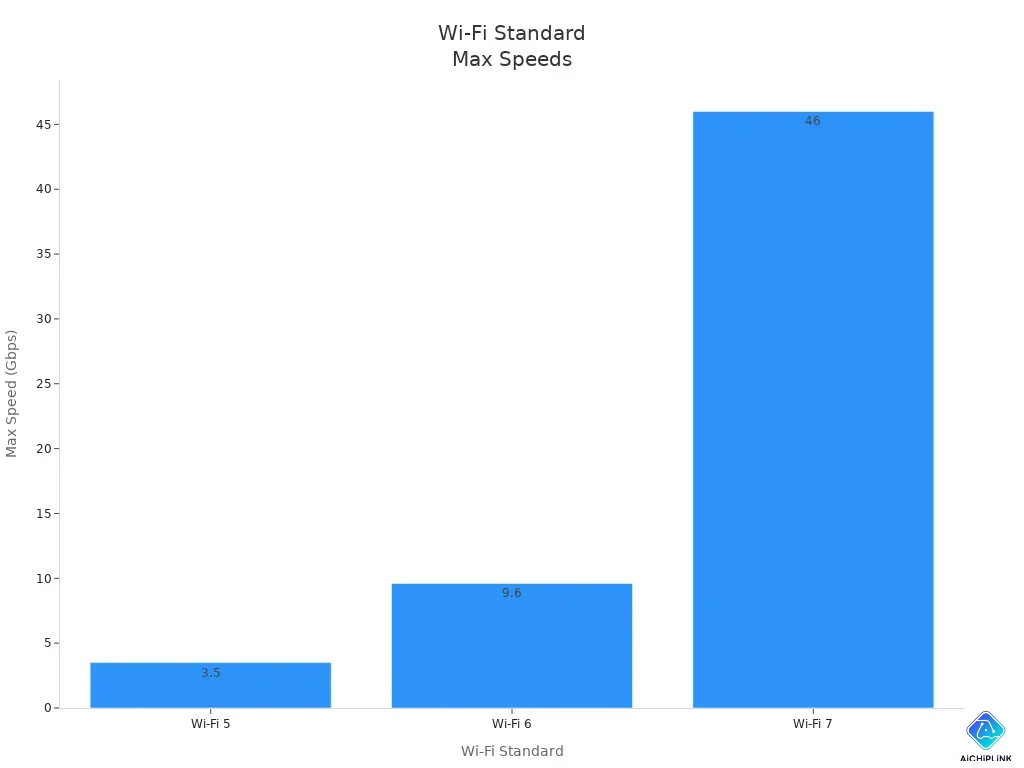
Wi-fi 7 can reach up to 46 Gbps. This is much faster than wi-fi 6e or wi-fi 5. You get quicker downloads and smoother online play. The chart below shows how wi-fi 7 is better than older wi-fi:
Low Latency and Stability
Low latency matters for gaming. Wi-fi 7 can lower latency by up to four times compared to wi-fi 6e. You will notice less lag and faster response. This helps you react quickly in games. Wi-fi 7 chipsets use Multi-Link Operation to send data over more than one band. This keeps your connection stable, even when many devices are on the network. You avoid lag spikes and keep your performance high.
-
Wi-fi 7 lowers latency by up to four times compared to wi-fi 6e.
-
Multi-Link Operation spreads traffic across bands, keeping latency low and connections stable.
-
You get fewer delays and better performance during intense gaming.
Tri-Band and Advanced Features
A tri-band wi-fi 7 router lets you use 2.4 GHz, 5 GHz, and 6 GHz bands at the same time. This helps you avoid network congestion and keeps your games running smoothly. Wi-fi 7 chipsets have advanced features that boost your gaming experience:
| Feature | Benefit |
|---|---|
| Multi-Link Operation (MLO) | Makes data transfer more efficient, reducing delays and retries, which is important for gaming. |
| Preamble Puncturing | Cuts overhead, so bandwidth is used better and congestion is reduced. |
| 16x16 MU-MIMO | Supports many connections at once, improving network capacity and performance. |
-
Multi-Link Operation lets you use all three bands for better speed and reliability.
-
Preamble Puncturing and 16x16 MU-MIMO help your wi-fi 7 network handle many devices without slowing down.
-
These improvements make wi-fi 7 a big step up from wi-fi 6e for gaming.
Tip: Pick a wi-fi 7 chipset and router that support tri-band features for the best gaming performance.
Compatibility with Wi-Fi 7 Routers and Hardware
Motherboard and Processor Requirements
You need the right hardware to unlock the full power of wi-fi 7. Your motherboard and processor must support the latest standards. Many new motherboards come with slots for wi-fi 7 cards. If you use an older motherboard, upgrading the wi-fi card may not give you the best wi-fi 7 experience. Modern processors help your system handle the fast speeds and advanced features of wi-fi 7, like Multi-Link Operation and Preamble Puncturing. These features boost your gaming performance by lowering latency and increasing throughput.
-
Multi-Link Operation lets your device use more than one band at once.
-
Preamble Puncturing helps your wi-fi avoid interference.
-
Wi-fi 7 supports up to 320MHz channel bandwidth on the 6GHz band.
-
Peak speeds can reach up to 46 Gbps, much higher than older wi-fi.
If you want the best wi-fi 7 experience, make sure your motherboard and processor are up to date.
Router and Card Support
To get the most from wi-fi 7, you need both a wi-fi 7 router and a wi-fi 7 card in your gaming device. If you only upgrade one, you will not see the full benefits. The best wi-fi routers for gaming, like the Archer BE670, Archer GE400, and Archer BE800, support tri-band wi-fi 7. These routers can handle large game downloads and many devices at once. A wi-fi 7 card in your PC or laptop lets you connect at top speeds and enjoy lower latency.
| Wi-Fi 7 Routers | Wi-Fi 7 Cards/Adapters |
|---|---|
| Archer BE670 | Archer TBE550E |
| Archer GE400 | Archer TBE400E |
| Archer BE3600 Pro | |
| Archer BE550 | |
| Archer BE700 | |
| Archer BE800 | |
| Archer BE19000 | |
| Archer GE800 |
Tip: Always pair your wi-fi 7 card with a wi-fi 7 router for the best gaming performance. This setup lets you use the 6GHz band and advanced features like Multi-Link Operation.
If you want smooth gameplay and fast downloads, make sure both your router and wi-fi card support wi-fi 7. Upgrading both parts of your network ensures you get the full speed, low latency, and reliability that wi-fi 7 offers.
Compare Best Wi-Fi 7 Chipsets
Evaluation Checklist
You want to pick the best wi-fi 7 chipsets for gaming. Make a simple checklist to help you compare choices. This makes it easier to find the right chipset for your setup.
-
Check the speed. Fast speeds let you download games quickly.
-
Look at latency. Low latency means your games react fast.
-
Test reliability. You need a stable connection that does not drop.
-
Review firmware support. Good firmware keeps your wi-fi card updated.
-
Read user feedback. Other gamers share if a chipset works well.
Tip: Use this checklist when shopping for a wi-fi card or router. It helps you focus on what matters most for gaming.
Leading Chipset Options
There are many wi-fi 7 chipsets to choose from. Some models are popular because they perform well and have good support. Here are two top options:
| Chipset Model | Speed | Latency | Reliability | Firmware Support | User Feedback |
|---|---|---|---|---|---|
| Intel AX210 | Very High | Very Low | Excellent | Strong | Positive |
| Intel AX6000 | Extremely High | Ultra Low | Excellent | Strong | Very Positive |
Both Intel AX210 and AX6000 work well with new routers. They support fast speeds and low latency. You get reliable wireless connections. Firmware support keeps your wi-fi card working with new standards. These chipsets also work with older wi-fi routers if needed.
Note: Always check if your router supports the chipset you pick. This makes sure you get all the benefits of wi-fi 7.
Real-World Gaming Performance
You want to know how wi-fi 7 chipsets work in real games. Many gamers say they get faster speeds and smoother play with these chipsets and a wi-fi 7 router. You see lower ping times and fewer lag spikes. This helps a lot in fast games like shooters or racing.
A recent test showed wi-fi 7 chipsets give:
| Feature | Wi-Fi 7 Improvements |
|---|---|
| Speed | Faster speeds than Wi-Fi 6 and 6E |
| Latency | Lower latency for real-time applications |
| Capacity | Higher capacity for dense environments |
| Reliability | Enhanced reliability for wireless connections |
| Firmware Support | Backward compatibility with previous Wi-Fi standards |
You get higher capacity, so your network can handle more devices. Enhanced reliability means you do not lose connection during matches. Firmware support keeps your wi-fi card updated and safe.
Tip: For the best gaming, use your wi-fi card with a good router. This setup lets you use all the advanced features of wi-fi 7.
If you want the best wi-fi 7 chipsets for gaming, look for strong reliability, good firmware support, and positive user feedback. These chipsets help you stay ahead in every game.
Practical Buying Tips
Reading Reviews
You should read reviews before you buy a wi-fi card or router. Reviews from gamers help you find problems and good features. Look for feedback about speed and reliability. See how well the wi-fi works for gaming. Many reviewers share their real experience with wi-fi 7 devices. They talk about if the router keeps a strong signal. They also mention if the wi-fi drops during games. You can check if the wi-fi card fits your gaming setup. Reading reviews helps you avoid mistakes and pick the right product.
Tip: Pay attention to reviews about gaming performance, not just regular wi-fi use.
Firmware and Security Updates
Firmware updates keep your wi-fi 7 chipset fast and safe. These updates fix bugs and improve performance. They add new features to help your wi-fi card and router work better for gaming. Security updates protect your network from hackers. They keep your data safe. Wi-fi 7 uses WPA3 for strong encryption and better authentication. You get safer connections, even on open networks. Always check if the maker gives regular firmware updates for your wi-fi card and router.
| Aspect | Impact of Firmware Updates on Wi-Fi 7 Chipsets in Gaming |
|---|---|
| Performance | Makes gaming work better and faster. |
| Security | Updates keep security strong and stop threats. |
| Encryption | Uses WPA3 for better encryption and login safety. |
| Risk Mitigation | Lowers risks of hacking and data loss with strong protection. |
-
Wi-fi 7 uses WPA3 for strong encryption.
-
Regular firmware updates are needed for good security.
Future-Proofing Your Setup
You want your gaming setup to last a long time. When you upgrade to wi-fi 7, pick devices with the newest features. Look for low latency and high throughput. Multi-Link Operation is important too. These features help your wi-fi handle new games and things like VR and cloud gaming. Wi-fi 7 gives you up to four times lower latency than wi-fi 6. You get faster downloads and smoother play. Multi-Link Operation lets your device use more than one band at once. This makes your connection more reliable. Choose a router and wi-fi card that support these features to keep your setup ready for the future.
-
Low latency matters for real-time gaming.
-
High throughput makes downloads and streaming faster.
-
Multi-Link Operation improves performance and reliability.
Note: Wi-fi 7 lets you enjoy new gaming like wireless VR and AR with stable and fast connections.
You can pick the right wi-fi 7 chipset for gaming by thinking about what is most important. Match the chipset features to your gaming needs. Make sure your hardware and router use the newest wi-fi standards. The table below lists key features and how they help your gaming:
| Feature | Benefit |
|---|---|
| Lower Latency | Faster response in real-time games |
| Multi-Link Operation | Better data transfer and less delay |
| 16x16 MU-MIMO | Stable connections for many devices |
Keep learning about wi-fi technology. This helps you get great gaming performance now and later.

Written by Jack Elliott from AIChipLink.
AIChipLink, one of the fastest-growing global independent electronic components distributors in the world, offers millions of products from thousands of manufacturers, and many of our in-stock parts is available to ship same day.
We mainly source and distribute integrated circuit (IC) products of brands such as Broadcom, Microchip, Texas Instruments, Infineon, NXP, Analog Devices, Qualcomm, Intel, etc., which are widely used in communication & network, telecom, industrial control, new energy and automotive electronics.
Empowered by AI, Linked to the Future. Get started on AIChipLink and submit your RFQ online today!
Frequently Asked Questions
What makes Wi-Fi 7 better for gaming than Wi-Fi 6 or 6E?
Wi-Fi 7 gives you faster speeds, lower latency, and better stability. You get smoother gameplay and fewer lag spikes. Multi-Link Operation lets your device use more than one band, which helps keep your connection strong during intense gaming sessions.
Do I need to upgrade both my router and my Wi-Fi card for Wi-Fi 7?
Yes, you need both a Wi-Fi 7 router and a Wi-Fi 7 card to enjoy all the new features. If you only upgrade one, you will not get the full speed or low latency that Wi-Fi 7 offers.
Will Wi-Fi 7 work with my older devices?
Wi-Fi 7 routers support older Wi-Fi standards. Your older devices can still connect, but they will not get the speed or low latency benefits of Wi-Fi 7. Only Wi-Fi 7 devices can use all the advanced features.
How do I know if my motherboard supports a Wi-Fi 7 card?
Check your motherboard’s specifications. Look for an M.2 slot or PCIe slot that supports Wi-Fi cards. Newer motherboards often list Wi-Fi 7 compatibility. If you are unsure, ask the manufacturer or check the manual.
Is Wi-Fi 7 safe for online gaming?
Yes, Wi-Fi 7 uses WPA3 encryption. This keeps your data safe from hackers. Regular firmware updates also help protect your network. You can play online games with strong security and peace of mind.