Development Board vs Single-Board Computer Which Is Right for Your Project
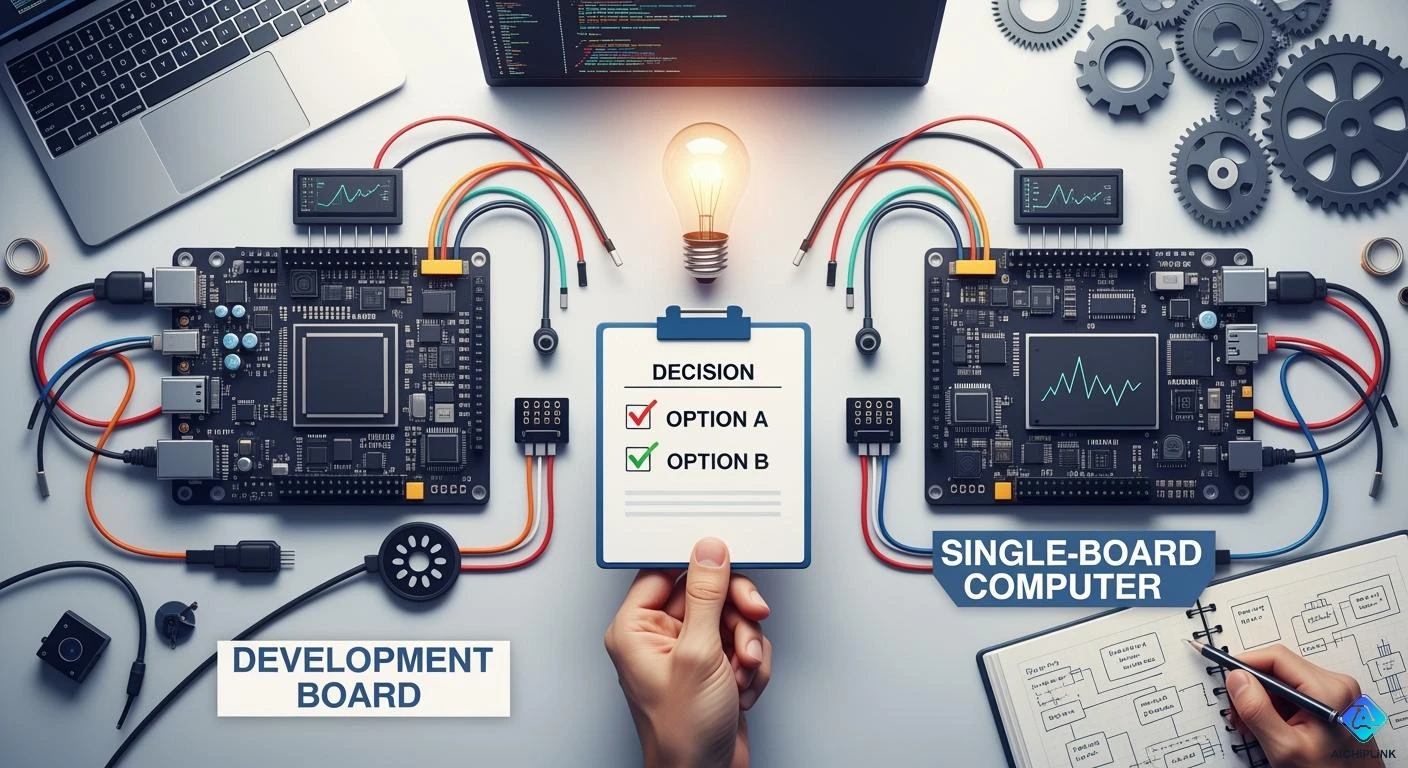
When you compare a Development Board vs Single-Board Computer, you notice a significant difference. Development boards allow you to control hardware for testing and building, while single-board computers function like compact computers for various applications. Your choice should depend on your project requirements. Some projects demand substantial processing power, whereas others may need to interface with sensors or specific operating systems.
-
Your project's needs will guide your selection:
-
Complex tasks require more processing power.
-
Projects involving videos necessitate video playback capabilities.
-
IoT projects must connect sensors and operate with minimal power consumption.
-
Key Takeaways
-
Pick a development board if you need to control hardware. It gives you more ways to test and change things.
-
Use a single-board computer if you want a small system that does everything. It works well for running programs and doing hard jobs.
-
Think about what your project needs. Choose the right board for what you want to do, like IoT, multimedia, or robotics.
-
Plan your spending. Development boards usually cost less. Single-board computers can do more but cost more.
-
Use guides and resources that are out there. Good help can make your project easier and help you learn better.
What Is a Development Board
A development board helps you make and test new ideas fast. You can build circuits and check if they work before making the final product. This board lets you connect things like sensors and motors. You can see how each part works by using the board. Many people pick a development board because it is flexible and can be changed for different projects.
Main Features
Most development boards have similar parts. These parts let you try many projects and change things easily. Here is a table that shows the main parts:
| Hardware Component | Description |
|---|---|
| Power Supply | Gives steady power with adapters, USB, or batteries. It uses voltage regulators. |
| Input/Output (I/O) Pins | Connects sensors and devices. Handles digital and analog signals. |
| Communication Interfaces | Has USB, UART, SPI, I2C, and GPIO. These help move data and control things. |
| Memory | Flash memory keeps code. RAM holds data while the board runs. |
| Oscillators and Clocks | Makes timing signals to keep things in sync. Often uses crystal oscillators. |
| Connectors and Headers | Lets you add modules like cameras and screens. Uses pin headers and ports. |
| LEDs and Buttons | Shows status and lets you give input. Helps with debugging. |
| Debugging Interface | Tools like JTAG and serial interfaces help fix problems. |
You can use these parts for lots of projects. The good things are easy changes, strong tools for fixing problems, and connecting many devices. The bad things are less power and sometimes not much software help.
Common Uses
Development boards are used in many fields. They are important for testing and making new things. Here are some ways people use them:
-
Aerospace: You can check designs and make sure they are correct.
-
Energy: You can test how electricity works and check signals.
-
Defense: You can make test products that must work every time.
-
Medical: You can build devices for health and make sure they are safe.
-
Robotics: You can make and test robots and their parts.
The good things about using a development board are fast work, easy fixing, and support for many projects. The bad things are harder to learn and sometimes not easy to use.
Examples
There are many development boards to pick from. Here are some well-known ones:
| Development Board | CPU/Processor | RAM | Connectivity | Key Features |
|---|---|---|---|---|
| Raspberry Pi 5 | Quad-core 2.4GHz ARM Cortex-A76 | Up to 8GB | Dual Gigabit Ethernet, USB 3.0 | Dual 4Kp60 HDMI outputs, PCIe 2.0, energy-efficient, multimedia capabilities |
| Particle Photon 2 | STM32 microcontroller | N/A | Wi-Fi | Cloud integration, OTA updates, extensive GPIO options, compact design |
| Discovery STM32MP157C Crypto Board | ARM dual Cortex-A7 | 4GB | Wi-Fi, Bluetooth, Ethernet | Dedicated GPU, low-power mode, audio codec, LCD, touch screen, GPIO expansion |
You can use these boards for things like home automation and factory control. The good things are lots of help from others, many ways to change things, and lots of guides. The bad things are higher prices for better boards and needing extra parts.
Tip: Pick a development board if you want to control things yourself, need to change parts, or want to test hardware for different projects.
What Is a Single-Board Computer
A single-board computer is a whole computer on one board. It has a processor, memory, storage, and ports together. This makes it smaller and lighter than normal computers. It also uses less power. You can use it for many things, like home or work projects. Makers often put a system on a chip in these computers. This lets you run operating systems and software like a desktop. You can find these computers in racks for factories or inside other devices.
Main Features
Single-board computers have many helpful features. Here is a table that shows how they compare to desktop computers:
| Feature | Single-Board Computers (SBCs) | Traditional Desktop Computers |
|---|---|---|
| Integration | All parts on one board | Parts on many boards |
| Size | Small and easy to carry | Big and hard to move |
| Power Consumption | Uses little power | Uses more power |
| Cost | Cheaper to make | Costs more to build |
| Application Flexibility | Good for special systems | Good for many uses |
You can connect screens, storage, and networks. You get HDMI, USB, Ethernet, and wireless choices. You can use a single-board computer for robots, smart homes, or media centers.
Common Uses
Single-board computers work in many areas. Here are some ways people use them:
-
Personal projects: Make smart mirrors or weather stations.
-
Education: Learn to code and use electronics.
-
Industry: Control machines and check sensors.
-
Business: Run kiosks or digital signs.
-
Embedded: Power medical tools or security systems.
-
IoT: Connect sensors and automate jobs.
-
Multimedia: Watch videos and listen to music.
-
Home automation: Control lights and devices.
These computers save money for these jobs. You can learn, try new things, and build with them.
Tip: Start with a single-board computer if you want a small, all-in-one system for many uses or special projects.
Examples
There are many single-board computers you can buy. Here are some popular ones and what they offer:
| SBC Model | CPU | Memory | Display Options | Ethernet | Storage | Power |
|---|---|---|---|---|---|---|
| Maxtang SBC-ALN35 | Intel Alder Lake-N Processor | Up to 32GB DDR4 | HDMI, DP, eDP/LVDS | 10/100/1000Mbps | mSATA, SATA3.0 | 12V-35V DC-IN |
| Maxtang EHL-35 | Intel Celeron J6412 | Up to 32GB DDR4 | HDMI, DP, eDP/LVDS | 10/100/1000Mbps | SATA3.0, mSATA | 12V DC input |
| Maxtang SBC-BYT35 | Intel Bay Trail BGA processor | Up to 4GB DDR3L | VGA, HDMI, eDP/LVDS | 10/100/1000Mbps | SATA2.0, mSATA, eMMC | 12V/19V DC input |
| Raspberry Pi 5 | In-house silicon | 4GB or 8GB variants | Dual MIPI interfaces for cameras/displays | Dual-band 802.11ac | SD104 high-speed mode | N/A |
You can choose a single-board computer based on what you need. There are many options for memory, screens, and ways to connect.
Development Board vs Single-Board Computer: Key Differences
When you look at a development board and a single-board computer, you see they are different. Each one has good and bad points. What you pick changes how you build and test your project. This is very true for iot and internet of things work.
Hardware & Performance
Hardware and performance make these boards different. A development board often uses a microcontroller, SoC, or FPGA. It lets you control pins and hardware at a low level. A single-board computer uses an application processor with memory. It has more ports and can do more things. You can see the main differences in this table:
| Comparison Item | Development Board | Single Board Computer |
|---|---|---|
| Primary Purpose | Development & Testing | Commercial Deployment |
| Core Silicon | Microcontroller, SoC, or FPGA | Application processor with memory |
| Software | Bare-metal firmware or RTOS | Full operating system (often Linux) |
| Typical Workload | Embedded control, prototyping | Computing, networking, multimedia |
| Interface Count | Very Rich | Moderate |
| Debug Support | Strong | Limited |
| Form Factor | Larger | Compact |
| Stability Focus | Medium | High |
| Lifecycle | Shorter | Long-term |
A development board lets you test and change your ideas. You can use many ports and control hardware. A single-board computer gives you more power and memory. It is good for videos, networks, and iot jobs. You can use it for big projects that last a long time.
Expandability & Connectivity
You should think about how you will connect things. A development board lets you add sensors, motors, and other parts. You get GPIO, CAN bus, UART, SPI, and I2C. These help you make smart city and factory projects. You can try new setups and add modules.
A single-board computer comes in many sizes, like 1.8", 3.5", and 4". Small boards fit in tiny robots and iot tools. Big boards let you add cards and storage. You can use HDMI, USB, Ethernet, and wireless. This helps you make smart devices and video projects.
-
Pick a development board if you want to change and add things.
-
Pick a single-board computer if you want easy setup and use.
Debug Support
Debugging helps you fix problems. A development board gives you strong tools for this. You can use on-chip debug, registers, and breakpoints. These help you find and fix mistakes.
A single-board computer uses tools in the operating system. You can check logs and use remote shells. You can fix software problems. But you cannot control hardware as much.
| Aspect | Development Board | Single-Board Computer |
|---|---|---|
| Debugging | On-chip debug, registers, breakpoints | OS-level tools, logs, remote shells |
A development board is better if you need to fix hardware problems. A single-board computer is not as good for this.
Software & Ease of Use
Software and how easy it is to use are not the same. A single-board computer is simple to use. It comes with software and easy menus. You can set it up fast, even if you are new. You can run Linux and do many things at once. This is great for learning and iot jobs.
A development board is harder to use. You must write code for each job. You may need to learn Arduino C++ or MicroPython. You can change more things, but it is harder for beginners. Some boards, like FPGA boards, are even harder to learn.
-
A single-board computer is good for quick setup and easy use.
-
A development board is good for making custom things.
-
A development board can be hard if you are new to coding.
Cost & Form Factor
Price and size are important for your project. A development board costs less. Microcontrollers are about $5 to $10. A single-board computer costs more, about $50 to $100 for cheap ones. You need to think about what you need and what you can spend.
| Type | Cost Range (USD) |
|---|---|
| Microcontrollers | $5 to $10 |
| Low-end SBCs | $50 to $100 |
Size matters for where you put your board. A development board is usually bigger. A single-board computer comes in many sizes, from big to very small. You can see the size differences in this chart:
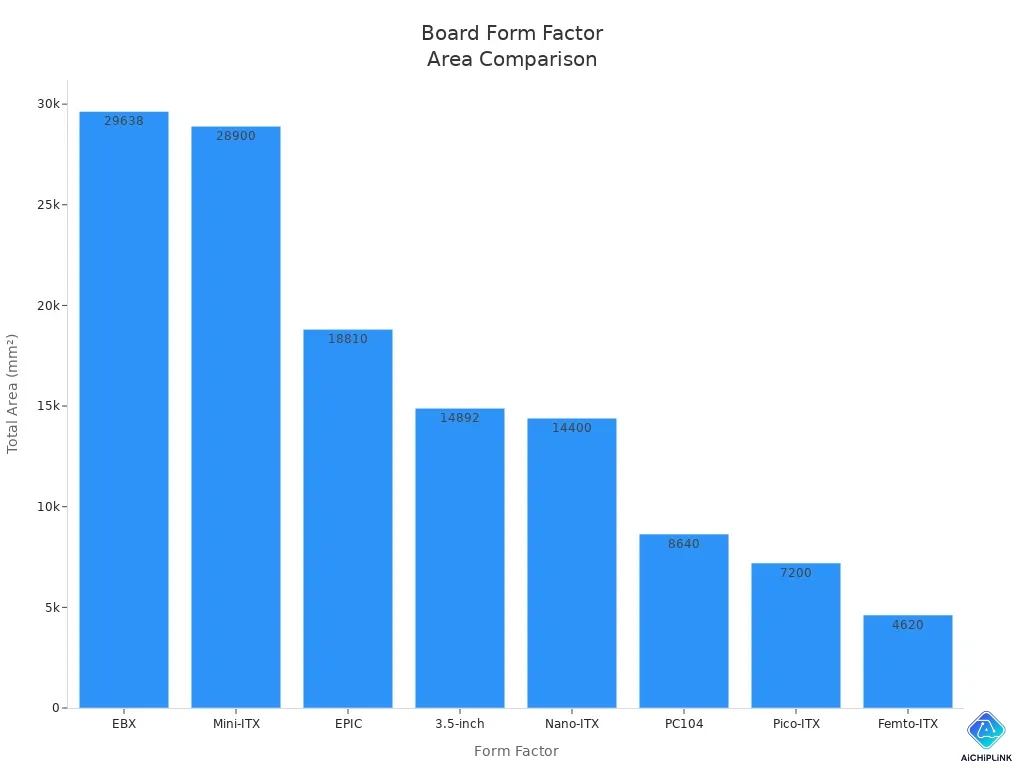
A single-board computer is better if you need a small system for iot. A development board may not fit if you have little space.
Target Users
You should know who uses each board. Engineers, developers, and makers like development boards. They use them to test, try new things, and change hardware. You get lots of ways to change and use them.
Single-board computers are used by hobbyists, teachers, and workers. You can use them to teach, learn, and do iot jobs. They are also used in factories and for selling products. Here are some common users:
-
Hobbyists use single-board computers for easy projects and iot.
-
Teachers use single-board computers for lessons and learning.
-
Workers use single-board computers for machines and control.
-
Developers use single-board computers for special jobs.
A development board is good for changing designs and hardware. A single-board computer is good for quick use and many jobs. A development board is not as good if you want something ready to use. A single-board computer is not as good if you want to change hardware a lot.
Tip: Think about what your project needs, what you know, and your money. This will help you pick the best board for your iot or internet of things project.
How to Choose for Your Project
Decision Checklist
You should make a plan before you pick a board. Use a checklist to help you choose. This list shows the most important things to do.
-
First, think about what your project will do. Do you want to make something simple or something that does many things?
-
Next, look at the hardware. Check the CPU, GPU, and memory. Make sure they are good enough for your project.
-
Then, see if the board works with your favorite software. Check if it supports the operating system you like.
-
Think about how much money you want to spend. Decide your budget before you buy.
-
Look at the ports and connections. Make sure the board has what you need.
-
Find boards with good guides and help. Good instructions make things easier.
-
Think about where your project will be used. If it will be in a hot or cold place, pick a board that can handle it.
Tip: Always check if the board fits your project. This helps you avoid problems and saves time.
Here is a table that shows how both board types compare:
| Consideration | Development Board | Single-Board Computer |
|---|---|---|
| Project Requirements | Made for special needs | Good for bigger, harder jobs |
| Specifications | Has basic features | May have more advanced parts |
| Price | Usually costs less | Can cost more for extra features |
| Use Cases | Simple jobs, real-time control | Videos, internet, many tasks |
Matching Needs to Board Type
You need to match your project to the right board. Each board is good for different things. A development board is best for simple jobs and testing hardware. You can use it for robots, checking sensors, and controlling machines. It lets you work close to the hardware and fix problems easily.
A single-board computer is better for hard jobs. You can use it for smart homes, media centers, and edge computing. It can do many things at once and has more memory. You get more features for big projects.
Here are some boards and what they can do:
| Board Name | Key Features | Customization Options |
|---|---|---|
| Clover SBC | Up to 8x Cortex-A72, 32GB RAM, fast connections | Good price for making many |
| Ivy SBC | Up to 6x Cortex-A55, 16GB RAM, two Ethernet | Made for tough places like factories |
| NVIDIA Jetson Orin Nano | AI tools, strong GPU, lots of ports | Easy to use with full software |
| Raspberry Pi 5 | Works for many things, big community | Has Wi-Fi and Bluetooth built in |
| BeagleBone | Factory ports, real-time control | Software support for a long time |
Some boards have 5G, strong x86 chips, and wireless built in. These help you make smart cities, factory tools, and home systems.
Note: Pick a development board if you need real-time control, factory ports, or want to use it for a long time. Choose a single-board computer for videos, internet, or doing many things at once.
Practical Scenarios
You can learn from real examples. These show how to pick the right board for your project.
-
If you want to make a weather station, use a development board. It works in hot or cold places and has factory ports like CAN Bus and RS-485.
-
If you want a media center for your TV, pick a single-board computer. It can play videos, connect to the internet, and do many things at once.
-
For factory machines, use a development board. It lasts a long time and has strong ports for machines.
-
If you want to make a smart mirror or home system, use a single-board computer. It can run many apps and connect to Wi-Fi and Bluetooth.
-
If you want to build a robot for school, start with a development board. It lets you control motors and sensors.
Here are some mistakes you should not make:
| Common Mistakes | Description |
|---|---|
| Not knowing what you need | Picking the wrong board can cause problems |
| Forgetting about connections | Missing ports can stop your project |
| Not checking guides | Boards without help are hard to use |
-
Boards with AI but no public SDK can slow you down.
-
x86 boards that get too hot can break.
-
Boards with no English guides are hard to fix.
Tip: Always pick a board that fits your project. Check the features, help, and where you will use it before you choose.
With the right board, you can make smart tools, control your home, run machines, and learn new things. Your choice will help your project work well.
You need to pick a board that matches your project. Look at the table to find which board is best for each need:
| Requirement | Best Board |
|---|---|
| OTA + Cloud Stack | Particle Tachyon |
| Linux Support + Community | Raspberry Pi 5 |
| Edge AI & ML Acceleration | NVIDIA Jetson Orin |
| x86 Compatibility | LattePanda Sigma |
| Android UI / Touchscreen | Khadas VIM3 / VIM4 |
| Low-Cost Prototyping | Banana Pi / Orange Pi |
Think about what features are most important to you. Ask yourself what you really need before you choose. You can join groups to get more help and ideas:
-
Rock PiX is good for ARM projects.
-
Latte Panda is great for x86 support.
-
Atomic Pi is helpful for flexible builds.
Tip: Picking the right board makes your project easier. You can learn more and build better if you take time to look at your choices!

Written by Jack Elliott from AIChipLink.
AIChipLink, one of the fastest-growing global independent electronic components distributors in the world, offers millions of products from thousands of manufacturers, and many of our in-stock parts is available to ship same day.
We mainly source and distribute integrated circuit (IC) products of brands such as Broadcom, Microchip, Texas Instruments, Infineon, NXP, Analog Devices, Qualcomm, Intel, etc., which are widely used in communication & network, telecom, industrial control, new energy and automotive electronics.
Empowered by AI, Linked to the Future. Get started on AIChipLink and submit your RFQ online today!
Frequently Asked Questions
What is the main difference between a development board and a single-board computer?
A development board helps you test hardware and build new things. A single-board computer lets you run software and do harder jobs. Each board is good for different projects.
Can you use a single-board computer for robotics projects?
A single-board computer is good for robots that need video or smart features. If your robot only needs to move motors or read sensors, a development board is better.
Which board is easier for beginners?
Single-board computers are easier for new users. They have operating systems and simple menus. Development boards need more coding and hardware skills.
Do both board types support wireless connectivity?
Many single-board computers have Wi-Fi and Bluetooth built in. Some development boards can use wireless, but you often need extra parts.
How do you decide which board to buy?
First, write down what you want your project to do. Next, check what hardware and software you need. Then, decide how much money you can spend. Match your needs to the board’s features. Ask people online if you need help.