The Building Blocks of Smart Glasses: From Sensors to Displays
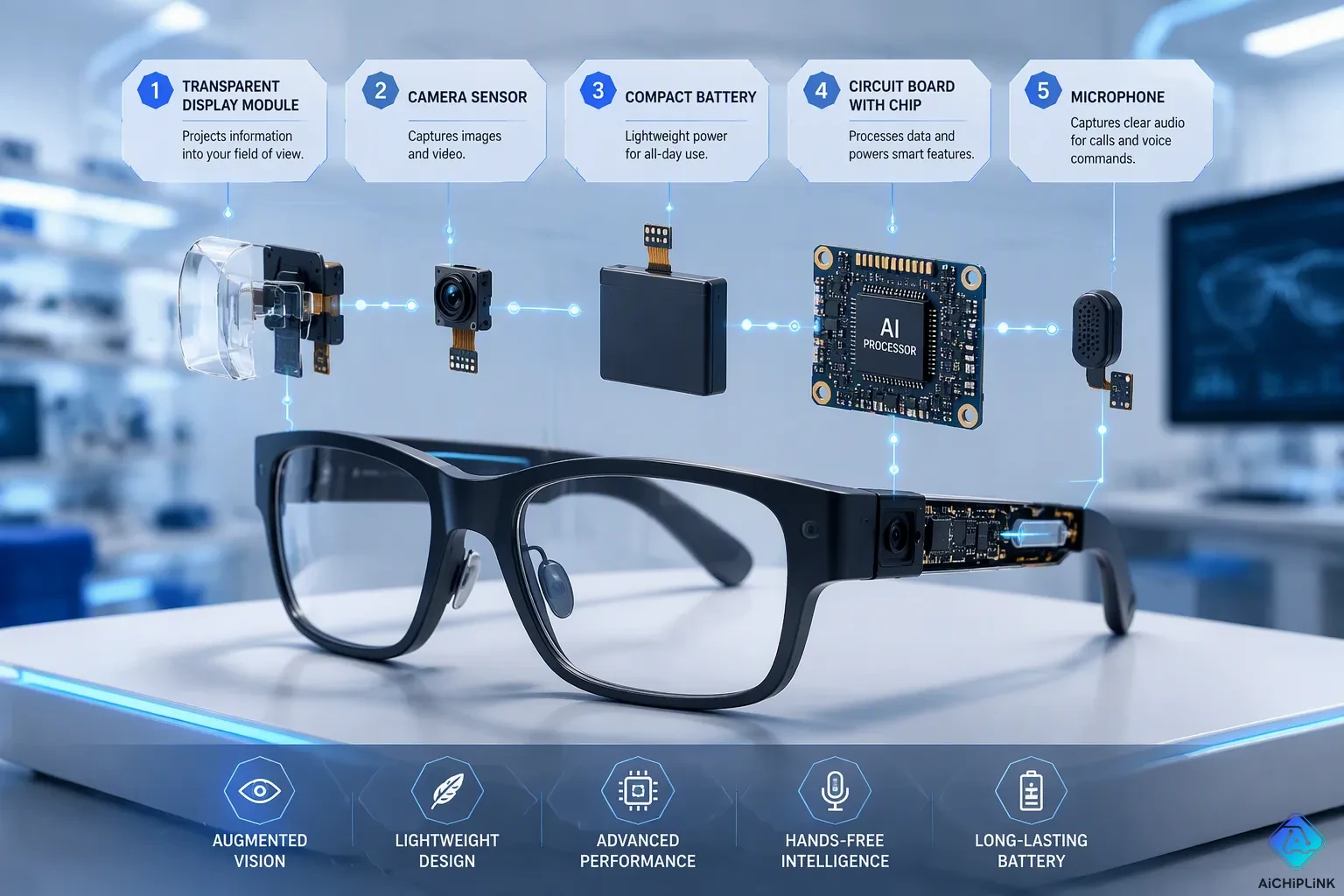
You walk down a busy street. Your smart glasses show a navigation prompt on the sidewalk. You see a blue arrow pointing to the nearest coffee shop. This is hands-free navigation at its best. You never need to pull out your phone.
Smart glasses, also known as AR glasses, are wearable technology. These augmented reality glasses fit computing, sensing, and display into a normal eyewear frame. Unlike VR headsets, they keep you in the real world. They place digital information over your view.
What are the main parts that make this possible? This article takes you inside the hardware. You will learn about the sensors that capture the world. You will see how the displays project information back to you. We break down each part and explain how they work together to deliver an augmented reality experience. Smart glasses applications like these are just the start.
Key Takeaways
-
Smart glasses use a system-on-chip (SoC) to handle data fast and without wasting power.
-
The on-device AI in the NPU helps the device respond quickly and saves battery life.
-
Cameras and sensors team up to follow your moves and make sense of the world around you.
-
Micro-displays and waveguides show clear images in front of your eyes.
-
Good batteries and handling heat keep smart glasses comfortable for daily use.
Core Components: The Processing Unit
The system-on-chip (SoC) is the brain of your smart glasses. It combines the CPU, GPU, and DSP into one compact unit. The CPU runs the operating system and app logic. The GPU renders graphics for AR overlays. The DSP processes audio signals and sensor data. This integration saves space and power.
The System-on-Chip (SoC) and Its Roles
You need a chip that fits inside a thin temple frame. The Snapdragon AR1+ Gen 1 is one example. It includes four Kryo CPU cores running at 1.9 GHz. This power handles everyday tasks smoothly. The GPU supports displays up to 1280x1280 pixels per eye. It draws AR graphics without lag. An integrated DSP handles voice commands and motion sensor data. This chip works well with small batteries.
Several SoCs power today’s AR glasses. The Snapdragon AR1 Gen 1 runs the Ray-Ban Meta Gen 1 and Gen 2. It pairs with a 154 mAh battery. The AR1+ Gen 1 announced in June 2025 consumes 7% less power. Its footprint is 26% smaller. The AR2 Gen 1 targets full AR glasses with six degrees of freedom and up to nine cameras. It uses 50% less power than earlier XR2 chips. These core hardware features let you enjoy augmented reality without bulky equipment. Smart glasses rely on these chips.
Neural Processing Units for On-Device AI
The NPU is a special processor for AI tasks. It handles wake-word detection and sensor fusion locally. On-device processing reduces latency dramatically. Wake word detection on the device takes under 100 milliseconds. Cloud-based detection takes 300 to 1000 milliseconds. That delay is too slow for real-time interaction. You get instant responses from your AR glasses.
The NPU achieves a superior performance-per-watt metric by incorporating hardware and software optimizations specifically for AI workloads while shedding general-purpose overhead.
This efficiency matters for battery life. The NPU draws only 1 to 5 watts during neural network inference. It can run always-on face detection for days on standby. The same task on a CPU drains a battery in hours. AI assistance becomes practical without frequent charging. The NPU also enables contextual AI by processing your environment in real time. Your glasses can recognize objects and offer contextual AI suggestions. Contextual AI interactions feel instant because everything stays on the device.
The NPU works with the DSP for a two-stage wake word. A tiny model runs on the DSP at under 1 milliwatt. It detects a possible wake word with high recall. Then the CPU or NPU runs a larger model for verification. Audio goes to the cloud only after on-device stages succeed. This design avoids cloud latency for the common case. You get quick and reliable voice commands. The NPU also runs models up to 1 billion parameters, like Llama 3.2 1B. This enables rich contextual AI features.
These NPUs make AR glasses smarter and more responsive. You benefit from real-time assistance without draining the battery. The core components work together seamlessly.
Sensors and Cameras for Smart Glasses
Your smart glasses need to understand the world around you. They rely on a collection of sensors and cameras to capture visual data, track your movements, and hear your voice. These components feed raw information to the processing unit. The SoC and NPU then interpret that data to deliver useful features like navigation prompts, object identification, and contextual AI assistance.
Cameras for Visual Input and Tracking
Cameras serve as the eyes of your AR glasses. They capture the environment for features such as object recognition and spatial mapping. These capabilities are essential for augmented reality overlays. When you look at a street sign, the camera records the image. The NPU processes that image to perform text recognition. This enables live translation of text displayed directly in your field of view.
The camera system also supports simultaneous localization and mapping, commonly called SLAM. SLAM algorithms track the camera's pose and map environmental features. Sensor fusion combines data from cameras, lidar, and inertial measurement units to estimate depth and three-dimensional structure. This fusion allows digital content to appear anchored to real surfaces. Virtual objects properly occlude behind physical items. Spatial consistency remains intact.
When sensor fusion works correctly, virtual user interface elements attach to physical surfaces. These elements become interactive touchpoints. You can point at a menu and receive real-time translation of the text. When SLAM underperforms due to poor sensor fusion, virtual objects drift, float, or jitter. This breaking of interaction patterns causes frustration. Good camera tracking prevents these problems.
Individual sensor types each have shortcomings in accuracy, robustness, stability, and operating speed. Cameras alone cannot deliver reliable tracking. Multiple sensors must work together for robust results. This multi-sensor fusion approach enables seamless interaction with virtual elements overlaid on the physical world. Your AR glasses combine optical data with other inputs to achieve stable performance.
IMUs and Microphones for Context Awareness
Inertial measurement units, or IMUs, track your head movements. These units contain accelerometers and gyroscopes. Accelerometers measure linear acceleration. Gyroscopes measure angular velocity. Together, they determine head orientation and position changes. This data helps the system understand where you are looking. Point-of-gaze object identification becomes possible when the system knows your viewing direction.
IMUs measure angular velocity and acceleration to track head orientation and position. This information provides necessary context for the software. When you turn your head toward a building, the IMU detects that motion. The system then updates the display to match your new viewpoint. This real-time response makes navigation prompts feel natural and immediate.
MEMS microphones capture your voice commands. These tiny microphones fit inside the glasses frame. They filter background noise and focus on your speech. Voice commands trigger actions like hands-free photography and video. You can say "take a photo" without touching any button. The microphone captures your words. The DSP processes the audio signal. The NPU verifies the command locally.
This combination of sensors enhances accuracy, stability, and realism. The system integrates virtual and real-world data more effectively. Contextual AI uses this sensor data to understand your situation. It can offer relevant suggestions based on where you look and what you say.
The accessibility benefits are significant. Live captioning converts speech to text for users with hearing impairments. Live captions and subtitles appear over the real world. Accessibility for low vision improves through audio descriptions of detected objects. The system performs object identification continuously. It announces what you see through bone-conduction speakers.
Hands-free photography becomes a natural extension of your vision. You capture moments without reaching for a phone. The camera records what you see. The IMU stabilizes the image based on head movement. The microphone captures ambient audio. This hands-free photography and video capability transforms how you document experiences.
Real-time translation works through the microphone and camera together. You hear a foreign language. The microphone captures the speech. The NPU processes the audio. Translation appears as captions on the display. You read the meaning instantly. This translation feature breaks down language barriers during travel and business meetings.
The identification capabilities extend beyond objects. The system recognizes faces, landmarks, and products. It provides contextual information about what you see. This identifying the world around you function turns your glasses into an information layer. Every glance offers learning opportunities. The sensors and cameras make this possible through constant, real-time data collection.
Displays and Optics for Augmented Reality
Micro-Displays and Light Engines
Micro-OLED displays are the picture makers in your smart glasses. These small screens create the digital images you see. The Sony ECX350F panel shows Full HD quality at 1920×1080 pixels. Each pixel is only 5.1 micrometers wide. Pixel density hits about 5,000 ppi. This sharpness matters for clear augmented reality overlays. You need easy-to-read text and clean graphics when info pops up in your view.
Brightness decides if you can see the overlay outside. Regular panels reach 1,000 to 3,000 nits. The Sony panel can hit 5,000 nits inside the light engine. Top brightness numbers can trick you. The ECX350F has a 10,000-nit peak rating. Steady brightness stays near 3,000 nits after waveguide losses and auto brightness limits. This gives you clear viewing in sunlight.
Micro-OLED displays beat LCoS in two big ways. They use less power. They give better contrast with deep blacks. LCoS panels shine brighter for outdoor use. Light engines in your AR glasses control intensity and color with great care. A beam splitter sends part of the laser beam to a photodetector. This instant feedback loop changes the laser drive current. The system fixes fiber bending loss and temperature shifts. The laser source blends red, green, and blue beams into one full-color beam. A scanning galvanometer draws each pixel one by one.
Translating Data into Visuals with Waveguides
Waveguides send light into your field of view. These thin glass pieces sit in front of your eyes. They make digital content look see-through and layered on the real world. The waveguide uses diffraction or holographic methods. The in-coupling stage is a key weak point. Any light lost at the in-coupler never reaches your eye. This loss cuts total system brightness. High-index materials like silicon carbide lower photon loss. They reduce problems like ghosting, haze, and rainbow effects.
Optical efficiency sets how bright the overlay looks. The dimmest spot across the field of view sets the limit. Those dark areas cannot go past the display's hardware brightness. This minimum sets the top possible brightness. See-through efficiency changes with wavelength. Blue light works less well than red and green. More layers stop stray diffraction. Diffractive waveguides give a wide view for immersive AR. Holographic waveguides give a narrower view. Your AR glasses offer instant updates to follow head motion. These core hardware features shape what you see in smart glasses.
Connectivity and Power in AR Glasses
Wireless Links for Seamless Interaction
Bluetooth and Wi-Fi link your smart glasses to your phone. These devices depend on wireless connections to move data. Bluetooth handles close-range jobs like alerts. Wi-Fi streams bigger content for live translation. You get directions without taking out your phone.
Sending heavy tasks to your phone uses up battery. Moving data constantly over Wi-Fi Direct drains power. The table shows the difference.
| Processing Approach | Impact on Smart Glasses Battery Life | Key Constraint |
|---|---|---|
| Offloading via Wi-Fi Direct | More power used from constant data flow | Power budget: ~200 mAh for all on-device computation |
| On-device edge AI | Removes delays, lowers power use | Example: 10x power savings on always-on voice interface |
On-device work keeps your battery going longer. The NPU handles voice and sensor jobs locally. This allows live translation and directions without constant charging. Translation quality stays strong because the model runs on your glasses. This translation feature works offline. Direction cues show up without steady connection.
Battery Life and Thermal Management
Battery cells in your AR glasses fit inside thin temple arms. This limits capacity. An Echo Frames teardown found a 0.589 Wh LiPo cell, about 159 mAh at 3.7 V. You get roughly a day of light use.
New battery tech improves this situation. The chart below compares four types.
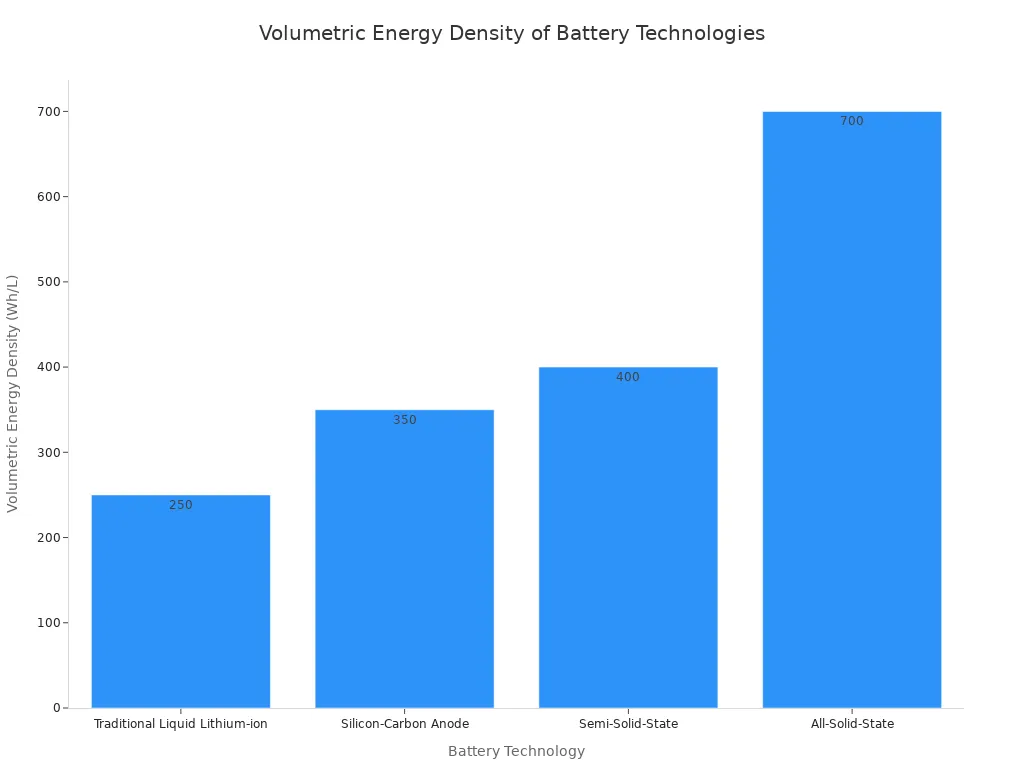
Standard liquid lithium-ion reaches about 250 Wh/L. Silicon-carbon anodes reach 350 Wh/L. Semi-solid-state batteries reach 400 Wh/L. All-solid-state batteries could reach 700 Wh/L later. Higher density means longer use in smaller spaces.
Heat control keeps your glasses cool. Passive cooling methods help. Graphene heat spreaders with 5,000 W/m·K thermal conductivity lower hot spots by 3–5°C. Phase-change materials soak up heat during heavy use. Spreading heat across both temple arms cuts near-ear surface temperature by 51.4%. Placing hot parts away from skin drops temperature by 11.1%. Your AR glasses run live translation and directions at the same time. The real-time processing stays effective. The system gives instant answers for every command. You enjoy hands-free translation during talks. Smart glasses become a useful daily tool with these power and heat advances.
Turn your head toward a storefront. The IMU detects that motion instantly. The SoC processes the data and updates the display. You see a product review overlay within milliseconds. This seamless flow defines the magic of smart glasses.
No single component creates the experience. The true innovation of wearable technology lies in miniaturization and cooperation. Tiny sensors, efficient NPUs, and transparent displays work as one system. Each part depends on the others for real-time response.
Future AR glasses will push these boundaries further. Brighter displays will improve outdoor visibility. More efficient batteries will extend usage. Smarter NPUs will deliver faster AI assistance. These augmented reality glasses will become lighter and more powerful. Mainstream adoption of augmented reality depends on these advances. Next-gen AR glasses will transform daily life.

Written by Jack Elliott from AIChipLink.
AIChipLink, one of the fastest-growing global independent electronic components distributors in the world, offers millions of products from thousands of manufacturers, and many of our in-stock parts is available to ship same day.
We mainly source and distribute integrated circuit (IC) products of brands such as Broadcom, Microchip, Texas Instruments, Infineon, NXP, Analog Devices, Qualcomm, Intel, etc., which are widely used in communication & network, telecom, industrial control, new energy and automotive electronics.
Empowered by AI, Linked to the Future. Get started on AIChipLink and submit your RFQ online today!
Frequently Asked Questions
How long does the battery last on a typical pair of AR glasses?
Battery size changes from one model to another. Many frames hold about 150–160 mAh cells inside the temple arms. Light use lasts about a day. Heavy tasks like nonstop video recording drain power faster. On-device AI processing helps extend runtime compared to always streaming over wireless.
Can you use smart glasses without a smartphone nearby?
Yes, for many features. On-device NPUs handle wake-word detection, object identification, and voice commands locally. This lowers delay and saves battery. However, you need a phone connection for notifications, cloud-based translation, and offloading hard tasks. The glasses work best when paired with your phone.
What languages does the translation feature support?
Translation depends on the software and cloud service your glasses connect to. Most systems support dozens of major languages. The camera captures text for visual translation. The microphone captures speech for audio translation. Captioning appears directly in your field of view. You read the meaning instantly without looking at a screen.
How does live captioning work for people with hearing impairments?
Live captioning turns speech into text in real time. The MEMS microphones pick up nearby conversation. The NPU processes the audio and creates captions. These captions appear as overlays in your display. This accessibility feature helps you follow conversations naturally. It also supports hands-free photography with voice commands.
What are the main enterprise smart glasses applications in the workplace?
Enterprise smart glasses applications include remote expert guidance, warehouse navigation, and hands-free documentation. Workers access manuals without holding devices. Technicians receive visual instructions on top of equipment. Object identification helps find inventory quickly. These tools improve safety and efficiency. Many companies use them for training new employees. The accessibility benefits extend to workers with disabilities too.