Bluetooth Explained: Characteristics and Applications
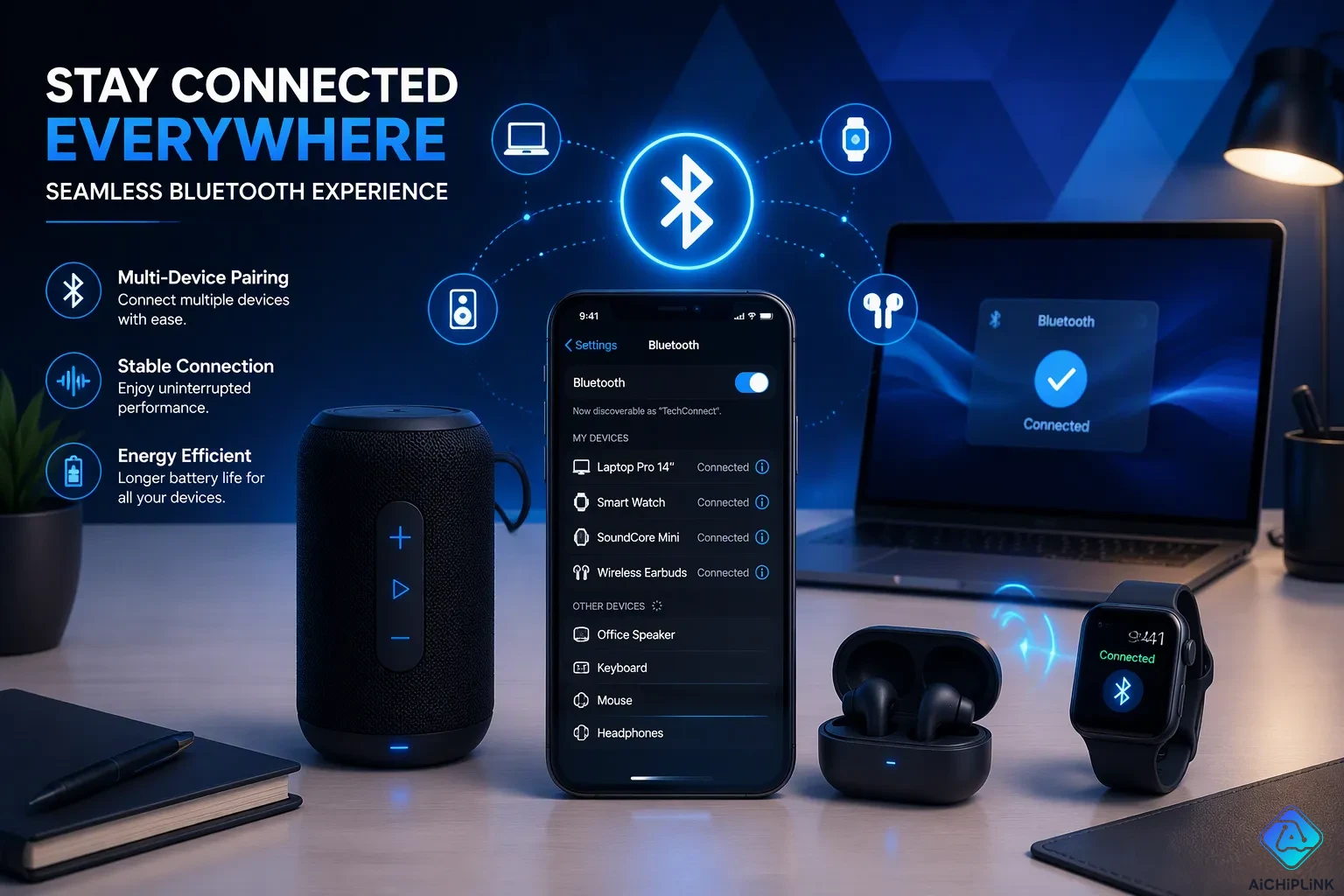
Bluetooth is a short-range wireless communication technology standard that swaps data between devices. This close-range wireless technology uses short-range radio frequency signals to link gadgets without cables. Most connections work within about 10 meters, or 30 feet. People meet Bluetooth everywhere. Wireless earbuds, car systems, and keyboards all depend on it. The term bluetooth explained simply means a trusted way for devices to talk. Bluetooth technology supports wireless data and voice communication across many products. This short-range wireless communication keeps everyday tasks simple. Engineers built this wireless communication technology for convenience, not distance. A phone pairs with a speaker in seconds. A laptop connects to a mouse without wires. Bluetooth remains a quiet helper in modern life.
Key Takeaways
-
Bluetooth links devices over short distances without wires.
-
Bluetooth uses very little power, so batteries last a long time.
-
Bluetooth works with many devices, so it is easy to use.
-
Bluetooth keeps your data safe by pairing devices securely.
-
Bluetooth lets you use wireless audio, smart homes, and more.
Key Characteristics and Applications of Bluetooth
Short Range and Low Power
Bluetooth works best when devices are close together. Most connections reach no more than 10 meters, or about 30 feet. This short-range wireless communication fits personal electronics that stay near each other. A phone links to earbuds in a pocket. A smartwatch syncs with a phone on the same wrist. These devices stay close, so the signal does not need to travel far.
The technology uses very little power. That trait makes it great for portable gadgets that run on small batteries. Bluetooth Low Energy, often called BLE, takes this efficiency much further. Engineers designed this power-efficient version of Bluetooth for fitness trackers, sensors, and IoT devices. A BLE device stays in an ultra-low-power idle state. It wakes only for short data bursts. This duty-cycled operation lets a coin-cell battery last for months or even years. Classic Bluetooth, by contrast, keeps a continuous link active and drains a battery faster.
Real-world power draw shows the difference. A BLE device in idle or sleep mode draws roughly 1 to 10 microamps. During advertising bursts, it pulls about 3 to 10 milliamps. An active connection averages about 5 to 30 milliamps over time. These figures come from typical Bluetooth 5.0 operating states. The low current draw explains why a wireless earbud or smartwatch can run all day on a tiny battery.
Range depends on more than the radio. Walls, furniture, and people block or reflect radio waves. Signal strength drops as waves travel through air, and obstacles make that loss worse. A wooden wall weakens a signal less than a concrete wall does. Manufacturers therefore target about 10 meters to balance stability and battery life. Bluetooth 5.0 can reach up to 300 meters, but only in ideal, open, unobstructed conditions. Most consumer headphones use Class 2 or Class 3 radios to conserve power.
Compatibility and Low Cost
Bluetooth appears in a huge range of products. This wide compatibility makes it a default choice for wireless links. Modern smartphones support it almost universally. In the USA and Canada, 58 percent of Android phones and 73 percent of iPhones supported Bluetooth 5.0 or newer in early 2021. Projections put overall smartphone adoption at 95 percent by 2023. That reach means a new pair of earbuds will almost certainly connect to a user's phone.
The technology also costs little to add. Chip makers build Bluetooth radios into tiny, cheap modules. This low cost helps explain its spread across keyboards, mice, speakers, and toys. One source notes that Bluetooth carries a higher cost than ZigBee, which targets very cost-sensitive, low-power uses. Even so, Bluetooth remains affordable enough for mass-market consumer goods.
A quick comparison shows where Bluetooth fits among wireless standards.
| Parameter | Bluetooth | ZigBee |
|---|---|---|
| Modulation | Frequency Hopping Spread Spectrum (FHSS) | Direct Sequence Spread Spectrum (DSSS) |
| Protocol Stack Size | 250 K bytes | 28 K bytes |
| Battery | Intended for frequent recharging | Not rechargeable |
| Maximum Network Speed | 1 Mbit/sec | 250 Kbit/sec |
| Network Range | 1 or 100 meters (depending on radio class) | Up to 70 meters |
| Typical Network Join Time | 3 seconds | 30 milliseconds |
These bluetooth key features shape its role. It favors flexibility and safety over raw range. It does not need line-of-sight alignment, unlike older infrared ports. A user can keep a phone in a bag and still stream audio. That freedom, combined with low cost and broad support, drives most bluetooth applications in daily life. Understanding bluetooth versions and types helps a buyer pick the right device. The characteristics and applications of Bluetooth rest on this simple bargain: modest range, tiny power draw, and near-universal compatibility.
How Bluetooth Technology Works
Pairing and Connections
Pairing is when two devices learn to trust each other and link up. A user turns on a phone and a speaker. The phone finds the speaker and asks the user to confirm. Then both devices share a secret key. This step makes a safe bluetooth connection. Pairing matters because it stops strangers from joining the link.
Bluetooth technology works in the 2.4 GHz industrial, scientific, and medical (ISM) frequency band. This band is crowded with Wi-Fi and microwaves. To cut down on interference, Bluetooth uses adaptive frequency hopping. Here is how it works:
-
At each connection event, the linked devices choose a radio channel with a channel selection algorithm.
-
The main device keeps a channel map that marks each channel as good or bad.
-
Noisy channels are tracked and skipped, while only good channels carry packets.
-
The channel map is shared with the second device and updated as interference changes.
This hopping spreads communication across many channels that change quickly. Co-located piconets collide with probability only about 1/79. Shorter packets also help, because they cut the time spent on any one channel.
Bluetooth supports point-to-point and point-to-multipoint links. One phone can send audio to two earbuds at once. This flexibility makes bluetooth connections useful in many settings.
Security concerns shape the pairing process. LE Secure Connections, from Bluetooth Core 4.2 and later, uses FIPS-compliant Elliptic Curve Diffie-Hellman for key generation. The shared secret never travels over the air. Numeric Comparison shows a six-digit value on both devices, and the user confirms the match. Just Works offers no real man-in-the-middle protection. Passkey Entry needs a digit keyboard. Out-of-Band uses another channel such as NFC. Proper pairing and encryption protect private data.
The Bluetooth Protocol Stack
The bluetooth protocol stack organizes hardware and software into layers. Each layer does a specific job. The radio (rf) layer sits at the bottom. It sends and receives raw bits over 2.4 GHz RF waves across 40 channels. The link manager protocol (lmp) layer sets up and controls the radio link between devices. The logical link control and adaptation protocol (l2cap) layer provides data encapsulation and logical end-to-end communication. The service discovery protocol (sdp) layer lets a device find services on another device.
| Layer | Function |
|---|---|
| Application | User-facing software that bundles Bluetooth LE features |
| Host | Upper LE layers and profiles for specific use cases |
| Controller | Lower LE layers, including the physical radio |
| HCI | Optional interface between host and controller |
| GAP | Defines device roles such as Broadcaster and Central |
| Link Layer | Manages the state of the LE radio |
| Physical Layer | Handles modulation and the 2.4 GHz ISM band |
Profiles define how protocols work for real tasks. A2DP streams two-channel stereo audio at up to 352 Kbps and 48 kHz. HFP handles voice calls with lower fidelity. Most headsets implement both HFP and HSP. The bluetooth protocol stack, the bluetooth protocol stack, and the bluetooth protocol stack all rely on these layers working together. Authentication and encryption protect data as it moves through the stack.
Bluetooth in Daily Life
Wearables and Smart Home Devices
Fitness trackers and smartwatches rely heavily on bluetooth. These bluetooth-enabled devices sync steps, heart rate, and notifications with a phone. The low-power design of BLE keeps the wearable running for days. A user checks a watch face without opening a phone. Data transfers automatically in the background. Users wear these devices all day. The constant connection drains very little power.
Smart home devices also use bluetooth. Smart locks unlock a door when a phone approaches. Smart lights change color through a bluetooth connection. The pairing process takes only seconds. A person opens an app and selects the device. The link forms quickly. Communication happens automatically after that. A user never repeats the setup for a trusted device.
Many smart home gadgets use bluetooth for initial setup. A thermostat connects to a phone for configuration. The user sets a schedule and preferences. After setup, the device may switch to Wi-Fi. Bluetooth provides a reliable bridge for this step. This approach keeps the first connection simple for homeowners. Most people find the process intuitive and fast.
Keyboards, Mice, and Peripherals
Wireless keyboards and mice use bluetooth for a clean workspace. No cables clutter the desk. A user pairs one keyboard with a tablet, a laptop, or a phone. The same keyboard switches between multiple bluetooth devices. This feature saves money and desk space. Office workers appreciate the tidy appearance.
Low power draw matters for peripherals. A mouse runs for months on one battery. A keyboard lasts even longer. Bluetooth connections stay stable during typing. Users do not worry about lag or sudden disconnects. The reliable link supports productive work.
Bluetooth versions differ in peripherals. An older keyboard works well for basic typing. A newer mouse offers longer range and lower power. Most peripherals use Class 2 radios with a 10-meter range. This range covers a typical desk setup. For office work, these devices provide enough speed. Gamers sometimes prefer wired devices. For everyday use, bluetooth peripherals deliver convenience.
The simplicity helps non-technical users. A person opens settings and taps a device name. The connection completes without wires. This ease drives the popularity of wireless peripherals. Users switch between devices without frustration.
Bluetooth in Cars and Factories
Cars and Hands-Free Calling
Cars use bluetooth to send data and voice during calls. The Hands-Free Profile connects a phone to the car audio system. A driver can make calls without holding a phone. Car microphones pick up speech. Speakers play the other person's voice. This setup keeps hands on the wheel and eyes on the road.
The pairing process is simple. A driver turns on bluetooth on the phone. The car radio shows up in the device list. A tap confirms the link. The car remembers the phone and connects automatically on later trips.
Many cars support more than one phone connection. The system stores each phone's profile. It picks the main phone on its own. This technology comes standard in modern vehicles.
Industrial Automation and Healthcare
Factories use Bluetooth Low Energy to track assets. Companies put BLE tags on pallets, tools, equipment, and medical devices. Bluetooth gateways find these tags and send data to a software platform. This gives a live view of asset movement across warehouses and factories.
| Gateway | Environment |
|---|---|
| Cassia X2000 | Outdoor, industrial, long-range |
| Cassia E1000 | Indoor enterprise |
| Cassia M2000 | Mobile or cellular-connected |
| Cassia AC | Multi-site management |
Different gateways serve different needs. The X2000 tracks assets in logistics yards and factories. The E1000 works indoors. The M2000 handles mobile cases. The AC manages many sites from one place.
Cloud-based location solving makes battery life five to ten times longer than GPS-only designs. The cloud processes scan data instead of figuring out coordinates on the device. Adaptive features change how often reports are sent based on movement. Still assets update slowly. Moving assets report more often. Sleep mode keeps devices inactive while watching for activity triggers. Edge processing filters data before it is sent. A temperature sensor reports only when limits are passed.
Hospitals also use bluetooth-enabled devices. Staff track equipment like infusion pumps and wheelchairs. Workers find devices fast. This cuts down time spent searching for equipment and improves patient care.
Market growth confirms this adoption. Future Market Insights predicts an 8.4 percent compound annual growth rate from 2025 to 2035.
Bluetooth in Audio and Entertainment
Headphones, Speakers, and Streaming
Wireless audio depends on bluetooth codecs to compress and send sound. Older codecs like SBC cap out at 320 kbps with 16-bit depth and a 48 kHz sample rate. Newer options push quality much higher. LDAC reaches 990 kbps at 24-bit and 96 kHz. aptX Lossless climbs to 1200 kbps. These gains give listeners richer detail and wider dynamic range.
Latency matters just as much as quality. LC3, part of Bluetooth LE Audio, replaces SBC with better sound at lower bitrates and less battery drain. LC3 latency sits between 20 and 30 milliseconds. LC3plus drops that to 5-15 milliseconds. aptX LL stays under 40 milliseconds. The LLAC codec reaches 30 milliseconds end-to-end, which suits gamers who need tight audio sync.
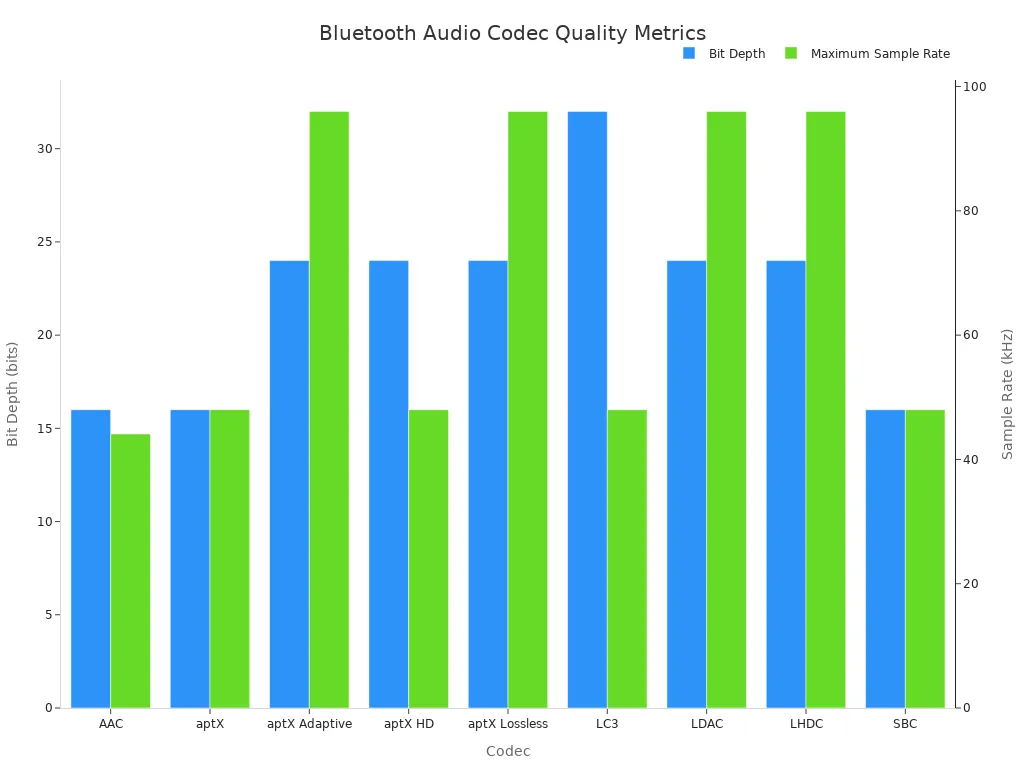
| Codec | Maximum Bitrate | Bit Depth | Maximum Sample Rate |
|---|---|---|---|
| SBC | 320 kbps | 16-bit | 48 kHz |
| aptX | 352 kbps | 16-bit | 48 kHz |
| aptX HD | 576 kbps | 24-bit | 48 kHz |
| AAC | 264 kbps | 16-bit | 44.1 kHz |
| LDAC | 990 kbps | 24-bit | 96 kHz |
| LC3 | 345 kbps | 32-bit | 48 kHz |
Gaming Controllers and Media Devices
Gaming controllers use bluetooth for wireless play on consoles, phones, and computers. A controller pairs once and reconnects automatically. Low latency keeps button presses and on-screen action aligned. The LLAC codec helps here with its 30-millisecond end-to-end delay. Players notice lag above roughly 40 milliseconds, so codecs like aptX LL and LLAC target that threshold.
Media devices also rely on this wireless link. Smart TVs send audio to soundbars and speakers. Streaming sticks connect to remotes through bluetooth. Portable speakers link to phones for music anywhere. These devices share one trait: they need a stable, low-power connection over short distances. The technology delivers exactly that.
Bluetooth is a quiet helper in modern wireless life. People hardly notice it, but it connects earbuds, cars, and keyboards every day. The technology works well because of four strengths: short range, low power, low cost, and wide compatibility. These traits make bluetooth explained easy for anyone to understand.
Bluetooth Low Energy now moves into IoT, healthcare, and industrial automation. This short-range wireless communication keeps growing as more devices appear. Bluetooth technology will stay useful for years. The main point is clear: bluetooth works best when devices stay close, and that closeness powers a connected world.

Written by Jack Elliott from AIChipLink.
AIChipLink, one of the fastest-growing global independent electronic components distributors in the world, offers millions of products from thousands of manufacturers, and many of our in-stock parts is available to ship same day.
We mainly source and distribute integrated circuit (IC) products of brands such as Broadcom, Microchip, Texas Instruments, Infineon, NXP, Analog Devices, Qualcomm, Intel, etc., which are widely used in communication & network, telecom, industrial control, new energy and automotive electronics.
Empowered by AI, Linked to the Future. Get started on AIChipLink and submit your RFQ online today!
Frequently Asked Questions
How far can a Bluetooth connection reach?
Most everyday devices link up within about 10 meters, or 30 feet. Walls and furniture make the signal weaker, so the real distance is often less than that. Bluetooth 5.0 can go up to 300 meters, but only in open spaces with nothing in the way. Makers aim for the shorter distance to keep the signal steady and save battery life.
Why does Bluetooth drain so little battery?
The radio is built to use very little power. Bluetooth Low Energy rests in an ultra-low-power idle state and wakes up only for short bursts of data. A BLE device in sleep mode pulls about 1 to 10 microamps. This on-and-off pattern lets a coin-cell battery last for months or even years.
What causes audio lag in wireless earbuds?
Lag happens when sound is squeezed down and sent through the air. Older codecs like SBC add more delay. LC3 latency falls between 20 and 30 milliseconds, and LC3plus cuts that to 5-15 milliseconds. Players notice lag above about 40 milliseconds, so low-latency codecs matter for gaming.
Is a Bluetooth connection secure?
Pairing builds trust between two devices using a shared secret key. LE Secure Connections uses FIPS-compliant Elliptic Curve Diffie-Hellman to create keys, and the secret never goes through the air. Numeric Comparison shows a six-digit value on both devices so the user can confirm. Just Works gives no real man-in-the-middle protection.
Can one phone connect to several devices at once?
Yes. Bluetooth handles point-to-point and point-to-multipoint links. One phone can send audio to two earbuds at the same time. A single keyboard can switch between a tablet, a laptop, and a phone. This flexibility makes the technology handy in many everyday settings.