Microprocessor vs Microcontroller: What's the Real Difference?
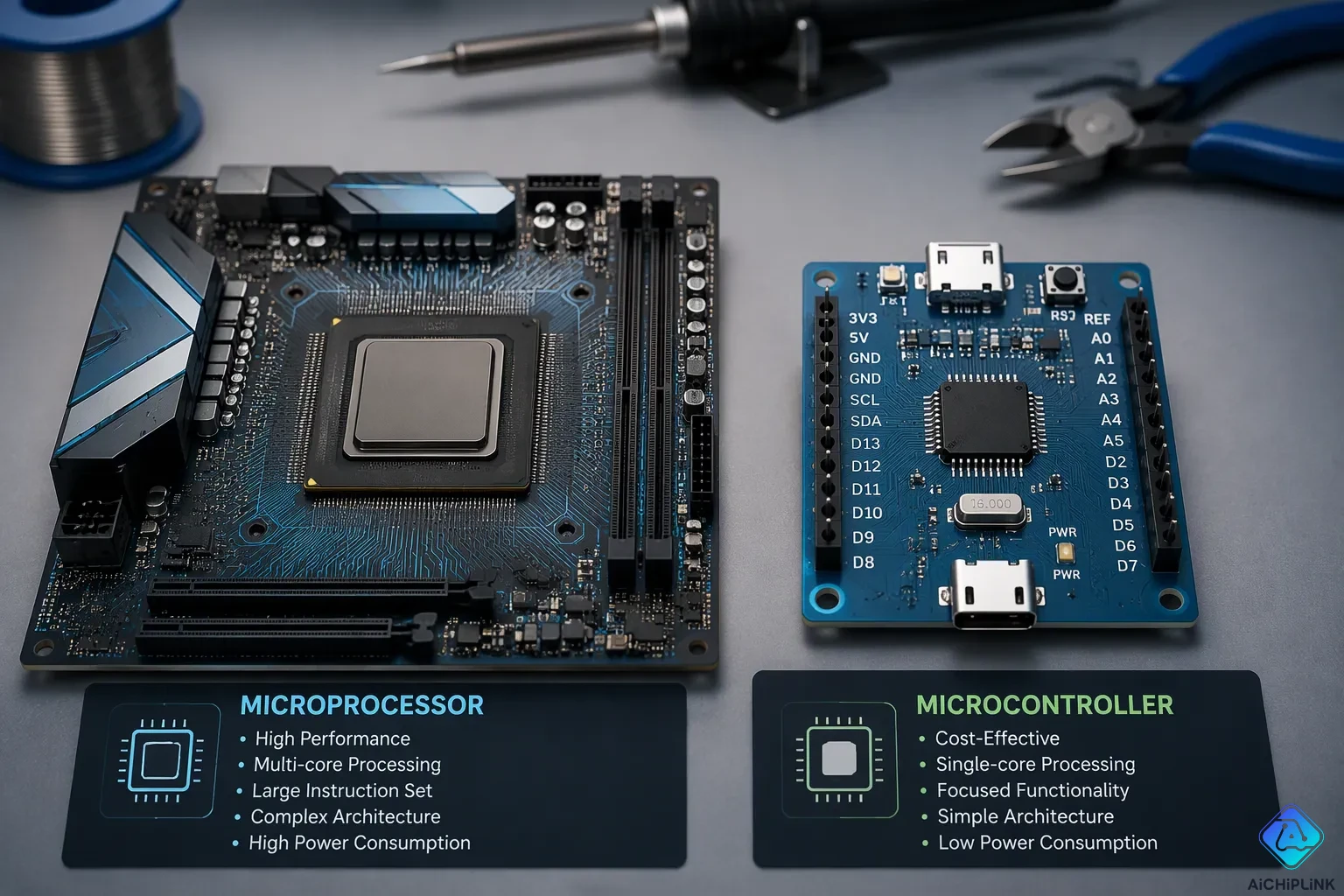
A microprocessor is a general-purpose CPU that depends on outside memory and peripherals. A microcontroller, on the other hand, puts the CPU, memory, and peripherals all on one chip. Both have a CPU. Both also show up in embedded systems. The real difference between a microprocessor and a microcontroller comes down to integration and intended use. It is not about one being a "real" computer.
That gap shapes your design choices: how many parts you need, power draw, cost, operating-system needs, and application fit. Microprocessors vs Microcontrollers is not a contest of superiority. Knowing the key differences between microprocessors and microcontrollers helps you match the part to the job. You weigh these factors before you pick a part.
Key Takeaways
-
A microprocessor is a general-purpose CPU that needs memory and peripherals from outside, while a microcontroller puts everything on one chip.
-
Pick a microprocessor for fast computing jobs that need an operating system, such as computers and servers.
-
Pick a microcontroller for small, low-power control jobs, like appliances and sensors, where built-in features and efficiency are important.
-
Think about the whole system's cost and power use: microprocessors need extra parts and more power, while microcontrollers give you a complete, efficient solution.
-
Pick the right chip for your project by asking about operating system needs, computing power, power budget, and real-time control.
Microprocessors vs Microcontrollers: Quick Comparison
You can see the whole picture in one table. Each row below shows a trade-off, not a winner. Read across the rows and match them to your project needs.
Comparison Table
| Feature | Microprocessor | Microcontroller |
|---|---|---|
| CPU | Yes, one central processing unit | Yes, one central processing unit |
| Memory | External RAM and storage | Integrated on the same chip |
| Peripherals | External chips and interfaces | Integrated timers, converters, and I/O |
| Operating system | Typically required | Typically not required |
| Clock speed | Up to 4 GHz | 200 MHz or less |
| Power draw | Higher | Lower |
| Unit cost | Higher for the chip alone | Lower for the complete system |
| Typical use | Computers, servers, high-throughput systems | Appliances, sensors, dedicated control |
The clock speed row deserves a closer look. A microprocessor can reach up to 4 GHz. A microcontroller usually runs at 200 MHz or less. That gap shows purpose, not quality. High clock speeds handle heavy general-purpose workloads. Modest speeds handle tight, dedicated control loops.
The cost row hides a common trap. A microprocessor chip may look affordable by itself. You must add external memory, storage, and interface chips to make it work. Those parts raise your total system cost and your board space. A microcontroller bundles everything, so its price covers the full system.
One-Line Rule of Thumb
Use a microprocessor for general-purpose computing that needs an operating system, and use a microcontroller for dedicated control that needs tight integration and low power.
That single sentence captures the key differences between microprocessor vs microcontroller designs. You pick the part that matches the job. You do not pick a favorite.
The table also clears up a common confusion. Both columns list a CPU. Both columns list memory and peripherals. The difference between microprocessors and microcontrollers lives in where those blocks sit. External blocks define the microprocessor. Integrated blocks define the microcontroller.
Keep this table nearby as you read the rest of this guide. The architecture section expands the memory and peripheral rows. The performance section expands the speed, power, and cost rows. The applications section expands the typical-use row. Each later section builds on this snapshot of microprocessors versus microcontrollers.
One more point keeps the comparison honest. A microprocessor vs. microcontroller choice depends on your requirements. A battery-powered sensor node rarely needs 4 GHz. A server rarely runs well on an integrated chip with modest memory. The table shows you the trade-offs. Your requirements tell you which trade-off to accept.
This quick view of microprocessors and microcontrollers gives you the vocabulary for the sections ahead. The next section opens the chip and shows how each architecture works. That deeper view of microprocessor vs. microcontroller explained in hardware terms will make the trade-offs concrete.
Architecture: Microcontroller vs Microprocessor
Microprocessor as a General-Purpose CPU
A microprocessor is a CPU on a single chip. It cannot work by itself. It needs outside RAM, storage, and I/O to run. It also usually needs a complex operating system. The chip sends addresses over an address bus and moves data over a data bus. Read and write control lines handle memory access, and a clock line keeps every step in time. Those off-chip connections add parts and take up board space.
This design follows the classic von Neumann model. Instructions and data share one bus, so the CPU cannot fetch an instruction and read data at the same time. Modern methods ease that limit, but the shared path is still the main trait. That is one clear difference between how microprocessors and microcontrollers are built.
Microcontroller as a System on a Chip
A microcontroller puts the cpu, memory, and peripherals on one die. That set includes cpu, memory, interrupt controls, timer, serial ports, bus controls, i/o peripheral ports. The chip is self-contained. It needs no outside circuits to work and no complex OS. This built-in integration shrinks the board, cuts the part count, and lowers design complexity.
Many microcontrollers use Harvard-style memory, with separate program and data spaces and their own buses. The CPU can then read an instruction and get data at the same time. Do not overgeneralize, though. Some parts fall between the two models, and modern systems blur the line. For most designs, the memory model matters less than the built-in memory and peripherals you get on the chip.
| Aspect | Von Neumann | Harvard |
|---|---|---|
| Memory space | One shared space | Separate program and data |
| Bus | Shared | Dedicated buses |
| Trade-off | Simpler hardware, bus contention | Faster, less flexible |
Performance: The Difference Between Microprocessors and Microcontrollers
Speed and Computational Capacity
Clock speed tells you a lot about how microprocessors and microcontrollers differ. A microprocessor runs at a much higher clock rate. It also has richer instruction sets and deeper memory layers. Engineers built these chips for high computing speed and flexibility. They handle heavy general-purpose workloads with ease.
A microcontroller takes a different path. Its clock speed stays lower on purpose. The design favors steady behavior, fast interrupt response, and low power. You get timing you can predict for dedicated control tasks. Raw speed matters less here than a steady, repeatable response.
| Attribute | Microcontroller | Microprocessor |
|---|---|---|
| Clock speed | Typically lower | Typically much higher |
| Design focus | Deterministic behavior, fast interrupt response, low power | High throughput, flexibility, advanced OS support |
| Power consumption | Low | Significantly higher |
Power, Cooling, and Cost
Power draw follows the speed gap. Microprocessors use much more energy. They may need outside cooling and they suit larger machines. Microcontrollers run on low power by design. That makes them a natural fit for battery-powered and heat-sensitive products.
Cost works the same way. A microcontroller-based design costs less. The whole system sits on a single chip, so it needs less memory, less computing power, and less complexity. A microprocessor-based design costs more. It requires strong external memory and external peripherals, and that adds complexity. The external parts a microprocessor needs push up the total system cost well beyond the chip price. Weigh that total, not the sticker price, when you compare microprocessors versus microcontrollers.
The key differences in this section come down to purpose. One chip chases speed. The other chases efficiency. Neither approach wins on every measure.
Three Key Differences Between Microcontrollers and Microprocessors in Applications
The three main differences between microcontrollers and microprocessors in real designs come down to integration, power use, and what each chip is built to do. Integration decides your board size and how many parts you need. Power use decides whether a battery can run the product. What the chip is built to do decides how much general computing the task needs. You will see all three at work in the examples below.
Where Microprocessors Fit Best
A microprocessor works best when a task needs heavy general computing and an operating system. Personal computers and laptops are the classic example. Servers and networking gear also depend on these chips for high throughput. You will find them in phones, cameras, and gaming consoles, where processing power and user interaction matter. Industrial automation uses them in PLCs and control systems. Medical devices such as ECG machines and infusion pumps use them for real-time processing. Communication systems, aerospace equipment, and automotive infotainment all depend on them too.
Notice the pattern. Each of these systems can afford a larger circuit, an outside power supply, and extra support chips. The design trades board space and power for computing capacity. That trade makes sense for demanding workloads.
Where Microcontrollers Fit Best
A microcontroller fits best when a product needs compact, low-power, dedicated control. Home appliances are a familiar example. A microwave oven counts temperature rise and fall, and a washing machine tracks set time. Wearables often use a microcontroller as the main design part instead of a microprocessor. Industrial automation, home automation, medical devices, and traffic management systems all depend on microcontroller-based systems for sensor data collection and real-time control.
The chart below shows how often different application areas appear across major vendors.
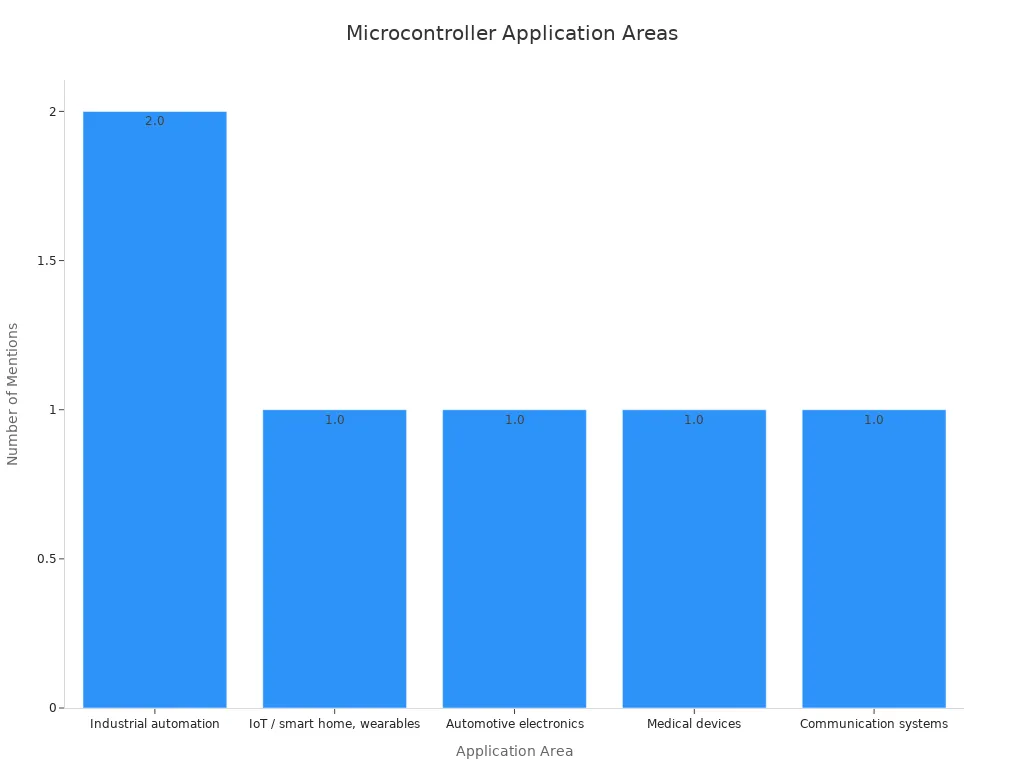
These examples show the difference between microprocessors and microcontrollers in practice. One option serves broad computing. The other serves tight, efficient control. Both fit their setting well.
Microcontroller and Microprocessor: How to Choose
Questions to Ask Before You Select
Begin with what your project needs, not with a part family you already like. Ask if the task needs an operating system. A design that runs several apps at once points to a microprocessor. A design that runs one dedicated task points to a microcontroller. Next, figure out how much computing power you need. Heavy data processing favors a microprocessor. Simple, repeatable control favors a microcontroller.
Then look at your power budget. Battery-powered products need the low-power modes and fast startup that microcontrollers offer. A microcontroller can wake up, do its job, and go back to sleep quickly. A microprocessor uses much more current and often needs a full boot cycle.
Set a cost goal and count your outside parts. A microprocessor needs DDR memory, a power management chip, storage, and often an Ethernet PHY. Each part adds cost and supply chain risk. A microcontroller needs only small passive parts around it, so one chip completes the design.
Last, think about real-time control and software complexity. A microcontroller gives you timing you can count on, which matters for motor loops and sensor sampling. A microprocessor gives you a rich OS and easier app-level development, but task timing is less predictable. The table below sums up the trade-offs for microcontroller and microprocessor selection.
| Consideration | Microcontroller | Microprocessor |
|---|---|---|
| Simplicity | High | Lower |
| Cost efficiency | Better | Lower |
| Performance | Moderate | High |
| Power efficiency | Excellent | Lower |
| Real-time control | Strong | Moderate |
| Multimedia / GUI | Limited | Excellent |
Common Design Scenarios
A battery-powered sensor node fits a microcontroller. Sleep current decides battery life here. A microprocessor cannot match that low-power profile.
A general-purpose computing device fits a microprocessor. Think of a laptop or a server. It needs a large address space, outside memory, and an OS that runs many programs at once. A microcontroller cannot run that software stack.
A real-time control task fits a microcontroller. Motor drives, appliances, and sensor hubs need fast interrupts and a response you can predict. A microprocessor handles these tasks too, but with more parts and more power.
The choice between a microprocessor and a microcontroller comes from these requirements. Neither option is better. Each one wins in its own setting. Use this guide as a checklist for your next embedded systems applications decision, and let the requirements make the call on microprocessor versus microcontroller.
A microprocessor gives you fast, general-purpose computing, and it needs outside support chips to work. A microcontroller gives you compact, low-power control with everything built onto one chip. Both have a CPU. Both are used in embedded systems. So the choice between microprocessors and microcontrollers comes down to speed, power, cost, integration, and operating-system needs.
Keep the main differences from this guide nearby. Use the decision questions as a checklist for your next project. Go through each one before you pick a part. Then comparing a microcontroller and a microprocessor is just a matter of matching the chip to what you need.

Written by Jack Elliott from AIChipLink.
AIChipLink, one of the fastest-growing global independent electronic components distributors in the world, offers millions of products from thousands of manufacturers, and many of our in-stock parts is available to ship same day.
We mainly source and distribute integrated circuit (IC) products of brands such as Broadcom, Microchip, Texas Instruments, Infineon, NXP, Analog Devices, Qualcomm, Intel, etc., which are widely used in communication & network, telecom, industrial control, new energy and automotive electronics.
Empowered by AI, Linked to the Future. Get started on AIChipLink and submit your RFQ online today!
Frequently Asked Questions
Does a microcontroller contain a microprocessor?
A microcontroller has a CPU core, and that core acts like a small processor. The chip also packs memory and peripherals around it. So you get processing plus support circuits in one package. The CPU inside is not a separate general-purpose microprocessor chip.
Can a microprocessor run without external memory?
No. A microprocessor needs outside RAM and storage to hold programs and data. It also needs external interfaces for input and output. Without those support chips, the CPU has nothing to work with. That is why a microprocessor design uses more board space.
Can a microcontroller run an operating system?
Yes, some can. Small real-time operating systems fit on microcontrollers with enough on-chip memory. A full desktop OS does not fit. Most microcontroller designs skip an OS and run one dedicated program instead. Your memory budget decides what is possible.
Can a microcontroller replace a microprocessor?
Only when your task is simple and dedicated. A microcontroller cannot match the throughput or memory scale of a general-purpose computer. If you need to run many programs at once, keep the microprocessor. If you need tight control at low power, the microcontroller fits.
Which one uses less power?
The microcontroller uses less power by design. It runs at lower clock speeds and offers deep sleep modes. A battery-powered product can last a long time on a microcontroller. A microprocessor draws much more current and often needs active cooling.


