How to Read Broadcom Chip Part Numbers
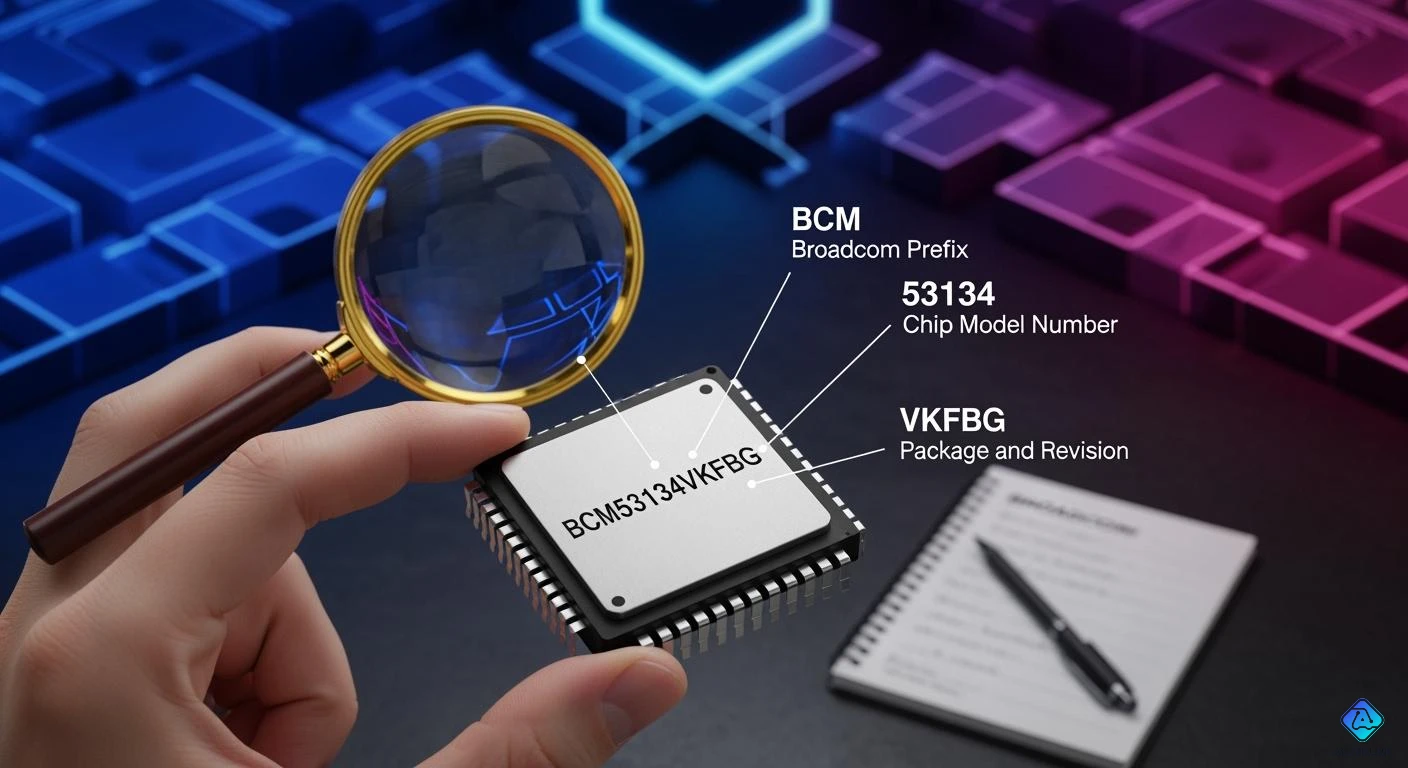
You can figure out Broadcom Chip Part Numbers by looking at each part of the code. The prefix, like BCM, shows the chip family. Each part of the number gives hints about the chip type, features, and how it was made. Knowing these parts helps you pick the right Broadcom chip for what you need.
Always look at the official papers to make sure your answer is correct and accurate.
Key Takeaways
-
Begin with the prefix 'BCM' to find the Broadcom chip family. This shows you what the chip mainly does.
-
Split the part number into parts: prefix, family code, product identifier, and revision code. Each part gives you key facts about the chip.
-
Always look at official datasheets for correct details about the chip's features and specs. This helps you make smart choices.
-
Look for extra letters or numbers in the product identifier. These can mean the chip has special features or versions.
-
Avoid mistakes by checking each part of the number closely. This helps you pick the right chip for your project.
Broadcom Chip Part Numbers Structure
Common Prefixes Like BCM
When you look at broadcom chip part numbers, you often see a prefix at the start. The most common prefix is BCM. This prefix tells you that the chip comes from broadcom. You can use the prefix to figure out which chip family the part belongs to. For example, BCM means the chip is part of broadcom’s main product lines. Other prefixes may exist, but BCM is the most widely used.
Tip: Always check the prefix first. It helps you narrow down the chip’s family and its main function.
Here is a table that shows how the BCM prefix connects to different broadcom chip families:
| Part Number | Description |
|---|---|
| BCM 53134 | Part of the 53xxx family of Ethernet switch chips (24+2 port Gigabit Ethernet switch) |
| BCM 43684 | Part of the 43xxx family; a Wi-Fi 6E (802.11ax) 4x4 combo chip |
| BCM 95808 | Represents an enterprise-class SAS/SATA RAID controller card (based on the BCM89xxx controller family) |
| BCM 89572 | Part of the 89xxx family; a SAS/SATA RAID controller chip |
Numbering Format Overview
Broadcom chip part numbers follow a clear format. You see the prefix first, then a series of numbers. Each segment has a purpose. The prefix shows the chip family. The numbers after the prefix tell you about the chip’s features, type, and sometimes its revision. For example, in BCM53134, BCM is the prefix, and 53134 is the product code. The product code helps you identify the chip’s main function, like Ethernet switching or Wi-Fi.
You should read broadcom chip part numbers from left to right. Start with the prefix, then move to the numbers. Each segment gives you clues about the chip’s role and its place in broadcom’s lineup. If you want to find out more about a specific broadcom chip, you can use the part number to search for datasheets or official documents.
Segment Meanings in Broadcom Part Numbers
When you look at broadcom chip part numbers, you see different segments. Each segment tells you something important about the chip. You can break the part number into three main parts: the prefix and family codes, the product identifier and features, and the revision and batch codes. Let’s look at what each part means.
Prefix and Family Codes
The prefix sits at the start of the part number. You often see "BCM" as the prefix. This prefix tells you that the chip comes from broadcom. The family code follows the prefix. It helps you know which group or family the chip belongs to. For example, in BCM53134, "53" is the family code. This code shows you that the chip is part of the Ethernet switch family.
Tip: Always check the prefix and family code first. These codes help you quickly find out if the chip fits your project.
You can use this table to see how prefixes and family codes work:
| Example Part Number | Prefix | Family Code | What It Means |
|---|---|---|---|
| BCM53134 | BCM | 53 | Ethernet Switch Family |
| BCM43684 | BCM | 43 | Wi-Fi Chip Family |
| BCM89572 | BCM | 89 | Storage Controller Family |
Product Identifier and Features
After the family code, you see more numbers. These numbers make up the product identifier. The product identifier tells you the exact model of the broadcom chip. It also gives you clues about the chip’s features. For example, in BCM53134, "134" is the product identifier. This part can show you things like the number of ports, speed, or special functions.
You can spot the chip type and variant by looking at the product identifier. Some chips have extra letters or numbers after the main code. These extra parts show you if the chip has special features, like low power or extra security.
-
If you see a letter at the end, it often means a special version.
-
If you see a longer number, it can mean more advanced features.
Note: Always check the product identifier in the datasheet. This step helps you match the chip to your needs.
Revision and Batch Codes
The last part of the broadcom chip part numbers shows the revision and batch codes. The revision code tells you if the chip has been updated or improved. You might see a letter or a number at the end, like "A1" or "B0". This code helps you know which version you have.
The batch code shows when and where the chip was made. You can use this code to track the chip’s history. This part is important if you need to check for updates or fixes.
Here is a simple way to read the last segment:
-
Revision code: Shows the version of the chip.
-
Batch code: Tells you the production date or factory.
If you want to make sure you have the right chip, always check the revision and batch codes. This step helps you avoid mistakes.
By breaking down each segment, you can understand what each part of the broadcom chip part numbers means. You can find the chip type, variant, and even when it was made. This skill helps you pick the right broadcom chip for your project.
Decoding Guide for Broadcom Part Numbers
Step-by-Step Process
You can decode broadcom chip part numbers by following a simple process. This method helps you find out what each part of the number means. Use these steps to break down any part number you see:
-
Spot the Prefix
Look at the start of the part number. You will often see "BCM." This prefix tells you the chip comes from broadcom. -
Find the Family Code
The next numbers show the chip family. For example, "53" means the Ethernet switch family. Write down these numbers. -
Read the Product Identifier
After the family code, you will see more numbers. These numbers tell you the exact model and its main features. Sometimes, you may see extra letters or numbers that show special versions. -
Check the Revision Code
At the end, look for a letter or number. This part shows the chip’s version. It helps you know if you have the latest update. -
Locate the Batch Code
Some chips have a batch code. This code tells you when and where the chip was made.
Tip: Always write down each segment as you go. This habit helps you avoid missing important details.
Here is a quick example using a sample part number:
BCM53134A1
| Segment | Example Value | What It Means |
|---|---|---|
| Prefix | BCM | Broadcom chip |
| Family Code | 53 | Ethernet switch family |
| Product ID | 134 | Specific model and features |
| Revision Code | A1 | Version of the chip |
Identifying Key Chip Information
You can use the decoded segments to find key information about the chip. Each part of the number gives you a clue:
-
Prefix and Family Code: These show you the chip’s main group and its general use. For example, you can tell if the chip is for networking or storage.
-
Product Identifier: This part helps you match the chip to your project. You can check if it has the right speed, number of ports, or special features.
-
Revision and Batch Codes: These codes help you make sure you have the right version. You can also track when and where the chip was made.
Note: Always check the official datasheet or documentation for the part number. This step makes sure you have the correct details. Sometimes, broadcom may change the meaning of a segment for a new chip family.
If you want to double-check your work, search for the part number on the broadcom website. You can also look for technical documents or datasheets. These sources give you the most accurate and up-to-date information.
By following this guide, you can read broadcom chip part numbers with confidence. You will know how to find the chip family, model, features, and version. This skill helps you choose the right chip for your needs and avoid mistakes.
Tips for Accurate Broadcom Identification
Avoiding Common Mistakes
You can stop problems by watching for mistakes when reading broadcom chip part numbers. Some people mix up numbers that look alike or miss small details. Always check every part of the number. Do not skip any part, even if it seems small.
Here are some tips to help you:
-
Check the prefix and family code twice. These show the main chip group.
-
Look for extra letters or numbers at the end. These can mean special versions or updates.
-
Match the part number with what your project needs. Make sure the features fit.
-
Do not guess what a segment means. Always find proof in official papers.
Tip: Write down the whole part number before you start searching. This step helps you stay clear and not get confused.
You can use this table to see mistakes and ways to avoid them:
| Mistake | How to Avoid |
|---|---|
| Not checking revision codes | Always look for version updates |
| Mixing up numbers that look alike | Compare each digit closely |
| Using sources that are not official | Use trusted references |
Using Official References
You should always use official sources when you check broadcom chip part numbers. Official papers give you the most correct and newest information. These sources help you check the chip’s features, version, and if it works for your project.
Here are some good places to find information:
-
Broadcom’s official website
-
Product datasheets and technical manuals
-
Websites of trusted distributors
-
Support forums run by broadcom
Note: If you cannot find the part number in official sources, ask broadcom support for help.
You can also search for the part number in the datasheet section on broadcom’s website. This step helps you find details and any changes to the chip. Always use trusted sources to make sure you pick the right chip for your project.
You can figure out Broadcom chip part numbers by looking at each part. The prefix, family code, product identifier, and revision code are important. Each segment tells you what the chip does and its features.
-
Check every segment to learn about the chip’s type and features.
-
Use official datasheets to make sure your answer is correct.
-
Follow this guide when you want to identify any Broadcom chip.
Remember: Knowing each part of the number helps you not make mistakes and pick the right chip for your project.

Written by Jack Elliott from AIChipLink.
AIChipLink, one of the fastest-growing global independent electronic components distributors in the world, offers millions of products from thousands of manufacturers, and many of our in-stock parts is available to ship same day.
We mainly source and distribute integrated circuit (IC) products of brands such as Broadcom, Microchip, Texas Instruments, Infineon, NXP, Analog Devices, Qualcomm, Intel, etc., which are widely used in communication & network, telecom, industrial control, new energy and automotive electronics.
Empowered by AI, Linked to the Future. Get started on AIChipLink and submit your RFQ online today!
Frequently Asked Questions
What does the BCM prefix mean in Broadcom chip part numbers?
When you see BCM at the start, it means the chip is from Broadcom. This prefix helps you know which chip family it is. Many chips with BCM can work with bluetooth.
How do I know if a Broadcom chip supports bluetooth?
Check the product identifier in the part number. If you see numbers like 43xxx or 44xxx, these usually mean the chip has bluetooth. Always look at the official datasheet to be sure about bluetooth features.
What is bluetooth security and why is it important?
Bluetooth security keeps your data safe when using bluetooth. You need it to stop hackers from getting your information. Broadcom chips with bluetooth often have bluetooth security to protect your connection.
How can I find out the bluetooth version in a Broadcom chip?
Look at the product identifier and revision code. Many Broadcom chips show the bluetooth version in the datasheet. Check the official documents to see if the chip has bluetooth 5.0 or another version.