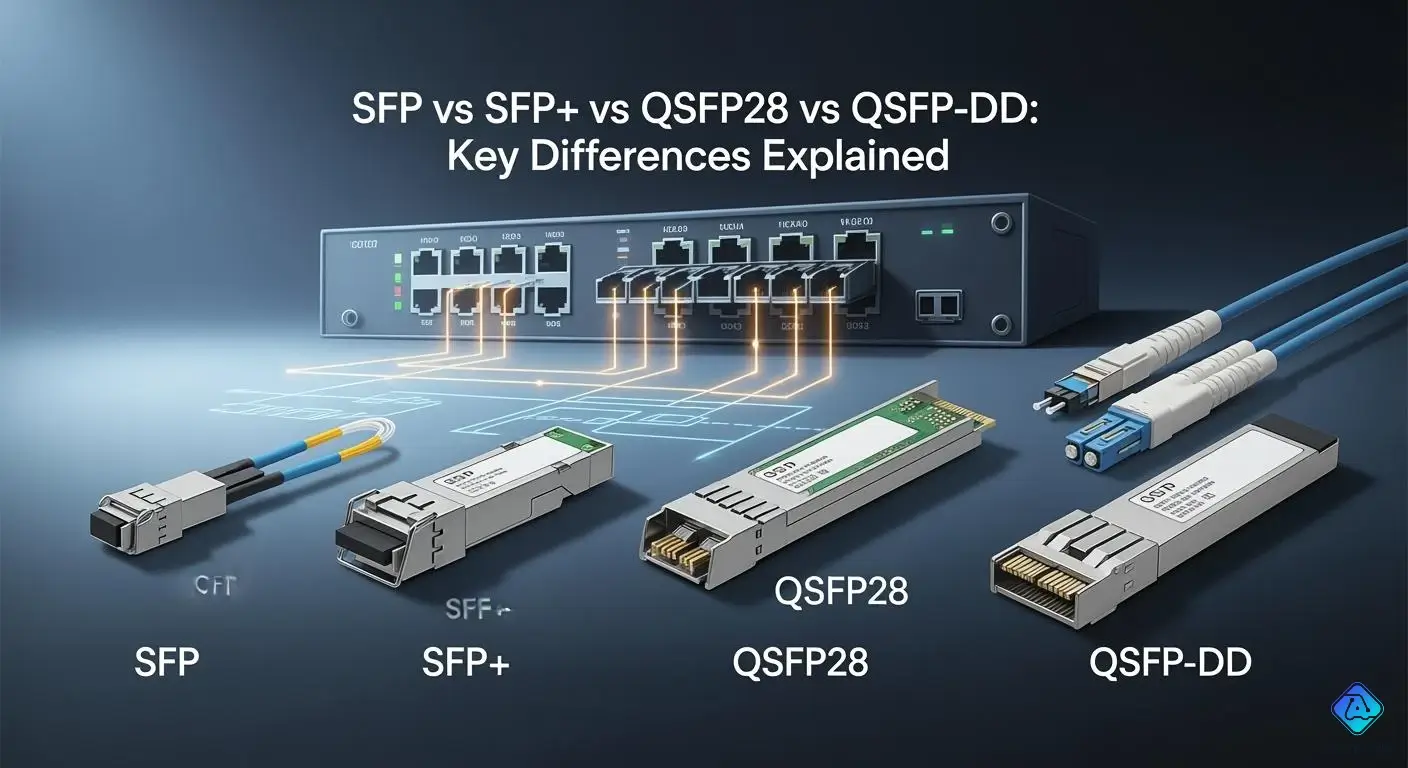
When you pick transceivers for your network, you make big choices. Understanding the key differences between sfp, sfp28, qsfp28, and qsfp-dd is essential, as they relate to speed, data capacity, and compatibility. Many groups now prefer fast modules such as sfp+ and sfp28 because they move more data. When you upgrade, you get better transceivers that work faster and use less power. These upgrades help your network grow and meet your business needs.
Key Takeaways
-
Learn how fast and how much data each module can handle. SFP modules can go up to 1G. SFP+ can reach 10G. SFP28 can go up to 25G. QSFP28 can reach 100G. QSFP-DD can go up to 400G or even 800G.
-
Pick the right size module for what you need. Smaller modules like SFP let you fit more ports on a switch. Bigger modules like QSFP28 and QSFP-DD can move more data at once.
-
Make sure things work together before you buy them. Using different brands or types can cause problems. Always check if your devices can connect with each other.
-
Think about what you might need later. Choose transceivers that can handle more data if your network grows. QSFP28 and QSFP-DD are better if you want to add more later.
-
Look at how much power and money each module uses. SFP and SFP+ cost less and use less power. QSFP28 and QSFP-DD give you more speed but cost more.
Key Differences Overview
Comparison Table
Before you pick a transceiver, you should know the main differences. The table below shows how sfp, sfp+, sfp28, qsfp28, and qsfp-dd are not the same. They have different speed, capacity, size, and compatibility. This table helps you quickly see which one fits your needs.
| Type | Speed | Capacity | Physical Size | Compatibility |
|---|---|---|---|---|
| SFP | 1G | 1 lane | Small | No |
| SFP+ | 10G | 1 lane | Small | Works in SFP slots (at 1G) |
| SFP28 | 25G | 1 lane | Small | Works in SFP+ slots (at 10G) |
| QSFP28 | 100G | 4 lanes | Larger | Works in QSFP slots (at 40G) |
| QSFP-DD | 400G/800G | 8 lanes | Largest | Backward compatible with QSFP28 |
Tip: You can put sfp28 modules in sfp+ slots, but they will only work at lower speeds. Always check if your devices work together before you buy anything.
Main Specs at a Glance
You want to choose the right module for your network. Here are the main things you should know:
-
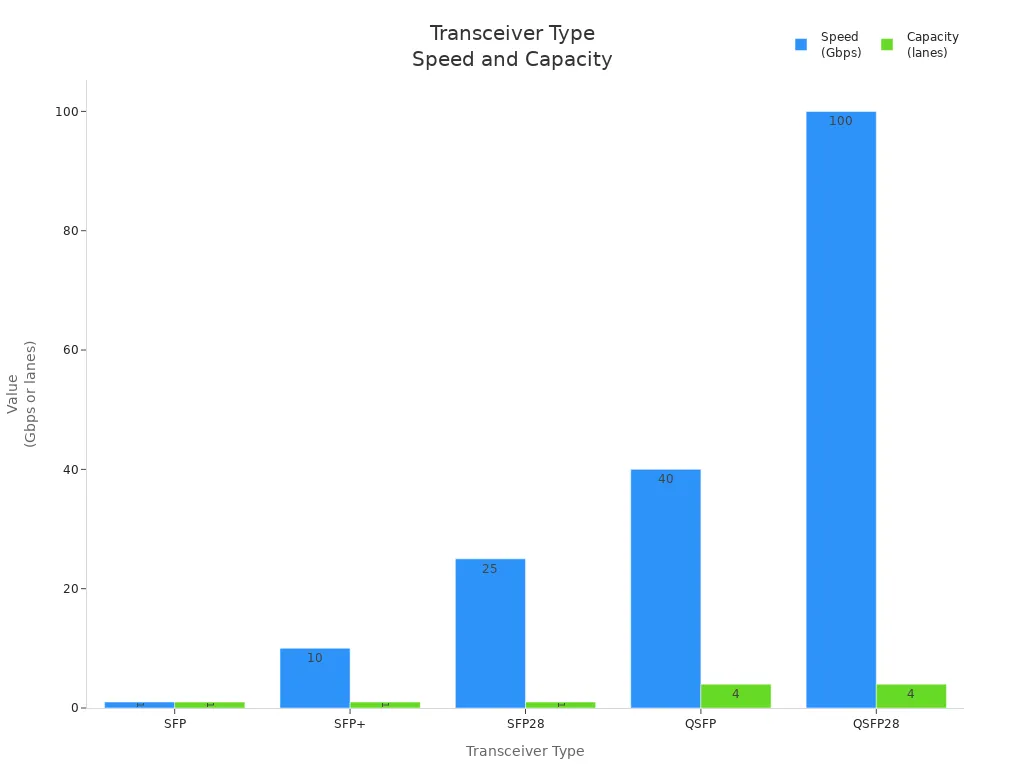
Speed and Capacity: Sfp modules go up to 1G. Sfp+ can reach 10G. Sfp28 goes up to 25G. Qsfp28 can do 100G with four lanes. Qsfp-dd can go up to 400G or 800G with eight lanes. Qsfp28 and qsfp-dd can move a lot more data at once.
-
Physical Size and Port Density: Sfp, sfp+, and sfp28 are all small. Qsfp28 is bigger, and qsfp-dd is the biggest. Smaller modules let you have more ports on a switch. Qsfp28 and qsfp-dd give you more data per port.
- Compatibility: You might have problems if you mix modules from different brands or use the wrong one for your switch. Some switches only let you use their own modules. Some may not work with the speed or type you want. Always check if the firmware, shape, and speed are right.
| Compatibility Issue | Description |
|---|---|
| Vendor-Specific Firmware Blocking | Some switches only let you use modules from the same brand. |
| Mismatch of Optical Parameters | Using the wrong fiber or distance can make the signal weak or not work. |
| Physical Layer Incompatibility | Broken connectors or odd shapes can stop modules from working. |
| Unsupported Transmission Rates or Protocols | If the module speed does not match the port, it will not work or may have errors. |
-
-
Sfp, sfp+, and sfp28 look the same but have different speeds.
-
Qsfp28 and qsfp-dd are bigger and can move more data.
-
Sfp28 and qsfp28 help you upgrade your network without changing everything.
-
Qsfp-dd has more lanes, so it is the fastest and can carry the most data.
-
Note: If you want your network to last a long time, qsfp28 and qsfp-dd are the best for fast data and easy upgrades.
SFP and SFP+ Transceivers
Speed and Capacity
You often see small form-factor pluggable transceivers in switches and routers. SFP transceivers can go as fast as 1 Gbps. This speed is good for small or medium networks. SFP+ transceivers can reach up to 10 Gbps. They are better for places that need to move more data, like data centers. The table below shows the top speed and usual bandwidth for each type.
| Transceiver Type | Maximum Supported Speed | Typical Bandwidth Capacity |
|---|---|---|
| SFP | Up to 1 Gbps | Small to medium-sized networks |
| SFP+ | Up to 10 Gbps | Higher bandwidth needs |
Physical Features
You can put in small form-factor pluggable transceivers without turning off your network. This hot-pluggable feature helps you avoid network downtime. When you add an SFP transceiver, check for dust or dirt. Clean connectors help your network stay strong. Cleaning and checking your modules often makes them last longer.
-
SFP transceivers are hot-pluggable, so you can swap them easily.
-
Always check connectors for dust before you install them.
-
Clean and watch your modules to keep your network working well.
Use Cases
You find small form-factor pluggable transceivers in many places. SFP transceivers work in business networks and help you build flexible systems. SFP+ transceivers support 10 gigabit ethernet and fast computing. You also see them in data centers and with internet service providers. These modules connect servers, switches, and routers to move data quickly.
| Use Case | Description | Speed | Compatibility |
|---|---|---|---|
| Data Centers | High-speed data transfer for cloud and big data | Up to 10 Gbps | 10 Gigabit Ethernet |
| High-Performance Computing | Needed for fast data throughput | Up to 10 Gbps | 10 Gigabit Ethernet |
| Enterprise Networks | Flexible design and fast connections | Up to 10 Gbps | 10 Gigabit Ethernet |
-
Data centers use these to keep servers and switches connected fast.
-
ISPs use these modules to give customers more bandwidth.
-
Business networks use them for strong and flexible connections.
Compatibility
You want your network to work with both old and new gear. SFP+ transceivers can work with SFP modules, so upgrades are easy. This backward compatibility saves money and keeps your system steady. Some transceivers, like the Gigamon SFP-532, work best with new equipment from top brands. You should always check your setup and vendor rules before you buy. Picking the right transceiver helps you avoid signal loss and future trouble.
-
SFP+ transceivers work with SFP modules for easy upgrades.
-
New modules fit best with gear from leading brands.
-
Check your network and vendor specs before you choose.
-
The right pick lowers signal loss and network slowdowns.
Tip: Always match your small form-factor pluggable transceiver to your network needs and equipment for the best results.
SFP28 and QSFP28 Transceivers
Speed and Bandwidth
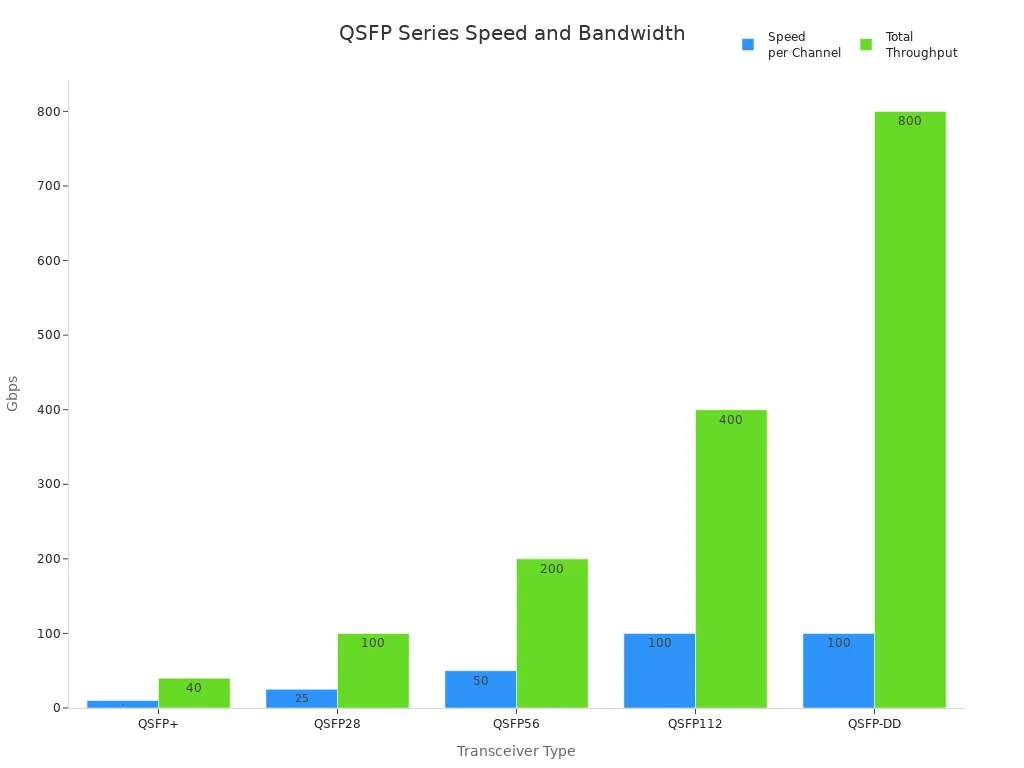
When you use sfp28 and qsfp28, your network gets much faster. Sfp28 can go up to 25 Gbps. This is a lot more than sfp or sfp+ modules. Qsfp28 uses four lanes, each at 25 Gbps. That means it can reach 100 Gbps in total. You get fast data and lots of bandwidth for your network. The table below shows how these transceivers are better than older ones.
| Transceiver Type | Speed per Channel | Total Throughput |
|---|---|---|
| QSFP+ | 10 Gbps | 40 Gbps |
| QSFP28 | 25 Gbps | 100 Gbps |
| QSFP56 | 50 Gbps | 200 Gbps |
| QSFP112 | 100 Gbps | 400 Gbps |
| QSFP-DD | 100 Gbps (8 ch) | 800 Gbps |
Physical Design
Sfp28 modules look just like sfp+ modules. You can put them in the same slots. Qsfp28 modules are quad small form-factor pluggable. This design lets you fit more ports in less space. It helps save room in busy data centers.
The qsfp28 transceiver can send data at 100 Gbps. It does this by using four lanes of 25 Gbps. This gives you fast and reliable connections, which are important for today’s data centers.
The quad small form-factor pluggable design lets you add more qsfp modules to your racks.
Typical Applications
You use sfp28 for links between top-of-rack switches and servers. It works for short distances up to 100 meters or long ones up to 10 kilometers. Sfp28 can take the place of two 10G links and uses less power. Qsfp28 is used for 100g ethernet, InfiniBand, and high-speed computing. You also see qsfp28 in cloud services, machine learning, and main networks.
-
High-Density Networking: Qsfp28 modules let you use many data channels and save space.
-
Interconnecting Switches and Routers: Qsfp28 to sfp28 adapters help connect different devices.
-
Scaling Bandwidth for Cloud Services: Qsfp28 gives you more bandwidth, which is needed for cloud work.
Compatibility Notes
You can use sfp28 in sfp+ ports without making changes. Sfp28 will work at 10Gbps in these ports. This lets you upgrade your network slowly. The table below shows how these transceivers work with older gear.
| Compatibility Feature | Description |
|---|---|
| Physical form factor | Sfp28 fits into sfp+ ports, so you do not need to change anything. |
| Electrical interface | Sfp28 can run at 10Gbps, which matches sfp+ needs and helps with upgrades. |
| Data rate | Sfp28 will switch to 10 Gbit/s in sfp+ ports, so it works with old setups. |
Tip: Always check the distance and speed before you put in a new transceiver. This helps you avoid problems and keeps your network working well.
QSFP-DD Transceivers
Speed and Performance
QSFP-DD transceivers give your network very high speed. They can go up to 400G, and some new ones may reach 800G. You can move lots of data very fast, which is good for today’s networks. The electrical interface can be from 28 Gbps to 112 Gbps. This means you can do hard jobs without slowing down. QSFP-DD also works with QSFP28, so you do not need to change everything when you upgrade.
| Feature | Specification |
|---|---|
| Maximum Speed | 400G (future: 800G) |
| Electrical Interface Rates | 28 Gbps to 112 Gbps |
| Backward Compatibility | QSFP28/56 |
Tip: QSFP-DD is great if you want fast speed and easy upgrades.
Physical and Power Aspects
QSFP-DD modules look like older QSFP+ connectors but are longer. The extra length lets them have more lanes and better speed. These modules use more power than older ones. For example, QSFP-DD can use up to 12 watts. QSFP28 uses less than 3.5 watts. The size of QSFP-DD is 18.35 by 89.4 by 8.5 mm. You need to make sure you have enough space and cooling in your racks.
| Transceiver Type | Maximum Power Consumption | Dimensions (mm) |
|---|---|---|
| QSFP28 | <3.5 Watts | 18.35 / 72.3 / 8.5 |
| QSFP56 | <5 Watts | 18.35 / 72.3 / 8.5 |
| QSFP-DD | 12 Watts | 18.35 / 89.4 / 8.5 |
Use Cases
QSFP-DD transceivers are used where you need very fast networks. They are important for 400G Ethernet in big data centers. You can use them for cloud computing, AI, and big data jobs. They help you save space and power in large networks. You connect servers, switches, and storage with fast links. This helps you stop slowdowns and keep things running well.
-
Use 400G Ethernet in new data centers
-
Move lots of data for cloud and AI work
-
Save space and power in big networks
-
Support fast links for analytics and real-time jobs
-
Connect servers, switches, and storage for better speed
Compatibility
You do not have to stop using your old equipment. QSFP-DD transceivers work with older QSFP and QSFP28 modules. They use the same pinout, so you can add QSFP-DD and keep your old hardware. This makes upgrades easy and saves you money. You get more choices and can grow your network when you use QSFP-DD.
Note: You can upgrade to QSFP-DD and still use your old SFP and QSFP28 modules. This helps you save money and keeps your network working well.
Detailed Comparison by Key Factors
Speed and Bandwidth
You need to look at both speed and bandwidth when you choose network modules. Speed tells you how fast data moves. Bandwidth shows how much data you can send at once. Sfp modules give you up to 1 Gbit/s, which works for small networks. Sfp28 modules increase your bandwidth to 25 Gbit/s per channel. This means you can move more data without adding more cables.
Qsfp28 modules use four channels, each at 25 Gbit/s, for a total of 100 Gbit/s. Qsfp-dd modules go even further. They use eight channels, each up to 100 Gbit/s, so you get up to 800 Gbit/s. You can see that more channels mean more bandwidth and faster networks. If you want to support cloud services or big data, you need modules with more channels.
Size and Port Density
The size of your module affects how many ports you can fit on a switch. Sfp, sfp+, and sfp28 modules are small, but they offer less bandwidth per port. Qsfp28 and qsfp-dd modules are bigger, but they give you much higher port density. You can fit more channels into the same space, which is important for data centers.
| Transceiver Type | Data Rate | Port Density Implication |
|---|---|---|
| SFP | 1 Gbit/s | Lower density |
| SFP+ | 10 Gbit/s | Moderate density |
| SFP28 | 25 Gbit/s | Higher density |
| QSFP+ | 40 Gbit/s | Higher density (4x SFP+) |
| QSFP28 | 100 Gbit/s | Very high density |
| QSFP-DD | 400 Gbit/s | Extremely high density |
One qsfp module allows four times more throughput than a single sfp module occupying the same physical space, making it an excellent choice for data centers.
If you want to save rack space and increase bandwidth, choose modules with more channels and higher port density.
Compatibility and Interchangeability
You may want to mix different modules in your network. This can cause problems if you do not check compatibility. Here are some common challenges:
-
Wavelength Matching: You must use modules that work at the same wavelength. If you do not, you can lose data.
-
Speed Compatibility: If you mix modules with different speeds, you may see connection failures or slower performance.
-
Fiber Type Selection: You need to use the right fiber type for each module. If you use the wrong one, your connection may not work.
-
Correct Switch Operation: Always check that your modules work with your switches. Some switches only support certain modules.
You can use sfp28 modules in sfp+ ports, but they will only work at 10 Gbit/s. Qsfp-dd modules can work with qsfp28 modules, but you must match the channel and speed settings. Always check the specs before you buy new modules.
Cost and Power
Cost and power use matter when you plan your network. Sfp and sfp+ modules cost less and use less power. Sfp28 modules use a bit more power but give you more bandwidth per channel. Qsfp28 and qsfp-dd modules cost more and use more power, but they give you much higher bandwidth and more channels.
| Form Factor | Data Rate | Lanes | Typical Use | Power Consumption |
|---|---|---|---|---|
| SFP | up to 4.25 Gbps | 1 | 1G/4G Ethernet, FC | ~1W |
| SFP+ | up to 10 Gbps | 1 | 10G Ethernet, FC | ~1.5W |
| SFP28 | up to 25 Gbps | 1 | 25G Ethernet, 5G fronthaul | 1.5–2W |
| QSFP | 40 Gbps (4x10G) | 4 | 40G Ethernet, high-density core | ~3.5W |
| QSFP28 | 100 Gbps (4x25G) | 4 | 100G Ethernet, cloud data center | 3.5–4W |
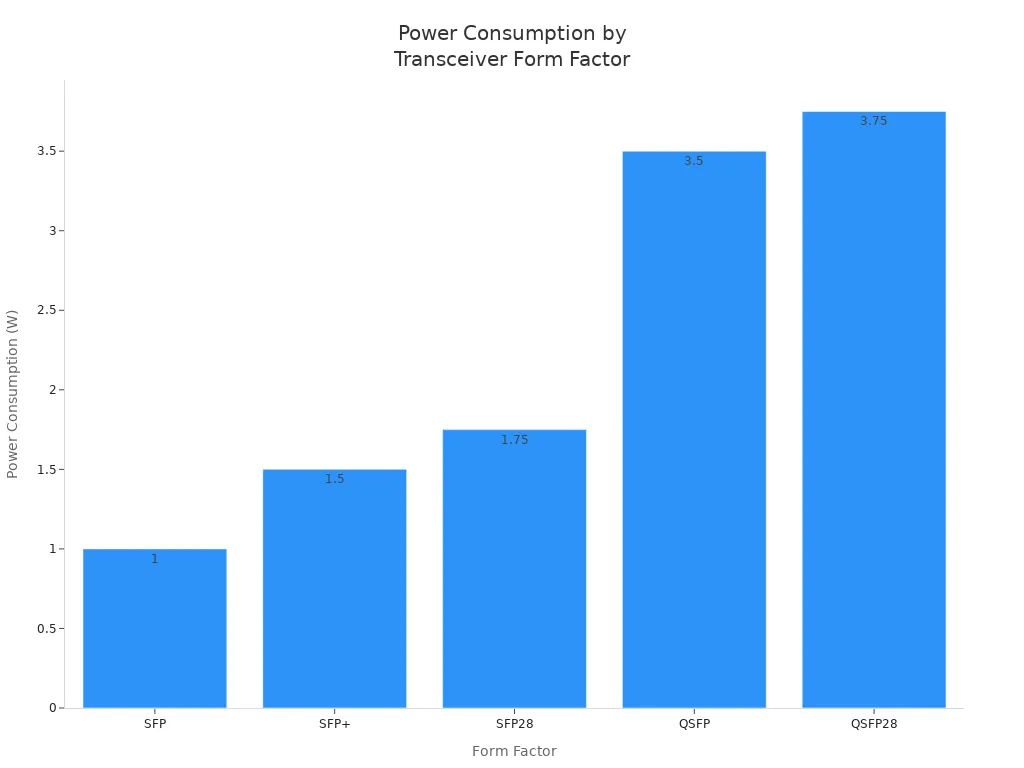
If you want to save on power and cost, use sfp or sfp+ modules for small networks. For bigger networks, qsfp28 and qsfp-dd modules give you more bandwidth per channel, but you need to plan for higher power use.
Future-Proofing
You want your network to last and grow with your needs. Sfp and sfp+ modules offer low bandwidth and limited growth. Sfp28 modules give you more bandwidth and moderate scalability. Qsfp28 and qsfp-dd modules offer high or very high bandwidth, more channels, and better scalability.
| Consideration | SFP/SFP+ | SFP28 | QSFP28 | QSFP-DD |
|---|---|---|---|---|
| Bandwidth | Low | Medium | High | Very High |
| Port Density | Low | Medium | High | Very High |
| Scalability | Limited | Moderate | High | Very High |
| Compatibility | High | High | Moderate | High |
| Future Growth Potential | Low | Medium | High | Very High |
-
Consider current performance needs.
-
Evaluate growth potential.
-
Determine appropriate transceiver type based on feature sets.
If you want to future-proof your network, choose modules with more channels and higher bandwidth. Qsfp28 and qsfp-dd modules help you scale up without changing your whole setup. You can add more channels as your needs grow.
Choosing the Right Transceiver
Assessing Network Needs
You need to look at several factors before you choose a transceiver. Start by thinking about what your network must handle today and in the future. Use the table below to help you focus on the most important points:
| Factor | Description |
|---|---|
| Compatibility | Make sure the transceiver works with your cables and protocols. |
| Performance | Check signal quality, distance, and power use for the best results. |
| Reliability | Pick trusted brands to avoid downtime and keep things running smoothly. |
| Cost | Balance price with long-term value and maintenance. |
You should also consider:
-
Temperature range for your environment.
-
How easy it is to install and replace the transceiver.
-
Power consumption to keep energy costs low.
-
Scalability so your system can grow when needed.
-
Check if you need single-mode or multi-mode fiber.
-
Think about your budget and do not sacrifice quality.
-
Choose transceivers with good reviews and warranties.
Compatibility Check
You want your new transceiver to work with your current equipment. Many companies, like FS, test their transceivers with different brands and devices. They check for things like OEM specs, real-world use, and matching wavelengths. You should always:
-
Make sure the transceiver fits the correct port.
-
Confirm that both ends use the same wavelength.
-
Look for compatibility lists from your hardware vendor.
Tip: Always double-check compatibility before you buy. This step helps you avoid costly mistakes and keeps your network stable.
Cost vs. Performance
You need to balance what you spend with what you get. Lower-cost transceivers may save money at first, but they can cause problems later. High-quality transceivers often last longer and give better performance. Think about:
-
Upfront cost versus long-term savings.
-
Power use, since more efficient models lower your bills.
-
Maintenance and replacement costs over time.
A good sfp module can offer strong value if you match it to your needs. Do not just look at price—think about how well the transceiver will work in your setup.
Planning for Growth
Plan for the future when you pick a transceiver. If you expect your data needs to grow, choose a model that can handle more traffic. For short distances, multi-mode fiber works well. For longer runs, single-mode fiber is better. Some planners use DWDM or CWDM transceivers to boost bandwidth without adding more cables. BiDi transceivers can also help you save on fiber by sending data both ways on one strand.
-
Think about how much your network might grow.
-
Invest in single-mode fiber if you need more coverage.
-
Pick transceivers that make it easy to upgrade later.
Note: Planning ahead helps you avoid costly upgrades and keeps your network ready for new demands.
You learned that sfp, SFP+, SFP28, QSFP28, and QSFP-DD are not the same. They have different speed, capacity, and ways to grow. Picking the right transceiver helps your network work well.
-
Make sure your devices fit together and work at the right speed.
-
Look at prices, but always pick good quality.
-
Pick options that let your network get bigger later.
| Criteria | Multimode Fiber | Single-Mode Fiber |
|---|---|---|
| Typical Use | Short links | Long distances |
| Upgrade Path | Limited | High scalability |
Watch for new changes in technology so your network stays strong in the future.

Written by Jack Elliott from AIChipLink.
AIChipLink, one of the fastest-growing global independent electronic components distributors in the world, offers millions of products from thousands of manufacturers, and many of our in-stock parts is available to ship same day.
We mainly source and distribute integrated circuit (IC) products of brands such as Broadcom, Microchip, Texas Instruments, Infineon, NXP, Analog Devices, Qualcomm, Intel, etc., which are widely used in communication & network, telecom, industrial control, new energy and automotive electronics.
Empowered by AI, Linked to the Future. Get started on AIChipLink.com and submit your RFQ online today!