Intel, AMD, and ARM Processors Compared for Chromebook Performance
You want the best processors for Chromebooks in 2026. Many people see that an arm processor gives you better battery life and works well. Recent tests show a Chromebook like the Lenovo Chromebook Plus 14 is fast. It uses the MediaTek Kompanio 910 and matches Intel and AMD in speed. This Chromebook lasts more than 13 hours. It supports Linux and Android apps, so you can use many programs. The Chromebook starts at $649 and gives you good value. When you pick a Chromebook, the processor changes speed, battery life, and what you can do each day.
Key Takeaways
-
Pick ARM processors if you want your battery to last longer. They can work for up to 19 hours on one charge.
-
Choose Intel Core i5 or AMD Ryzen if you need to do many things at once. They help run tough apps well.
-
For simple jobs like browsing the web or watching videos, Intel Core i3 and ARM models are fast and work well.
-
Think about what you do each day before you pick a Chromebook. ARM is good for long use. Intel is good for doing many things at once. AMD gives balanced performance.
Best Processors for Chromebooks 2026
Chromebook Performance Overview
You want your chromebook to be fast every time you use it. In 2026, the best processors mix speed, battery life, and compatibility. ARM chips are good for saving power and lasting longer. Intel processors are best for quick tasks like web browsing. AMD processors are strong when you run many apps at once.
Industry benchmarks show the Intel Core i3-N305 scores 4,477 on Geekbench 6. This means you can do schoolwork, stream videos, and play light games easily. The Intel Core i5 is best for multitasking and high-end Android games. AMD Ryzen processors work well for Android apps and light gaming, but their battery does not last as long. ARM processors, like MediaTek Kompanio, are fast for daily tasks and have the longest battery life.
Chromebook performance is measured by Geekbench 6 scores for single-core and multi-core CPU. Tests like CrXPRT 2 and WebXPRT 4 show how your chromebook handles real tasks and battery life. These tests help you compare models and pick the best processor.
Key Factors: Speed, Battery, Compatibility
Think about what you need from your chromebook. If you want fast web browsing, schoolwork, or video calls, pick a processor with high single-thread speed. Intel processors are good for this. If you want to run many apps or use Linux and Android apps, AMD processors with strong multi-core features are helpful.
ARM processors give you the best battery life. For example, the Lenovo 100e Chromebook Gen 4 with ARM lasts about 33% longer than a similar x86 chromebook. You can use your device all day without charging. ARM processors also keep your chromebook cool and quiet, which is nice for long use.
Here is a simple table showing how processor architecture affects speed, battery life, and compatibility:
| Architecture | Speed | Battery Life | Compatibility |
|---|---|---|---|
| x86 | High | Lower | High |
| ARM | Moderate | Extended | Moderate |
x86 processors, like Intel and AMD, work better with Linux and Android apps. ARM processors are good for most tasks, but some advanced apps may not work as well.
When you pick a processor, match your needs to its features. If you want fast gaming or heavy multitasking, choose Intel or AMD. If you want the longest battery life and a light device, ARM is a smart choice. Students, professionals, and casual users should pick processors based on how they use their chromebook each day.
-
For the best overall performance, choose Intel Core i5 or AMD Ryzen.
-
For the best battery life and a cool, quiet device, pick an ARM-based chromebook.
-
For basic tasks like writing, web browsing, and streaming, ARM and Intel Core i3 models are fast and reliable.
Use these features to find the best processors for chromebooks in 2026.
Intel Chromebook Performance
Intel Core vs N-Series
When you look at intel chromebooks, you see two main types: Core and N-Series. The Core models, like the Core i3 and Core i5, give you strong performance for multitasking and fast web browsing. You can open many tabs, stream videos, and use Android apps without slowdowns. The N-Series, such as the N100 and N305, focus on everyday tasks. These models work well for schoolwork, writing, and video calls. If you want a chromebook for basic use, the N-Series gives you enough speed. For heavy multitasking or advanced apps, the Core models offer better performance.
Battery Life and Efficiency
You want your chromebook to last all day. Intel-powered chromebooks give you different battery life based on the device tier. Here is a table to help you compare:
| Device Tier | Claimed Battery Life | Real-World Battery Life |
|---|---|---|
| Budget (Intel Celeron) | 8–10 hrs | 6–8 hrs |
| Mid-Range / Chromebook Plus | 10–12 hrs | 9–11 hrs |
| Premium x86 (Core Ultra) | 10–12 hrs | 10–11 hrs |
Most intel chromebooks last between 6 and 11 hours in real use. You can finish your school day or work shift without charging. Premium models with Core Ultra chips give you the best mix of performance and battery life.
Compatibility and Value
Intel chromebooks stand out for their wide compatibility. You can run Linux applications natively on many models with Apollo Lake chips. This means you get access to more apps without extra steps. You can use tools for coding, design, or productivity with ease. Intel chromebooks also support Android apps and web apps well.
When you compare price and value, intel chromebooks offer strong options. For example:
-
The Acer Chromebook Plus 514 costs $350 and gives you a Core 3 N355 processor with a 512 GB SSD.
-
Standard intel chromebooks range from $200 to $400, with 4 GB RAM and 64–128 GB storage.
-
Chromebook Plus models cost $349 to $699 and come with at least 8 GB RAM and 128 GB SSD.
-
Memory and storage prices have gone up, so budget models now cost $90 to $165 more than before.
You get good value with intel chromebooks, especially if you want strong performance and app support. You can find a model that fits your needs and budget.
AMD Chromebook Performance
Multi-Core Performance
You want your chromebook to handle many tasks at once. AMD gives you strong multi-core performance. When you use a chromebook with an AMD Ryzen or Athlon 3000 C-Series Mobile Processor, you see up to 212% better performance in multitasking and content creation compared to older models. You can open many tabs, edit documents, and stream videos without slowdowns. This boost in performance helps you finish schoolwork or work projects faster. You get a chromebook that works well for both learning and professional tasks.
-
You browse the web faster.
-
You switch between apps smoothly.
-
You create content with less waiting.
Battery and Thermals
You want your chromebook to last all day and stay cool. AMD chromebooks use batteries that compare well with other models. For example, the Dell Latitude Chromebook 3445 with an AMD Ryzen 3 7320C processor has a 54WHr battery. This is close to the 58 Wh battery in the Intel Core i3-N305 HP Chromebook MT7921 and the 47Wh battery in the MediaTek Kompanio 1380 HP Slim 3 Chrome. You get enough power for a full day of use. Your chromebook stays cool, so you can use it on your lap or in your backpack without worry.
Tip: If you want the longest battery life, arm chromebooks still lead. AMD gives you a good balance between performance and battery life.
App Compatibility
You need your chromebook to run all your favorite apps. AMD chromebooks support Android and Linux apps well. Linux on chromebooks, called Crostini, lets you run Linux apps next to your Chrome OS apps. This is great if you want to code or use special tools. Android apps run inside a secure container, which keeps your chromebook safe. Chrome OS uses SELinux and VerifyApps to protect you from harmful apps.
-
Android apps run smoothly in a Linux container.
-
Chrome OS supports both arm and Intel processors for Android apps.
-
You can use Linux apps and Chrome OS apps at the same time.
You get a flexible chromebook that works for school, work, and play. AMD gives you strong performance, good battery life, and wide app support. If you want the best battery life, arm chromebooks are still the top choice.
ARM Chromebook Performance
Efficiency and Battery Life
You want your chromebook to last all day without searching for a charger. ARM chips help you get long battery life, which makes your device perfect for school, work, or travel. You can see how different models perform in the table below:
| Segment | Battery Range | Tested Example | Result |
|---|---|---|---|
| Budget (under $250) | 6–8 hours | Asus CX1405 | 6–8 hrs video |
| Mid-range Plus | 9–11 hours | Acer Spin 714 (2024) | 9 hrs 30 min |
| Premium ARM | 13–15 hours | Lenovo Plus 14 | 13–15 hrs real-world |
| Premium ARM peak | 17–19 hours | Asus Plus CM34 Flip | 19 hrs (CrXPRT 2) |
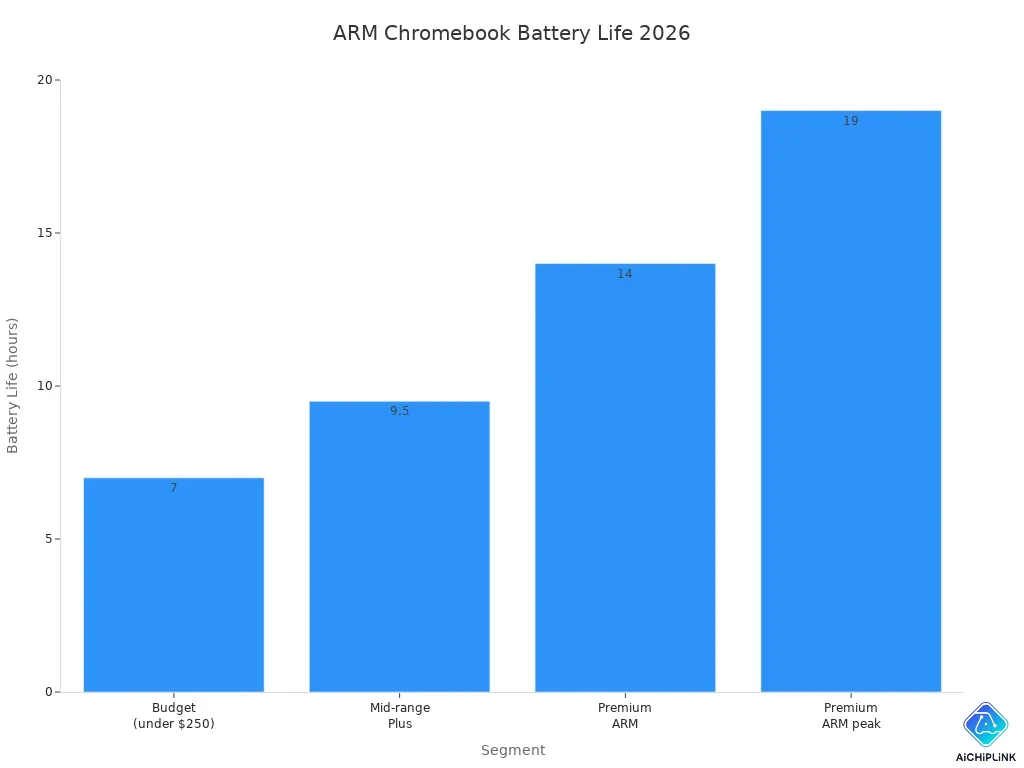
You can see that premium arm chromebooks reach up to 19 hours on a single charge. This means you get long battery life for streaming, browsing, and working. You do not need to worry about your device running out of power during the day.
Tip: If you want a chromebook that stays cool and quiet, arm chips help keep your device comfortable to use for hours.
GPU and Multi-Core Strengths
You want smooth graphics and fast multitasking. ARM chromebooks give you both. The HP Chromebook x360 with the Mediatek Kompanio 1300 shows strong GPU performance. You can play Android games like Call of Duty mobile without lag. These devices also handle emulators and video streaming well. You get a fun experience for gaming and media.
ARM chips use octa-core designs to boost performance. You can see how different chipsets help your chromebook in the table below:
| Chipset | CPU Configuration | Key Features |
|---|---|---|
| Snapdragon 7c | Octa-core: 2 Cortex-A76 (2.4GHz), 6 Cortex-A55 | Incredible performance, battery life, and connectivity. |
| MediaTek Kompanio 1200 | Octa-core: 4 Cortex-A78, 4 Cortex-A55 | Enhanced computing experiences, video conferencing, 4K HDR streaming, AI applications. |
| MediaTek Kompanio 820 | Octa-core: 4 Cortex-A76, 4 Cortex-A55 | Long battery life, high-quality visuals with Mali-G57 GPU. |
You can open many tabs, join video calls, and stream 4K video. ARM chromebooks give you long battery life and strong performance for daily tasks.
Chrome OS Compatibility
You want your chromebook to run all your favorite apps. ARM chromebooks support Chrome OS, Android apps, and web apps. Most popular tools work well, including Google Docs, YouTube, and Zoom. Some advanced Linux apps may not run as smoothly as on Intel or AMD, but you still get great support for most tasks.
You can use your arm chromebook for school, work, or fun. ARM chips give you long battery life, quiet operation, and smooth performance. You get a device that fits your busy life.
Chromebook Comparison: Intel vs AMD vs ARM
Performance Summary Table
You want to know how different chromebooks do in real tests. Benchmark scores help you see which device is fastest for daily use. Speedometer 3.1 and Basemark Web 3.0 scores show how quickly your chromebook opens web apps and loads pages.
Here is a table with benchmark results for popular models in 2026:
| Chipset / Device | Speedometer 3.1 | Basemark Web 3.0 |
|---|---|---|
| Kompanio Ultra 910 (Acer Plus Spin 514) | 27.9 | 1,662 |
| Kompanio Ultra 910 (Lenovo Plus 14) | 25.2 | 1,151 |
| Kompanio 838 (budget arm) | ~11 | 502.99 |
| Intel Celeron N4500 (budget) | Sub-10 | Sub-300 |
Premium arm models like the Acer Plus Spin 514 and Lenovo Plus 14 score higher than budget models. Intel Celeron N4500 chromebooks get lower scores in both tests. This means premium arm models are faster for most tasks.
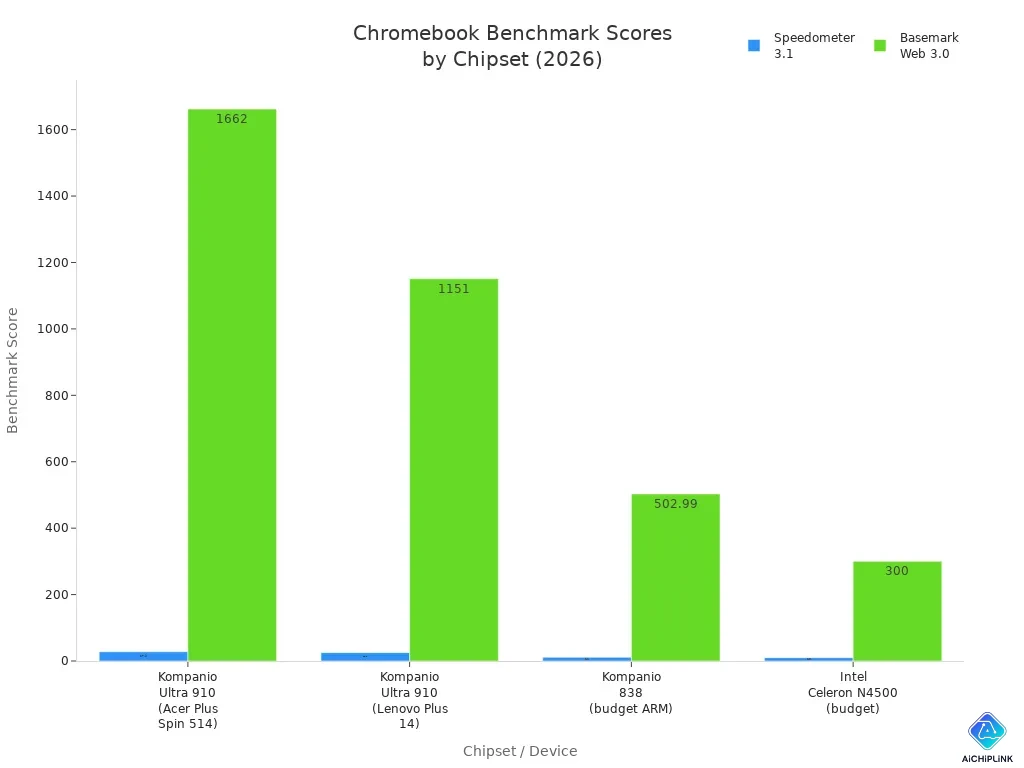
Chromebook benchmarks help you choose the right device for your needs. You can use these scores to compare models for school, work, or fun.
Key Differences
You want to know what makes each chromebook special. Look at speed, battery life, and compatibility to see which one fits your day. Here is a table that shows key differences between Intel, AMD, and arm models:
| Type | Speed (CPU) | Battery Life | Compatibility |
|---|---|---|---|
| Intel | 12th-generation Intel Core i3-1215U | Optimized for multitasking and Android apps | Excellent for Chrome OS and Android apps |
| ARM | MediaTek Kompanio 520 | Long battery life | Good for Android apps, limited multitasking |
| AMD | Ryzen 3 7320C | Balanced for multitasking | Good for Linux and Android apps |
Intel models are great for multitasking. You can open many tabs and run Android apps at once. Arm models last all day and stay cool. AMD models give you balanced speed and work well with Linux and Android apps.
-
Intel models are best if you need speed and lots of app support.
-
Arm models are good if you want long battery life and a quiet device.
-
AMD models help you multitask and use Linux apps easily.
Tip: If you want a chromebook for school, pick one with long battery life. If you need to run many apps, choose Intel or AMD. For streaming and browsing, arm models work best.
Use these benchmark scores to find the right chromebook for you. Each model has its own strengths. You can pick the best device for your daily needs.
Best Chromebook Recommendations
For Students
You want the best chromebook for schoolwork, web research, and video calls. Many students need a device that balances price, battery, and speed. You can find a budget model with an Intel Celeron or Pentium chip. These models handle web browsing, Google Docs, and browser-based tasks well. If you want more power for multitasking, choose an Intel Core i3 or i5. These chips give you better performance for demanding apps. Many students say a 2-in-1 chromebook helps with note-taking and drawing.
Here is a table to help you compare:
| Processor Type | Performance Description | Battery Life | Price Range |
|---|---|---|---|
| Intel Core i3 / i5 / i7 | Heavy multitasking, running demanding apps, desktop-like experience | Good to Fair | $350–$700 |
| Intel Celeron / Pentium | Basic tasks, budget-friendly, moderate use | Good | $200–$350 |
A 2-in-1 chromebook with a Celeron chip is ideal for students who want a budget option. You get a long battery life and a low price. If you want a faster device, pick a Core i3 model. Many students find these models last all day and run web apps smoothly.
Tip: You can save money by choosing an inexpensive chromebook for basic tasks. Look for sales to get the best price.
For Professionals
You need the best chromebook for work, multitasking, and web meetings. Many professionals use a 2-in-1 chromebook for flexibility. You can open many web tabs, run Android apps, and join video calls. The Dell Chromebook 11 and Acer Chromebook 13 give you strong performance for office tasks. If you want the best price and speed, pick a model with an Intel Core i5 or AMD Ryzen chip. These models cost more but handle heavy web use and demanding apps.
-
Dell Chromebook 11: Fast multitasking, good for web meetings.
-
Acer Chromebook 13: Great graphics, strong for web-based tasks.
-
2-in-1 chromebook: Flexible for presentations and travel.
You can find a budget 2-in-1 chromebook for under $400. If you want a premium device, expect a higher price. Many professionals choose a 2-in-1 chromebook as an affordable secondary device for travel.
For Casual Users
You want the best chromebook for web browsing, streaming, and simple tasks. A budget 2-in-1 chromebook works well for you. You can find an inexpensive chromebook for under $250. These models use ARM or Intel Celeron chips. You get long battery life and a low price. You can watch videos, check email, and use web apps. Many people use a 2-in-1 chromebook as a budget option for home or travel.
Note: If you want a device for browser-based tasks, pick an inexpensive chromebook. You get the best price and enough speed for daily use.
You can find the best chromebook for your needs by matching price, battery, and performance. Students, professionals, and casual users all have budget options. You can choose a 2-in-1 chromebook for flexibility and value.
You can pick from many chromebooks. ARM processors help your battery last longer. They let you use Android apps easily. Intel chips are good for doing many things at once. They support lots of apps. AMD models are fast and save battery for daily use. Think about what you need before you choose:
-
ARM is good if you want to use your chromebook all day.
-
Intel is best for multitasking and using many apps.
-
AMD gives you both speed and battery life.
Chromebooks are great for web browsing and streaming. They are easy to update and take care of.

Written by Jack Elliott from AIChipLink.
AIChipLink, one of the fastest-growing global independent electronic components distributors in the world, offers millions of products from thousands of manufacturers, and many of our in-stock parts is available to ship same day.
We mainly source and distribute integrated circuit (IC) products of brands such as Broadcom, Microchip, Texas Instruments, Infineon, NXP, Analog Devices, Qualcomm, Intel, etc., which are widely used in communication & network, telecom, industrial control, new energy and automotive electronics.
Empowered by AI, Linked to the Future. Get started on AIChipLink and submit your RFQ online today!
Frequently Asked Questions
What processor is best for battery life on a Chromebook?
You get the best battery life with ARM processors. These chips use less power and keep your Chromebook cool. You can use your device all day without charging.
Can you run Android and Linux apps on all Chromebook processors?
Most Chromebooks support Android and Linux apps. Intel and AMD models offer the best compatibility. ARM models run most apps, but some advanced Linux tools may not work as well.
Do Chromebooks with Intel, AMD, or ARM processors get Chrome OS updates?
You receive regular Chrome OS updates on all processor types. Google supports Intel, AMD, and ARM Chromebooks for many years. You stay secure and get new features.