How to Select AI Chips for On-Device Machine Learning Applications
Choosing AI chips means you must balance five main factors: fast response times, total power limits, energy efficiency measured in TOPS per Watt, hardware costs, and software compatibility. You can pick the right hardware by testing these specific choices early in your design process.
Running machine learning models directly on internal CPUs, GPUs, NPUs, or low-power MCUs removes the need for the cloud completely. Processing data locally cuts network delays immediately, keeps personal user data safe, and allows your device to work without internet. You get dependable speed when you match your project needs directly to these local processing chips. This method ensures smooth operation across many different hardware setups.
Key Takeaways
-
Pick AI chips by establishing firm speed, storage, and energy targets for your chosen hardware.
-
Neural processing units provide quicker answer times and improved battery life compared to basic microcontrollers.
-
Check actual chip performance using standard benchmark tests rather than trusting marketing claims from seller companies.
-
Check software tool kit compatibility early to prevent big delays in your product creation process.
-
Pick low-energy processors to keep the system cool and lower the overall hardware production costs.
Defining Model and System Requirements
You must outline your model workload and system needs before picking hardware. Smart thermostats, factory robots, and smart cars need very different setup goals. Finding your performance limits early stops expensive hardware swaps later on.
Establishing Latency and Performance Budgets
You need fast response times to keep real-time programs safe and reliable. Smart cars and factory robots need steady response speeds to prevent crashes and line stops. Real-world AI setups usually need a response speed under 200 ms for each check. You should also save extra processing power for sudden work surges. Keeping total computer usage under 85% capacity stops system slowdowns during busy times.
Your chosen hardware must stay steady without failing. Frequent system glitches ruin user trust and lower overall safety. Picking dependable processors guarantees smooth work over long setup times. You can judge potential hardware choices using these main work goals:
| Production AI/ML KPI | Target |
|---|---|
| System uptime | 99.9% availability |
| Prediction latency | < 200 ms per prediction |
| Resource utilization | Maintain within 85% capacity |
| Error rates | < 1% system errors per month |
| Model performance | Average accuracy 90% across models |
Mapping Memory and Power Limits
You have to match model size with available memory speed and heat boundaries. Sending data between outer memory and main chip cores drains power and slows down tasks. Big built-in chip memory keeps data close, which cuts electricity use and lowers chip heat. Planning around local memory limits guarantees steady runs without needing cooling fans on small gear.
Power limits change greatly across small computer builds. TinyML lets simple chips run local machine learning models using roughly 1 mW of power. Battery-run smart thermostats use this low power use to handle room temperature data locally for years. Ambient energy gatherers can deliver up to 10 mW during good conditions to run distant factory sensors constantly. You save system uptime by picking hardware that works easily inside these tough power limits.
Evaluating Hardware Categories for AI Chips
Four main processor types exist to run your local machine learning workloads. Central processing units handle simple logic but usually struggle with large vector math. Graphics processing units crunch parallel data smoothly. Still, heavy power draw and big chip sizes keep GPUs away from small edge devices. Finding the best AI Chips means comparing microcontrollers, neural processing units, and special edge accelerators.
Comparing MCUs, NPUs, and Edge Accelerators
Basic microcontrollers without extra hardware offer very low chip prices. Yet, testing gear like the ESP32 shows slow speeds, taking 7.11 to 536.22 ms while drawing 129.74 to 157.17 mW. Adding a tiny micro NPU to a basic chip greatly boosts overall speed while saving battery life.
| Hardware Category | Power Envelope | Core Strengths | Operational Benchmarks |
|---|---|---|---|
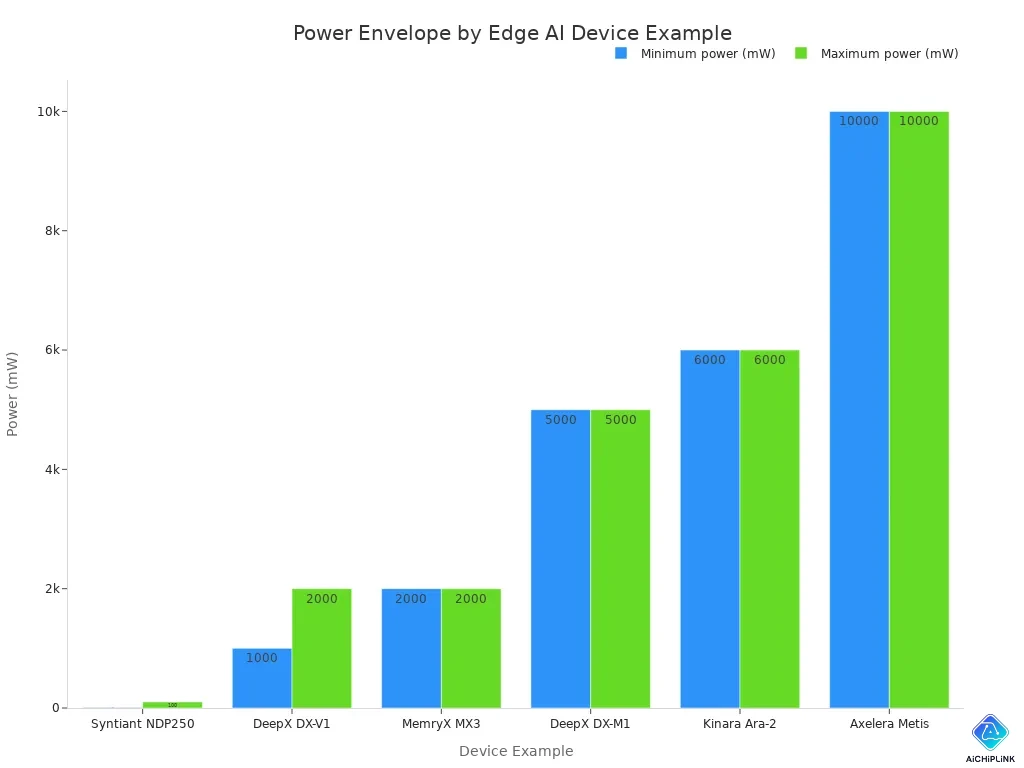
| MCU without NPU | 10–100 mW (Syntiant NDP250) | Simple sensor integration, ultra-low cost | Competitive only for basic Autoencoder models |
| MCU with integrated μNPU | < 3 W (Exynos NPU) | Fast sub-30 ms end-to-end latency | Object detection in < 2 ms (Alif Ensemble) |
| Edge NPU SoC / Accelerator | 1–5 W (DeepX DX-V1 / DX-M1) | High efficiency for vision processing | 0.17–0.61 ms inference speed (MILK-V) |
| High-performance Edge Accelerator | 6–10 W (Kinara Ara-2 / Axelera Metis) | Transformer networks and complex vision | General battery-powered edge scale up to 15 W |
Adding a TinyEngine NPU cuts AI inference latency by up to 90x while lowering power use over 120x compared to simple microcontrollers. As an example, the Alif Ensemble runs small language models at 36 mW and handles image sorting in under 8 ms. Dedicated edge processors like the MILK-V hit inference times down to 0.17 ms, though high idle power demands smart energy setup.
Measuring TOPS and Energy Efficiency
Look past bright seller claims when judging total computer speed. Peak TOPS counts maximum math power assuming every core works non-stop on low-precision math. On actual jobs, peak numbers exaggerate neural network speeds by almost 2x. One tested chip promised 7.5x the TOPS of a GPU but gave only 4x real speed.
Real TOPS per Watt tracks steady work per watt inside actual system limits. Moving data drains power fastest because reading DRAM takes 100x to 1000x more energy than one simple multiply math step. Judge chip power using official benchmark suites rather than splashy product ads.
-
Try MLPerf Tiny v1.4 to compare low-power microcontrollers, RISC-V cores, and tiny NPUs under strict test rules.
-
Check Energy Per Inference to record power used moving data, reading cache, and running model math.
-
Track the Energy-Delay Product so your AI Chips save total battery while meeting your hard speed goals.
Official benchmark tests show real silicon progress. For example, SiMa.ai raised work per watt by 7% to 16% across MLPerf test rounds. Checking trusted benchmark scores guards your team from fake hype during hardware buying.
Assessing Software Toolchains and Frameworks
Make sure your chosen silicon works with your AI software program prior to spending money. Chip makers create custom coding tools that change trained AI networks into active device scripts. Buying processors with weak tool support causes long delays spent rewriting system code from scratch.
Verifying Framework and Toolkit Compatibility
Your team should align your AI build engine with the system software from the chip maker. TensorFlow Lite Micro executes small networks on simple chips needing just 16 KB of memory space. Regular TensorFlow Lite scales over basic processors, smartphones, and special edge silicon using target acceleration modules. ONNX Runtime offers a versatile path for varied device setups since it runs engines across Intel, ARM, and custom hardware.
| Runtime Framework | Supported Hardware Platform | Hardware Acceleration Method |
|---|---|---|
| TensorRT | NVIDIA GPUs, Jetson, and servers | CUDA and Tensor Cores |
| Core ML | Apple iOS and macOS devices | CPU, GPU, and Apple Neural Engine |
| ONNX Runtime | Cross-platform desktop, mobile, and edge | CUDA, TensorRT, DirectML, OpenVINO, NNAPI, CoreML |
| TensorFlow Lite | Microcontrollers to mobile devices | NNAPI, GPU, DSP, EdgeTPU |
Maker coding tools dictate how quickly you launch software onto target edge chips. NVIDIA JetPack SDK allows teams to run server code on Jetson boards with small edits. Google Edge TPU depends on TensorFlow Lite using simplified 8-bit integer formats. AMD Xilinx Kria runs ready-made image tools on unique hardware, whereas EdgeCortix SAKURA employs the MERA converter to adjust PyTorch files for flexible layouts.
Evaluating Quantization and SDK Support
Quantization compresses large 32-bit math files into compact forms for edge silicon setups. Standard per-tensor uneven 8-bit integer shrinking reduces file volume by about 4x while preserving original precision. Teams can also apply mixed precision to keep key model layers in 16-bit format while packing remaining values into 4-bit integer forms.
Converting models post-training skips extra training steps, yet lower bit settings might hurt task accuracy. Custom chips such as the MAX78000 run ultra-low-bit values at high speeds using very little battery power. Common microcontrollers lack native low-bit boosting, so running math on simple single-line cores increases task wait times. Always run test code through vendor software toolkits on physical devices before placing final chip orders.
Balancing Cost, Thermal, and Deployment Trade-offs
You must balance unit costs, chip temperatures, and production supply before selecting hardware. Physical limits often force tough engineering choices during final deployment.
Managing Thermal Limits and Package Size
Small device enclosures trap heat very quickly. High heat slows processor speeds and damages electronic parts. Package-on-package stacking mounts memory directly over a processor to save board space. However, vertical 3D stacking creates thermal bottlenecks because heat cannot escape lower dies easily. Chiplet designs combine multiple dies on an interposer, concentrating thermal energy in tiny areas. You must place high-power chiplets near cooling interfaces and use internal temperature sensors to protect your hardware.
Selecting low-power processors allows you to build silent devices without internal fans. Lowering thermal design power keeps system temperatures manageable in harsh industrial environments.
| Aspect | Thermal Specification | Operational Impact |
|---|---|---|
| Low-power chip selection | ARM RK3562J (5 W TDP) | Cuts heat generation by over 90% compared with 65 W desktop processors |
| Built-in AI capability | 1 TOPS of AI acceleration | Handles image recognition and voice judgment at low power |
| Passive cooling performance | Aluminum fin enclosure with thermal pads | Holds internal temperature at 65°C in an 85°C ambient with 40% better efficiency than traditional air cooling |
| Power management | Dynamic Voltage and Frequency Scaling (DVFS) | Lowers CPU frequency to 0.8 GHz when idle to cut power consumption by 60% |
Calculating BOM Cost and Hardware Availability
You need to check total component costs beyond the main processor price tag. Extra voltage regulators, memory modules, and specialized circuit boards increase your overall bill of materials. Selecting low-power AI Chips keeps power supplies small and removes expensive cooling hardware.
Component availability determines whether you can build products on schedule. Buying rare custom silicon creates long manufacturing delays when demand surges. You should choose established vendors with guaranteed multi-year production commitments. Evaluating silicon availability early protects your project from supply chain disruptions.
You pick hardware by pairing your exact system setup needs straight to chip abilities across real-world locations.
| Application | Recommended Hardware Tier | Primary Decision Criteria |
|---|---|---|
| Simple sensor | MCU | Low power budget |
| Real-time vision | SoC with NPU | High inference speed |
| Complex robotics | Edge GPU or NPU | Ultra-low latency |
Low-power microcontrollers handle simple vibration or audio facts easily. Built-in NPUs bring fast image checks to smart edge cameras. High-performing chips process huge data feeds inside multi-part robot tools. Always run vendor software toolkits, framework fits, and SDK stability checks prior to buying AI Chips. Proven seller software tools assure long-term work success and trusted hardware help for your final product releases.

Written by Jack Elliott from AIChipLink.
AIChipLink, one of the fastest-growing global independent electronic components distributors in the world, offers millions of products from thousands of manufacturers, and many of our in-stock parts is available to ship same day.
We mainly source and distribute integrated circuit (IC) products of brands such as Broadcom, Microchip, Texas Instruments, Infineon, NXP, Analog Devices, Qualcomm, Intel, etc., which are widely used in communication & network, telecom, industrial control, new energy and automotive electronics.
Empowered by AI, Linked to the Future. Get started on AIChipLink and submit your RFQ online today!
Frequently Asked Questions
What target latency should you set for real-time edge AI applications?
Aim for prediction response times below 200 ms in real-time setups like self-driving cars or factory machines. Keeping overall hardware usage under 85% prevents sudden slowdowns when tasks peak.
Why should you look beyond peak TOPS when choosing an AI chip?
Peak TOPS numbers exaggerate actual speed by about 2x since they assume non-stop full output. You must check real TOPS per Watt on live workloads to track heavy battery drain from data transfer.
How much power do microcontrollers use for local machine learning tasks?
TinyML microcontrollers execute local models on roughly 1 mW of electricity. Joining a small NPU to a basic chip cuts calculation delay up to 90x while boosting power savings over 120x.
Which benchmark suite best evaluates low-power AI processors?
Test simple microcontrollers, RISC-V setups, and tiny NPUs with MLPerf Tiny v1.4. Checking Energy Per Inference alongside Energy-Delay Product lets you confirm seller claims before purchasing.