Battery Energy Capacity: A Practical Guide to mAh and Wh
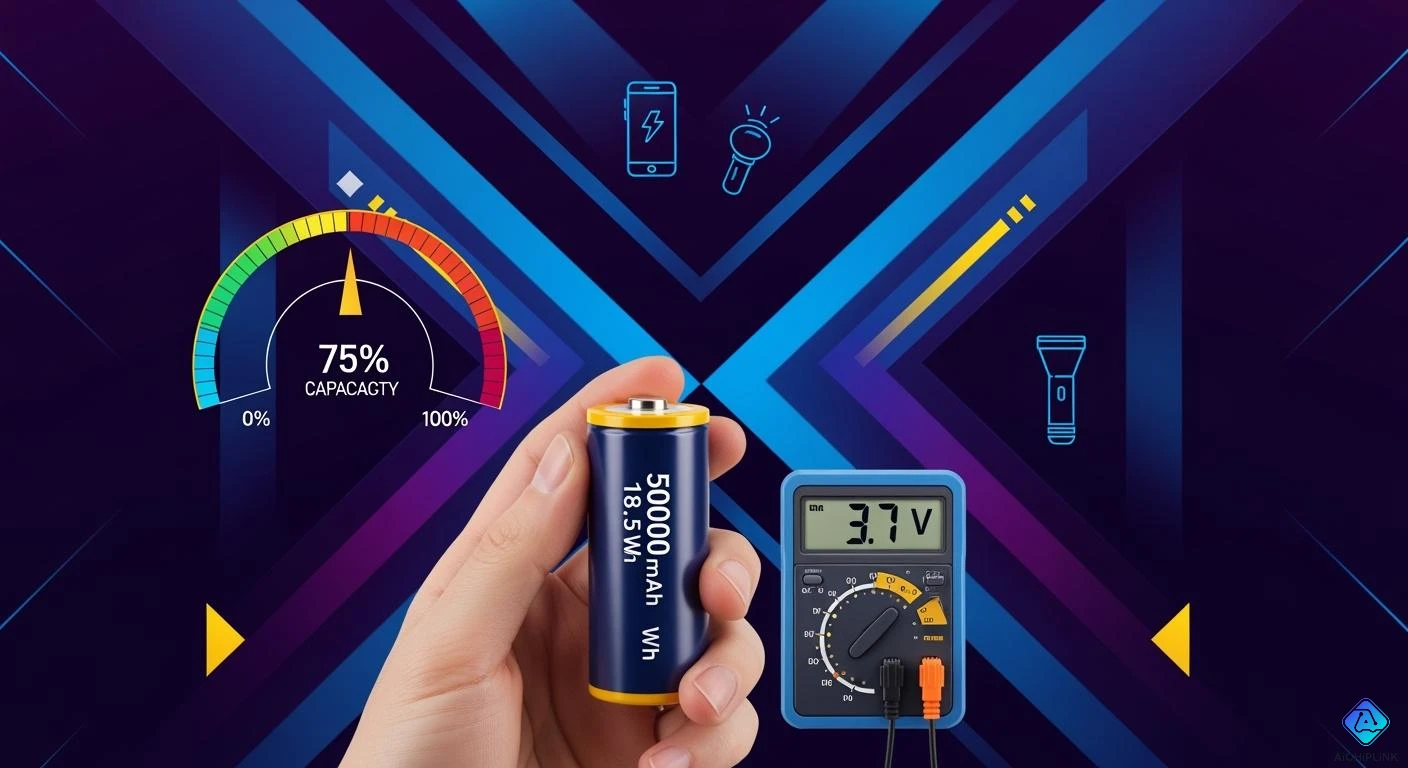
You see mAh and Wh when checking battery energy capacity. mAh means milliampere-hour and shows the charge a battery gives. Wh stands for watt-hour and measures energy using voltage. To change mAh to Wh, multiply mAh by voltage, then divide by 1000. Knowing battery energy capacity helps you choose devices with longer battery life. It also helps you guess how long a device will run and follow airline rules. Understanding battery energy capacity stops mistakes and helps you make better choices.
-
mAh tells you how much charge a battery holds.
-
Wh shows the energy a battery can provide based on voltage.
Key Takeaways
-
mAh shows how much charge is in a battery. A higher mAh lets your device work longer before you need to charge it again.
-
Wh tells you the total energy a battery gives. You should always change mAh to Wh to compare batteries the right way.
-
Voltage is very important in battery math. It changes how much energy comes out, so always look at voltage with mAh.
-
Use this formula: Wh = (mAh × Voltage) / 1000 to change mAh to Wh. This helps you guess how long your device will run.
-
Airlines have strong rules that use Wh. You need to know your battery's Wh to follow the rules when you fly.
Battery Energy Capacity Basics
What is mAh?
You see mAh on batteries a lot. mAh means milliamp-hours. It tells you how much electric charge a battery can hold. This number shows how much current the battery gives over time. If a battery has a higher mAh, your device lasts longer before charging. For example, alkaline AA batteries have 1,500 to 3,000 mAh. Lithium AA batteries can have more than 3,400 mAh. The mAh number helps you guess how long your device will work on one charge. You can use mAh to compare batteries for different devices. Milliamp-hours only measure charge, not energy. You need more details to know the total battery energy.
What is Wh?
Wh stands for watt-hours. This unit shows the energy inside a battery. Wh uses both voltage and capacity. You find Wh by multiplying voltage by amp-hours. Wh tells you how much energy a battery gives over time. Two batteries with the same mAh can have different Wh if their voltages are not equal. Wh is used for many battery types. You use Wh to compare energy for things like laptops, power banks, and camping gear. For example, camping for one night needs 150–300 Wh. Using high-power devices for longer may need 1,000–2,000 Wh or more.
mAh vs Wh: Key Differences
It is important to know the difference between mAh and Wh. mAh measures charge capacity. Wh measures energy capacity. If you only look at mAh, you might not see how much energy the battery gives. Voltage changes the total energy. A 5,000 mAh battery at 3.7V is not the same as a 5,000 mAh battery at 12V. Many people make mistakes by only looking at mAh. Always use mah to wh conversion for better comparisons. The table below shows the main differences:
| Measurement | Description | Example |
|---|---|---|
| mAh | Shows how much charge a battery holds over time. | 2,000 mAh can power a device for a certain time based on its current use. |
| Wh | Shows the energy capacity using voltage and current. | 20 Wh can power a device that needs 20 watts for one hour. |
Tip: Always change mAh to Wh when you compare battery energy for devices with different voltages. This guide helps you avoid mistakes and pick the right battery.
mAh to Wh Conversion Explained
Conversion Formula
You often see both mAh and Wh on battery labels. To compare batteries or understand how much energy you get, you need to convert mAh to Wh. The formula for this conversion is simple:
| Component | Description |
|---|---|
| mAh | The capacity of the battery in milliampere-hours |
| Voltage (V) | The voltage rating of the battery |
| Formula | Wh = (mAh × Voltage) / 1000 |
You use this formula to find out how many watt-hours your battery holds. The mAh value tells you the charge. The voltage shows how much energy each unit of charge can deliver. When you multiply mAh by voltage and divide by 1000, you get the energy in watt-hours. This helps you compare batteries with different voltages. If you want to convert Wh to mAh, you can rearrange the formula: mAh = (Wh × 1000) / Voltage.
Note: The voltage value is very important. Batteries with the same mAh but different voltages will have different Wh values. Always check the voltage before you convert mAh to Wh.
Step-by-Step Guide
You can follow a step-by-step guide to convert mAh to Wh for any battery. This process works for lithium-ion, LiFePO₄, and lead-acid batteries. Here is how you do it:
-
Find the mAh value on your battery label.
-
Look for the voltage (V) on the same label.
-
Multiply the mAh by the voltage.
-
Divide the result by 1000.
-
The answer is the battery’s energy in watt-hours.
You can use this method for any battery chemistry. For example, lithium-ion batteries usually have a voltage of about 3.6–3.7V. LiFePO₄ batteries have about 3.2V. Lead-acid batteries have about 2V per cell. Always use the correct voltage for your battery type.
Tip: Do not compare mAh ratings alone. A higher mAh at a lower voltage can store less energy than a lower mAh at a higher voltage. Always use the step-by-step guide to get the real energy value.
Example Calculation
Let’s look at a real-world example. Suppose you have a power bank with 10,000 mAh and a voltage of 3.7V. You want to know how many watt-hours it holds.
-
Step 1: Find the mAh value. Here, it is 10,000 mAh.
-
Step 2: Find the voltage. Here, it is 3.7V.
-
Step 3: Multiply mAh by voltage: 10,000 × 3.7 = 37,000.
-
Step 4: Divide by 1000: 37,000 / 1000 = 37.
So, your 10,000 mAh battery at 3.7V stores 37 Wh. This means your power bank can deliver 37 watt-hours of energy before losses from voltage conversion. If you want to convert Wh to mAh, you can use the formula in reverse.
You can see how voltage changes the result. For example, a 3,000 mAh battery at 3.7V gives you 11.1 Wh. A 2,000 mAh battery at 5V gives you 10 Wh. The voltage makes a big difference in the total energy.
⚡️ Always remember: mAh does not tell the whole story. Use the formula to convert mAh to Wh or wh to mAh for the most accurate battery comparison.
Common mistakes include ignoring voltage, comparing mAh ratings from different batteries, or thinking mAh is a universal score for battery life. You should always check both mAh and voltage to avoid these errors. If you want to convert wh to mAh, use the formula: mAh = (Wh × 1000) / Voltage.
Now you know how to use the mAh to Wh conversion formula, follow a step-by-step guide, and check your results with real numbers. This skill helps you compare batteries, estimate device runtime, and follow airline rules with confidence.
Using a mAh to Wh Calculator
How Calculators Work
A mah to wh calculator makes battery math simple and quick. This tool helps you avoid mistakes and gives correct answers. You do not need to remember the formula or worry about units. Just type in the numbers and get your answer.
Knowing how to change mAh to Wh helps in many ways. You can guess how long your device will work. You can also check if a new battery fits your device.
Using a calculator is a good idea to lower mistakes and get exact answers.
Most online calculators use the formula Wh = (mAh × Voltage) / 1000. You can use this formula by hand, but a calculator is faster and helps with big batteries.
A calculator or tool makes things easier, but you can use the formula (Wh = (mAh × Voltage) / 1000) if you pay close attention to the numbers and units.
You can find good calculators on these websites:
-
A1 SolarStore: This site has an easy calculator for mAh to Wh. A1 SolarStore Calculator
-
Goal Zero: This tool lets you change mAh to Wh and shows the formulas. Goal Zero Calculator
Use these calculators for fast answers or to check your math. They help you compare batteries for phones, laptops, or power banks.
Input Needed
You need some basic info to use a mah to wh calculator. The calculator asks for numbers found on your battery label. You must enter the mAh number and the voltage. Some calculators let you change settings for energy loss.
| Requirement | Description |
|---|---|
| mAh Input | The calculator needs you to type in milliamp hours (mAh). |
| Nominal Voltage | You must enter the voltage, with choices for common types like 3.2 V LiFePO4. |
| Efficiency Loss Adjustment | The calculator should let you change for energy loss in the math. |
| User-Friendly Design | A simple look and clear words make it easy to use, so you do not get confused by hard designs. |
You can use the formula Wh = (mAh × V) ÷ 1000. For example, a 10,000 mAh battery at 3.7V is 37 Wh. This way makes it easy to do math for big batteries.
Tip: Always look at your battery label for mAh and voltage before using a calculator. This step helps you get the right answer.
A mah to wh calculator helps you compare batteries, guess how long devices last, and follow airline rules. The calculator saves you time and helps you feel sure about your answers.
Why Voltage Matters in Battery Energy Capacity
What is Voltage?
Voltage is what pushes electric charge in a battery. It is the difference between the anode and cathode. Think of voltage like pressure that moves electricity. It pushes power from one end to the other. This number shows how much voltage a full battery has. For example, a lithium-ion battery has about 3.7 volts. Voltage helps you know how much energy your battery can give.
Voltage in mAh to Wh Conversion
You must know voltage to change mAh to Wh. Voltage links the charge in mAh to the energy in Wh. Here is why voltage is important:
-
Voltage is needed for the mAh to Wh and Wh to mAh formulas.
-
The formula for mAh to Wh is: Wh = (mAh × Voltage) / 1000.
-
The formula for Wh to mAh is: mAh = (Wh × 1000) ÷ Voltage.
-
Two batteries with the same Wh but different voltages have different mAh.
-
If a device needs 5 Wh on a 3.7-volt battery, you need at least 1,351 mAh for one hour.
You can see voltage changes how much energy a battery gives. When you compare lithium-ion batteries, check both mAh and voltage. This helps you understand battery energy and how well it works.
Tip: Always use voltage in your math. This helps you avoid mistakes and understand battery efficiency better.
Finding Your Battery’s Voltage
You can find your battery’s voltage in a few ways:
-
Look at the battery label. Most batteries show voltage near the mAh number.
-
Use a voltmeter to measure open circuit voltage (OCV). This works for battery packs, single cells, or cells in a row.
-
The OCV shows the difference between the battery ends. It also tells you how full your battery is.
You should always know the voltage before changing mAh to Wh or Wh to mAh. This is important for all battery types, even lithium-ion packs. Knowing voltage helps you make better choices about battery energy and how well it works.
Practical Applications of mAh to Wh
Estimating Device Runtime
You can use mAh to Wh conversion to guess how long your device will work. First, find out your battery’s energy in watt-hours. Then, look at how many watts your device uses. Divide the battery’s energy by the device’s power to get the runtime. For example, a battery with 20,000 mAh at 3.7V gives you 74 Wh. If your device uses 10 watts, it will last about 7.4 hours. A battery with 20,000 mAh at 12V gives you 240 Wh. This means your device can run longer if it needs more power.
| Conversion Method | Example | Result |
|---|---|---|
| mAh to Wh | 20,000mAh at 3.7V | 74Wh |
| mAh to Wh | 20,000mAh at 12V | 240Wh |
Tip: Use the formula Wh = (mAh × V) ÷ 1000. Then, find runtime with Runtime = Battery Energy (Wh) / Device Power (W).
Airline Battery Rules
Airlines have strict rules for batteries in your carry-on bag. You must check the Wh number before you fly. Batteries under 100 Wh are allowed in devices and as spares. If your battery is between 100 and 160 Wh, you need airline approval. You can only bring two spare batteries in this range. Batteries over 160 Wh are not allowed in your carry-on bag. Always use mAh to Wh conversion to check your battery before you travel.
| Battery Type | Capacity | Carry-on Allowed | Notes |
|---|---|---|---|
| In device | <100Wh | Yes | Yes |
| Spare | <100Wh | Yes | Approval needed |
| In device | 100-160Wh | Yes | Approval needed |
| Spare | 100-160Wh | Max 2 spares | Approval needed |
| In device | >160Wh | No | Approval needed |
| Spare | >160Wh | No | Approval needed |
Airlines use Wh to decide if a battery is safe to bring. Always check battery size before you pack.
Choosing the Right Battery
You need to know mAh and Wh to pick the best battery for your device. Compare battery sizes using mAh to Wh conversion. A higher mAh does not always mean more energy. Voltage changes how much energy the battery has. For laptops, look for batteries with higher Wh numbers. For devices that use different amounts of power, use Wh to guess how long they will run. This helps you match the battery to your device’s needs.
-
Compare mAh and Wh to find the best battery for your device.
-
Check voltage to make sure you get the right energy.
-
Use mAh to Wh conversion for the most correct battery size.
Knowing mAh, Wh, and voltage helps you avoid mistakes and pick the right battery for your needs.
Common Mistakes to Avoid
Misreading Labels
Battery labels have lots of numbers. Some people mix up mah and wh. This can make you buy the wrong battery. Always check if the label shows mah, wh, or both. If you only see mah, you must find the voltage to get wh. Some batteries show both numbers, but some do not. Never guess the energy from mah alone.
Tip: Read the label closely. Look for both mah and voltage. This helps you find the right wh value.
Ignoring Voltage
You should not ignore voltage when comparing batteries. Voltage changes how much energy a battery gives. If you skip voltage, you may think two batteries have the same energy. This is not true. The wh value depends on both mah and voltage.
-
Battery capacity (Ah) shows total energy stored.
-
Voltage tells how fast the battery gives energy.
-
Ignoring voltage can make you miscalculate energy. You might get a battery that does not power your device long enough.
Always use the formula with voltage to get the right wh. This helps you avoid problems with power and device performance.
Overestimating Runtime
Many people overestimate runtime by looking at mah only. They forget to check wh and device power use. If you use only mah, you may think your device will last longer than it does. You need to know the wh and how many watts your device uses.
| Mistake | What Happens | How to Fix |
|---|---|---|
| Using mah only | Overestimates runtime | Use wh and device watts |
| Ignoring voltage | Wrong energy calculation | Always include voltage |
| Not checking device use | Battery drains faster than expected | Check device watt rating |
Remember: Always use wh and device power to estimate runtime. This gives you a more accurate answer.
You can avoid these mistakes by reading labels, using the right formula, and checking both mah and voltage. This will help you pick the best battery and get the runtime you expect.
Quick Reference Chart for mAh to Wh
Common Battery Sizes
You can use a quick reference chart to check battery energy fast. The chart below shows popular battery sizes. It lists the rated capacity in mAh, the nominal voltage, the energy output in Wh, and the airline approval status. You can see which batteries are safe to bring on a plane.
| Rated Capacity (mAh) | Nominal Voltage (V) | Energy Output (Wh) | Airline Approval Status (100Wh Limit) |
|---|---|---|---|
| 5,000 | 3.7 | 18.5 | Safe to Fly (Carry-on) |
| 10,000 | 3.7 | 37.0 | Safe to Fly (Carry-on) |
| 20,000 | 3.7 | 74.0 | Safe to Fly (Carry-on) |
| 26,800 | 3.7 | 99.16 | Safe to Fly (The maximum limit) |
| 30,000 | 3.7 | 111.0 | Check with Airline (Needs Approval) |
| 40,000 | 3.7 | 148.0 | Check with Airline (Needs Approval) |
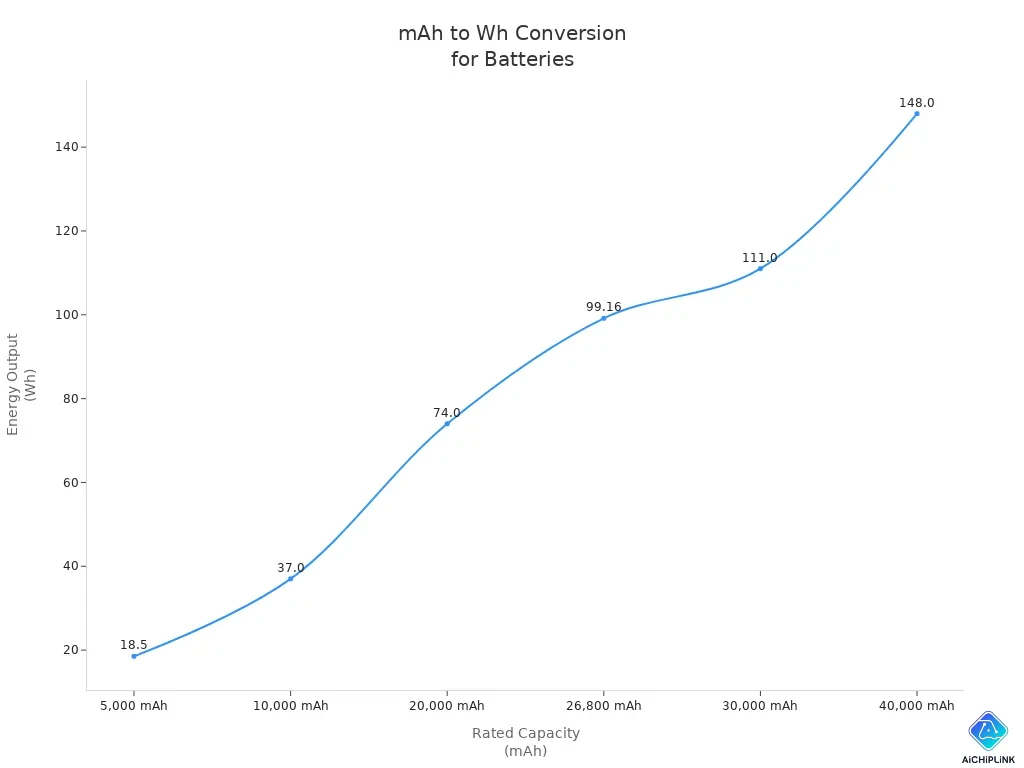
You can use this chart to find out if your battery meets airline rules. The chart also helps you compare energy output for different devices.
How to Use the Chart
You can use the chart to save time when checking battery energy. Find your battery’s mAh rating in the first column. Look across to see the voltage and Wh value. The Wh number tells you how much energy your battery holds. The last column shows if you can bring the battery on a plane.
-
If your battery is not listed, use the formula:
Wh = (mAh × Voltage) / 1000 -
You can check the Wh value to see if your battery fits airline rules.
-
You can compare Wh numbers to pick the best battery for your device.
The chart gives you quick answers. You do not need to do math every time. You can use it to make smart choices about batteries for travel, laptops, or power banks.
You can also use the chart image to see how mAh and Wh change as battery size increases. The chart helps you understand battery energy at a glance. You can feel confident when you choose a battery or pack for a trip.
You should know how to change mah to wh. This helps you pick the best battery. You can guess how long your device will work. You can also follow airline rules. Use the formula, calculator, and chart to check battery energy. Always look at the voltage before you change mah to wh. This stops mistakes and gives you the right runtime. Always read labels and use the correct conversion every time.

Written by Jack Elliott from AIChipLink.
AIChipLink, one of the fastest-growing global independent electronic components distributors in the world, offers millions of products from thousands of manufacturers, and many of our in-stock parts is available to ship same day.
We mainly source and distribute integrated circuit (IC) products of brands such as Broadcom, Microchip, Texas Instruments, Infineon, NXP, Analog Devices, Qualcomm, Intel, etc., which are widely used in communication & network, telecom, industrial control, new energy and automotive electronics.
Empowered by AI, Linked to the Future. Get started on AIChipLink and submit your RFQ online today!
Frequently Asked Questions
What does mAh mean on a battery?
You see mAh on most batteries. It stands for milliampere-hour. This number tells you how much charge the battery can store. A higher mAh means your device can run longer before you need to recharge.
Where do you find the voltage on a battery?
You usually find the voltage printed on the battery label. Look near the mAh rating. If you cannot find it, check the device manual or search the battery model online.
How do you convert mAh to Wh?
You use this formula: `Wh = (mAh × Voltage) / 1000` Find the mAh and voltage on your battery label. Multiply them, then divide by 1000. This gives you the energy in watt-hours.
Why do airlines care about Wh instead of mAh?
Airlines use Wh because it shows the total energy a battery can release. This helps them set safety limits. mAh alone does not show the full energy, so always check Wh before you travel.
Can two batteries with the same mAh have different Wh?
Yes! If the voltages are different, the Wh will change. You must check both mAh and voltage to know the real energy.